Modern desktops and laptops have quietly dropped the built-in SD slot, which leaves a camera card, a drone card or a handheld console’s microSD card with nowhere to go. A card reader fixes that for a small amount of money, but the details still matter. The wrong port type means a dongle that does not fit, a single slot means swapping cards one at a time, and a slow reader can turn a big photo dump into a coffee break.
This guide is for PC owners who offload photos and video from cameras, check trail camera footage, copy game files to a handheld or back up a dash cam. We compare eight readers in 2026 using only the features in their listings. Many of them are near-identical dual-slot designs that differ mainly by connector and brand, so the most useful choice is usually the port on your computer: USB-A for older desktops, USB-C for newer machines and both for mixed households.
Our Top Picks

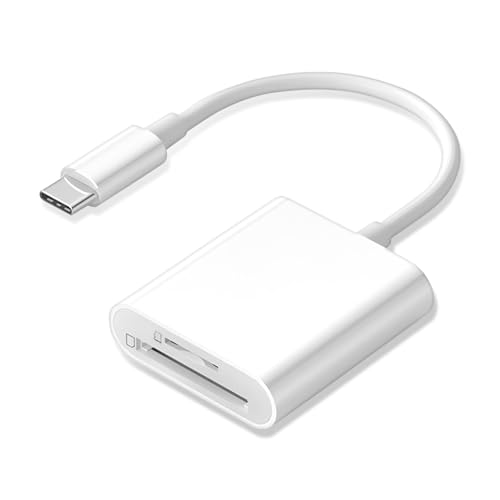
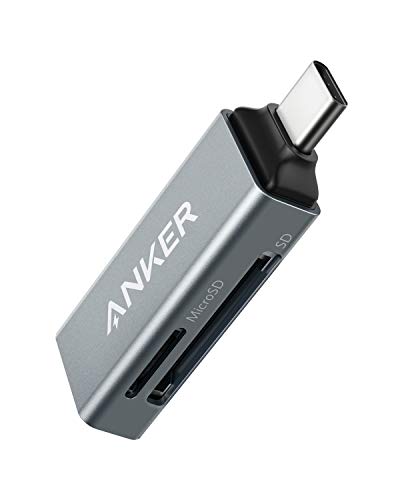


Top 3 picks at a glance
Quick Picks
As an Amazon Associate we earn from qualifying purchases at no extra cost to you.





| Product | Best for | Key feature from the listing |
|---|---|---|
| Acer Dual-Slot USB-C Reader | Laptops with USB-C ports | Dual slots for SD and microSD |
| Dual-Slot USB-C Trail Camera Reader | Trail camera footage on a PC | Two slots, trail camera viewer |
| Anker Dual-Slot USB-C Reader | Trusted-brand USB-C use | SDXC, SDHC, microSD, UHS-I support |
| UANTIN USB-A and USB-C Reader | Mixed USB-A and USB-C devices | Both connectors on one reader |
| Acer Aluminum USB-A 3.0 Reader | Older desktops with USB-A | Aluminum body, dual slot, MMC and TF support |
| Acer Aluminum USB-C Reader | Premium-feel USB-C option | Aluminum body, dual slots |
| Dual-Port USB-C Reader for iPhone and iPad | Phones, tablets and PCs | USB 3.0, SD and microSD, plug and play |
| Dual-Slot USB-C Photo Transfer Reader | Photo and video transfers | SD and microSD, trail camera viewer |
How to Choose
Start With the Port on Your Computer
This decides most of the purchase. USB-A readers fit older desktops and many motherboards, while USB-C readers fit newer laptops and tablets. A reader with both connectors, as one listing states, covers a mixed household but may sit slightly bulkier. If your PC has only USB-A and the reader is USB-C, you would need another adapter, which defeats the point.
Look at Card Types and Speed Wording
Check that the reader names the cards you use: SD, SDHC and SDXC for cameras, plus microSD for drones, handhelds and phones. One listing mentions UHS-I, which refers to a common speed class for modern cards, and another lists MMC and TF cards. Card speed matters most for large video files, so match the reader to the fastest card you own and do not pair a premium card with an unlisted slow reader.
Consider Slot Count and Body Design
Dual-slot readers let you copy between an SD card and a microSD card without swapping, which suits photographers and handheld owners. Aluminum bodies may dissipate heat during long transfers and feel sturdier than plastic, though the listings do not promise either. Small designs hang off a laptop’s side but can block neighboring ports, so look at port spacing before you buy.
Ignore Device Lists, Watch Budget Trade-Offs
Many listings mention iPhone, iPad and MacBook compatibility because they target a wide audience. For a PC, only the connector and card support matter. Budget readers may skip a protective cap, a long-lasting build or clear card labeling. Avoid trusting any reader as the only copy of irreplaceable photos until the transfer finishes and you have verified the files.
The 8 Best Options
Acer Dual-Slot USB-C Reader
A familiar-brand reader for laptops and tablets with USB-C ports, offering two slots for common card sizes. It suits someone who shoots on a camera and also keeps a microSD card in a handheld or action camera, and wants one dongle in the laptop bag for both.
- Strength: dual slots for microSD, SDHC and SDXC cards
- Strength: listed for laptops, PCs, MacBooks and Android devices
- Trade-off: USB-C only, so older USB-A desktops need an adapter
Skip it if your computer lacks a USB-C port.
Dual-Slot USB-C Trail Camera Reader
A reader targeted at people who pull footage from trail cameras and need to view clips quickly on a laptop. Hunters, wildlife watchers and property owners often swap cards in the field and review them in the truck, which favors a small, simple plug-in reader.
- Strength: two slots for SD and microSD cards
- Strength: plug and play with a trail camera viewer mentioned
- Trade-off: a lesser-known brand with limited listed details
Skip it if you prefer an established brand.
Anker Dual-Slot USB-C Reader
A recognizable name for buyers who want a USB-C reader from a maker with a broad accessory range. Buyers who value a known support channel and a predictable build often start here before looking at no-name alternatives.
- Strength: supports SDXC, SDHC, SD and microSD cards
- Strength: UHS-I cards are named in the listing
- Trade-off: no USB-A connector
Skip it if you use an older USB-A desktop.
UANTIN USB-A and USB-C Reader
The flexible choice for households that mix a USB-A desktop with a USB-C laptop and phone. It is the reader to keep in a drawer for whichever machine is closest, whether that is the family desktop or a work laptop.
- Strength: both USB-A and USB-C connectors
- Strength: dual slots for microSD, SDHC and SDXC
- Trade-off: dual connectors add some bulk
Skip it if you only need one connector type.
Acer Aluminum USB-A 3.0 Reader
A fit for older desktops and any computer with a standard USB-A 3.0 port, wrapped in an aluminum shell. It is a sensible upgrade for a desk PC that still lacks a front-panel card slot and needs a permanent reader plugged in beside the keyboard.
- Strength: USB 3.0 Type-A with an aluminum body
- Strength: supports SD, microSD, SDXC, SDHC, MMC and TF cards
- Trade-off: no USB-C connector for newer laptops
Skip it if your computer is USB-C only.
Acer Aluminum USB-C Reader
The USB-C counterpart to the aluminum reader, for newer laptops where you want a sturdier-feeling accessory. Thin laptops that travel often benefit from a body that does not flex when the card is inserted.
- Strength: aluminum body with dual slots
- Strength: listed for laptops, MacBooks, iPads and iPhones
- Trade-off: USB-C only
Skip it if you have USB-A ports only.
Dual-Port USB-C Reader for iPhone and iPad
A multi-device reader that also lists USB 3.0 transfers, suiting people who move photos between phones, tablets and PCs. If you are a casual photographer who does a little of everything, one reader that travels between devices is easier than managing several.
- Strength: supports SD and microSD cards with plug and play
- Strength: USB 3.0 mentioned in the listing
- Trade-off: the listing leans on phone use rather than PC details
Skip it if you want a brand-name reader.
Dual-Slot USB-C Photo Transfer Reader
A straightforward reader for photo and video transfers, also marketed to trail camera users. Its simplicity suits a family member who just wants to drop pictures onto a laptop without installing anything.
- Strength: supports SD and microSD cards
- Strength: plug and play for iPhone, iPad and laptop use
- Trade-off: a generic brand with limited detail
Skip it if long-term support matters.
Which One Fits Your Situation
You Have an Older USB-A Desktop
The Acer Aluminum USB-A 3.0 Reader matches a standard USB-A port and covers common card types including MMC and TF. Because it plugs straight into a USB-A port, there is no need for extra adapters or hubs.
You Own a Modern USB-C Laptop
The Anker Dual-Slot USB-C Reader or the Acer Dual-Slot USB-C Reader offer dual slots from established names. Either is a tidy fit for a thin-and-light machine that has few ports to spare.
You Use Both USB-A and USB-C Devices
The UANTIN USB-A and USB-C Reader avoids buying two readers by carrying both connectors on one body. This also helps if you upgrade a PC later and want the reader to keep working.
Common Mistakes
- Buying a USB-C reader for a computer that has only USB-A ports.
- Pairing a fast card with a reader that does not list its card type.
- Assuming every dual-slot reader copies between cards without a computer.
- Pulling a card out before the transfer is finished.
- Ignoring port spacing on a laptop with crowded sides.
Related guides
- How To Set Up Computer Speakers For Better Sound At Your Desk
- How To Check Whether Your Ram Is Running At Its Rated Speed
- How To Choose The Right Monitor Riser Height For Your Desk
Frequently Asked Questions
Do I need a USB 3.0 reader?
For large photo and video files, yes, because USB 2.0 transfers are slow. Look for USB 3.0 or newer wording in the listing, and plug the reader into a matching port, since a slower port limits the transfer no matter how good the reader is.
Can I use both slots at once?
Dual-slot readers are designed to read two cards, though you should confirm behavior for your specific model. Some designs share bandwidth between slots, so transferring from both at once may be slower than one at a time.
Will a phone reader work on a PC?
Most USB-C readers named for phones also work on laptops, but confirm the connector on your machine first. The phone-oriented wording in a listing does not stop a reader from working with a standard laptop.
Are aluminum readers better?
They feel sturdier, though a plastic reader can transfer just as quickly. Choose by connector and card support first, then by brand and price. Eject the card through the operating system before pulling it out to avoid damaged files.
Related guides
More from Amazon
Programs that pair well with the guide above. Offers and eligibility are set by Amazon and may change.
Free shipping on eligible items, Prime Video and more. Eligible new members can start with a free trial.
Start a Prime free trialAd-free music streaming. Eligible new subscribers can start with a free trial.
Try Music Unlimited freeA Prime membership for ages 18-24 with a trial period. Eligibility is set by Amazon.
See Prime for Young AdultsAudiobooks and podcasts to listen to on the go. Eligible new members can start with a free trial.
Try Audible freeAs an Amazon Associate we earn from qualifying purchases.