
The best HTPC motherboard in this group is the ASRock B850i Lightning WiFi 6E, a compact AM5 Mini-ITX board that combines an HDMI 2.1 output, one PCIe 5.0 and one PCIe 4.0 M.2 slot, 2.5G Ethernet and Wi-Fi 6E in a 170 mm footprint. An HTPC (home theater PC) board has to be small enough for a living-room case, drive a television directly from the processor’s integrated graphics, and stay quiet. If you want a second video output, the ASUS TUF Gaming B850I WiFi NEO adds DisplayPort. The ASRock B550M-ITX/ac makes sense only if you already own AM4 parts.
Our Top Picks
 ASUS ROG Strix B850-I Gaming WiFi AMD AM5Mini-ITX | M.2x2 | WiFi 79 x 3.8 x 7.3 inches2.3 PoundsCheck on Amazon
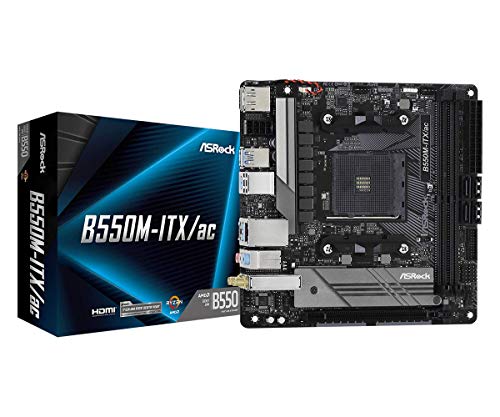 ASRock B550M-ITX/AC Supports 3rd Gen AMD AM4 Ryzen™700W11 x 8.5 x 2.5 inches0.9 poundsCheck on Amazon

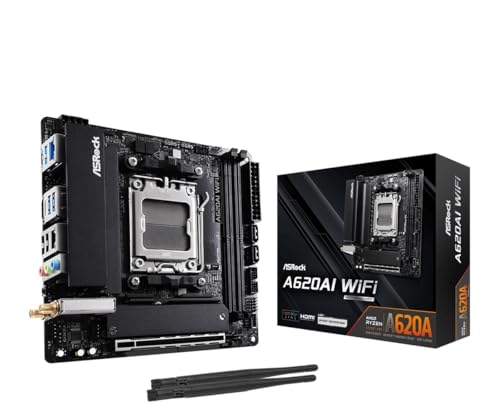


Top 3 picks at a glance
Quick List
- ASRock B650I Lightning WiFi – best for a straightforward AM5 media PC with a PCIe 5.0 SSD slot
- ASUS ROG Strix B850-I Gaming WiFi – best for a living-room PC that also plays games and wants Wi-Fi 7
- ASRock A620AI WiFi – best for an entry-level AM5 build that needs two network ports
- ASUS TUF Gaming B850I WiFi NEO – best for sending video to a TV and a receiver or monitor at once
- ASRock B550M-ITX/ac – runner-up for reusing AM4 processors and DDR4 memory
- ASRock B850i Lightning WiFi 6E – best overall for a quiet, balanced home theater build
Which One Is Right for You?
| If you… | Choose |
|---|---|
| want the best all-round HTPC board with HDMI 2.1 and two M.2 slots | ASRock B850i Lightning WiFi 6E |
| need both HDMI and DisplayPort on the back panel | ASUS TUF Gaming B850I WiFi NEO |
| want Wi-Fi 7 and a gaming-capable living-room PC | ASUS ROG Strix B850-I Gaming WiFi |
| plan a simple media server and want a Gen5 SSD slot without paying for extras | ASRock B650I Lightning WiFi |
| want two Ethernet ports for a media server that also routes or segments traffic | ASRock A620AI WiFi |
| already own a Ryzen 5000G-class processor and DDR4 memory | ASRock B550M-ITX/ac |
All six boards are Mini-ITX, so each fits the small cases that suit a media cabinet. The main decision is the platform: five boards use the newer AM5 socket with DDR5, while one uses the older AM4 socket with DDR4. After that, pick on video outputs, storage slots and networking.
All 6 Picks in Detail
1. ASRock B650I Lightning WiFi – Best for a Simple AM5 Media PC
As an Amazon Associate we earn from qualifying purchases at no extra cost to you.

This board is a good fit if you want a modern AM5 platform for a streaming and file-playback machine without extra gaming features you will never use. The listing names Ryzen 9000, 8000 and 7000 support, DDR5 rated up to 7200+ (OC) and a PCIe 5.0 M.2 slot. ASRock’s own specification page shows a single HDMI 2.1 output, so it is a one-display board, which is exactly what a television setup needs.
- AM5 socket, B650 chipset, Mini-ITX
- Two DDR5 slots, listed up to 7200+ (OC)
- Two M.2 slots: a CPU-connected Gen5 x4 slot and a chipset-connected Gen4 x4 slot
- One HDMI 2.1 output from the processor’s integrated graphics
- 2.5G Ethernet and Wi-Fi 6E with Bluetooth
Fit and setup notes: because the only video connector is HDMI, plan the cable run before you buy. A short certified high-speed HDMI cable from the PC to the television or receiver is all you need, and a receiver in the middle will pass the signal through if it supports the resolution you want. Remember that the board only produces video when the installed processor has integrated graphics. Pair it with a non-F Ryzen model, and set the first M.2 slot aside for the operating system so the faster drive handles your boot and app loading.
Pros
- Two M.2 slots leave room for a boot drive and a media library drive
- Wi-Fi 6E and 2.5G wired networking cover most home networks
Cons
- No DisplayPort output on the back panel
- Maximum memory capacity is stated differently across retailers, so confirm on listing if you need 128 GB
Compared with the newer B850i Lightning, this board gives up little for a pure media role, though the B850 board is the better choice if you want the stronger power delivery and the newer chipset.
2. ASUS ROG Strix B850-I Gaming WiFi – Best for a Living-Room Gaming and Media PC

This is the premium Mini-ITX option in the group, aimed at someone who wants one small PC that plays games on the television and also runs the media player. The listing names a 10+2+1 stage power design, DDR5, 2.5G LAN, Wi-Fi 7, two M.2 slots, a PCIe 5.0 x16 slot and a 20 Gbps USB-C port. It is more board than a plain media player needs, so choose it only if the gaming side matters.
- AM5 socket, B850 chipset, Mini-ITX (170 x 170 mm)
- 10+2+1 power stages named in the listing
- Two M.2 slots, both described by ASUS as PCIe 5.0 x4
- One HDMI port, plus DisplayPort output through a USB-C port
- 2.5G Ethernet and Wi-Fi 7
Fit and setup notes: this is a board for people who will actually use the extra bandwidth, such as a living-room PC that doubles as a game console replacement and a media server. Keep an eye on case clearance, because large decorative heatsinks and a full-length graphics card can crowd a slim chassis. If you only plan to stream video and play local files, the extra features here sit idle, and a simpler board in this list will serve you equally well while being easier to fit and cool in a tight cabinet.
Pros
- Wi-Fi 7 and a fast USB-C port give it the longest runway of the AM5 boards here
- Two Gen5-capable M.2 slots suit a large local media library
Cons
- Gaming-oriented features add cost and complexity an HTPC does not use
- Memory capacity is quoted differently by different sellers, so confirm on listing
Next to the TUF B850I NEO, this board offers a newer Wi-Fi standard and more M.2 bandwidth, while the TUF board offers a native DisplayPort connector on the back panel.
3. ASRock A620AI WiFi – Best for an Entry-Level Build with Two Network Ports

The A620AI uses the simplest AM5 chipset in the group and still delivers the features an HTPC cares about. ASRock lists an 8+2+1 phase power design, DDR5 up to 8200+ (OC), an HDMI 2.1 output with HDR and HDCP 2.3, and two Ethernet ports. The second LAN port is unusual on a Mini-ITX board and helps if your media PC also acts as a network storage box.
- AM5 socket, A620A chipset, Mini-ITX
- Two DDR5 slots, listed up to 8200+ (OC)
- One Gen4 M.2 slot and one Gen3 M.2 slot, plus two SATA ports
- Dual LAN: one 2.5 Gigabit port and one Gigabit port
- Wi-Fi 6E and one HDMI 2.1 output
Fit and setup notes: the two network ports are the reason to choose this board. One practical use is plugging the 2.5 Gigabit port into your main switch for streaming and the Gigabit port into a second device, such as a network storage box or a dedicated camera network. Because the second M.2 slot runs at Gen3 speed, put your boot drive in the faster Hyper slot and use the slower slot for bulk media, where speed barely matters. Pair it with a processor that has integrated graphics so the HDMI output works.
Pros
- Dual Ethernet suits a combined media player and home server
- Gen4 PCIe is more than enough for a movie library
Cons
- No PCIe 5.0 storage, and the second M.2 slot runs at the slower Gen3 speed
- Only one display output
Compared with the B650I Lightning, this board trades the Gen5 SSD slot for a second Ethernet port, which is the better trade for a server-style HTPC.
4. ASUS TUF Gaming B850I WiFi NEO – Best for Feeding a TV and a Receiver or Monitor

The TUF board is the pick when you want both HDMI and DisplayPort on the back panel. Sending HDMI to a television and DisplayPort to a receiver, projector adapter or monitor is a common home theater arrangement. The listing names Wi-Fi 6E, 2.5Gb LAN, PCIe 5.0, two M.2 slots, two USB-C ports and a pre-mounted I/O shield, which saves a fiddly step in a tight case build.
- AM5 socket, B850 chipset, Mini-ITX
- 8+2+1 phase power design rated at 80 A, according to coverage of the launch
- Two M.2 slots and two SATA ports; the primary slot runs PCIe 5.0 only with certain Ryzen generations
- HDMI 2.1 and DisplayPort 1.4 outputs
- Realtek 2.5Gb Ethernet and Wi-Fi 6E
Fit and setup notes: with HDMI and DisplayPort both available, you can split roles cleanly, sending video to the television over HDMI and a second signal to a receiver, projector adapter or desk monitor over DisplayPort. Be aware that the first M.2 slot only reaches PCIe 5.0 speed with some Ryzen generations, so check the processor you plan to install. The pre-mounted I/O shield and the DIMM Fit memory design named in the listing both aim to make installation easier in the cramped interior of a small case.
Pros
- Two video outputs without an adapter
- Pre-mounted I/O shield makes assembly easier
Cons
- The second M.2 slot is limited to PCIe 4.0 speed, and the PCIe 5.0 slot depends on the processor
- Wi-Fi 6E rather than Wi-Fi 7
Relative to the ROG Strix B850-I, it drops Wi-Fi 7 but keeps the useful video outputs and a simpler feature set.
5. ASRock B550M-ITX/ac – Runner-Up for Reusing AM4 Parts
This board belongs here as a runner-up. It is a genuine Mini-ITX HTPC board with HDMI and DisplayPort, but it uses the older AM4 socket and DDR4 memory, so it is a poor starting point for a new build. Its value is in reuse: if you already have a Ryzen APU such as a 5000G-series chip and DDR4 memory, it gets those parts into a small living-room case.
- AM4 socket, B550 chipset, Mini-ITX
- Two DDR4 slots
- One M.2 slot and four SATA ports
- HDMI and DisplayPort outputs; video output needs a processor with integrated graphics
- Gigabit Ethernet and 802.11ac Wi-Fi
Fit and setup notes: before buying, confirm that your processor is supported at the BIOS version the board ships with, since a BIOS update may be needed for newer AM4 chips and you may not have a compatible processor on hand to perform it. Video output only works with a Ryzen APU that has integrated graphics. Four SATA ports make it practical to use 2.5 inch or 3.5 inch drives for a growing library, and the single M.2 slot is best kept for the operating system. For anything new, move to one of the AM5 boards instead.
Pros
- Four SATA ports suit a hard drive based media library
- Both HDMI and DisplayPort are present
Cons
- Older platform with no upgrade path beyond AM4 processors; a BIOS update may be needed for some processors, so confirm on listing
- Only one M.2 slot and older Wi-Fi
Every other board here is a better foundation for a new system; choose this one only to avoid replacing processor and memory.
6. ASRock B850i Lightning WiFi 6E – Best Overall for a Balanced Home Theater Build

This is the board to buy if you want the most sensible all-round HTPC platform. ASRock lists an HDMI 2.1 output with HDR and HDCP 2.3, a CPU-connected Gen5 M.2 slot, a chipset-connected Gen4 M.2 slot, two SATA ports and Wi-Fi 6E. The rear USB-C port also carries DisplayPort alternate mode, which offers a second display path through an adapter or cable when needed.
- AM5 socket, B850 chipset, Mini-ITX
- Two DDR5 slots, listed up to 8200+ (OC) and 128 GB
- M.2 slots: one Gen5 x4 and one Gen4 x4, plus two SATA3 ports
- HDMI 2.1 output; USB-C with DisplayPort alternate mode
- 2.5G LAN, Wi-Fi 6E and Realtek ALC1220 audio
Fit and setup notes: use the Gen5 M.2 slot for the operating system and applications, and the Gen4 slot or the SATA ports for the media library. The vertical wireless card slot keeps the Wi-Fi module out of the way of the cooler. If you want a second display, the rear USB-C port can output DisplayPort through a suitable cable or adapter. Pair the board with a non-F Ryzen processor so the HDMI output works, and pick a low-profile cooler if your case limits height.
Pros
- Strong power delivery and a quality audio codec for a board this size
- Gen5 plus Gen4 M.2 gives a fast boot drive and a spacious library drive
Cons
- No native DisplayPort connector, unlike the TUF board
- No dedicated USB4 or Thunderbolt port
Next to the B650I Lightning, it adds the newer chipset and a stronger power stage, which helps if you plan to fit a higher-end processor later.
Specs Compared
| Board | Socket / chipset | Memory | M.2 slots | Video output | Networking |
|---|---|---|---|---|---|
| ASRock B650I Lightning WiFi | AM5 / B650 | DDR5, up to 7200+ (OC) | 2 (Gen5 x4 and Gen4 x4) | HDMI 2.1 | 2.5G LAN, Wi-Fi 6E |
| ASUS ROG Strix B850-I Gaming WiFi | AM5 / B850 | DDR5, 2 slots (confirm on listing for speed) | 2 (PCIe 5.0 x4) | HDMI plus DisplayPort over USB-C | 2.5G LAN, Wi-Fi 7 |
| ASRock A620AI WiFi | AM5 / A620A | DDR5, up to 8200+ (OC) | 2 (Gen4 and Gen3) | HDMI 2.1 | 2.5G plus 1G LAN, Wi-Fi 6E |
| ASUS TUF Gaming B850I WiFi NEO | AM5 / B850 | DDR5, 2 slots (confirm on listing for speed) | 2 (Gen5 on supported CPUs, Gen4) | HDMI 2.1 and DisplayPort 1.4 | 2.5Gb LAN, Wi-Fi 6E |
| ASRock B550M-ITX/ac | AM4 / B550 | DDR4, 2 slots | 1 | HDMI and DisplayPort | Gigabit LAN, 802.11ac Wi-Fi |
| ASRock B850i Lightning WiFi 6E | AM5 / B850 | DDR5, up to 8200+ (OC) | 2 (Gen5 x4 and Gen4 x4) | HDMI 2.1, USB-C DisplayPort alternate mode | 2.5G LAN, Wi-Fi 6E |
How We Chose These
We built this list from the products named in the catalog and compared them using manufacturer specification pages, retailer listing titles and independent hardware coverage of the boards. We looked first for Mini-ITX size, because HTPC cases are small, and then for a usable HDMI output, enough M.2 or SATA storage for a media library, sound networking and quiet operation. Features aimed at overclocking were treated as nice extras, not requirements. Where sources disagreed, for example on maximum memory capacity, we said so and told you to confirm on the listing instead of guessing. The older AM4 board is placed as a runner-up because it is not a sensible base for a new build.
What to Look For
Form Factor and Case Fit
Mini-ITX boards measure 170 x 170 mm, which is the standard for small media cabinets and slim cases. Check the case before the board, not after. Slim HTPC chassis often limit CPU cooler height to a few centimeters and may accept only low-profile or SFX-sized power supplies. A board that looks small can still collide with a tall M.2 heatsink or a high VRM heatsink, so compare the case’s stated clearance with the board’s tallest component. Also confirm that the case’s rear opening matches the board’s I/O layout, because a pre-mounted I/O shield, as on the TUF board, saves effort but must still line up with the case.
Cooling is the other fit question. Home theater cabinets trap heat, so leave airflow around the board and avoid boxing it in. A lower-power processor with a modest cooler is usually easier to keep quiet than a flagship chip, and it suits a machine that spends most of its day idling or decoding video. Cable routing matters too: a slim case leaves little room for thick power cables, so a short, flexible set helps airflow and makes later upgrades less painful.
Video Output and Integrated Graphics
Most HTPCs rely on the processor’s integrated graphics, so the motherboard’s video connectors only work if the processor has integrated graphics. On AM5, most Ryzen 7000 and 9000 desktop processors include a small integrated GPU, but models with an F suffix do not. On AM4, you need a processor with integrated graphics such as a G-series part. For a television, HDMI 2.1 is the connector to look for, since it handles 4K at higher refresh rates and HDR when the processor allows it. Output capability ultimately depends on the processor, so treat the board’s HDMI version as a ceiling, not a promise. A second connector, such as DisplayPort on the TUF board, helps if you send audio to a receiver and video to a display separately. HDMI-CEC, which lets a television remote control the PC, is generally not built into desktop boards; if you want it, plan on a USB CEC adapter.
Storage, Memory and Expansion
Media libraries are large but undemanding. A PCIe 4.0 SSD is far faster than any video file requires, so do not pay extra for Gen5 speed unless you also use the PC for editing or heavy file transfers. What matters is slot count and capacity. Two M.2 slots let you pair a small boot drive with a big library drive, and SATA ports let you add high-capacity hard drives later. For memory, two DDR5 slots are standard on Mini-ITX; 16 GB is plenty for playback, and 32 GB suits a PC that also runs a media server or a few virtual machines. Rule of thumb: add up your library first. A collection of 30 ultra high definition movie rips at about 60 GB each needs roughly 1.8 TB, so a 2 TB drive is the bare minimum and 4 TB leaves room to grow.
Networking, Audio and Quiet Operation
For streaming, wired Ethernet is more reliable than Wi-Fi, so prioritize a 2.5G or Gigabit port and treat Wi-Fi as a backup. Streaming services generally recommend a connection in the range of 15 to 25 Mbps for 4K video, which every board here can handle, but large local files over a home network benefit from 2.5G. Wi-Fi 6E adds the 6 GHz band, and Wi-Fi 7 builds on it, but both need a matching router to matter. For audio, rely on HDMI to carry sound to a receiver, and use the board’s onboard codec only for analog needs. Quiet operation depends mostly on the cooler and case fans, but boards with a passively cooled chipset and generous fan headers let you tune noise. Avoid boards with small active chipset fans in a quiet room.
A Worked Example: Sizing a Build
Suppose you want a quiet 4K streaming and local-library machine for a media cabinet. Start with the case: a slim Mini-ITX chassis with a 58 mm cooler limit and an SFX power supply. That rules out tall coolers and favors a low-power processor with integrated graphics. Next, count storage: a 1 TB M.2 drive for the system plus a 4 TB drive for about 60 ultra high definition rips at roughly 60 GB each. Finally, choose the board that supplies one HDMI 2.1 port, two M.2 slots and wired Ethernet. In that scenario, either ASRock B850 or B650 board in this list does the job, and the extra features on the pricier gaming boards would sit unused.
Questions
Do I need a Mini-ITX board for an HTPC?
Not always, but most home theater cases are designed for Mini-ITX, so a larger board will not fit. Micro-ATX and ATX boards suit big HTPC cases, such as a full-width AV cabinet chassis. Check your case’s supported form factors first.
Can I use a discrete graphics card in these boards?
Yes. Every board here has a PCIe x16 slot, so you can add a graphics card for gaming or heavy video work. Check the case’s maximum card length and thickness, because slim cases often limit you to short or low-profile cards.
Is Wi-Fi 7 worth it for a home theater PC?
Usually not. Wired Ethernet is the better path for streaming and large file transfers, and Wi-Fi 6E already covers 4K video comfortably. Wi-Fi 7 only matters if your router supports it and you cannot run a cable.
Should I choose AM5 or stay on AM4?
Choose AM5 for a new build because it uses DDR5 memory and supports newer processors, giving you a longer upgrade path. AM4 is sensible only when you already own a compatible APU and DDR4 memory and want to reuse them.
Do I need a CPU with integrated graphics?
If you do not plan to install a graphics card, yes. The HDMI and DisplayPort connectors on the board only work with a processor that has integrated graphics. Avoid models with an F suffix on AM5 unless you will add a graphics card.
How much storage does a home theater PC need?
It depends on the library. A boot drive of 500 GB to 1 TB is enough for the operating system and apps, then add a larger drive for movies. Remember that ultra high definition rips can reach tens of gigabytes each.
Update History
- October 14, 2026 – Initial publication; product set drawn from current catalog listings.
- Check the product page for current specifications and availability before buying.
Sources
- Manufacturer product and specification pages for ASRock and ASUS
- Retailer listing titles and specification fields
- Independent hardware coverage of the ASUS ROG Strix B850-I Gaming WiFi and ASRock B850I Lightning WiFi, including Tom’s Hardware and TechPowerUp









