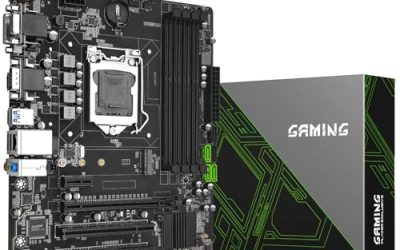
PCIe 4.0 doubles the per-lane bandwidth of PCIe 3.0, and for most builders the payoff shows up in two places: the M.2 slot that holds the main SSD, and the x16 slot that holds the graphics card. A fast NVMe drive can only reach its rated sequential speeds on a PCIe 4.0 link, and recent graphics cards are designed for PCIe 4.0 or 5.0 slots. If you are choosing a board with PCIe 4.0 support, you are probably building a mainstream gaming or content-creation PC where those two parts matter, and you want a board that will not hold them back.
The six boards here come from two platforms. Five use AMD’s AM4 socket with the B550 chipset, which is the established, affordable route to PCIe 4.0 with DDR4 memory. One uses the newer AM5 socket with the B850 chipset, DDR5 memory, and PCIe 5.0. Two PCIe adapter cards that appeared in the original shortlist were left out because they are add-in cards, not motherboards. The right choice depends mostly on which processor you already own or plan to buy.
Our Top Picks
 GIGABYTE B550M K AMD AM4 Micro-ATX MotherboardmATX10.43 x 10.43 x 2.12 inches1.7 poundsCheck on Amazon
 ASUS TUF Gaming B550-PLUS WiFi II AMD AM4B550-Plus|M.2x2|D4|WiFi610.75 x 2.75 x 13.5 inches1.27 poundsCheck on Amazon


Top 3 picks at a glance
Quick Picks
As an Amazon Associate we earn from qualifying purchases at no extra cost to you.


| Product | Best for | Key spec from the title |
|---|---|---|
| ASUS ROG Strix B550-F Gaming WiFi II | Feature-rich AM4 gaming build | ATX, PCIe 4.0, WiFi 6E, 2.5Gb LAN |
| GIGABYTE B550M K | Budget AM4 micro-ATX build | Micro-ATX, 2x M.2, PCIe 4.0, Ryzen 5000/4000/3000 |
| ASUS TUF Gaming B550-PLUS WiFi II | Durable AM4 ATX board with wireless | ATX, PCIe 4.0, WiFi 6, USB 3.2 Gen 2 |
| ASUS Prime B550M-A WiFi II | Compact AM4 build with ECC support | Micro-ATX, PCIe 4.0, WiFi 6, ECC, HDMI 2.1 |
| ASRock B550M WiFi | Value micro-ATX with wireless | Micro-ATX, DDR4 4733+, PCIe 4.0 |
| ASUS ROG Strix B850-A Gaming WiFi | New AM5 platform, DDR5, PCIe 5.0 | AM5, 14+2+2 power stages, 4x M.2, PCIe 5.0 |
How to Choose
Pick the platform first: AM4 with DDR4 or AM5 with DDR5
The socket decides everything. AM4 boards take Ryzen 3000, 4000, and 5000 series processors and DDR4 memory. AM5 boards take newer Ryzen chips and DDR5. The B550 boards here are the lower-cost route if you already own DDR4 or a Ryzen 5000 chip. The B850 board costs more and needs DDR5 memory, but it opens the door to a newer processor line and PCIe 5.0. Check your processor before buying: an AM4 board will not accept an AM5 chip.
Check what PCIe 4.0 actually covers on the board
PCIe 4.0 is not always on every slot. On many B550 boards, the main x16 slot and the first M.2 slot run at PCIe 4.0, while the chipset-fed slots and sometimes the second M.2 slot run slower. The Gigabyte B550M K lists two M.2 slots, so read the manual to see which one runs at full speed. If you plan on two fast SSDs, count the PCIe 4.0 M.2 slots, not just the total number of slots.
Match the form factor and the power delivery
ATX boards, like the ROG Strix B550-F and the TUF B550-PLUS, offer more expansion slots and fan headers. Micro-ATX boards, like the B550M K and Prime B550M-A, fit smaller cases. For a mid-range Ryzen, a modest power design is fine. The Gigabyte lists 3+3 power phases, which suits entry-level processors; the ASUS B850-A lists 14+2+2 power stages, better for higher-end chips. Budget boards cut corners on VRM heatsinks, which matters if you plan to overclock or use a 12-core or 16-core chip.
Look at networking, storage, and what to ignore
Wireless varies: WiFi 6E on the ROG Strix B550-F, WiFi 6 on the TUF and Prime boards. A 2.5Gb LAN port is useful if your network supports it. BIOS Flashback, listed on the ASUS ATX boards, lets you update the BIOS without a CPU installed, which matters when a board needs an update to support a newer processor. Ignore RGB headers unless you want lighting. Also confirm the BIOS version supports your processor out of the box.
Take a moment to match the board to the rest of the parts list, too. Check the memory: the B550 boards use DDR4 and the B850 board uses DDR5, and the two are not interchangeable, so a mismatched kit means a return. Check the cooler mounting: AM4 and AM5 coolers share many mounting parts but not all, so confirm your cooler lists the socket you chose. Count the SATA ports if you plan on several hard drives, since small boards offer fewer. And consider the case, because a micro-ATX board leaves a lot of empty space in a full tower while an ATX board will not fit a compact shell.
Finally, remember that a board is a long-term part. It will outlast two or three graphics cards and probably a couple of storage drives. Paying a little more for extra M.2 slots, a better power design, or built-in wireless often costs less than replacing a board later. On the other hand, paying for features you will never use, such as extra RGB headers or a heavy heatsink, is wasted money on a modest build.
The 6 Best Options
ASUS ROG Strix B550-F Gaming WiFi II
This is the feature-rich AM4 pick: an ATX board with PCIe 4.0, WiFi 6E, 2.5Gb LAN, BIOS Flashback, and HDMI 2.1. It is for a gaming build around a Ryzen 3000 or 5000 series chip where the owner wants quality networking and full-size expansion without moving to a newer platform.
- Strength: WiFi 6E and 2.5Gb LAN for strong networking.
- Strength: BIOS Flashback for easy updates.
- Trade-off: it sits in a higher price tier than the micro-ATX B550 boards.
Skip it if you want a small case or the lowest cost.
GIGABYTE B550M K
A micro-ATX AM4 board that supports Ryzen 5000, 4000, and 3000 series processors, with DDR4, 3+3 power phases, two M.2 slots, and PCIe 4.0. It is the budget pick for a basic gaming or office build that still needs a fast NVMe drive. The two M.2 slots allow a second drive later.
- Strength: budget tier with two M.2 slots and PCIe 4.0.
- Strength: broad Ryzen 3000-5000 support.
- Trade-off: 3+3 power phases suit mid-range, not high-end, processors.
Skip it if you plan a high-core-count chip or want built-in wireless.
ASUS TUF Gaming B550-PLUS WiFi II
The TUF Gaming B550-PLUS is an ATX AM4 board with PCIe 4.0, WiFi 6, 2.5Gb LAN, BIOS Flashback, and USB 3.2 Gen 2. The TUF line focuses on durability, so it suits a builder who wants a solid mid-range board with wireless and fast wired networking in one package.
- Strength: WiFi 6 plus 2.5Gb LAN.
- Strength: BIOS Flashback and USB 3.2 Gen 2.
- Trade-off: WiFi 6 is a step behind the 6E on the ROG Strix model.
Skip it if you need the newest wireless standard or a compact board.
ASUS Prime B550M-A WiFi II
A Micro ATX AM4 board with PCIe 4.0, WiFi 6, ECC memory support, HDMI 2.1, and an RGB header. The ECC support is unusual at this tier and appeals to a home server or workstation builder who wants error-correcting memory on a consumer platform. It also suits a compact gaming PC.
- Strength: ECC memory support listed in the title.
- Strength: HDMI 2.1 and built-in WiFi 6.
- Trade-off: micro-ATX limits expansion slots.
Skip it if you need many expansion cards.
ASRock B550M WiFi
This Micro-ATX board supports Ryzen 3000 through 5000 on AM4 and lists DDR4 4733+ memory speeds and PCIe 4.0. The built-in wireless is the draw at its value tier, since many cheap boards omit it. It suits a straightforward gaming or home PC where fast memory support is a bonus.
- Strength: wireless included at a value tier.
- Strength: DDR4 4733+ memory support listed.
- Trade-off: fewer premium extras than the ASUS boards.
Skip it if you want BIOS Flashback or a full ATX layout.
ASUS ROG Strix B850-A Gaming WiFi
The only AM5 board here, the ROG Strix B850-A is an ATX board with 14+2+2 power stages, DDR5 AEMP support, 2.5G LAN, four M.2 slots, and PCIe 5.0. It covers PCIe 4.0 drives and cards while adding a path to PCIe 5.0 storage. It is for builders buying into the newer platform who want room to upgrade.
- Strength: PCIe 5.0 with four M.2 slots.
- Strength: strong 14+2+2 power stage design.
- Trade-off: it needs DDR5 and an AM5 processor, which raises the build cost.
Skip it if you already own DDR4 and an AM4 processor.
Which One Fits Your Situation
You own a Ryzen 5000 chip and DDR4
The ASUS TUF Gaming B550-PLUS WiFi II suits a standard ATX case, and the ASUS ROG Strix B550-F Gaming WiFi II adds WiFi 6E.
You are building small on a budget
The GIGABYTE B550M K is the cost-conscious micro-ATX choice. If you want wireless included, the ASRock B550M WiFi covers it.
You are building a home server or workstation
The ASUS Prime B550M-A WiFi II lists ECC support, which sets it apart.
You are starting a new build in 2026
The ASUS ROG Strix B850-A Gaming WiFi is the AM5 route, with DDR5 and PCIe 5.0 room for future storage.
If two boards seem close, tie-break on the parts you already own. Existing DDR4 memory and an AM4 processor make a B550 board the obvious path, while a fresh build with no carry-over parts makes the AM5 board easier to justify as a long-term base. Read the manual for the PCIe lane layout before you fill every slot, since using an extra M.2 drive can sometimes disable a SATA port or reduce a slot’s speed. Updating the BIOS to the current version before installing a new processor avoids most first-boot surprises and keeps storage and memory behaving as the spec sheet describes.
Common Mistakes
- Buying an AM4 board for an AM5 processor, or the reverse.
- Assuming every M.2 and PCIe slot on the board runs at PCIe 4.0.
- Forgetting that the board may need a BIOS update to support a newer Ryzen chip.
- Pairing a high-core-count processor with a board that has minimal power delivery.
- Buying an add-in adapter card when you needed a motherboard.
Related guides
- Noctua Nh-D15 Vs Thermalright Peerless Assassin 120
- Sustainable Gaming Pc Power Supply Efficiency Guide
- Thermal Paste Application Method For Lga1851
Frequently Asked Questions
Do I need PCIe 4.0 for gaming?
Most games do not saturate PCIe 3.0, but a PCIe 4.0 board lets a fast NVMe drive reach its rated speeds. It also keeps the system ready for newer graphics cards.
Is B550 still worth buying?
For a Ryzen 5000 build with DDR4, yes. It is a mature platform with PCIe 4.0. A new build with no existing parts may prefer AM5.
What is BIOS Flashback?
It lets you update the board’s firmware from a USB drive without a processor installed. That helps when a board needs an update for a newer chip.
Does PCIe 5.0 matter yet?
For most users, not much. It offers headroom for future SSDs and graphics cards. A PCIe 4.0 board is enough for current mainstream parts.