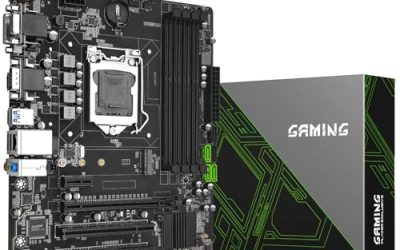
Two sockets on one board is a very different proposition from the usual gaming build. A dual CPU motherboard exists to multiply cores and memory channels, which is why these boards turn up in rendering rigs, virtual machine hosts, home labs, and budget workstations built from older server parts. Buyers who search for the best dual CPU motherboards are rarely chasing frame rates. They want a lot of threads and a lot of RAM for the least outlay, and they accept that this means working with a previous-generation platform.
All five boards in this guide are built around Intel’s X99 platform and the LGA 2011-3 socket, paired with Xeon E5 v3 and v4 processors and DDR4 memory. That is a deliberate, value-driven corner of the market in 2026: mature, well understood, and inexpensive compared with current server hardware. It also comes with caveats about power, cooling, case size, and compatibility, which this comparison explains using only the facts stated in each listing.
Our Top Picks

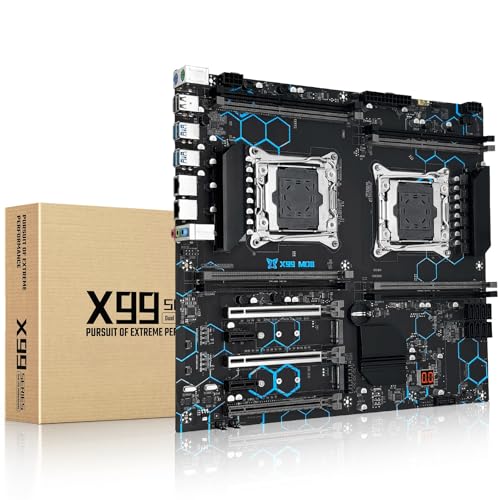
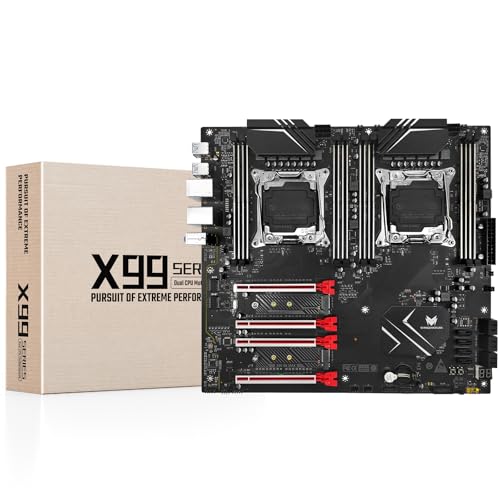

Top 3 picks at a glance
Quick Picks
As an Amazon Associate we earn from qualifying purchases at no extra cost to you.




| Product | Best for | Key spec from the title |
|---|---|---|
| MACHINIST X99-D8-MAX | E-ATX server-style workstation | LGA 2011-3, E-ATX, PCIe 3.0, DDR4 |
| MACHINIST X99 Dual CPU | NVMe-ready dual Xeon build | LGA 2011-V3, DDR4 up to 256GB, NGFF/NVMe M.2 |
| SHANGZHAOYUAN X99 Dual CPU | ECC memory and fast storage | E-ATX, 8x DDR4 ECC up to 256G, 2x NVMe |
| SHANGZHAOYUAN X99 MD8 | Alternative E-ATX dual-socket layout | LGA 2011-V3, DDR4 up to 256GB, PCIe 3.0 |
| Jkjhbhged X99 | Maximum memory slots on a budget | Dual CPU support, 8x32G memory |
How to Choose
Confirm the processors you plan to run
Each listing names Xeon E5 v3 and v4 support, and three of the five also mention Core i7 fifth and sixth generation chips. The important point is that a two-socket configuration generally needs Xeon E5-2600-series processors that are designed to work in pairs. A consumer Core i7 can usually be used in a single-socket setup but cannot be installed in both sockets. If your plan depends on dual operation, buy two matching Xeon parts, and confirm the exact model against the seller’s compatibility list before ordering.
Plan for E-ATX size and case clearance
Three of the listings call out E-ATX, an oversized form factor wider than a standard ATX board, and the other two do not state a size at all. Many ordinary mid-tower cases cannot hold an E-ATX board, so measure the case against the board dimensions in the listing, and look for a case that lists E-ATX support. Two sockets also mean two large coolers and wide memory banks, so leave room around the board for airflow. A cramped installation is the number one source of trouble for first-time server-board buyers. When a listing is silent on size, ask the seller for the exact dimensions and the mounting hole pattern before you buy a case to match.
Look at memory type and capacity
These boards use DDR4, with listings quoting up to 256GB. One lists eight DDR4 ECC slots and another a configuration of eight 32GB modules, which shows how many slots to fill. ECC memory can catch and correct single-bit errors, which helps long-running virtual machines and rendering jobs. Server memory is often registered, and consumer memory is not, so confirm which type each board accepts before purchasing modules. Buying the wrong kind is a frustrating and avoidable mistake.
Check storage, networking, and power
The listings mention PCIe 3.0, M.2 NGFF or NVMe support, and Gigabit LAN. These are enough for most home labs, but they are far from current standards, so expect no PCIe 4.0 and no 2.5G networking. Dual-socket boards need a power supply with two CPU power connectors; if your supply has only one, a splitter cable might be required, and you must check that the supply can handle the combined load. Budget boards from lesser-known brands often cut corners on documentation, BIOS updates, and support, so factor in your own troubleshooting time. Keep a spare USB drive with the latest BIOS file available from the seller, and plan on a first boot that takes longer than a desktop board because server-class firmware trains a lot of memory before it reaches the logo screen.
The 5 Best Options
MACHINIST X99-D8-MAX
An E-ATX server board for Intel LGA 2011-3 with dual CPU support. It is listed for Xeon E5 v3 and v4 and Core i7 fifth and sixth generation processors, with PCIe 3.0 and DDR4 memory.
- Strength: an explicit dual CPU E-ATX design built for server-style use.
- Strength: broad Xeon E5 v3 and v4 compatibility stated up front.
- Trade-off: the E-ATX size demands a case that supports it.
Skip it if you have a standard mid-tower and do not want a case change. It suits anyone assembling a rendering or virtualization box who wants the most detailed processor compatibility list in the group, and who accepts the PCIe 3.0 limit. A pair of matching Xeon E5 chips, registered memory, and a roomy E-ATX case turn it into a capable many-thread machine for encoding and compiling.
MACHINIST X99 Dual CPU
This listing names LGA 2011-V3, Xeon E5 v3 and v4 support, DDR4 with a 256GB maximum, Gigabit LAN, PCIe 3.0, and NGFF/NVMe M.2 storage support, in a dual CPU board.
- Strength: M.2 NGFF/NVMe support allows a fast boot drive.
- Strength: 256GB maximum memory leaves room for virtual machines.
- Trade-off: Gigabit LAN and PCIe 3.0 are dated compared with current boards.
Skip it if you need modern networking or PCIe 4.0 expansion. It is a sensible choice for a home lab that boots from NVMe and stores bulk data elsewhere. Buyers moving workloads from a single-socket machine will like the extra threads. Because the title does not state a form factor, measure the board against your case before ordering, and confirm the processor list with the seller.
SHANGZHAOYUAN X99 Dual CPU
An E-ATX server board on LGA 2011-3 for Core i7 fifth and sixth generation and Xeon E5 v3 and v4 series. The listing highlights eight DDR4 ECC slots up to 256G and two NVMe slots.
- Strength: eight DDR4 ECC slots for a large pool of error-correcting memory.
- Strength: two NVMe slots in the listing, for fast storage without an adapter card.
- Trade-off: E-ATX size and ECC memory demand careful case and RAM choices.
Skip it if you want a standard ATX footprint or plan to use non-ECC desktop memory. Builders running databases or long virtual machine sessions get the most from the ECC emphasis, since a long job that silently corrupts one bit can waste hours of work. Pair it with a case that lists E-ATX support and a power supply with two CPU connectors.
SHANGZHAOYUAN X99 MD8
A second SHANGZHAOYUAN option with dual CPU support, LGA 2011-V3, DDR4, E-ATX, and Xeon E5 v3 and v4 plus Core i7 fifth and sixth generation compatibility. It lists a 256GB memory maximum and PCIe 3.0.
- Strength: a similar dual-socket E-ATX layout with stated 256GB memory support.
- Strength: PCIe 3.0 expansion for add-in cards and storage controllers.
- Trade-off: the visible title is brief on storage and networking details.
Skip it if you want clear storage specifications in the title. It suits buyers comparing two similar boards who prefer to read the full description and confirm the layout themselves. Because it shares its platform and memory ceiling with the other SHANGZHAOYUAN board, the decision often comes down to which description answers your questions about storage and slots most clearly. Ask the seller about the exact M.2 and SATA counts before you plan a drive layout.
Jkjhbhged X99
A plainly labeled LGA 2011-3 board that supports dual CPU, DDR4, and eight 32G memory modules for Xeon E5 series processors. The listing does not mention form factor, so check the dimensions.
- Strength: support for eight 32G modules points to high memory capacity.
- Strength: explicit dual CPU support for Xeon E5 series chips.
- Trade-off: the title leaves out form factor, storage, and networking details.
Skip it if you need a clear specification list or a recognizable brand. It fits experienced builders who can verify dimensions and compatibility with the seller before buying, and who are comfortable sourcing registered or ECC memory if the board requires it. Treat it as the riskiest pick for a first server build and the most interesting for someone chasing the largest possible memory pool.
Which One Fits Your Situation
A rendering workstation with lots of cores
The MACHINIST X99-D8-MAX is the clearest listing for a dual Xeon E5 v3 or v4 build in an E-ATX case, with DDR4 and PCIe 3.0 for cards. Add a pair of matching Xeons and a large power supply, and the result is a many-thread machine for encoding, compiling, and 3D rendering jobs that scale across cores.
A home lab with virtual machines and ECC memory
Choose the SHANGZHAOYUAN X99 Dual CPU for its eight ECC slots and NVMe support. It lines up with workloads that run for days, such as a small file server, a build machine, or several virtual machines sharing one box. Fill the memory slots in matched sets so the board can use all of its channels.
A fast-booting build with M.2 storage
The MACHINIST X99 Dual CPU lists NGFF/NVMe M.2 support and a 256GB memory ceiling, which suits a boot drive and a data pool. Put the operating system and active projects on the NVMe drive and keep archives on cheaper SATA disks, so the platform’s older bus speeds never get in the way of daily work.
A memory-heavy experiment on a tight plan
The Jkjhbhged X99 supports eight 32G modules, but verify the form factor and compatibility first. The SHANGZHAOYUAN MD8 is the safer comparison. Either way, treat the purchase as an experiment, keep the seller’s return terms handy, and test the board with a single processor and a single memory stick before filling every slot.
Common Mistakes
- Assuming a Core i7 can fill both sockets, when dual operation generally needs matching Xeon E5 chips.
- Buying an E-ATX board without checking that the case supports it.
- Using the wrong memory type, since server boards may require ECC or registered modules.
- Forgetting the second CPU power connector and the cooler for the second socket.
- Expecting current features such as PCIe 4.0 or 2.5G networking from an X99 platform.
Related guides
- Sustainable Gaming Pc Power Supply Efficiency Guide
- Noctua Nh-D15 Vs Thermalright Peerless Assassin 120
- Thermal Paste Application Method For Lga1851
Frequently Asked Questions
Are X99 dual CPU boards still worth buying now?
For value builds such as home labs and rendering rigs, yes. For gaming or energy efficiency, newer single-socket platforms are the better choice. A dual-socket X99 system draws considerably more power at idle and under load than a modern desktop, so factor running costs into the decision.
Do I need two identical processors?
Generally yes. Dual-socket boards expect two matching Xeon parts, so buy a pair of the same model and check the board’s processor list.
Can I use these boards in a normal case?
Only if the case supports the board size. E-ATX models need a larger chassis, so check dimensions and standoff layout first.
What power supply do I need?
One with two CPU power connectors and enough capacity for both processors plus graphics. Add up the processor ratings and leave headroom. Remember to budget for a second cooler, since each socket needs its own, and for memory modules, which can cost more than the board itself when you fill every slot.