
Managing thermal performance across high-performance desktop PCs, home office workstations, and dedicated server chassis requires effective airflow management. When assembling custom rigs with six, eight, or ten fans, connecting every cooling unit directly to the motherboard is rarely feasible. Standard motherboard headers typically deliver up to 1 amp (12 watts) of power, meaning daisy-chaining multiple high-RPM fans off a single header risks overloading motherboard traces, triggering thermal throttling, or causing permanent component damage.
Dedicated powered splitters solve this limitation by separating power delivery from control signaling. By drawing direct 12V power from your power supply unit via a standard 15-pin connection, the best fan hubs with sata power allow you to drive expansive multi-fan arrays safely while maintaining synchronized pulse-width modulation (PWM) speed curves. As component power requirements rise heading into 2026, selecting a reliable, SATA-powered fan distribution hub ensures your workstation remains cool, quiet, and electrically stable.
As an Amazon Associate we earn from qualifying purchases at no extra cost to you.





Our Top Picks



Top 3 picks at a glance
Quick Picks
| Product | Best For | Price |
|---|---|---|
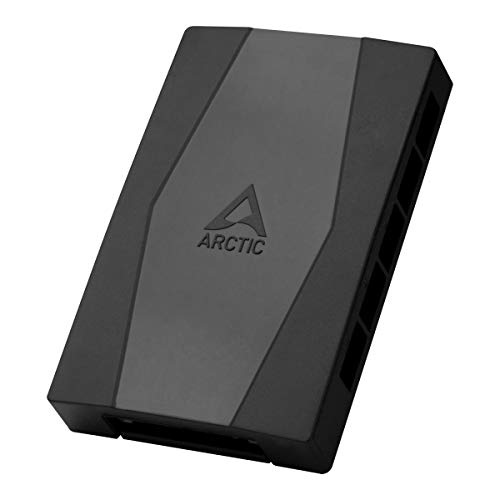
| ARCTIC Case Fan Hub – 10-fold PWM Fan Distributor with SATA Power – Black | Best Overall Value | Check on Amazon |
| XMSJSIY SATA to 3 Pin 4 Pin PWM Fan Adapter Splitter Hub for 12V -2PCS | Best Multi-Pack Budget | Check on Amazon |
| Fan Hub Splitter Extension Cable, 1 to 10 Way Power Supply Cable 15-Pin SATA Powered PWM PC Case Motherboard Fan Power Adapter Extension Cord Hub for Desktop Computer Case 4-Pin and 3-Pin Cooling Fan | Best Cable Extension | Check on Amazon |
| LRONG 1PC PC Chassis Fan Hub CPU Cooling HUB Fan PWM SATA Controller Speed Controller | Best Minimalist Splitter | Check on Amazon |
| FainWan 1-Pack 10 Way 4Pin PWM PC Fan Hub with Cable Computer Cooling Fan Power Cable Extender PCB Adapter SATA 1 to 10 Multi Way Splitter | Best Heavy-Duty PCB | Check on Amazon |
| Noctua NA-FH1, 8-Port PWM Fan Hub, Magnetic with Short Circuit Protection | Best Premium Safety & Build | Check on Amazon |
| Ransanx 4 Pin PWM Fan Controller Hub, 6-Port SATA/DC Powered 12V Fan Speed Regulator, Max 60W for PC Case, CPU, and Server Cooling | Best Manual Speed Regulator | Check on Amazon |
| 4 Pin 12V PWM Fan Controller 6 Fans Supported , PC Fan Adapter Hub Powered by SATA and DC 5525, Cooling Fan Speed Knob with Max Total 60W 5A Output | Best Dual-Power Knob Control | Check on Amazon |
How We Compared
Evaluating fan expansion hubs requires analyzing electrical safety, physical build quality, and usability. Motherboard header protection is paramount; we evaluated hubs based on their ability to draw power directly from the PSU rather than stressing the system motherboard. Key criteria included total port capacity, compatibility with both 3-pin and 4-pin fans, mounting mechanisms (such as adhesive backing versus magnetic mounts), and built-in electrical safety features like auto-resetting fuses or surge protection.
We also analyzed power envelope metrics, focusing on models rated for standard 12V rails capable of sustaining total power outputs up to 60W (5A). Finally, we evaluated practical convenience—balancing automated motherboard PWM signaling against manual physical control knobs for custom server enclosures and noise-sensitive home office environments.
The 8 Best Picks
ARCTIC Case Fan Hub – 10-fold PWM Fan Distributor with SATA Power – Black
The ARCTIC Case Fan Hub is designed for PC builders who need to power up to ten 4-pin PWM fans from a single motherboard header. By taking power directly from a standard 15-pin SATA cable, it isolates your motherboard from heavy current draws while broadcasting synchronized speed controls across every connected fan.
- Pros: Expansive 10-port layout easily supports multi-radiator setup; direct SATA power prevents motherboard header overload.
- Pros: Clean black aesthetic blends seamlessly behind motherboard trays.
- Con: Open PCB layout lacks a protective outer shell casing.
When to skip: Skip if you need individual speed control per fan port rather than uniform speed synchronization.
XMSJSIY SATA to 3 Pin 4 Pin PWM Fan Adapter Splitter Hub for 12V -2PCS
This 2-pack bundle from XMSJSIY offers an affordable solution for multi-zone cooling or dual-system builds. Operating at 12V via direct SATA connection, these compact hub modules accommodate both 3-pin voltage-regulated and 4-pin PWM fans. They offer a simple, dual-unit package priced under ten dollars.
- Pros: Includes two complete splitter hubs for multi-case or split-chamber builds; broad compatibility with 3-pin and 4-pin designs.
- Con: Included foam adhesive pads can lose grip in high-temperature chassis environments.
When to skip: Skip if your workstation enclosure requires magnetic mounting or tactile hardware speed knobs.
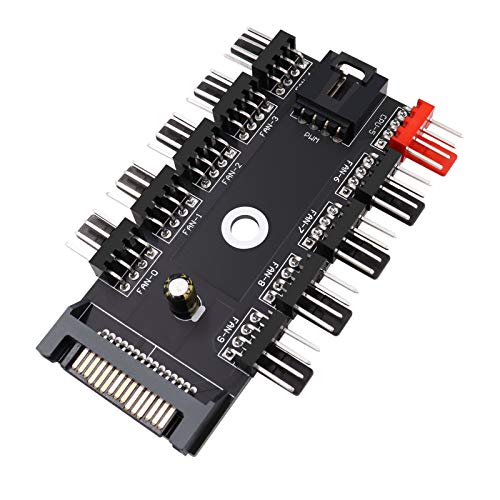
Fan Hub Splitter Extension Cable, 1 to 10 Way Power Supply Cable 15-Pin SATA Powered PWM PC Case Motherboard Fan Power Adapter Extension Cord Hub
Targeted at large full-tower desktop builds, this 1-to-10 way power extension hub bridges long cable runs while distributing SATA power to ten cooling fans. The integrated extension cable simplifies routing behind crowded backpanels, ensuring clean cable management while keeping current draw off the primary board.
- Pros: Flexible extension lead allows effortless routing to hidden cable channels; full 10-fan capacity on a single board signal.
- Pros: Versatile compatibility with 3-pin and 4-pin desktop case fans.
- Con: Longer circuit board profile requires ample flat mounting space behind the tray.
When to skip: Skip if you are assembling an ultra-compact mini-ITX build with restricted cable management clearance.
LRONG 1PC PC Chassis Fan Hub CPU Cooling HUB Fan PWM SATA Controller Speed Controller
The LRONG Chassis Fan Hub is an entry-level, minimal-footprint distribution board tailored for straightforward custom PC cooling configurations.
- Pros: Compact physical footprint fits into tight cable management channels; extremely economical pricing.
- Pros: Straightforward plug-and-play installation requires zero configuration software.
- Con: Lacks protective circuit isolation fuses for extreme high-draw industrial fans.
When to skip: Skip if you require advanced electrical safeguards or industrial magnetic chassis mounting.
FainWan 1-Pack 10 Way 4Pin PWM PC Fan Hub with Cable Computer Cooling Fan Power Cable Extender
FainWan’s 10-way 4-pin PWM hub features a reinforced printed circuit board paired with a sturdy power extension cable. Built to supply reliable 12V power to dense array configurations—such as custom liquid cooling push-pull radiator loops—it converts one motherboard PWM signal into ten SATA-backed outputs.
- Pros: Thick PCB construction reduces board flex during cable installation; stable SATA power feed across ten ports.
- Pros: Included extension cable simplifies clean wiring setups.
When to skip: Skip if you are only installing two or three auxiliary case fans and do not need a 10-port array.
Noctua NA-FH1, 8-Port PWM Fan Hub, Magnetic with Short Circuit Protection
The Noctua NA-FH1 represents the pinnacle of fan hub engineering, featuring advanced safety protections including auto-resetting fuses and overcurrent safeguards. Capable of handling up to 54W via SATA power, this 8-port unit incorporates internal magnets for secure, tool-free mounting inside steel PC enclosures.
- Pros: Advanced short-circuit and overcurrent protection guards high-end components; strong built-in magnets offer effortless tool-free installation.
- Pros: Premium industrial build quality backed by Noctua safety standards.
When to skip: Skip if you are on a strict budget and only need basic, unshielded signal distribution.
Ransanx 4 Pin PWM Fan Controller Hub, 6-Port SATA/DC Powered 12V Fan Speed Regulator
Designed for home servers, liquid cooling rigs, and workstation cases, the Ransanx 6-Port Fan Controller combines SATA and DC power input options with a physical stepless speed regulation knob. Capable of supporting up to 60W total output, it grants manual override control over fan speed and acoustic levels.
- Pros: Integrated manual control knob enables instant, precise noise and airflow adjustments; high 60W power rating handles heavy fan loads.
- Pros: Dual power input capability via SATA or DC power connectors.
- Con: Manual speed override bypasses automatic dynamic motherboard PWM scaling.
When to skip: Skip if you want your operating system or BIOS software to dynamically adjust fan speeds based on real-time GPU temperatures.
4 Pin 12V PWM Fan Controller 6 Fans Supported, Powered by SATA and DC 5525, Cooling Fan Speed Knob
Engineered for high-draw cooling applications, this 6-fan controller hub features a physical rotary potentiometer alongside dual SATA and DC 5525 power connections. Capable of delivering up to 60W with a total 5A output at 12V, it provides the raw power required for heavy-duty industrial or high-RPM workstation fans.
- Pros: High total output capacity of 60W (5A) accommodates power-hungry, high-RPM industrial fans; rotary knob permits precise manual speed adjustments.
- Pros: Dual power inputs (SATA and DC 5525) provide installation flexibility for PC and non-PC enclosures.
- Con: Requires direct physical access to the knob, making internal hidden placement inconvenient.
When to skip: Skip if your PC enclosure lacks external panel access or if you prefer fully automated BIOS fan curves.
Buying Guide
1. Understanding Power Limits and SATA Delivery
Standard motherboard fan headers are rated for 1A (12W). Connecting more than three standard case fans to a single motherboard header via simple passive splitters can overload internal traces, potentially causing thermal damage to your motherboard. A SATA-powered hub draws power directly from your power supply unit’s 12V rail, which typically supports up to 4.5A to 5A (54W to 60W total). This setup isolates power delivery while maintaining signal communication with the motherboard.
2. Automatic PWM vs. Manual Speed Regulation
When choosing a hub, decide whether you prefer software-managed auto-scaling or direct physical control:
- Automatic PWM Hubs: Read the PWM tachometer signal from your CPU header or motherboard fan port and duplicate that exact duty cycle across all connected 4-pin fans. This is ideal for gaming PCs and dynamic workstations.
- Manual Knob Controllers: Use an integrated potentiometer to vary voltage or signal output manually. These are ideal for dedicated home servers, rendering nodes, or audio production spaces where setting a fixed, quiet fan speed is preferred over dynamic RPM ramping.
3. Port Density, Layout, and Mounting Solutions
Consider your chassis space and fan count before purchasing. Compact 6-port or 8-port hubs fit neatly in tight ITX/mATX spaces, while 10-port distribution boards span broader areas and suit full-tower cases. Additionally, pay attention to mounting mechanisms: standard double-sided foam tape works well for permanent placement, whereas magnetic mounts (like those on premium units) allow effortless repositioning without leaving sticky adhesive residue behind.
Our Verdict
For standard desktop PC builds requiring maximum fan expansion at an unbeatable value, the ARCTIC Case Fan Hub is our top pick, offering 10 PWM outputs and clean SATA power integration. If safety and build quality are your top priorities, the Noctua NA-FH1 stands out with its short-circuit protection and convenient magnetic mounting. Finally, for home servers or workstation builds requiring tactile speed tuning, the Ransanx 4 Pin PWM Controller Hub delivers excellent manual knob control backed by a robust 60W power envelope.
FAQ
Can I plug 3-pin fans into a 4-pin SATA powered fan hub?
Yes, 3-pin fan connectors physical fit onto standard 4-pin PWM hub headers. However, because 3-pin fans lack the dedicated fourth PWM control wire, they will typically run at full 100% speed continuously unless the hub specifically incorporates a manual DC voltage regulator knob.
Why is SATA power better than running fan splitters directly off the motherboard?
SATA power connections pull 12V current straight from your computer’s power supply unit. This prevents current overdraw on your motherboard’s fan headers, protecting sensitive trace circuits from overheating or failing when running multi-fan setups.
Will all fans run at the same speed when connected to a SATA fan hub?
On an automatic PWM hub, every connected 4-pin fan receives the exact same PWM duty-cycle percentage from the motherboard. If all connected fans are identical models, they will run at the exact same RPM. If different fan models are mixed, each will run at its respective relative speed percentage.
How many fans can I safely run on a single SATA-powered hub?
Most SATA powered fan hubs safely support between 6 and 10 fans, provided the total power draw stays below the hub’s rated limit—typically 4.5A to 5A (54W to 60W). Always check your individual fan amperage specs (usually 0.1A to 0.3A per fan) to ensure your total load remains within safe operational boundaries.









