Disclosure: As an Amazon Associate we earn from qualifying purchases. When you buy through links on this page, we may earn a commission at no extra cost to you.
If you go shopping for an MLC SSD today, you will find plenty of listings that use the word loosely and very few drives that actually use multi-level cell NAND in the classic sense. That gap between the label and the silicon is the whole story of this guide. MLC, properly defined, stores two bits per cell. It was the mainstream performance technology of the SATA era, it delivers strong sustained writes and generous endurance for its capacity, and it has been almost completely displaced by TLC and QLC, which pack three and four bits per cell, cost less to manufacture, and now dominate every consumer product line.
Because the category has shrunk so far, this guide applies an evidence rule that most roundups skip. A drive only appears here if the manufacturer specification, the official datasheet, or the Amazon product details state the NAND type as MLC in plain language. If a specification sheet says TLC or QLC, the drive is out, no matter how fast it is. If the NAND type is not stated at all, the drive is also out, because an unstated NAND type is not evidence. If a seller uses the word MLC in a headline but the manufacturer does not, that is not evidence either.
That rule leaves a short list, and we would rather publish a short, honest list than pad it with TLC drives wearing an MLC costume. Below you will find two classic two-bit MLC SATA drives and one enterprise NVMe drive whose datasheet uses Samsung’s own three-bit MLC wording, with that naming difference explained in full rather than hidden. We also explain which popular drives were excluded and why, so you can apply the same test elsewhere.
Top 3 picks at a glance


Quick picks
- Best classic MLC SATA drive: Samsung 860 PRO 512GB (MZ-76P512BW) — Samsung V-NAND 2-bit MLC, a 2.5-inch SATA drive with a DRAM cache, hardware encryption, and an endurance rating that reflects its two-bit cells.
- Best MLC drive for older PCs and laptops: Transcend SSD370S 512GB (TS512GSSD370S) — Transcend lists the flash type plainly as MLC NAND flash, with a DDR3 DRAM cache and a standard 7mm 2.5-inch aluminium enclosure that drops into older machines.
- Best enterprise option, with a naming caveat: Samsung 983 DCT 960GB M.2 (MZ-1LB960NE) — a data centre NVMe drive whose official Samsung datasheet lists the NAND as Samsung V-NAND 3-bit MLC. Read its section carefully before deciding whether Samsung’s three-bit wording meets your definition of MLC.
1. Samsung 860 PRO 512GB (MZ-76P512BW)
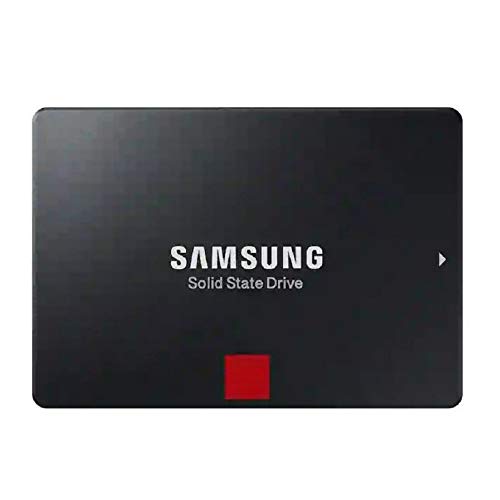
The 860 PRO is the clearest modern answer to the question this keyword asks. Samsung’s specification for the drive lists the NAND as V-NAND 2-bit MLC, which is the classic definition: two bits stored per cell, in a vertically stacked V-NAND structure. This is not a marketing nickname borrowed from a seller listing. It is the manufacturer’s own specification language, and it is why the 860 PRO qualifies here while its sibling, the 860 EVO and 870 EVO, do not. Those EVO drives use three-bit V-NAND, which is TLC by the standard definition, and they were excluded from this guide for exactly that reason.
As a piece of hardware, the 860 PRO is a 2.5-inch SATA III drive, so it fits the drive bays and SATA ports of desktops and laptops built across a long span of years. Samsung rates sequential performance at up to 560 MB/s read and 530 MB/s write, effectively at the practical ceiling of the SATA interface. The drive uses Samsung’s MJX controller with an LPDDR4 DRAM cache, which matters more than the headline speeds for everyday responsiveness, because the cache holds the mapping table that lets the drive find data quickly under mixed workloads. It also supports AES 256-bit hardware encryption and TCG Opal 2.0, which makes it a sensible choice for a work laptop as well as a home machine.
Endurance is where the two-bit MLC shows its value. The 512GB model carries a terabytes written rating of 600 TBW in Samsung’s specifications, a figure that reflects how much more write headroom two-bit cells provide at a given capacity than three-bit cells in a comparable consumer drive. For a gaming PC, that headroom is mostly insurance. For a machine that records video, edits large projects, runs virtual machines, or serves as a scratch drive, it is a working advantage that compounds over years of use.
Key specifications
- Capacity: 512GB, model MZ-76P512BW
- NAND: Samsung V-NAND 2-bit MLC, per Samsung specification
- Form factor and interface: 2.5-inch, SATA III 6Gb/s
- Controller and cache: Samsung MJX controller, LPDDR4 DRAM cache
- Sequential performance: up to 560 MB/s read, up to 530 MB/s write
- Security: AES 256-bit encryption, TCG Opal 2.0
Pros
- Genuine two-bit MLC NAND, confirmed in the manufacturer’s own specification
- Strong endurance rating for its capacity class
- DRAM cache keeps small-file and mixed workloads responsive
- Hardware encryption support for work and travel machines
- Standard SATA fit suits a huge range of existing PCs and laptops
Cons
- SATA interface caps peak speed far below any NVMe drive
- Capacity range is modest by current standards
- Stock can be inconsistent, so check the exact model code before ordering
Check the Samsung 860 PRO 512GB on Amazon
2. Transcend SSD370S 512GB (TS512GSSD370S)
Transcend is one of the few manufacturers that still prints the answer where buyers can find it. The official SSD370S product page lists the flash type in its specification table as MLC NAND flash, with no ambiguity and no code words. The drive itself is a conventional 2.5-inch SATA III SSD in an aluminium casing, 7mm thick, which makes it an easy transplant into older laptops, small desktops, and external enclosures that expect a standard SATA drive.
Transcend rates the 512GB model at up to 530 MB/s sequential read and 430 MB/s sequential write, with a DDR3 DRAM cache supporting the controller. Those figures sit slightly below the SATA ceiling, and for the machines this drive usually enters, that difference is invisible next to the jump from a mechanical hard drive. What the SSD370S offers instead is endurance. Transcend’s current specification lists 1,480 TBW for the 512GB capacity, an unusually generous figure that follows directly from the MLC flash and the drive’s conservative tuning. For a home server, a media box, a workshop PC, or any system that writes steadily all day, that rating is the reason to choose this drive over a faster-on-paper TLC model.
The SSD370S also supports the standard housekeeping features you should expect: TRIM, S.M.A.R.T. monitoring, wear levelling, error correction, and DevSleep low-power states for laptops. Transcend’s SSD Scope software handles health monitoring and firmware updates on Windows. Nothing here is exotic, and that is the point. This is a mature, well-documented MLC drive for keeping older hardware useful.
One caution applies to the whole SSD370 family: buy the exact model code TS512GSSD370S, and confirm the capacity and the S suffix on the product page before ordering, because Transcend has sold closely named variants and marketplace listings sometimes blur them together.
Key specifications
- Capacity: 512GB, model TS512GSSD370S
- NAND: MLC NAND flash, per Transcend’s official specification table
- Form factor and interface: 2.5-inch aluminium, 7mm, SATA III 6Gb/s
- Cache: DDR3 DRAM cache
- Sequential performance: up to 530 MB/s read, up to 430 MB/s write
- Endurance: 1,480 TBW for this capacity, per Transcend’s current specification
Pros
- MLC flash type stated plainly in the manufacturer’s specification
- Very high TBW rating for a SATA drive of this capacity
- Slim 7mm enclosure fits older laptops and tight drive bays
- DRAM cache included, unlike many surviving entry-level SATA drives
- Well suited to write-steady roles such as home servers and media PCs
Cons
- Write speed sits below the SATA interface ceiling
- An older platform, so firmware and software are Windows-focused
- Listings for similar Transcend models are easy to confuse; check the model code
Check the Transcend SSD370S 512GB on Amazon
3. Samsung 983 DCT 960GB M.2 (MZ-1LB960NE) — read the caveat first
The 983 DCT is an enterprise NVMe drive, and it is included for one specific reason: Samsung’s official datasheet for the 983 DCT lists the NAND flash memory, for every capacity and both form factors, as Samsung V-NAND 3-bit MLC. By the evidence rule of this guide, manufacturer wording that says MLC counts as a claim we can show you. But honesty requires the rest of the sentence. Three bits per cell is what most of the industry calls TLC. Samsung has historically used the term MLC as an umbrella for multi-bit V-NAND and then specified the bit count alongside it, so 2-bit MLC on the 860 PRO and 3-bit MLC on the 983 DCT are not the same cell structure, even though both datasheets contain the letters MLC.
So treat this pick as an enterprise drive with a documented naming quirk, not as a classic two-bit MLC drive. If your requirement is strictly two bits per cell, choose one of the two SATA drives above and stop here. If your requirement is a data centre drive with power-loss protection, consistent latency under load, and Samsung’s enterprise V-NAND, the 983 DCT is a legitimate option that happens to carry the MLC wording in its datasheet.
On hardware, the 960GB M.2 version, model MZ-1LB960NE, uses a PCIe Gen 3.0 x4 interface with NVMe 1.2b, Samsung’s Phoenix controller, and a 1.5GB LPDDR4 cache. Samsung rates it at up to 3,000 MB/s sequential read and 1,100 MB/s sequential write. The form factor is M.2 22110, longer than the common 2280 size, so check your slot length before ordering. Enterprise features include power-loss protection and end-to-end data protection, which consumer drives normally do not offer. There is also a U.2 version of the same family; make sure the listing you open is the M.2 model code above if that is what your system needs.
Key specifications
- Capacity: 960GB, model MZ-1LB960NE
- NAND: Samsung V-NAND 3-bit MLC, per Samsung’s official 983 DCT datasheet; note that three bits per cell is called TLC by most of the industry
- Form factor and interface: M.2 22110, PCIe Gen 3.0 x4, NVMe 1.2b
- Controller and cache: Samsung Phoenix controller, 1.5GB LPDDR4
- Sequential performance: up to 3,000 MB/s read, up to 1,100 MB/s write for this capacity
- Enterprise features: power-loss protection, end-to-end data protection
Pros
- NVMe performance far beyond any SATA drive in this guide
- Power-loss protection that consumer SSDs do not provide
- Enterprise design targets consistent performance under sustained load
- MLC wording documented in the manufacturer’s own datasheet
Cons
- Three-bit cells, so it is not classic two-bit MLC despite the datasheet wording
- M.2 22110 length does not fit every motherboard or laptop
- Enterprise drive, so consumer conveniences and support channels are limited
- PCIe Gen 3.0 platform, not a current-generation interface
Check the Samsung 983 DCT 960GB M.2 on Amazon
Why MLC is so hard to find now
MLC lost on manufacturing economics, not on merit. A NAND wafer that stores three or four bits per cell yields more sellable capacity than the same wafer storing two bits, so TLC and then QLC took over every price-sensitive product line. Modern controllers, error correction, and SLC caching made TLC fast enough that most buyers never noticed the change in burst workloads. Two-bit MLC now survives mainly in older premium SATA lines that are still listed, and in industrial and enterprise catalogues where buyers specify cell type in contracts.
That history produces two traps. The first is the naming trap, illustrated by the 983 DCT, where a datasheet can say MLC and mean three bits. Always read the bit count next to the letters. The second is the silent-spec trap, where a listing never states the NAND type and third-party articles fill the gap with guesses. If the manufacturer will not state it, treat the drive as unknown and move on.
How to choose an MLC SSD
Start with the bit count. Two bits per cell is classic MLC. Three bits is TLC in standard terminology, whatever a given brand calls it, and four bits is QLC. Decide which definition you actually need before you compare anything else.
Check the interface you really have. Both classic MLC picks here are SATA drives. They are excellent for reviving or stabilising an existing machine, but no SATA drive can approach NVMe speeds, and no MLC badge changes that. Buy MLC for endurance and consistency, not for headline throughput.
Read the TBW, not just the capacity. Terabytes written is where MLC earns its keep. Compare the TBW in the manufacturer’s specification for the exact capacity you are buying, because ratings scale with capacity.
Confirm the exact model code. MLC and TLC siblings often share a product family name. The model code on the listing, such as MZ-76P512BW or TS512GSSD370S, is what ties the drive to the specification you checked. If the code differs, recheck the NAND type from scratch.
Plan for limited stock. These are mature product lines. If a listing shows a different capacity or a refurbished unit, verify the model code and NAND claim again before ordering, and keep a second choice in mind.
Popular drives we excluded, and why
To show the evidence rule in action: the Samsung 970 EVO Plus, 980, 980 PRO, and 990 PRO lines use three-bit V-NAND and are TLC by the standard definition, so they are out despite their speed. The Samsung 860 EVO and 870 EVO are likewise three-bit drives. The WD Black SN850X, Crucial MX500, SK hynix Platinum P41, and Kingston KC3000 are all TLC drives, excluded on their manufacturers’ specifications. The older Samsung 850 PRO is a genuine two-bit MLC drive, but its listings are now dominated by discontinued and used stock, so it did not meet the standard for a current recommendation. None of these exclusions are quality judgements; several excluded drives are faster than everything here. They are simply not MLC.
FAQs
What does MLC mean in an SSD?
MLC stands for multi-level cell. In its classic and most useful definition it means two bits stored per NAND cell, sitting between one-bit SLC and three-bit TLC for endurance, sustained write behaviour, and manufacturing cost.
Is Samsung’s 3-bit MLC the same as TLC?
By cell structure, yes: three bits per cell is what the wider industry calls TLC. Samsung’s datasheets have used the phrase 3-bit MLC for its V-NAND, which is why this guide quotes the bit count for every pick and flags the difference wherever it appears.
Are MLC SSDs faster than TLC SSDs?
Not necessarily in peak speed, because interface and controller design matter more. A SATA MLC drive is far slower at peak than a PCIe Gen 4 TLC drive. MLC’s advantages are sustained write consistency once caches fill, and higher write endurance at a given capacity.
Why are there only three drives in this guide?
Because only three currently listed drives met the evidence rule of a manufacturer-stated MLC NAND type, and one of those carries the three-bit naming caveat explained above. A longer list would have required guessing at unstated NAND types or relabelling TLC drives, and this guide does neither.
Is an MLC SSD worth it for a gaming PC?
For game storage alone, usually not: load times depend far more on the interface than the cell type, and a modern NVMe TLC drive loads games faster. MLC makes sense when the same drive also handles heavy writing, recording, editing, or server duty, or when you are keeping an older SATA machine in service for years.
How can I verify a drive is MLC before buying?
Find the manufacturer’s specification page or datasheet for the exact model code and look for the NAND or flash type line. It should state MLC and ideally the bit count. If the document says TLC, QLC, or nothing at all, treat the drive as not MLC, whatever the retail listing headline claims.
Conclusion
The best MLC SSDs are a short list because the technology has genuinely retreated, and any guide showing ten current MLC drives is not checking its sources. For classic two-bit MLC in a standard SATA bay, the Samsung 860 PRO 512GB is the strongest all-round pick, and the Transcend SSD370S 512GB is the endurance-focused alternative for older machines and write-steady roles. The Samsung 983 DCT serves enterprise NVMe needs, with its 3-bit MLC datasheet wording explained openly so you can judge it against your own definition. Whichever you choose, verify the exact model code and the manufacturer’s NAND line one last time on the product page. In this corner of the SSD market, that single habit is worth more than any benchmark chart.
Related guides
More from Amazon
Programs that pair well with the guide above. Offers and eligibility are set by Amazon and may change.
Free shipping on eligible items, Prime Video and more. Eligible new members can start with a free trial.
Start a Prime free trialAd-free music streaming. Eligible new subscribers can start with a free trial.
Try Music Unlimited freeA Prime membership for ages 18-24 with a trial period. Eligibility is set by Amazon.
See Prime for Young AdultsAudiobooks and podcasts to listen to on the go. Eligible new members can start with a free trial.
Try Audible freeAs an Amazon Associate we earn from qualifying purchases.