Choosing a dual band router sounds settled the moment you read the box, yet the real decision is how the two radios divide your household: the 5 GHz band carries the fast, close-range traffic while 2.4 GHz reaches the far rooms and the smart plugs. Buyers who shop on the combined headline speed alone often end up with a router whose weaker band or missing mesh option shows up within a week.
This guide is for households replacing an ageing router, renters who cannot run ethernet, and home workers whose calls share airtime with everyone else’s streaming. Every router below is a genuine dual-band model: its listing states a 2.4 GHz radio and a 5 GHz radio, and nothing here is a tri-band unit in disguise.
Top 3 picks at a glance


Quick Picks
As an Amazon Associate we earn from qualifying purchases.
| Product | Best for | Key spec from title |
|---|---|---|
| TP-Link Archer AX21 | Straightforward whole-home upgrade on a sensible budget | AX1800 dual band Wi-Fi 6 router |
| TP-Link Archer AX55 | Faster 5 GHz band plus a USB port for shared storage | AX3000 dual band with 2,402 Mbps on 5 GHz |
| ASUS RT-AX1800S | AiMesh expansion and ASUS security features | AX1800 dual band, AiMesh compatible |
How to Choose
Read the per-band speeds, not the combined number
The class printed on the box, such as AX1800 or AX3000, adds both bands together, yet no single device ever uses that total. What matters is the split: a laptop near the router lives on the 5 GHz figure, while a phone in the back bedroom may fall back to the 2.4 GHz figure. Compare the individual band speeds in each listing and weigh the 5 GHz number most heavily if your demanding devices sit within a room or two of the router. A home with one laptop cares about the headline; a home with thirty connected gadgets cares about how the router divides attention, which is where the feature list in the next sections starts to matter.
Decide whether mesh expansion matters to you
A single dual band router covers a flat or small house comfortably, but thick walls and long floorplans leave dead corners. Routers with a mesh system in the listing, such as EasyMesh, OneMesh or AiMesh depending on brand, let you add a compatible node later instead of replacing everything. If there is any chance you will extend coverage, pick the router whose ecosystem you would happily buy a second unit from, because nodes only pair within their own family. The standards differ in maturity: AiMesh is ASUS’s long-running system, OneMesh works with TP-Link extenders and routers, and EasyMesh is a cross-brand Wi-Fi Alliance standard that TP-Link’s newer models list.
Count wired ports and USB before you need them
Dual band describes the wireless side only. A desktop PC, a NAS or a games console still benefits from a cable, so check the listing for the number of gigabit LAN ports. A USB port, present on only one router in this guide, lets a drive or printer hang off the network for the whole household. These details are cheap to confirm on the listing now and annoying to work around after the router is on the shelf. Count what you already own that prefers a wire: a work desktop, a television used for large game downloads, a network drive.
Treat Wi-Fi 6 features as the tiebreaker
All three routers here are Wi-Fi 6 models, and their listings name features such as OFDMA and MU-MIMO, which help when many devices talk at once, plus WPA3 security on the newer firmware lines. None of that rescues a weak band split or poor placement, but between two otherwise equal routers, the one listing the fuller feature set and current security support is the better long-term buy. OFDMA matters most in device-dense homes, because it lets the router serve several small requests in one transmission instead of queueing them. WPA3 is worth confirming for a different reason: a router bought today will guard the network for years, and its security standard should not already be a generation behind.
The 3 Best Options
TP-Link Archer AX21

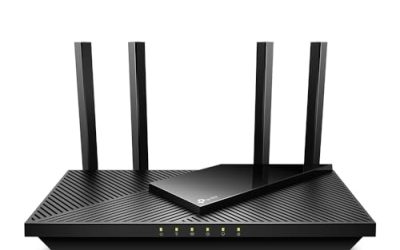
The Archer AX21 is the uncomplicated upgrade: a Wi-Fi 6 dual band router whose listing promises up to 1,201 Mbps on 5 GHz and 574 Mbps on 2.4 GHz, fed by four external antennas. It suits flats and small houses moving up from an internet provider’s basic box, where the goal is stable streaming and calls rather than exotic features. TP-Link also lists OneMesh support, so a compatible extender can join later if one room refuses to cooperate.
Specs
- Wi-Fi class: AX1800 dual band Wi-Fi 6
- Band speeds: up to 1,201 Mbps (5 GHz) and 574 Mbps (2.4 GHz)
- Antennas: 4 high-gain external antennas
- Features from listing: OFDMA, MU-MIMO, OneMesh support
- Compatibility from listing: works with Amazon Alexa
Best for: Smaller homes wanting a clean Wi-Fi 6 step up from a provider router.
Watch out for: No USB port, so network-shared storage needs another solution.
ASIN: B08H8ZLKKK
TP-Link Archer AX55
The Archer AX55 keeps the same dual band layout but pushes the 5 GHz radio to 2,402 Mbps per its listing, which is where households with several heavy users will feel the difference. It adds a USB 3.0 port for sharing a drive across the network and lists EasyMesh, TP-Link’s newer mesh standard, alongside OFDMA and MU-MIMO. For a family home where laptops, consoles and televisions compete every evening, this is the router in the guide with the most headroom.
Specs
- Wi-Fi class: AX3000 dual band Wi-Fi 6
- Band speeds: up to 2,402 Mbps (5 GHz) and 574 Mbps (2.4 GHz)
- Ports: USB 3.0 for media and storage sharing
- Features from listing: EasyMesh, OFDMA, MU-MIMO, HomeShield
- Antennas: 4 high-gain antennas with Beamforming
Best for: Busy family homes that want the strongest 5 GHz band and shared USB storage.
Watch out for: The 2.4 GHz band is unchanged from cheaper models; distant smart devices gain nothing.
ASIN: B09G5W9R6R
ASUS RT-AX1800S
ASUS takes a different angle with the RT-AX1800S: the listing matches the AX1800 class of the Archer AX21 but leans on AiMesh, so this router can pair with other AiMesh units to blanket a larger or awkwardly shaped home. ASUS also lists its AiProtection Classic security suite and VPN support, which appeal to buyers who tinker with network settings. If your home needs coverage growth more than raw single-room speed, this is the flexible foundation.
Specs
- Wi-Fi class: AX1800 dual band Wi-Fi 6
- Bands: 2.4 GHz and 5 GHz
- Features from listing: AiMesh compatible, AiProtection Classic
- VPN: server and client support listed
- Features from listing: MU-MIMO and OFDMA
Best for: Homes that plan to grow into a mesh setup within the ASUS ecosystem.
Watch out for: AiMesh only pairs with ASUS AiMesh models, so future nodes must stay in the family.
ASIN: B09M9477NS
Which One Fits Your Situation
You rent a flat and just need the Wi-Fi to stop dropping
Take the Archer AX21. Its band split is honest, the antennas cover a typical flat, and there is nothing to configure beyond a sensible network name and password. It solves the common complaint, an unreliable provider router, without paying for capacity a small space cannot use. When the lease ends, it also moves well: the same unit covers the next flat, or becomes the second device in a larger home.
Your evenings are four people streaming, gaming and calling at once
The Archer AX55 is built for that pile-up. The faster 5 GHz radio gives the demanding devices room to breathe, and the USB port lets one drive serve media or backups to everyone. Households that feel their current router most at peak hours should start here. The extra headroom also delays the next upgrade: as more of the home’s devices gain Wi-Fi 6, this router’s stronger band keeps absorbing them.
Your house has a dead zone you already know about
Start with the RT-AX1800S. On its own it covers a modest home, and when the dead zone wins, an AiMesh node joins the same network instead of forcing a full replacement. Buyers in older, thick-walled houses get the most from that escape hatch. Place the first unit centrally, live with it for a week, and add the node only where the signal genuinely fails; one well-placed addition usually ends the problem.
You work from home and your calls cannot stutter
Any of the three will carry a video call, but the deciding factor is distance from the router. If your desk sits near it, the Archer AX21 is plenty. If your office is the far bedroom, favour the RT-AX1800S for its mesh path or the Archer AX55 for its stronger 5 GHz band, and wire the work machine if a cable run is possible at all. A call cares about stability far more than peak speed.
Common Mistakes
- Comparing routers by the combined AX number and ignoring how little of it sits on the band your devices actually use.
- Buying a tri-band router for a dual band job and paying for a third radio nothing in the house needs.
- Placing the new router inside a cabinet or behind the television, then blaming the hardware for weak far-room signal.
- Mixing mesh brands later and discovering the nodes refuse to join the existing network.
- Keeping the provider router’s Wi-Fi switched on alongside the new one, creating interference and confusion.
Frequently Asked Questions
Is dual band enough, or do I need tri-band?
For most homes, dual band is enough. A third radio mainly helps very busy networks by dedicating a band to mesh backhaul or extra devices. If your household streams, works and games without constant slowdowns on a good dual band router, tri-band money is usually better spent on placement or a mesh node.
What do AX1800 and AX3000 actually mean?
The number is the sum of the theoretical maximum speeds across both bands: roughly 1,800 or 3,000 Mbps in total. No single device receives that figure. The useful comparison is the per-band split in the listing, especially the 5 GHz speed, which is why this guide quotes both numbers for every router.
Can these routers work with my existing modem?
Yes, in the normal arrangement: the router connects to the modem or fibre terminal with an ethernet cable and creates your home network. If your provider supplied a combined modem-router, the cleanest setup usually puts their unit in bridge mode or simply turns its Wi-Fi off so the new router runs the show.
How far will a dual band router reach?
The 5 GHz band is fast but fades through walls quickly, while 2.4 GHz travels further at lower speeds. In practice a single unit covers a flat or small house well; larger or multi-storey homes are exactly the case the mesh-ready picks in this guide are meant for.
Related guides
More from Amazon
Programs that pair well with the guide above. Offers and eligibility are set by Amazon and may change.
Free shipping on eligible items, Prime Video and more. Eligible new members can start with a free trial.
Start a Prime free trialAd-free music streaming. Eligible new subscribers can start with a free trial.
Try Music Unlimited freeA Prime membership for ages 18-24 with a trial period. Eligibility is set by Amazon.
See Prime for Young AdultsAudiobooks and podcasts to listen to on the go. Eligible new members can start with a free trial.
Try Audible freeAs an Amazon Associate we earn from qualifying purchases.