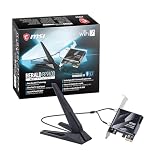
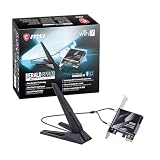
The TP-Link Archer TXE75E is the easiest WiFi 6E card to recommend for a desktop. It uses an Intel AX210 chip, ships with two magnetic-base antennas on cables, and includes both standard and low-profile brackets for small cases. WiFi 6E means Wi-Fi 6 with an added 6 GHz band, which gives your PC a cleaner lane than the crowded 2.4 and 5 GHz channels, provided you have a 6 GHz router and Windows 11. Most cards in this group share the same Intel AX210 core, so the real differences are antennas, Bluetooth cabling and what the seller actually includes.
Our Top Picks
 TP-Link WiFi 6E Intel AX210 AXE5400 PCIe WiFi1 Count (Pack of 1)3.75 x 4.76 x 0.85 inches0.59 poundsCheck on Amazon

Top 3 picks at a glance
Quick List
- GIGABYTE GC-WBAX210 – best for builders who want a motherboard-brand card with an Intel AX210 core
- OKN AX5400 PCIe Card – best for a straightforward AX210 card with Bluetooth 5.3
- Generic AX210 PCIe Card (Bluetooth 5.3) – best for an AX5400 tri-band card from a lesser-known seller
- BZIZU WiFi 6E PCIe Card – best for a simple AX210 card with Bluetooth 5.3
- TP-Link Archer TXE75E – best overall for antennas, brackets and a known brand
- DTK AX210NGW Kit – best for those who need an M.2 2230 module with antennas (check the adapter)
Which One Is Right for You?
| If you… | Choose |
|---|---|
| want a known brand with brackets for both full-height and small cases | TP-Link Archer TXE75E |
| match your build to Gigabyte or Aorus motherboards | GIGABYTE GC-WBAX210 |
| want an AX210 card with Bluetooth 5.3 from a straightforward listing | OKN AX5400 PCIe Card |
| are happy with a lesser-known seller to keep things simple | BZIZU WiFi 6E PCIe Card |
| want another tri-band AX5400 card with Bluetooth 5.3 | Generic AX210 PCIe Card |
| already have a spare M.2 Key E slot or an adapter | DTK AX210NGW Kit |
Because almost every card here is built on the same Intel chip, speeds on paper are identical. Choose by how well it fits your case, how the antennas are positioned, and whether you can trust the seller’s support. Placing the antennas at desk height rather than behind a metal case matters more than a few extra lines on a spec sheet.
All 6 Picks in Detail
1. GIGABYTE GC-WBAX210 – Best for a Motherboard-Brand Card
As an Amazon Associate we earn from qualifying purchases at no extra cost to you.

This Gigabyte card is named in the listing as a 2×2 802.11ax tri-band WiFi 6E card with Bluetooth 5.2 on a PCIe expansion card, and the model name points to an Intel AX210 module. It is the one to look at if you prefer a card from a motherboard maker, since firmware, drivers and warranty come through a company you may already deal with. The Bluetooth version is 5.2 in the listing name, which is one step behind the 5.3 stated on several other cards in this group, though real-world difference is small for headphones and controllers. Confirm antenna and bracket details on the product page.
- Standard: 802.11ax tri-band (2.4, 5 and 6 GHz), 2×2 streams
- Bluetooth: 5.2 per the listing name
- Interface: PCIe expansion card
- Chipset: Intel AX210, as the model name suggests; confirm on listing
- Antenna type and bracket options: confirm on listing
Pros
- Brand familiar to many PC builders
- Same Intel core as several rivals, with broad driver support
- Tri-band support brings the 6 GHz channel
Cons
- Bluetooth 5.2 is one version behind other cards in the list
- Antenna details are not in the listing name
It sits close to the TP-Link in capability, but the TP-Link states more about antennas and brackets.
2. OKN AX5400 PCIe Card – Best for a Straightforward AX210 Card

The OKN card is listed as a WiFi 6E AX5400 PCIe card with an Intel AX210 chip, Bluetooth 5.3, WPA3, MU-MIMO and OFDMA on a tri-band adapter. In plain terms, that means a standard AX210 build with the features that make the 6 GHz band useful: OFDMA lets the router serve several devices in one transmission, and MU-MIMO lets it talk to more than one device at once. WPA3 is the newer encryption standard. The listing text is cut off after that, so confirm the antenna style, bracket sizes and what is in the box.
- Chipset: Intel AX210, per the listing name
- Speed class: AX5400 tri-band
- Bluetooth: 5.3
- Security and efficiency: WPA3, MU-MIMO, OFDMA
- Bracket and antenna details: confirm on listing
Pros
- Bluetooth 5.3 and WPA3 are both listed
- Intel chipset means mature drivers on Windows and Linux
- Tri-band 6E access
Cons
- Lesser-known seller, so warranty terms need checking
- Antenna design is not in the visible name
Because the AX210 supports 160 MHz channels with two streams, it can use the widest channels on the 5 and 6 GHz bands when the router allows it. It is nearly identical to the BZIZU card, and your decision there comes down to the bundled parts and seller support.
3. Generic AX210 PCIe Card With Bluetooth 5.3 – Best for a Tri-Band AX5400 Alternative

This listing is titled as a WiFi 6E AX210 PCIe wireless network card with Bluetooth 5.3, AX5400 tri-band speeds and support for OFDMA and MU-MIMO, and the text continues past what the catalog shows. It appears to follow the same template as the other AX210 cards: a PCIe x1 carrier board, a small Wi-Fi module, a Bluetooth cable to an internal USB header, and an antenna pair. In practice this means the experience is the same as the better-known cards once installed, and any difference shows up in packaging, cable quality and support. Because the brand is not named in the visible text, check who stands behind the product and what the return and warranty terms are before choosing it over a branded model.
- Chipset: Intel AX210, per the listing name
- Speed class: AX5400 tri-band
- Bluetooth: 5.3, which needs an internal USB header connection
- Features: OFDMA and MU-MIMO
- Brand, antennas and bracket set: confirm on listing
Pros
- Same core features as better-known branded cards
- Bluetooth 5.3 supports current devices
Cons
- Brand is not visible in the listing name
- No way to judge antenna quality from the title
Choose it only if the details on the page match your needs, otherwise the TP-Link is the safer alternative.
4. BZIZU WiFi 6E PCIe Card – Best for a Simple Intel AX210 Setup

The BZIZU is described as a WiFi 6E PCIe card with an Intel AX210 chip, 5400 Mbps and Bluetooth 5.3 for desktop PCs. The 5400 Mbps figure is a combined number across all three bands, not the speed one device will get. A single device on 5 or 6 GHz with a 160 MHz channel and two streams is capped at 2402 Mbps in link rate. The listing name is short, so antenna count, bracket types and warranty are for you to confirm. If those details check out, it is a plain, workable card for a desk PC that sits within a room of the router.
- Chipset: Intel AX210, per the listing name
- Speed class: 5400 Mbps combined, tri-band
- Bluetooth: 5.3
- Target: desktop PCs
- Bracket, antennas and cables: confirm on listing
Pros
- Familiar AX210 core with wide software support
- Bluetooth 5.3 is listed
Cons
- Few details in the listing name
- Smaller brand with less established support
Compared with the OKN, it has fewer stated extras, so the OKN edges ahead on information.
5. TP-Link Archer TXE75E – Best Overall for Antennas and Brackets

The TXE75E is TP-Link’s AXE5400 tri-band PCIe card built on the Intel AX210. TP-Link lists up to 2402 Mbps on 6 GHz, 2402 Mbps on 5 GHz and 574 Mbps on 2.4 GHz. It has two adjustable antennas with a magnetic base on SMA connectors, both full-height and low-profile brackets, and Bluetooth that connects over a USB header cable. TP-Link notes that 6 GHz requires Windows 11 and that Bluetooth 5.3 may need a firmware update, as packaging can mention 5.2. It is a safe, well-documented choice.
- Chipset: Intel AX210, tri-band 2×2
- Maximum link rates: 2402 Mbps on 6 GHz, 2402 Mbps on 5 GHz, 574 Mbps on 2.4 GHz
- Antennas: two adjustable external antennas with magnetic base
- Brackets: standard and low-profile
- Bluetooth: needs an internal USB header; version 5.3 per the listing, possibly after a firmware update
Pros
- Magnetic antennas can sit on top of the case
- Two bracket sizes suit small and full-size cases
- Recognizable brand with published documentation
Cons
- Needs a free internal USB header for Bluetooth
- 6 GHz works only on Windows 11 with a 6 GHz router
It beats the Gigabyte model on stated details, though both share the Intel AX210 chip.
6. DTK AX210NGW Kit – Best for M.2 Slot Owners, Runner-Up for Most Desktops

The DTK listing is for an AX210NGW, which is the M.2 2230 form of the Intel AX210, along with an 11-inch RF cable, 5 dBi high-gain antennas and a low-profile part that the truncated name does not fully describe. An M.2 2230 module plugs into a Key E slot, which many modern motherboards have, not a normal PCIe slot. Unless the listing includes a PCIe carrier card, it may not fit the way the other five do. Treat it as a runner-up and confirm what is in the box before buying, including whether a PCIe carrier card, a Bluetooth cable and a mounting bracket are supplied. The included 5 dBi antennas are a plus for a PC tucked under a desk.
- Form factor: M.2 2230 module, per the AX210NGW name
- Wi-Fi: 2×2 802.11ax with 6 GHz support, Bluetooth 5.3, tri-band
- Included parts: 11-inch RF cable and 5 dBi antennas
- PCIe adapter or bracket: confirm on listing
- Bluetooth cabling: confirm on listing
Pros
- Fits boards with an open M.2 Key E slot
- Higher-gain antennas are included
Cons
- May not fit a standard PCIe slot without an adapter
- Requires care when installing the small RF connectors
It is more of a swap-in module than a full card like the TP-Link.
Specs Compared
| Product | Wi-Fi chip stated | Speed class | Bluetooth | Form factor | Antennas stated |
|---|---|---|---|---|---|
| GIGABYTE GC-WBAX210 | AX210 (model name) | 2×2 tri-band 802.11ax | 5.2 | PCIe card | Confirm on listing |
| OKN AX5400 PCIe Card | Intel AX210 | AX5400 tri-band | 5.3 | PCIe card | Confirm on listing |
| Generic AX210 PCIe Card | AX210 | AX5400 tri-band | 5.3 | PCIe card | Confirm on listing |
| BZIZU WiFi 6E PCIe Card | Intel AX210 | 5400 Mbps tri-band | 5.3 | PCIe card | Confirm on listing |
| TP-Link Archer TXE75E | Intel AX210 | AXE5400 (2402 / 2402 / 574 Mbps) | 5.3 per listing | PCIe card | Two magnetic-base antennas |
| DTK AX210NGW Kit | AX210NGW | 2×2 tri-band | 5.3 | M.2 2230 module | 5 dBi antennas, 11-inch RF cable |
How We Chose These
This list is based on research of desktop WiFi 6E cards currently offered in this category. We compared the chip, speed class, Bluetooth version, form factor and antenna details that each listing states, and we read TP-Link’s and other manufacturers’ specification pages where they exist. Because most cards share the Intel AX210 core, we gave more weight to published antenna and bracket details, Bluetooth cabling information and clarity about what comes in the box. One listing is an M.2 module rather than a PCIe card, so we placed it last and said why. Where the listing name was cut off, we wrote “confirm on listing”.
What to Look For
What WiFi 6E actually adds
WiFi 6E uses the same 802.11ax standard as Wi-Fi 6 but opens a new 6 GHz band, which in the United States spans 1,200 MHz of spectrum. That space supports up to seven non-overlapping 160 MHz channels, and no older devices share it, so there is less interference from neighbors and from your own older gear. The catch is range: 6 GHz signals lose strength through walls faster than 5 GHz or 2.4 GHz. Use 6 GHz when your PC and router are in the same room or one wall apart, and let the card fall back to 5 GHz farther away.
Reading speed numbers
AX5400 is a marketing total: 574 Mbps on 2.4 GHz plus 2402 Mbps on 5 GHz plus 2402 Mbps on 6 GHz. A 2×2 card can use only one band at a time for a single connection, so the practical ceiling is 2402 Mbps link rate. Dividing by eight gives roughly 300 megabytes per second in theory, and real-world file transfers usually land at a fraction of that because of overhead and signal conditions. If your internet plan is 1 gigabit or less, you will rarely see the limit of the card. The gain from 6E is mostly stability and lower delay.
Windows version, drivers and region
Using 6 GHz on Windows requires Windows 11, and Windows 10 will only reach the 2.4 and 5 GHz bands. Intel supports the AX210 across Windows and with the iwlwifi driver on Linux, though 6 GHz on Linux depends on kernel version and regional rules. Some countries have not opened the 6 GHz band, or limit it to lower channels. Always update the card’s driver from the manufacturer or Intel after installation, since early drivers sometimes lack 6 GHz. A simple checklist helps: install the card with the PC unplugged, attach both antennas before powering on, connect the Bluetooth cable to a USB 2.0 header, boot into Windows 11, install the latest driver, then connect to the 6 GHz network name on your router. If the 6 GHz network does not appear, check that the router has the band enabled and that the country setting matches where you live.
Bluetooth cable and antenna placement
Most PCIe Wi-Fi cards send Bluetooth over a USB cable to an internal header on the motherboard. Check you have a free USB 2.0 header, typically a nine-pin connector, before you buy. Without it, Wi-Fi works but Bluetooth does not. For antennas, avoid placing them behind the case or among metal and cables. A magnetic base that lets you put the antennas on top of the case, or on a nearby shelf, can improve signal more than a faster chip. A practical rule: if your PC sits under a desk, extend the antennas onto the desk surface. Worked example: a tower under the desk with the antennas still on the back panel might sit at 65 percent signal, while moving the same antennas to the desktop, two feet higher and out of the metal enclosure, can lift the signal enough to move a connection from the 5 GHz band up to 6 GHz.
PCIe slot and case fit
These cards use a PCIe x1 connection, but they also fit in x4, x8 or x16 slots. Choose a slot away from the graphics card, since a large GPU can block airflow and shield antenna cables. Low-profile brackets matter in small cases, so check that the card includes one if you build a compact system. An M.2 2230 module such as the DTK needs a Key E slot, which is typically near the CPU on the motherboard. Many boards already use that slot for onboard Wi-Fi, in which case you would replace the existing module rather than add a second one. Also think about grounding yourself before handling the card, since the small module and RF connectors are fragile, and never force a connector that does not click in easily.
Questions
Do I need a WiFi 6E router to use one of these?
You need a router with a 6 GHz band to use the 6E part of the card. Without one, the card still connects on 5 GHz or 2.4 GHz and works like a Wi-Fi 6 adapter. A Wi-Fi 6 router will not offer the 6 GHz channel.
Why are so many cards based on the Intel AX210?
The AX210 is a widely available, well-supported chip, so makers can build cards around it. That means driver quality is similar across brands, and the differences come from antennas, brackets and support.
Can I use these cards in Windows 10?
Yes, but only the 2.4 GHz and 5 GHz bands will work. The 6 GHz band needs Windows 11, so a 6E card on Windows 10 behaves like a Wi-Fi 6 card.
Is Bluetooth 5.3 the same as 5.2 in everyday use?
For most headphones, controllers and keyboards, the difference is hard to notice. Newer versions add small efficiency and connection improvements. Compatibility with your devices matters more than the version number.
Will it work in a small form factor PC?
Yes if the card includes a low-profile bracket, as the TP-Link does, or if your case has a spare slot. The M.2 module can also work well in a compact build with the right slot.
Is WiFi 6E fast enough, or should I get WiFi 7?
For most home connections, 6E is plenty. Wi-Fi 7 adds wider channels and multi-link features that need a Wi-Fi 7 router to pay off. If you already own a 6E router, upgrading the PC card alone brings little benefit.
Update History
- October 20, 2026 – Initial publication; product set drawn from current catalog listings.
- Check the product page for current specifications and availability before buying.
Sources
- Manufacturer product and specification pages for TP-Link
- Retailer listing titles and specification fields for each product above
- Third-party specification summaries and press coverage of the Wi-Fi chips involved