Our Top Picks
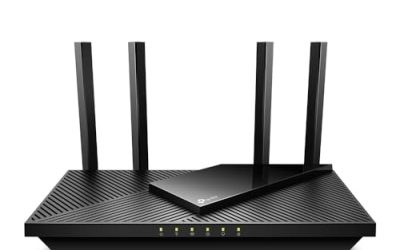
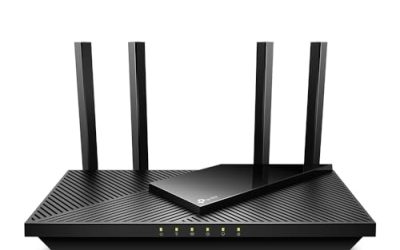
 TP-Link AXE5400 Tri-Band WiFi 6E RouterWiFi 6E, Tri-Band AXE540012.91 x 10.43 x 4.72 inches1.5 poundsCheck on Amazon

Top 3 picks at a glance

Introduction
A gaming PC can have a fast graphics card and a high-refresh monitor, yet still feel sluggish online when the network hardware cannot keep up. Lag spikes, rubber-banding, and dropped voice chat usually trace back to the router or modem sitting between the PC and the internet, not to the PC itself. The best routers and modems for gaming are built to move game traffic first, keep latency steady under load, and give wired connections the priority they deserve.
This guide covers five options that suit different setups. Three are standalone gaming routers for homes that already have a modem or a fiber ONT. One is a WiFi 6E router aimed at households with newer devices and crowded airwaves. The last is a modem-router combo for cable internet households that want one box handling both jobs.
Before choosing, it helps to know the basics. A modem connects a home to the internet service provider. A router distributes that connection to every device in the home, wired and wireless. A combo unit does both jobs in a single box. Gamers on cable internet often need a modem, while fiber customers usually receive an ONT from the provider and only need a router.
At a Glance
| Product | Type | WiFi Standard | Wired Highlight | Best For |
|---|---|---|---|---|
| ASUS ROG Rapture GT-AX6000 | Gaming router | WiFi 6 | Dual 2.5G ports | Dedicated gaming setups |
| NETGEAR Nighthawk RAXE500 | Gaming router | WiFi 6E | 2.5G multi-gig port | Large homes with many devices |
| ASUS RT-AX86U Pro | Gaming router | WiFi 6 | 2.5G port plus gaming port | Console and PC gaming |
| TP-Link Archer AXE75 | Gaming router | WiFi 6E | 2.5G WAN port | WiFi 6E on a smaller footprint |
| ARRIS SURFboard SBG8300 | Modem-router combo | WiFi 5 | 4 gigabit LAN ports | Cable internet households |
1. ASUS ROG Rapture GT-AX6000
ASUS ROG Rapture GT-AX6000 on Amazon
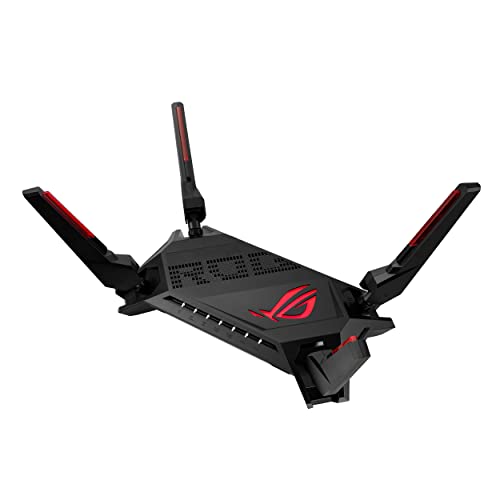
The ROG Rapture GT-AX6000 is a dual-band WiFi 6 gaming router built around low-latency play. It runs an AX6000 wireless configuration, with combined wireless throughput up to 6000 Mbps across its 2.4 GHz and 5 GHz bands, and it carries a 2.0 GHz quad-core processor to handle heavy traffic from gaming, streaming, and downloads running at the same time.
Its headline feature is triple-level game acceleration. The router prioritizes game packets from the device all the way to the game server, and a dedicated gaming port on the back automatically gives any device plugged into it top priority. That matters in a household where someone else begins a large download mid-match, since the router keeps game traffic ahead of the queue instead of letting it fight for bandwidth.
Connectivity is strong for a wired gaming setup. Two 2.5G ports can serve as WAN and LAN, or be combined through WAN aggregation for a faster link to the modem, and the remaining gigabit LAN ports cover a PC, a console, and a streaming box. VPN Fusion lets a VPN connection and a regular connection run side by side, so game traffic can take the direct path while other traffic stays behind the VPN. AiMesh support means the GT-AX6000 can link with other compatible ASUS routers to extend coverage, and lifetime internet security plus Instant Guard add protection without a recurring subscription.
Considerations
The GT-AX6000 is a WiFi 6 router, not WiFi 6E, so it has no 6 GHz band for newer devices. It is also a large unit with three external antennas, so it needs clear space on a desk or shelf and good airflow around it. Households that want the newest wireless standard or a compact router may prefer one of the WiFi 6E picks below, while gamers who value dedicated gaming prioritization and dual 2.5G wired ports will find this one hard to fault.
2. NETGEAR Nighthawk RAXE500
NETGEAR Nighthawk RAXE500 on Amazon
The Nighthawk RAXE500 is a tri-band WiFi 6E router aimed at big households where many people game, stream, and work from home at once. Its AXE11000 wireless configuration spreads up to 10.8 Gbps of combined throughput across three bands: 2.4 GHz, 5 GHz, and a 6 GHz band reserved for WiFi 6E devices. The 6 GHz band stays clear even when the 5 GHz band is crowded, which is where WiFi 6E pays off most in apartment buildings and dense neighborhoods.
Twelve wireless streams and a 1.8 GHz quad-core processor let the RAXE500 serve many devices at once without the slowdowns that appear when a weaker router is asked to juggle a gaming PC, several phones, smart TVs, and a work laptop. Coverage reaches up to 3,500 square feet with support for up to 60 devices, so a single unit can cover a large home that would otherwise need extra access points.
Wired gamers get a 2.5 Gbps multi-gig port alongside four gigabit LAN ports, plus two USB 3.0 ports for shared storage or a printer. Dynamic QoS automatically identifies and prioritizes latency-sensitive traffic such as online games and video calls, and the Nighthawk app handles setup and day-to-day management from a phone. Security features include NETGEAR Armor, WPA3 encryption, and protection against common network attacks, and voice control through Amazon Alexa and Google Assistant is included for hands-free management.
Considerations
The RAXE500 is a large router with eight antennas, so placement matters. WiFi 6E benefits only appear with WiFi 6E devices, so older laptops and consoles will use the 5 GHz band instead. It is more than a single gamer in a small apartment needs, but it earns its place in a busy household where the network is always under load.
3. ASUS RT-AX86U Pro
The ASUS RT-AX86U Pro is a dual-band WiFi 6 gaming router that focuses on the features gamers actually use, without the size or complexity of a flagship model. It runs an AX5700 wireless configuration and includes a 2.5G port plus a dedicated gaming port that automatically prioritizes any device connected to it, so a PC or console plugged into that port gets first claim on bandwidth.
Mobile Game Mode is a useful addition for households where phones and tablets are part of the gaming mix. It optimizes the connection for mobile games with a single tap in the ASUS Router app, reducing lag on handheld devices without touching the settings for the rest of the network. Port forwarding is handled through a straightforward interface, which helps with games and services that need open ports for voice chat or hosting.
Network security comes from AiProtection Pro, a subscription-free security suite that guards against intrusions and blocks access to malicious sites, and the router supports VPN connections for households that want one. AiMesh compatibility lets the RT-AX86U Pro join a mesh network with other compatible ASUS routers later, so coverage can grow without replacing the main unit.
Considerations
The RT-AX86U Pro is a WiFi 6 router, so it lacks the 6 GHz band found on WiFi 6E models. Its wireless throughput is lower than the flagship ROG model above, which is a fair trade for a smaller chassis and a simpler feature set. Gamers with a gigabit or multi-gig internet plan and several wired devices may want the dual 2.5G ports of the GT-AX6000, while everyone else will find the RT-AX86U Pro covers a typical gaming setup well.
4. TP-Link Archer AXE75
TP-Link Archer AXE75 on Amazon
The TP-Link Archer AXE75 is a tri-band WiFi 6E router that brings the 6 GHz band into a compact, straightforward package. Its AXE5400 wireless configuration delivers combined throughput up to 5400 Mbps across 2.4 GHz, 5 GHz, and 6 GHz bands, with the 6 GHz band providing a clean channel for newer phones, laptops, and consoles that support WiFi 6E. Six high-performance antennas help the signal reach through a home, and the router supports up to 160 MHz channel width for faster wireless links.
A 2.5 Gbps WAN port is the standout wired feature, letting the router accept a multi-gig internet connection and pass that speed through to the network. Four gigabit LAN ports cover wired devices, and a USB 3.0 port adds shared storage. OneMesh support lets the AXE75 link with compatible TP-Link extenders to widen coverage, and HomeShield adds network scanning, IoT protection, QoS controls, and parental controls. VPN support and WPA3 security round out the feature list, and setup runs through the Tether app with a guided process.
Considerations
The AXE75 has a single 2.5G port, and it serves as the WAN connection, so the LAN side stays at gigabit speed. That is fine for most gaming setups, where a single gigabit wired link is already far faster than the latency demands of online play, but households with multi-gig wired devices should note the difference. The 6 GHz band has shorter range than 5 GHz through walls, so placement near the main gaming area gets the most from it. As a WiFi 6E router in a compact body, it suits gamers who want the newer standard without a flagship-sized unit.
5. ARRIS SURFboard SBG8300

ARRIS SURFboard SBG8300 on Amazon
The ARRIS SURFboard SBG8300 is different from the other picks in this guide because it is a modem-router combo. It combines a DOCSIS 3.1 cable modem with an AC2350 dual-band WiFi router in one box, so cable internet households can replace both a rented modem and a separate router with a single device. It is approved for use with Comcast Xfinity, Cox, Spectrum, and other major cable providers, and it supports cable internet plans up to 1 Gbps.
The modem side uses 32 downstream by 8 upstream DOCSIS channels with 2 by 2 OFDM, which is the current DOCSIS 3.1 configuration for gigabit cable plans. The router side provides AC2350 dual-band WiFi with four gigabit Ethernet ports for wired connections to a gaming PC or console. A single wired connection to the SBG8300 gives a gaming rig a stable, low-latency link, while the WiFi side covers phones, tablets, and smart TVs around the home.
Setup runs through the SURFboard Central app, which handles activation with the cable provider and day-to-day management. The single-box design removes a cable, a power adapter, and a point of failure from the setup, and it frees shelf space that two separate boxes would occupy. For cable households that want to stop renting provider equipment and simplify their network, the combo approach is a practical fit.
Considerations
The SBG8300 is a cable modem, so it only works with cable internet service, not fiber or DSL. Its WiFi is WiFi 5 rather than WiFi 6 or 6E, so wireless throughput is lower than the standalone routers above, and it has no dedicated gaming port or game-traffic prioritization beyond standard QoS. It is also a single point of failure: if the modem side needs replacing, the router goes with it. Gamers who want the strongest wireless performance should pair a standalone DOCSIS 3.1 modem with one of the gaming routers above instead, while households that value simplicity will find the combo convenient.
How to Choose
Begin with the internet connection. Cable households need a DOCSIS modem, either as a standalone unit or inside a combo like the SBG8300, and the modem must be on the provider’s approved list. Fiber households receive an ONT from the provider and only need a router. DSL households need a DSL modem or a combo built for DSL. Buying a router when a modem is needed, or the reverse, is the most common mistake in this category.
Next, decide between WiFi 6 and WiFi 6E. WiFi 6 covers the 2.4 GHz and 5 GHz bands and suits most gaming setups today, since consoles and many PCs still connect on those bands. WiFi 6E adds a 6 GHz band that is less crowded and supports wider channels, which helps in apartment buildings and in homes with many newer devices. The benefit only appears with WiFi 6E devices, so check the devices that will use the network before paying for the newer standard.
Wired connections deserve attention because they matter most for latency. A gaming PC or console should connect over Ethernet whenever possible, since a wired link avoids wireless interference and keeps ping steady. Look for at least one multi-gig port if the internet plan exceeds gigabit speed, and a dedicated gaming port if the router has one. Four LAN ports cover a typical setup, while households with more wired devices may need a network switch alongside the router.
Game-traffic prioritization, often labeled QoS, is worth having in a busy household. It identifies gaming packets and moves them ahead of downloads, backups, and video streams, which keeps latency stable when the network is loaded. Mesh support matters for larger homes, since a single router may not cover every room, and a router that can join a mesh system avoids a full replacement later.
Fit and Installation
Placement shapes performance more than any single specification. Put the router in a central, elevated spot, away from thick walls, metal shelves, and large appliances, and keep it out of an enclosed cabinet where heat builds up. Antennas should point in different directions to spread the signal, and the main gaming area should sit as close to the router as practical, especially on the 6 GHz band.
For a modem or combo unit, activation comes first. Connect the coaxial cable, power the unit on, and follow the provider’s activation steps, usually through an app or a phone call, before expecting an internet connection. The provider may need the modem’s MAC address, which is printed on the bottom label. A standalone router connects to the modem or ONT with an Ethernet cable on its WAN port, and setup then runs through the router’s app or web interface.
After the hardware is online, update the firmware before changing anything else, since updates fix security issues and improve stability. Then connect the gaming PC or console with an Ethernet cable, set a strong WiFi password with WPA3 where available, and turn on QoS or game prioritization, using the router’s gaming port for the main gaming device.
Frequently Asked Questions
Do I need a gaming router, or will any router work for gaming?
Any modern router can carry game traffic, but a gaming router adds prioritization that keeps latency steady when the network is busy. Features such as a dedicated gaming port, adaptive QoS, and multi-gig wired ports matter most in households where downloads, streams, and video calls compete with gaming. A single gamer in a quiet household may see little difference, while a busy household will notice it.
Can I use my own modem with cable internet?
Yes, most major cable providers allow customer-owned modems, as long as the model is on the provider’s approved list. The SBG8300 in this guide is approved for Comcast Xfinity, Cox, Spectrum, and other major providers. Check the provider’s approved-device page before buying, and confirm the modem supports the speed tier of the internet plan.
Is WiFi 6E worth it for gaming?
WiFi 6E helps when the 5 GHz band is crowded, since the 6 GHz band is clear and supports wider channels. The benefit appears with WiFi 6E devices and at closer range, because the 6 GHz signal weakens faster through walls than 5 GHz. Wired Ethernet is still the best connection for competitive play, so treat WiFi 6E as an improvement for wireless devices rather than a replacement for a cable.
Should I buy a modem-router combo or separate devices?
A combo is simpler, with one box, one power adapter, and one setup process, and it suits households that want to replace rented equipment with minimal fuss. Separate devices give more flexibility: the router can be upgraded without touching the modem, and a dedicated gaming router adds prioritization and wired features that combos usually lack. Gamers who want the strongest network performance should choose separate devices, while households that value simplicity should choose a combo.
Conclusion
The best routers and modems for gaming come down to the connection type, the size of the household, and how much the network is shared. The ASUS ROG Rapture GT-AX6000 suits dedicated gaming setups that value game prioritization and dual 2.5G wired ports. The NETGEAR Nighthawk RAXE500 fits large homes where many devices share the network and the 6 GHz band stays clear. The ASUS RT-AX86U Pro covers a typical gaming setup with a dedicated gaming port and mobile game mode in a smaller body. The TP-Link Archer AXE75 brings WiFi 6E into a compact router with a 2.5G WAN port. The ARRIS SURFboard SBG8300 gives cable households a single box that handles modem and router duties together.
Match the pick to the setup: cable or fiber, wired or wireless, one gamer or a full household. Then place the router well, connect the gaming PC or console over Ethernet, and turn on game prioritization. A network built that way stays steady when it matters most, which is the whole point of upgrading.
As an Amazon Associate, we earn from qualifying purchases.
Related guides
More from Amazon
Programs that pair well with the guide above. Offers and eligibility are set by Amazon and may change.
Free shipping on eligible items, Prime Video and more. Eligible new members can start with a free trial.
Start a Prime free trialAd-free music streaming. Eligible new subscribers can start with a free trial.
Try Music Unlimited freeA Prime membership for ages 18-24 with a trial period. Eligibility is set by Amazon.
See Prime for Young AdultsAudiobooks and podcasts to listen to on the go. Eligible new members can start with a free trial.
Try Audible freeAs an Amazon Associate we earn from qualifying purchases.