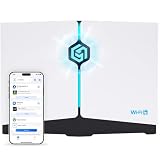
A router is the one box every device in the house shares, so buying a cheap router that still works well matters more than chasing the fastest headline speed. The trap is picking a router that looks like a bargain but bottlenecks a fast connection, drops the signal in the far bedroom, or needs replacing within a year. The five routers below keep their cost low by skipping extras you may never use, not by cutting the basics: dual-band Wi-Fi, gigabit ports and stable firmware.
This guide is for households that want reliable Wi-Fi without paying for gaming features or tri-band hardware. Every pick below was chosen from names and specs on its Amazon product page, with selling status checked against listings and trackers updated in November 2026. The five cover small apartments, busy family homes and first-time buyers who just want the internet to work.
Top 3 picks at a glance

Quick Picks
As an Amazon Associate we earn from qualifying purchases
| Product | Best for | Key spec from title |
|---|---|---|
| TP-Link Archer AX21 | Best overall value | AX1800 Wi-Fi 6 |
| ASUS RT-AX55 | Best security and mesh | AX1800 Wi-Fi 6 with AiMesh |
| TP-Link Archer AX10 | Best entry-level Wi-Fi 6 | AX1500 Wi-Fi 6 |
| TP-Link Archer A7 | Best coverage on a budget | AC1750, up to 2,500 sq ft |
| TP-Link Archer A6 | Best simple starter router | AC1200 with gigabit ports |
How to Choose
Match the Wi-Fi standard to your devices
Wi-Fi 6 routers handle many connected devices better than older Wi-Fi 5 models, because they schedule traffic more efficiently instead of letting every device fight for airtime. If your phones, laptops and TV already support Wi-Fi 6, an AX1800 or AX1500 router is the sensible floor. If most of your gear is older, a Wi-Fi 5 router such as the Archer A7 still streams and browses well, and costs less. Do not buy a single-band router in 2026: without a 5 GHz band, one neighbour’s network can crowd yours and slow everything down.
Count the ports before you buy
Every router here has gigabit Ethernet ports, and that matters more than it sounds. A router with 100 Mbps ports caps every wired device at that speed, no matter how fast your internet plan is. Look for one gigabit WAN port and at least three or four gigabit LAN ports, so a desktop, a console and a TV box can all plug in at full speed. A USB port is a useful bonus for sharing a printer or a drive, but it is not essential. If you plan to wire a gaming PC, put it on a LAN port and leave Wi-Fi for the phones.
Size the coverage to your home
Coverage claims on the box assume open rooms and thin walls, so treat them as a ceiling rather than a promise. A single router suits most apartments and one-floor homes up to about 1,500 square feet. Larger homes, thick concrete walls or a router tucked in a basement corner all shrink real coverage fast. If your home is bigger, pick a router that supports mesh expansion, such as the ASUS RT-AX55 with AiMesh or a TP-Link model with OneMesh, so you can add a second node later instead of replacing the whole router.
Check the software and security extras
Cheap routers differ most in software, not hardware. Look for WPA3 security, a guest network, parental controls and an app that lets you manage the router from your phone. Lifetime security software, such as the AiProtection on the ASUS RT-AX55, adds real value because it never asks for a subscription. A router that supports access point mode is also handy: it can extend an existing network in a large home or serve as a second access point in a home office. Skip routers whose apps are abandoned or whose firmware has not been updated in years.
The 5 Best Options
TP-Link Archer AX21

The Archer AX21 is the strongest all-round pick in this group, because it brings Wi-Fi 6, gigabit ports and mesh support together at a budget level. Its AX1800 dual-band radio splits into 1,201 Mbps on the 5 GHz band and 574 Mbps on the 2.4 GHz band, which is plenty for 4K streaming, video calls and a house full of phones. OFDMA and MU-MIMO keep latency steady when many devices connect at once, and the Tether app makes setup a short guided process rather than a chore.
Specs
- Wi-Fi 6, AX1800 dual-band: 1,201 Mbps on 5 GHz plus 574 Mbps on 2.4 GHz
- 1 gigabit WAN port and 4 gigabit LAN ports
- OFDMA and MU-MIMO for many-device households
- EasyMesh support for adding mesh nodes later
- WPA3 security, parental controls and guest network
- Works with Alexa voice control
Best for: Most homes that want Wi-Fi 6, gigabit wired ports and mesh expansion without paying for premium hardware.
Watch out for: The AX21 has no USB port, so you cannot share a printer or a drive from the router itself. If you need USB sharing, look at the Archer A7 instead.
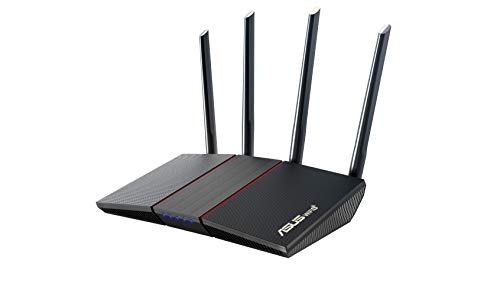
ASUS RT-AX55
The RT-AX55 is the pick for buyers who care about security and future expansion. Its 1.5 GHz quad-core processor drives an AX1800 Wi-Fi 6 radio, and the lifetime AiProtection security suite, powered by Trend Micro, blocks malicious sites and infected devices without a subscription. AiMesh lets you pair it with another ASUS router to build a mesh network later, and the ASUS Router app gives you parental controls, guest Wi-Fi and device scheduling from your phone.
Specs
- Wi-Fi 6, AX1800 dual-band with OFDMA and MU-MIMO
- 1.5 GHz quad-core processor
- 1 gigabit WAN port and 4 gigabit LAN ports
- AiMesh support for whole-home mesh expansion
- Lifetime AiProtection security, no subscription
- Coverage for up to 3,000 sq ft and more than 25 devices
Best for: Family homes that want built-in security, parental controls and a clear path to mesh coverage later.
Watch out for: The RT-AX55 has no USB port, so there is no way to attach a drive or printer. Its four antennas are fixed in place, so you cannot swap them for higher-gain ones.
TP-Link Archer AX10
The Archer AX10 is the cheapest way into Wi-Fi 6 in this group, and it does not feel like a compromise for everyday use. Its AX1500 radio delivers up to 1,500 Mbps combined, with beamforming that aims the signal toward your devices instead of spreading it evenly in all directions. Four gigabit LAN ports cover wired devices, and the 900 MHz dual-core processor keeps the connection stable when phones, laptops and a TV stream at the same time. Setup runs through the Tether app in a few minutes.
Specs
- Wi-Fi 6, AX1500 dual-band: 1,201 Mbps on 5 GHz plus 300 Mbps on 2.4 GHz
- 900 MHz dual-core processor
- 1 gigabit WAN port and 4 gigabit LAN ports
- Beamforming, OFDMA and MU-MIMO
- WPA3 security, parental controls and guest network
- Works with Alexa voice control
Best for: Small households and first-time Wi-Fi 6 buyers who want modern speed at the lowest cost in this group.
Watch out for: Coverage is sized for smaller homes, so a large house or thick walls may leave dead spots. It has no USB port and no mesh support, so expansion means adding a separate extender.
TP-Link Archer A7

The Archer A7 is a Wi-Fi 5 router that earns its place through coverage and ports. Its AC1750 radio combines 1,300 Mbps on the 5 GHz band with 450 Mbps on the 2.4 GHz band, and three external antennas push the signal across up to 2,500 square feet. A Qualcomm processor keeps things steady under load, and the USB port lets you share a printer or a drive across the network. OneMesh support means it can join a TP-Link mesh network with a compatible extender if your home grows.
Specs
- Wi-Fi 5, AC1750 dual-band: 1,300 Mbps on 5 GHz plus 450 Mbps on 2.4 GHz
- Qualcomm processor
- 1 gigabit WAN port and 4 gigabit LAN ports
- USB port for printer and storage sharing
- OneMesh support and Alexa compatibility
- Parental controls, QoS and VPN server
Best for: Larger apartments and homes that need wide coverage and a USB port, without paying for Wi-Fi 6.
Watch out for: As a Wi-Fi 5 router, it handles crowded networks less efficiently than the Wi-Fi 6 picks here. If most of your devices support Wi-Fi 6, the AX21 gives you more headroom for the same kind of money.
TP-Link Archer A6

The Archer A6 is the simplest router in this group, and that is exactly its appeal. Its AC1200 dual-band radio gives 867 Mbps on the 5 GHz band and 300 Mbps on the 2.4 GHz band, which covers browsing, streaming and video calls in a small home. Four gigabit ports mean wired devices never hit a 100 Mbps bottleneck, and MU-MIMO keeps four devices streaming at once without one hogging the connection. Access point mode lets it extend an existing network instead of replacing it.
Specs
- Wi-Fi 5, AC1200 dual-band: 867 Mbps on 5 GHz plus 300 Mbps on 2.4 GHz
- 4 gigabit LAN ports and 1 gigabit WAN port
- MU-MIMO for simultaneous device connections
- OneMesh support and access point mode
- WPA3 security, guest Wi-Fi and parental controls
- 4 external antennas
Best for: Renters, dorm rooms and small flats that need a reliable, uncomplicated router for everyday browsing and streaming.
Watch out for: It has no USB port, so you cannot share a printer or drive from it. Its 300 Mbps 2.4 GHz band is the slowest in this group, so keep fast devices on the 5 GHz band.
Which One Fits Your Situation
Small apartment with a few devices
Pick the TP-Link Archer AX10. Its AX1500 Wi-Fi 6 radio is more than enough for a one-bedroom flat with a laptop, a phone and a TV, and its four gigabit ports cover a wired desktop or console. It is the lowest-cost Wi-Fi 6 pick here, so you get modern scheduling and WPA3 security without paying for coverage you will never use. Set it in the middle of the flat and most rooms will get a strong signal.
Family home with phones, laptops and a console
Pick the TP-Link Archer AX21. OFDMA and MU-MIMO keep video calls smooth while the kids stream and the console downloads, and the four gigabit LAN ports let you wire the devices that need the steadiest connection. EasyMesh support means you can add a node later if a far bedroom turns into a dead zone. It is the most balanced pick for a busy household.
A home you plan to expand with mesh
Pick the ASUS RT-AX55. AiMesh is the most flexible mesh system among the budget routers here, because it works with a wide range of ASUS routers, so your second node does not have to be the same model. The lifetime AiProtection security suite also protects every device on the network, including smart home gear that cannot run its own antivirus. Buy one now, add a node when the house grows.
A tight budget with basic needs
Pick the TP-Link Archer A6. It covers browsing, streaming and video calls in a small home, and its gigabit ports mean wired devices run at full speed. If your home is larger and you want the same simplicity with wider coverage, the Archer A7 is the step up, adding a stronger radio, a USB port and OneMesh support for about the same kind of money.
Common Mistakes
- Buying a router with 100 Mbps ports and then wondering why a fast internet plan feels slow on wired devices.
- Placing the router in a corner, behind the TV or inside a cabinet, where walls and metal block the signal before it reaches the far rooms.
- Choosing a single-band router to save money, then sharing the crowded 2.4 GHz band with every neighbour’s network.
- Ignoring mesh support and then having to replace the whole router when a dead zone appears in a far bedroom.
- Skipping firmware updates, which leaves known security holes open and misses stability fixes the maker already shipped.
Frequently Asked Questions
Is a cheap router enough for streaming and video calls?
Yes, for most homes. A dual-band router with gigabit ports handles 4K streaming and video calls well, because those tasks need steady throughput rather than extreme top speed. The Archer A6 covers a small home, while the AX21 adds Wi-Fi 6 scheduling that helps when several people stream at once. Put the router in a central spot and use the 5 GHz band for the TV and laptop.
Do I need Wi-Fi 6, or is Wi-Fi 5 still fine?
Wi-Fi 5 is still fine if your devices are older and your home is small, since it streams and browses well. Wi-Fi 6 is worth it when you have many devices, because OFDMA and MU-MIMO schedule traffic more efficiently and cut lag during busy evenings. The AX10 is the cheapest Wi-Fi 6 pick here, so the jump from Wi-Fi 5 costs little if your phones and laptops already support it.
How many devices can a budget router handle?
Budget routers in this group handle roughly 20 to 30 devices comfortably, including phones, laptops, TVs and smart home gear. Wi-Fi 6 models such as the AX21 and RT-AX55 manage crowded networks better, because they schedule airtime instead of letting devices compete freely. If your device count keeps growing past 30, look at the RT-AX55, which lists support for more than 25 devices and pairs with AiMesh nodes.
Should I rent a router from my internet provider instead?
Renting is convenient, but the monthly fee adds up fast and the provider’s router is often an older model with weaker Wi-Fi. Buying one of the routers in this guide pays for itself within a year, and you keep the hardware. The exception is if your provider requires its own router for a fibre connection, in which case you can add your own router behind it in access point mode.
Related guides
More from Amazon
Programs that pair well with the guide above. Offers and eligibility are set by Amazon and may change.
Free shipping on eligible items, Prime Video and more. Eligible new members can start with a free trial.
Start a Prime free trialAd-free music streaming. Eligible new subscribers can start with a free trial.
Try Music Unlimited freeA Prime membership for ages 18-24 with a trial period. Eligibility is set by Amazon.
See Prime for Young AdultsAudiobooks and podcasts to listen to on the go. Eligible new members can start with a free trial.
Try Audible freeAs an Amazon Associate we earn from qualifying purchases.