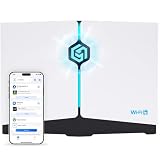
A home network depends on the router at its center. When the router matches the home, video calls stay clear, streamed shows load without long pauses, online games stay responsive, and smart home devices stay connected through the day. When the router is too weak for the space, a bedroom can lose signal, a laptop can drop a call, and a television can buffer at the worst moment.
Linksys routers share a familiar set of building blocks: setup through the Linksys app, Intelligent Mesh for adding nodes later, guest network access, and parental controls for managing when younger household members get online. The differences that matter most are the WiFi standard, the number of bands, the combined wireless speed, the coverage each unit is built for, and the number of devices it can handle at once.
This guide brings together five Linksys routers for different homes: a compact WiFi 6 model, a mid-range mesh-ready model, a tri-band WiFi 6 mesh system, and two tri-band WiFi 5 models. Every model can act as the main router connected to a modem. Before choosing, count the rooms that need a strong signal and the devices that stay connected, and check the speed of the internet plan.
Top 3 picks at a glance

At a Glance
| Model | WiFi Standard | Combined Wireless Speed | Coverage | Devices | Mesh |
|---|---|---|---|---|---|
| Linksys Hydra Pro 6 MR5500 | WiFi 6, dual-band | Up to 5.4 Gbps | Up to 2,700 sq ft | 30+ | Yes |
| Linksys Velop MX5300 MX5 | WiFi 6, tri-band | Up to 5.3 Gbps | Up to 3,000 sq ft | 50 | Yes |
| Linksys Hydra 6 MR20EC | WiFi 6, dual-band | Up to 3.0 Gbps | Up to 2,000 sq ft | 25+ | Yes |
| Linksys EA8300 Max-Stream | WiFi 5, tri-band | Up to 2.2 Gbps | Up to 2,000 sq ft | 20+ | Yes, with Velop |
| Linksys MR8300 | WiFi 5, tri-band | Up to 2.2 Gbps | Up to 2,000 sq ft | 20+ | Yes, with Velop |
Coverage and device figures are the figures Linksys lists for each model. Walls, floors, and interference can reduce coverage in a real home, so treat these figures as planning guides.
1. Linksys Hydra Pro 6 MR5500

The Hydra Pro 6 MR5500 is a strong all-round choice for a family home that needs fast WiFi 6 without moving to a full mesh kit on day one. It is a dual-band WiFi 6 router with a combined wireless speed of up to 5.4 Gbps, split between a 2.4 GHz band at up to 574 Mbps and a 5 GHz band at up to 4,804 Mbps. The 2.4 GHz band reaches further through walls, while the 5 GHz band carries streaming, gaming, and video calls.
Linksys lists coverage of up to 2,700 square feet for a single unit, with support for more than 30 connected devices. That capacity suits a home with several phones, laptops, a television or two, a game console, and a growing set of smart home devices. WiFi 6 features such as OFDMA and MU-MIMO help the router serve many devices at once.
On the back, the MR5500 has four gigabit Ethernet ports for wired connections, plus a gigabit internet port for the modem connection, and a USB 3.0 port for sharing a drive or a printer on the local network. Two external adjustable antennas help shape the wireless signal. Setup runs through the Linksys app, which also handles guest network access, parental controls, and firmware updates. A compatible Velop node can be added later to extend coverage.
Considerations
The Hydra Pro 6 is a dual-band router, so it has no second 5 GHz band and no 6 GHz band to spread traffic across. In a home with many WiFi 6 devices active at the same time, a tri-band model may keep traffic moving more smoothly. Its wired ports are gigabit ports, so an internet plan faster than gigabit speeds will not reach wired devices at its full speed through this router.
2. Linksys Velop MX5300 MX5
The Velop MX5300, sold as the Velop MX5, is the mesh system pick for a larger home. It is a tri-band WiFi 6 system with a combined wireless speed of up to 5.3 Gbps, and a single node is listed for coverage of up to 3,000 square feet and up to 50 connected devices. That makes it a good fit for a multi-bedroom home, a home with a home office, or a household where televisions, consoles, laptops, and smart devices are all online through the evening.
The third band is the key difference from the dual-band models in this guide. With two 5 GHz bands plus a 2.4 GHz band, the MX5300 has more room to separate traffic, and when extra nodes are added, one band can carry traffic between nodes while the others serve devices. The tall tower design keeps antennas internal, so it can sit on a shelf or a side table without drawing attention.
Each node has gigabit Ethernet ports for wired devices and a USB port, and the system is managed through the Linksys app. Because the MX5300 is both a router and an extender in one unit, it can serve as the main router connected to the modem, and further MX5300 nodes or compatible Velop nodes can be added to cover additional floors or far rooms.
Considerations
A single MX5300 node is a capable router on its own, but the system shows its full value when coverage needs grow beyond one room or one floor. Anyone buying a single node for a small apartment may find a smaller dual-band model simpler and easier to place. The wired ports are gigabit ports, so a multi-gigabit internet plan will not reach wired devices at full speed. It needs a stable, ventilated surface with room around it.
3. Linksys Hydra 6 MR20EC
The Hydra 6 MR20EC is the sensible entry point into Linksys WiFi 6 for a smaller home or apartment. It is a dual-band WiFi 6 router with a combined wireless speed of up to 3.0 Gbps, listed for coverage of up to 2,000 square feet and more than 25 connected devices. That is enough for a couple or a small family with phones, laptops, a television, and a handful of smart devices, and it leaves headroom for guests and new devices.
What makes the MR20EC appealing is that it keeps the core Linksys features while staying compact and simple. It uses Intelligent Mesh, so it can join a Linksys mesh network or act as the main router with extra Velop nodes added later. Setup runs through the Linksys app, with guest network access and parental controls included. The router has gigabit Ethernet ports for wired devices, and its two external antennas can be adjusted to aim the signal toward the rooms that need it most.
Considerations
The MR20EC is built for smaller spaces, so a large or multi-story home will likely need an added node to reach the far rooms, or a model with wider listed coverage. Its combined speed is lower than the Hydra Pro 6 and the Velop MX5300, which shows up when many devices stream high-definition video at the same time. It is also a dual-band model, so it has no second 5 GHz band to separate heavy traffic. Anyone in a compact home will find the MR20EC covers the essentials well.
4. Linksys EA8300 Max-Stream

The EA8300 Max-Stream is a tri-band WiFi 5 router for homes that want steady coverage and strong multi-device handling without moving to WiFi 6. It delivers a combined wireless speed of up to 2.2 Gbps across three bands: one 2.4 GHz band and two 5 GHz bands. MU-MIMO lets the router communicate with several devices at once rather than serving them strictly one at a time, which helps in a household where phones, tablets, laptops, and televisions are all active in the evening.
Four external antennas give the EA8300 a clear, adjustable shape, and the router includes gigabit Ethernet ports for wired connections plus a USB 3.0 port for sharing storage or a printer on the network. The Linksys Smart WiFi app handles setup, guest network access, and parental controls. Its listed coverage of up to 2,000 square feet and support for more than 20 devices suit a medium family home.
Considerations
WiFi 5 is an older standard than WiFi 6, so the EA8300 does not include WiFi 6 features such as OFDMA, and it cannot use the 6 GHz band found on WiFi 6E models. A home that is adding new WiFi 6 phones, laptops, and smart devices may get more future headroom from the Hydra 6 or Hydra Pro 6. The EA8300 also has gigabit wired ports, so it is not the right match for a multi-gigabit internet plan. Its four antennas need clear space around them, and the router should sit in the open rather than inside a closed cabinet, where the signal would be blocked before it reaches the far rooms.
5. Linksys MR8300
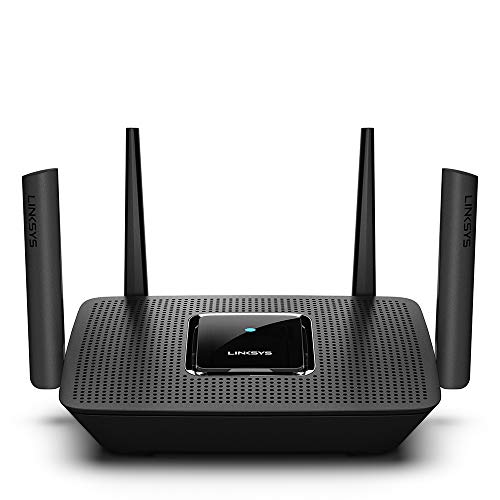
The MR8300 rounds out this guide as a tri-band WiFi 5 mesh router built for Velop homes. It delivers a combined wireless speed of up to 2.2 Gbps across one 2.4 GHz band and two 5 GHz bands, with listed coverage of up to 2,000 square feet and support for more than 20 devices. Its main strength is flexibility: it works as a standalone router, and it also works as a node in a Linksys Velop mesh network, so it can extend an existing Velop setup or start one.
Setup runs through the Linksys app, which also manages guest network access, parental controls, and firmware updates. The router has four gigabit Ethernet ports for wired devices, a gigabit internet port, and a USB 3.0 port. Its four external antennas can be adjusted, and the tri-band design gives it room to keep devices on separate bands when the network is busy. It suits a household that wants a stable connection across several rooms and the option to grow the network later.
Considerations
Like the EA8300, the MR8300 is a WiFi 5 model, so it lacks WiFi 6 features and the 6 GHz band. Homes buying a router to last through several rounds of new devices may prefer a WiFi 6 model instead. Its wired ports are gigabit ports, and its listed coverage is built for a medium home rather than a large multi-story house, so very large homes will need extra nodes. The router also needs a clear, ventilated spot with room for its antennas, and it should not be hidden behind a television or inside a closed cabinet if the far rooms are to get a useful signal.
How to Choose
Start with the size of the home and the number of devices. A compact home with up to 25 devices is well served by the Hydra 6 MR20EC, while a medium family home with more devices and more rooms fits the Hydra Pro 6 MR5500. A large home, or a home with thick walls and several floors, points toward the Velop MX5300, where extra nodes can be added as needed. The EA8300 and MR8300 fit medium homes where WiFi 5 devices still dominate and steady tri-band coverage matters more than the newest wireless standard.
Next, look at the WiFi standard and the bands. WiFi 6 models handle many devices at once more efficiently than WiFi 5 models, and they suit homes with new phones and laptops. Tri-band models, whether WiFi 5 or WiFi 6, give traffic more room by adding a second 5 GHz band, which helps when many devices are active at the same time. Dual-band models are simpler and often enough for smaller homes.
Then check the wired side. Count the devices that will use a cable: a desktop computer, a game console, a television, and a network drive all benefit from a wired connection. Make sure the router has enough Ethernet ports for those devices, and check that its internet port matches the speed of the internet plan. Finally, think about growth: starting with one mesh-ready node and adding another later is simpler than replacing a standalone router.
Fit and Installation Considerations
Placement matters as much as the model. A router works best in a central, elevated, open spot, away from thick walls, metal objects, and large appliances that can block or reflect the signal. A shelf in the middle of the home usually gives better coverage than a corner, a basement, or a closed cabinet. Keep the router away from microwaves, cordless phone bases, and other electronics that can interfere with the wireless signal, and leave space around it for airflow so it does not overheat during long streaming sessions.
Before installation, confirm the modem connection and the cable that will link it to the router. The router connects to the modem through its internet port, and wired devices connect through its Ethernet ports. Setup for these Linksys models runs through the Linksys app, which guides the connection to the modem, the creation of the WiFi network name and password, and the setup of guest access and parental controls. Have the modem, the router, the power adapter, and an Ethernet cable ready before starting, and keep the phone or tablet used for setup close to the router during the process.
After setup, walk through the home and note where the signal weakens. A weak spot is a sign that an added mesh node, or a move of the router to a more central spot, would help. After setup, use the Linksys app to check for firmware updates, and set a strong, unique password for the WiFi network and a separate strong password for the router admin account.
FAQ
Do I need a mesh system, or is one router enough?
One router is enough for many homes, especially compact homes where the router can sit near the center and the far rooms are only one or two walls away. A mesh system is worth considering for a large home, a multi-story home, or a home with thick walls where a single router leaves weak spots. Models that support Intelligent Mesh can start as one router and gain nodes later.
What is the difference between WiFi 6 and WiFi 5 in a Linksys router?
WiFi 6 is a newer wireless standard that handles many connected devices more efficiently than WiFi 5, with features that help the router serve several devices at once and reduce waiting time on a busy network. WiFi 5 routers such as the EA8300 and MR8300 still deliver steady speeds for streaming and gaming. A home adding new phones, laptops, and smart devices will usually benefit more from a WiFi 6 model.
Can these Linksys routers work with my existing modem?
Yes, these routers are built to connect to a modem from an internet provider through an Ethernet cable. The modem connects to the router’s internet port, and the router then creates the home WiFi network and provides wired ports for other devices. Confirm that the internet plan speed matches the router’s internet port.
How many devices can a Linksys router handle?
The answer depends on the model. The Hydra 6 MR20EC is listed for more than 25 devices, the Hydra Pro 6 MR5500 for more than 30 devices, and the Velop MX5300 for up to 50 devices, while the EA8300 and MR8300 are listed for more than 20 devices. Those figures are planning guides, and real-world capacity also depends on what the devices are doing. A home with many devices streaming at once needs more headroom than a home where most devices sit idle.
Conclusion
The best Linksys router is the one that matches the home, the devices, and the internet plan, rather than the one with the highest numbers on the box. For a compact home, the Hydra 6 MR20EC covers the essentials with WiFi 6 speed and mesh expansion. For a busy family home, the Hydra Pro 6 MR5500 adds speed, coverage, and capacity that hold up through the evening. For a large home, the Velop MX5300 gives tri-band WiFi 6 and room to grow with extra nodes. For a medium home where WiFi 5 devices still dominate, the EA8300 Max-Stream and the MR8300 give steady tri-band coverage, with the MR8300 adding the flexibility of a Velop mesh node.
As an Amazon Associate, we earn from qualifying purchases.
Related guides
More from Amazon
Programs that pair well with the guide above. Offers and eligibility are set by Amazon and may change.
Free shipping on eligible items, Prime Video and more. Eligible new members can start with a free trial.
Start a Prime free trialAd-free music streaming. Eligible new subscribers can start with a free trial.
Try Music Unlimited freeA Prime membership for ages 18-24 with a trial period. Eligibility is set by Amazon.
See Prime for Young AdultsAudiobooks and podcasts to listen to on the go. Eligible new members can start with a free trial.
Try Audible freeAs an Amazon Associate we earn from qualifying purchases.