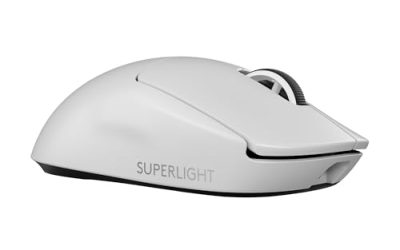
Counter-Strike 2 punishes sloppy aim more than almost any other shooter. Duels are decided in fractions of a second, headshots end rounds, and a mouse that lags, stutters, or drags will cost you fights you should have won. The right mouse will not turn an average player into a professional, but it removes hardware as an excuse and lets your aim do the talking.
The best gaming mouse for CS2 pairs a flawless optical sensor with low-latency wireless, a light shell, and a shape that fits your grip. Every mouse in this guide meets that bar, so you can pick based on shape, weight, and button layout rather than worrying about raw tracking quality.
As an Amazon Associate, we earn from qualifying purchases.
Our Top Picks
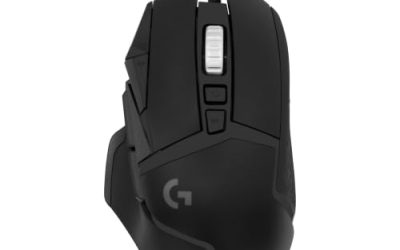
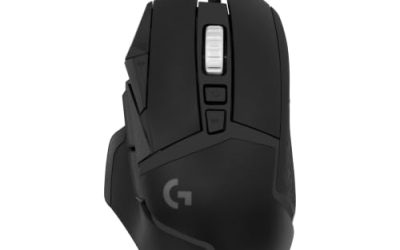
 Logitech G502 X Plus Wireless RGB Gaming MouseWireless7.1 x 4.6 x 2.7 inches0.84 poundsCheck on Amazon

Top 3 picks at a glance

Quick Answer
For most CS2 players, the ASUS ROG Harpe Ace Aim Lab Edition is the safest pick: light, fast, and tuned with professional input. Palm and claw players who want an ergonomic shell should look at the Razer DeathAdder V3 HyperSpeed, while the Pulsar X2V2 Mini suits fingertip grips best.
How to Choose
Start with the sensor. Every serious CS2 mouse now uses a top-tier optical sensor with no acceleration, no smoothing, and no angle snapping. That matters because CS2 rewards small, precise corrections, and a sensor that adds its own movement will fight your muscle memory. All five mice below clear this bar, so sensor quality is a tiebreaker rather than a deciding factor.
Weight comes next. Lighter mice make flick shots and fast 180-degree turns easier, and they cause less fatigue across long sessions. Most competitive players settle somewhere between 50 and 70 grams. Heavier mice can feel steadier for players who anchor their wrist and aim with the arm, but anything above 100 grams starts to feel sluggish when you need to snap between targets.
Shape matters more than specifications. A mouse that fights your hand will hurt your aim no matter how good its sensor is. Palm grippers need a taller, longer shell that fills the hand. Claw grippers want a medium shell with a defined hump. Fingertip players do best with a short, low, symmetrical shell they can pinch and lift easily. If you know your grip, you can narrow this list to one or two mice in seconds.
Polling rate is how often the mouse reports its position to your PC. A 1,000 Hz rate reports every millisecond, which is already fast enough for most players. An 8,000 Hz rate reports eight times as often and can feel slightly smoother on high-refresh monitors. It is a nice bonus, not a requirement, and it draws more battery.
Wireless is now the standard for competitive play. Modern LIGHTSPEED and HyperSpeed links are stable and responsive, with no cable drag to fight during wide flicks. Wired mice still work well, but wireless removes one more variable from your setup.
Button count should match the game. CS2 needs very few buttons: primary fire, secondary fire, a couple of side buttons for utility or voice, and a scroll wheel. A crowded side panel can cause accidental presses in tense rounds, so keep the layout simple and bind only what you use.
Finally, think about battery life and charging. A mouse that dies mid-match is worse than a slightly heavier one. Look for at least 70 hours of rated battery life and a USB-C connection for quick top-ups. All five mice below meet that standard.
ASUS ROG Harpe Ace Aim Lab Edition

The ASUS ROG Harpe Ace Aim Lab Edition is the most complete esports mouse in this guide, and it earns that status. It weighs only 54 grams, uses the ROG AimPoint sensor with up to 36,000 DPI, and supports tri-mode connectivity, so you can run it over 2.4 GHz wireless, Bluetooth, or a wired USB-C connection. That covers everything a competitive player needs: fast flicks, stable tracking, and a shape tuned with professional players.
The symmetrical shape suits palm, claw, and fingertip grips, which is rare. It is not the tallest or the longest mouse, so players with very large hands may want something more ergonomic, but most hand sizes fit it comfortably. The shell has no holes, which keeps the design clean and stops dust collecting inside the body. Five programmable buttons cover everything CS2 needs without clutter, and the Aim Lab Settings Optimizer helps you dial in sensitivity and lift-off distance for your own playstyle.
ROG SpeedNova wireless keeps the connection stable even in crowded wireless environments, and the USB-C charging port means you can top up with the same cable as most modern headsets and phones. Battery life runs up to 90 hours, so a single charge covers a full week of evening sessions for most players. The ROG Micro Switches give crisp, consistent clicks that hold up over long use, and the smooth PTFE feet glide cleanly on cloth pads.
Where this mouse really shines is consistency. The sensor tracks cleanly at high speeds, the feet glide smoothly on cloth pads, and the low weight makes micro-adjustments easy. If you are coming from a heavier office mouse, the difference in the first few rounds is obvious: crosshair placement feels lighter, flicks land faster, and your wrist tires less by the end of a long match.
Specs
| Feature | Detail |
|---|---|
| Sensor | ROG AimPoint optical |
| Max DPI | 36,000 |
| Polling rate | Up to 1,000 Hz |
| Weight | 54 grams |
| Buttons | 5 programmable |
| Connection | 2.4 GHz wireless, Bluetooth, USB-C |
| Battery life | Up to 90 hours |
Razer DeathAdder V3 HyperSpeed
The Razer DeathAdder V3 HyperSpeed is the ergonomic pick in this guide. Its right-handed shape has been a favorite among Counter-Strike players for years, and this version refines it with a lighter 55-gram shell, a Focus X 26K sensor, and Gen-3 optical switches. If you palm grip and want a mouse that fills your hand, this is the one to buy.
The ergonomic curve supports the palm and places the thumb naturally on the side buttons. That support matters in CS2 because long holds and slow, controlled peeks reward a relaxed hand. A symmetrical mouse can feel fine for short bursts, but the DeathAdder shape stays comfortable across a full evening of matches. Claw grippers also get along well with it, though fingertip players may find the shell too long.
The Focus X 26K sensor tracks up to 26,000 DPI with no smoothing or acceleration, and the HyperSpeed wireless link keeps latency low. Battery life runs up to 100 hours, and the mouse charges over USB-C. Eight programmable controls keep the layout clean, with side buttons placed where your thumb rests naturally.
One thing to note is the polling rate. Out of the box, the DeathAdder V3 HyperSpeed polls at 1,000 Hz, which is fast enough for competitive play. An optional HyperPolling dongle raises that to 8,000 Hz, but it is sold separately.
Specs
| Feature | Detail |
|---|---|
| Sensor | Focus X 26K optical |
| Max DPI | 26,000 |
| Polling rate | Up to 1,000 Hz, 8,000 Hz with optional HyperPolling dongle |
| Weight | 55 grams |
| Buttons | 8 programmable controls |
| Connection | HyperSpeed wireless, USB-C |
| Battery life | Up to 100 hours |
Pulsar X2V2 Mini Wireless
The Pulsar X2V2 Mini Wireless is the lightest mouse in this guide at 51 grams, and it is built for players who flick fast and lift often. Its symmetrical shape suits fingertip and claw grips, and the low weight makes rapid target switching feel almost effortless. If your playstyle leans on aggressive peeks and fast flicks, this mouse matches it.
The PixArt PAW3395 sensor reaches up to 26,000 DPI and tracks cleanly at high speeds, while the 2.4 GHz wireless link responds in a single millisecond, so you get fast reporting without buying extra hardware. Optical switches give a crisp, light click with no debounce delay, which helps when you need to tap single shots precisely.
Five programmable buttons give you the bindings CS2 needs without clutter, and the compact, low shell is one fingertip players will love, while palm players with large hands may find it too small for long sessions. The smooth feet glide well on cloth pads, and the solid shell has no holes to collect dust.
Battery life runs up to 70 hours, and the mouse charges over USB-C. For pure speed and flick-heavy play, this is the strongest option in the lineup.
Specs
| Feature | Detail |
|---|---|
| Sensor | PAW3395 optical |
| Max DPI | 26,000 |
| Polling rate | Up to 1,000 Hz, 4,000 Hz with optional dongle |
| Weight | 51 grams |
| Buttons | 5 programmable |
| Connection | 2.4 GHz wireless, USB-C |
| Battery life | Up to 70 hours |
Razer Cobra Pro

The Razer Cobra Pro is the most versatile mouse in this guide. It combines a compact, symmetrical shape with 10 customizable controls, Chroma RGB lighting, and three connection modes: HyperSpeed wireless, Bluetooth, and wired USB-C. If you want one mouse for CS2, everyday work, and other games, this one covers the most ground.
The Focus Pro 30K sensor tracks up to 30,000 DPI with no smoothing, and Gen-3 optical switches keep clicks fast and consistent. The 77-gram weight sits between the ultralight esports mice and heavier all-rounders, giving a planted feel that some players prefer for controlled, deliberate aim. It is heavier than the Pulsar X2V2 Mini, but the extra mass can help steady your crosshair during slow peeks.
Battery life is a standout: up to 170 hours over HyperSpeed wireless, which is the longest in this guide by a wide margin. The 11-zone Chroma lighting adds flair, though you can turn it off to save battery and keep the setup clean.
The extra buttons are the main reason to choose the Cobra Pro over a simpler mouse. Ten customizable controls let you bind utility, voice chat, and weapon slots without reaching for the keyboard. Just be careful to bind only what you need, since a crowded layout can cause misclicks in clutch moments. For players who want flexibility without giving up esports-grade tracking, this is a strong middle ground.
Specs
| Feature | Detail |
|---|---|
| Sensor | Focus Pro 30K optical |
| Max DPI | 30,000 |
| Polling rate | Up to 1,000 Hz |
| Weight | 77 grams |
| Buttons | 10 customizable controls |
| Connection | HyperSpeed wireless, Bluetooth, USB-C |
| Battery life | Up to 170 hours |
Logitech G502 X Plus
The Logitech G502 X Plus is the button-heavy option in this guide, and it suits CS2 players who want maximum control at their fingertips. It carries 13 programmable buttons, a dual-mode scroll wheel, LIGHTSYNC RGB lighting, and the HERO 25K sensor, all in a familiar ergonomic shell that G502 fans have used for years.
The HERO 25K sensor tracks up to 25,600 DPI with sub-micron precision and no smoothing or acceleration, which is more than enough for CS2. LIGHTSPEED wireless keeps the link stable, and LIGHTFORCE hybrid switches deliver fast, crisp clicks. The dual-mode scroll wheel is a genuine advantage: ratchet mode gives precise weapon switching, while free-spin mode lets you scroll through buy menus and inventory quickly.
At 106 grams, this is the heaviest mouse in the guide, and that weight is the main trade-off. Players who aim with the wrist and like a planted, steady feel will appreciate it, while flick-heavy players may find it slow. The ergonomic shape fills the palm well and supports long sessions, though the extra buttons take time to learn.
Battery life runs up to 130 hours with lighting off, and the mouse charges over USB-C. If you want a do-everything mouse with the most buttons and the most features, this is the pick.
Specs
| Feature | Detail |
|---|---|
| Sensor | HERO 25K optical |
| Max DPI | 25,600 |
| Polling rate | Up to 1,000 Hz |
| Weight | 106 grams |
| Buttons | 13 programmable |
| Connection | LIGHTSPEED wireless, USB-C |
| Battery life | Up to 130 hours |
Who Should Skip It
Not every CS2 player needs an ultralight esports mouse, and buying one will not fix bad crosshair placement or poor game sense. If you mostly play casual modes and rarely touch competitive matchmaking, a simpler mouse will serve you just as well, and the money is better spent on a better mousepad or headset.
Players who love heavy mice should also think twice. If you have used a 100-gram mouse for years and your aim is built around that weight, switching to a 54-gram shell can feel twitchy and uncontrolled for weeks. Muscle memory is real, and a lighter mouse is not automatically better for everyone.
Small-handed players should avoid the largest shells here. The DeathAdder V3 HyperSpeed and the G502 X Plus are both long mice, and a small hand will struggle to reach the side buttons comfortably. In that case, the Pulsar X2V2 Mini or the Harpe Ace will fit better.
Finally, skip the feature-heavy models if you only play CS2. Extra buttons, RGB lighting, and Bluetooth modes add weight and complexity you will never use in a match. A simple, light, five-button mouse is the cleaner choice.
FAQ
What DPI should I use for CS2?
Most competitive players use 400 or 800 DPI with a low in-game sensitivity, which gives fine control for small adjustments and steady tracking. Lower DPI values make your crosshair move slower across the screen, so tiny hand movements translate into precise aim. Start at 800 DPI, set your in-game sensitivity so a full mousepad swipe turns you about 180 degrees, and adjust from there until flicks feel natural.
Is wireless fast enough for CS2?
Yes. Modern LIGHTSPEED and HyperSpeed wireless links report fast enough that the delay is negligible in real play, and professional players have used wireless mice in top-level Counter-Strike matches for years. A wireless mouse also removes cable drag, which helps during wide flicks. Just keep the battery charged and the receiver close to the mouse for the most stable connection.
How much does mouse weight matter in CS2?
Weight matters more than most specifications. A lighter mouse makes flick shots faster and reduces wrist fatigue across long sessions, which is why most competitive players use mice under 70 grams. Heavier mice can feel steadier for slow, controlled aim, so the right weight depends on your grip and playstyle. If you are unsure, start in the middle around 60 grams and adjust from there.
Do I need extra buttons for CS2?
No. CS2 needs very few mouse buttons: primary fire, secondary fire, a couple of side buttons for utility or voice chat, and a scroll wheel for weapon switching. Extra buttons are useful if you play other games or want more binds, but they are not required for competitive CS2. A simple five-button layout is enough, and it reduces the chance of accidental presses in tense rounds.
Final Verdict
The ASUS ROG Harpe Ace Aim Lab Edition is the best gaming mouse for CS2 for most players. It is light, fast, and tuned with professional input, with a shape that fits nearly every grip. Buy it if you want the safest, most versatile pick in this guide.
Players who prefer an ergonomic shell should choose the Razer DeathAdder V3 HyperSpeed, while flick-heavy fingertip players will get the most from the Pulsar X2V2 Mini. The Razer Cobra Pro is the best choice if you want extra buttons and long battery life, and the Logitech G502 X Plus suits players who want maximum controls and a heavier, planted feel. Whichever you pick, pair it with a large cloth mousepad and give yourself time to build muscle memory before judging the switch.
Product and ASIN Reference
| Product | ASIN |
|---|---|
| ASUS ROG Harpe Ace Aim Lab Edition | B0BSKX9V7C |
| Razer DeathAdder V3 HyperSpeed | B0D4RF55QK |
| Pulsar X2V2 Mini Wireless | B0CH9XHFW8 |
| Razer Cobra Pro | B0C51934VF |
| Logitech G502 X Plus | B092CB69Q4 |
Related guides
More from Amazon
Programs that pair well with the guide above. Offers and eligibility are set by Amazon and may change.
Free shipping on eligible items, Prime Video and more. Eligible new members can start with a free trial.
Start a Prime free trialAd-free music streaming. Eligible new subscribers can start with a free trial.
Try Music Unlimited freeA Prime membership for ages 18-24 with a trial period. Eligibility is set by Amazon.
See Prime for Young AdultsAudiobooks and podcasts to listen to on the go. Eligible new members can start with a free trial.
Try Audible freeAs an Amazon Associate we earn from qualifying purchases.