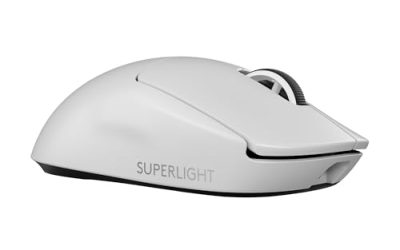
A gaming mouse is one of the few upgrades that changes how every game feels, yet the market is crowded with lookalike shells and inflated spec sheets. The good news is that value no longer means compromise. Sensors that once belonged only to flagship models now appear in affordable wireless mice, and lightweight designs are available at every tier. The trick is knowing which features actually improve your aim and which ones only pad a product page. This guide sorts five real gaming mice by what they deliver for their tier, so you can match a mouse to your grip and your games instead of guessing from a feature list.
As an Amazon Associate, we earn from qualifying purchases.
Our Top Picks
 Razer Basilisk V3 Customizable RGB Wired Ergonomic GamingMouse2.96 x 5.12 x 1.67 inches0.2 poundsCheck on Amazon
Top 3 picks at a glance

Quick Answer
The Logitech G305 LIGHTSPEED is the best gaming mouse for the money for most buyers, pairing a proven HERO sensor with wireless freedom and marathon battery life in a compact shell. Shooter players who want a lighter wired option should look at the Razer DeathAdder V3, while the HyperX Pulsefire Haste 2 Wireless is the wireless pick for players who want a light frame with long battery life.
How to Choose
Start with shape, because no sensor can fix a mouse that fights your hand. Palm grippers need a taller, fuller shell that supports the whole hand, claw grippers do best with a medium hump that lets the fingers arch, and fingertip grippers want a short, light body they can steer with the fingertips alone. If you are unsure which grip you use, watch your hand during a long session: a flat palm on the shell means palm grip, arched fingers with a floating palm means claw, and contact only at the fingertips means fingertip.
Sensor quality comes next, and the gap between tiers has narrowed sharply. Any modern optical sensor with a high maximum sensitivity rating, a fast tracking speed, and no acceleration will track cleanly in competitive play. What separates sensors now is consistency at high flick speeds and clean lift-off, so look for one that holds tracking when you reposition quickly.
Weight matters more than most buyers expect. A lighter mouse changes direction faster and tires the wrist less, which is why competitive players gravitate toward shells under 65 grams. Heavier mice are not automatically worse. Some players aim more steadily with a planted shell, and a heavier frame can steady slow, deliberate aim.
Connection type is a practical choice rather than a performance one. Modern wireless links report at the same rate as wired connections, so the real differences are batteries and cable drag. Wireless mice need charging or battery swaps, while wired mice need a clean cable route so the cord never snags mid-fight. If your desk is cramped, wireless removes a real annoyance. If you hate thinking about batteries, wired removes a chore.
Buttons and polling rate round out the decision. Six buttons cover most shooters, while MMO and strategy players benefit from extra side buttons for abilities. A high polling rate keeps cursor updates frequent, which matters most at high refresh rates. Finally, check the software: onboard memory keeps your settings when you move between machines, while cloud-dependent software ties your setup to one account.
1. Logitech G305 LIGHTSPEED

The G305 is the value pick that the rest of this list is measured against. It takes the proven HERO sensor, pairs it with a lag-free wireless link, and wraps both in a compact egg-shaped shell that suits claw and fingertip grips. It runs on a single AA battery that lasts for months of regular play, and the receiver stores inside the body, so the mouse travels well. There is no cable to manage and no charging dock to buy.
What makes the G305 stand out in the budget tier is how little it gives up. The sensor tracks up to 12,000 DPI with no smoothing or acceleration, the wireless link reports at a 1 millisecond rate, and six programmable buttons cover the essentials for shooters and general play. Onboard memory stores one profile, so your sensitivity and button mapping travel with the mouse. At 99 grams with the battery installed, it is light enough for fast flicks.
The compromises are honest ones. There is no Bluetooth fallback, so losing the tiny receiver means buying a replacement. The shell is on the small side, which palm grippers with large hands may find cramped. The side buttons are small and sit close together, so players who rely on rapid thumb presses may need time to adjust. None of these are deal breakers at this tier, and the battery life alone removes the most common wireless annoyance.
Specs
| Spec | Detail |
|---|---|
| Sensor | HERO optical, up to 12,000 DPI |
| Weight | 99 grams with battery |
| Connectivity | LIGHTSPEED wireless, USB receiver |
| Buttons | 6 programmable buttons |
| Battery | 1 AA battery, up to 250 hours |
| Report rate | 1 millisecond |
| Onboard memory | 1 profile |
2. Razer Basilisk V3
The Basilisk V3 is the pick for players who want one mouse to cover everything. Its right-handed ergonomic shell fills the palm, eleven programmable buttons map abilities, weapons, and macros across genres, and a HyperScroll tilt wheel switches between a notched step for weapon swaps and a free spin for long documents, which makes the Basilisk V3 useful outside games too.
The Focus+ 26K sensor tracks up to 26,000 DPI with no smoothing, filtering, or acceleration, and onboard memory holds five profiles, so you can keep a separate setup for each game or machine. The optical switches actuate with a crisp click and avoid the double-click faults that wear out mechanical switches over time. Chroma RGB lighting is built into the logo and scroll wheel, and it can be set to a static color or turned off in the companion software.
At 101 grams, the Basilisk V3 is the heaviest mouse on this list, and that is the main trade-off. Players who favor fast, low-sensitivity flicks may find it slow to redirect, and small hands may struggle to reach the furthest thumb buttons. The braided cable is flexible, but it is still a cable, so a bungee or a clean desk route helps. For players who value buttons and control over raw lightness, nothing else in this tier packs in as much.
Specs
| Spec | Detail |
|---|---|
| Sensor | Focus+ 26K optical, up to 26,000 DPI |
| Weight | 101 grams |
| Connectivity | Wired USB |
| Buttons | 11 programmable buttons |
| Scroll wheel | HyperScroll tilt wheel |
| Onboard memory | 5 profiles |
| Lighting | Chroma RGB |
3. Razer DeathAdder V3 Wired
The DeathAdder V3 is the classic ergonomic esports mouse, refined down to 59 grams. Its right-handed shape has been a competitive standard for years, with a gentle curve that supports the palm while leaving the fingers free to click quickly. The Focus Pro 30K optical sensor tracks cleanly at high speeds, and the 8K Hz HyperPolling rate keeps cursor updates frequent on high refresh rate displays. Gen-3 optical switches actuate with a crisp click and avoid the double-click faults that wear out mechanical switches over time.
At 59 grams, the DeathAdder V3 feels almost weightless next to older ergonomic mice, and the difference shows up in long sessions where wrist fatigue normally sets in. The Speedflex cable is soft and light, so it drags far less than a stiff braided cord, and the PTFE feet glide smoothly on cloth pads. Six programmable buttons keep the layout simple: two main clicks, a scroll click, a DPI switch, and two thumb buttons.
The simplicity is also the limit. Players who want a dozen macro buttons will find the layout sparse, and left-handed players get no version of this shape. The smooth-touch finish can feel slick if your hands run warm, and grip tape helps. For right-handed shooter players who want a light, proven ergonomic shape with a top-tier sensor, the DeathAdder V3 is the most direct route.
Specs
| Spec | Detail |
|---|---|
| Sensor | Focus Pro 30K optical |
| Weight | 59 grams |
| Connectivity | Wired USB, Speedflex cable |
| Buttons | 6 programmable buttons |
| Switches | Gen-3 optical switches |
| Polling rate | 8K Hz HyperPolling |
| Shape | Ergonomic, right-handed |
4. Razer Viper V3 HyperSpeed

The Viper V3 HyperSpeed brings the wireless esports formula to the mid-range tier: a light symmetrical shell, a flagship-class sensor, and battery life measured in months rather than days. At 82 grams, it sits between featherweight and midweight, which suits claw and fingertip players who want quick direction changes without a shell that feels insubstantial. The Focus Pro 30K optical sensor handles fast flicks cleanly, and the wireless link supports a 4000 Hz polling rate for frequent cursor updates.
Battery life is the headline feature. A single AA battery powers the mouse for up to 280 hours of play, so charging becomes a rare event. The symmetrical shape suits right-handed claw and fingertip grips, and eight programmable controls give room to map abilities without crowding the shell. Gen-2 mechanical switches deliver a firm, tactile click, and the onboard memory stores your settings for use on another machine.
The trade-offs are modest. There is no Bluetooth mode, so the included receiver is the only wireless path, and the mouse ships without a charging cable because it runs on a replaceable battery. The shell has no RGB lighting, which keeps the weight down but may disappoint players who like a lit setup. The DPI button sits on the underside, so mid-match sensitivity changes take a moment longer. For players who want long battery life in a clean, light wireless mouse, the Viper V3 HyperSpeed covers the brief.
Specs
| Spec | Detail |
|---|---|
| Sensor | Focus Pro 30K optical |
| Weight | 82 grams |
| Connectivity | HyperSpeed wireless, USB receiver |
| Buttons | 8 programmable controls |
| Switches | Gen-2 mechanical switches |
| Battery | 1 AA battery, up to 280 hours |
| Polling rate | 4000 Hz wireless |
5. HyperX Pulsefire Haste 2 Wireless

The Pulsefire Haste 2 Wireless is the wireless pick for players who want a light, proven esports mouse without the flagship-tier feature set. At 61 grams, it disappears in the hand, and the symmetrical shape suits claw and fingertip grips. The HyperX 26K sensor tracks up to 26,000 DPI with precise, consistent movement, and dual wireless connectivity covers both 2.4 GHz and Bluetooth, so the mouse pairs with a laptop as easily as a desktop.
What justifies the step up from the budget tier is the total package, not any single number. The shell has no holes, so it stays clean during long sessions. USB-C charging replaces the older micro-USB port, and the battery lasts up to 100 hours of play. Six programmable buttons keep the layout uncluttered, and onboard memory holds your profile across machines. The PTFE feet glide smoothly out of the box, and the included grip tape lets you tune the feel.
The Pulsefire Haste 2 Wireless is not for everyone. Its symmetrical shape gives palm grippers less support than a sculpted ergonomic shell, and the six-button layout leaves MMO players wanting more. The smooth matte finish can feel slick to some hands, though the included grip tape fixes that. For dedicated competitive players who want wireless freedom in a light, clean shell, it is a strong benchmark for the tier.
Specs
| Spec | Detail |
|---|---|
| Sensor | HyperX 26K optical, up to 26,000 DPI |
| Weight | 61 grams |
| Connectivity | 2.4 GHz wireless, Bluetooth, USB-C charging |
| Buttons | 6 programmable buttons |
| Switches | HyperX Switches |
| Battery | Up to 100 hours |
| Shape | Symmetrical, ambidextrous |
Who Should Skip It
Not every gamer needs a dedicated gaming mouse, and buying one for the wrong reasons wastes money. If you play slow-paced strategy games, turn-based titles, or casual games where reaction time rarely decides the outcome, a comfortable office mouse will serve you just as well. The same applies if your hand pain comes from posture rather than hardware: a better chair position, a wrist rest, and regular breaks do more than a lighter shell.
Players with very large hands should pause before ordering a compact lightweight mouse. A shell that is too short forces the fingers into a cramped claw, and a narrow mouse lets the ring finger drag on the pad. In that case, an ergonomic model with a full-length body, such as the Razer Basilisk V3, is the safer start. Left-handed players should check handedness carefully, since two mice on this list are right-handed only and their shapes cannot be mirrored.
Finally, skip the premium tier if you are new to PC gaming or still settling on a grip. A budget wireless mouse teaches you what shape and weight you prefer at a fraction of the commitment, and you can move up once your preferences are clear. The premium pick rewards players who already know their grip and play often enough to feel the difference.
FAQ
Is a wireless gaming mouse as fast as a wired one?
Yes, for practical purposes. Modern wireless gaming mice use dedicated low-latency links that report at the same rate as wired connections, so the delay is far below what a human can perceive. The real differences are battery management and cable drag, not input speed. A wired mouse never needs charging, while a wireless mouse never snags on a desk edge.
How much does mouse weight matter for aiming?
Weight matters most in fast-paced shooters where quick flicks and constant repositioning are routine. A lighter mouse changes direction faster and tires the wrist less over long sessions. Heavier mice can feel steadier for slow, precise aiming, and some players prefer the planted feel. The best weight is the one that lets you flick accurately without fatigue after an hour of play.
What DPI should I use for gaming?
Most competitive players use a sensitivity between 400 and 1600 DPI combined with a low in-game sensitivity setting, because that combination gives fine control without jitter. A high maximum DPI rating shows the sensor has headroom, but it does not mean you should play at the maximum. Set your DPI so that a comfortable wrist movement covers the angle you need, then adjust in small steps.
Do I need extra buttons on a gaming mouse?
It depends on your games. Shooters need only a few extra buttons for melee, grenades, or push-to-talk. MMO and strategy players benefit from many side buttons mapped to abilities and macros. More buttons add weight and complexity, so choose the count that matches your genre rather than the highest number on the box.
Final Verdict
The best gaming mouse for the money depends on your grip and your games, not on the highest number on a spec sheet. The Logitech G305 LIGHTSPEED is the pick for most buyers: a proven sensor, wireless freedom, and battery life measured in months, all in a compact shell that covers claw and fingertip grips. The Razer DeathAdder V3 is the wired esports choice for right-handed shooter players who want a light ergonomic shape, while the Razer Viper V3 HyperSpeed adds long battery life and a clean wireless setup to the same formula.
The Razer Basilisk V3 remains the best option for players who want buttons and control above all else, and the HyperX Pulsefire Haste 2 Wireless is the wireless benchmark for competitive players who feel every gram. Whichever tier you choose, confirm the shape fits your grip first, because comfort decides more matches than any sensor rating. Buy the mouse that fits your hand, then let the specs fade into the background.
Product and ASIN Reference
| Product | ASIN |
|---|---|
| Logitech G305 LIGHTSPEED | B07CMS5Q6P |
| Razer Basilisk V3 | B09C13PZX7 |
| Razer DeathAdder V3 Wired | B0B6XTDJS1 |
| Razer Viper V3 HyperSpeed | B0CF4DJM7F |
| HyperX Pulsefire Haste 2 Wireless | B0BX52C4LN |
Related guides
More from Amazon
Programs that pair well with the guide above. Offers and eligibility are set by Amazon and may change.
Free shipping on eligible items, Prime Video and more. Eligible new members can start with a free trial.
Start a Prime free trialAd-free music streaming. Eligible new subscribers can start with a free trial.
Try Music Unlimited freeA Prime membership for ages 18-24 with a trial period. Eligibility is set by Amazon.
See Prime for Young AdultsAudiobooks and podcasts to listen to on the go. Eligible new members can start with a free trial.
Try Audible freeAs an Amazon Associate we earn from qualifying purchases.