Finding the best gaming mouse with extra buttons begins with a simple question: how many commands do you want under your thumb before you need to reach for the keyboard? A standard gaming mouse gives you left click, right click, a scroll wheel and two side buttons. A mouse with extra buttons adds a thumb grid, a DPI clutch, scroll-wheel tilt inputs or a swappable side plate, and each input can hold a macro, an ability, a weapon swap or a push-to-talk key.
That extra capacity changes how a game feels. In an MMO, a full action bar can sit on the thumb panel. In a MOBA, item actives can move off the keyboard. In a battle royale, healing and pinging can stay on the mouse while movement stays on the keyboard. The mice in this guide differ mainly in how many buttons they add, how those buttons are arranged, whether they are wired or wireless, and how heavy the shell is.
Disclosure: As an Amazon Associate, we earn from qualifying purchases.
Our Top Picks


Top 3 picks at a glance

How to Choose a Gaming Mouse with Extra Buttons
Count the buttons, then check the layout
A 12-button thumb grid suits ability-heavy games where every slot needs a distinct key. A six-button thumb cluster suits players who want extra inputs without learning a full grid. A mouse with 11 programmable buttons spread across the top, side and scroll wheel suits players who mix FPS aiming with a smaller set of macros. Before choosing, count how many abilities, items and communication keys you actually use in a typical match, then add two or three spare inputs. Raised or angled thumb buttons are easier to find by feel, and a sliding or swappable side panel lets you move the thumb cluster to match your thumb reach.
Match the sensor to your sensitivity
Every mouse in this guide uses a modern optical sensor with a wide DPI range, adjustable in software and often in single-DPI steps. The maximum DPI figure is less important than control at the sensitivity you actually use. Most players settle between 400 and 3,200 DPI, so a sensor that tracks cleanly at low DPI is more useful than a headline maximum.
Wired or wireless
Wired mice remove charging from the routine entirely. Wireless mice remove the cable from the desk and add a choice between a low-latency 2.4 GHz receiver and Bluetooth, which suits a laptop or a second machine, while the 2.4 GHz mode suits competitive play. Battery design varies: one mouse here runs on a single AA battery, another uses a built-in rechargeable battery with an optional charging dock, and a third uses a built-in battery whose quoted life changes with lighting and connection mode.
Shape, weight and grip
Extra buttons add width, especially on the thumb side, so these mice are generally wider and heavier than a minimal FPS mouse. Right-handed ergonomic shells dominate this category. Weight is adjustable on some models and fixed on others, ranging from just over 100 grams to around 135 grams in this guide.
Software, onboard memory and the scroll wheel
Each brand has its own configuration software: Logitech G HUB for the Logitech models, Razer Synapse for the Razer models, and Corsair iCUE for the Corsair model. Use the software to assign macros, remap keys and set DPI steps, then save the result to onboard memory where the mouse supports it, so the profile travels with the mouse. The scroll wheel is an extra-button surface in its own right: a tilt wheel adds left and right inputs, a dual-mode wheel switches between a notched mode and a free-spin mode, and a DPI clutch button lets you hold a lower sensitivity for precise aiming.
Comparison Table
| Product | Key specs | Best for |
|---|---|---|
| Logitech G502 HERO | 11 programmable buttons, HERO 25K sensor up to 25,600 DPI, wired USB, 121 g with adjustable weights | FPS and general play with a DPI clutch and tunable weight |
| Razer Naga V2 Pro | 19 plus 1 programmable buttons, swappable 2, 6 and 12-button side plates, Focus Pro 30K sensor up to 30,000 DPI, wireless | MMO play with a full thumb grid that can change shape |
| Corsair Scimitar RGB Elite | 17 programmable buttons, 12-button side panel with Key Slider, 18,000 DPI optical sensor, wired USB | MMO and MOBA play with a sliding thumb panel |
| Logitech G604 Lightspeed | 15 programmable controls including 6 thumb buttons, HERO sensor up to 25,600 DPI after software update, wireless | Wireless MMO and battle royale play with long battery life |
| Razer Basilisk V3 Pro | 11 programmable buttons, HyperScroll Tilt Wheel, Focus Pro 30K sensor up to 30,000 DPI, wireless | Ergonomic wireless play with a versatile tilt wheel |
Logitech G502 HERO

Link: https://www.amazon.com/dp/B07GBZ4Q68
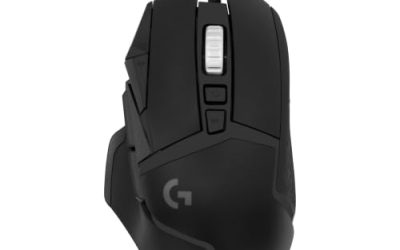
The Logitech G502 HERO is the most versatile mouse in this guide: a wired, right-handed mouse with 11 programmable buttons, a HERO 25K optical sensor, a dual-mode hyper-fast scroll wheel and an adjustable weight system. The sensor covers 100 to 25,600 DPI, with zero smoothing, filtering or acceleration listed in the manufacturer specifications, a maximum speed above 400 IPS, a maximum acceleration above 40 G, and a USB report rate of 1000 Hz.
The button layout suits many genres. The thumb cluster holds several programmable inputs, the scroll wheel tilts left and right, and a DPI shift button sits within thumb reach. Holding that button drops sensitivity temporarily for precise aiming, then returns to the normal setting on release. The mouse weighs 121 g on its own, and five 3.6 g weights can be arranged in the base for up to 18 g of added mass. LIGHTSYNC RGB lighting covers a single zone, and onboard memory stores up to five profiles.
Key specs:
- 11 programmable buttons, including a DPI shift button and scroll-wheel tilt inputs
- HERO 25K optical sensor, 100 to 25,600 DPI, 1000 Hz USB report rate
- Five 3.6 g adjustable weights, up to 18 g of added mass, 121 g base weight
- LIGHTSYNC RGB lighting and onboard memory for up to five profiles, wired USB
Razer Naga V2 Pro
Link: https://www.amazon.com/dp/B0BGJTLFN5
The Razer Naga V2 Pro is the most adaptable MMO mouse in this guide, because its side panel changes shape. It ships with three magnetic swappable side plates carrying 2, 6 and 12 thumb buttons. With the 12-button plate fitted, the mouse has 19 plus 1 programmable buttons and 22 programmable controls in total. With the 6-button plate, the layout suits a lighter ability set, and with the 2-button plate, the same mouse suits FPS and battle royale play.
The sensor is the Razer Focus Pro 30K optical sensor, with a listed maximum of 30,000 DPI and tracking rated up to 750 IPS with 70 G acceleration. Razer Optical Mouse Switches Gen-3 are listed with a 0.2 ms actuation and a 90-million-click lifecycle, using infrared light to register presses with no debounce delay. The HyperScroll Pro Wheel adds six scroll modes, including a customizable mode in Razer Synapse. On-the-fly sensitivity adjustment covers 400, 800, 1600, 3200 and 6400 DPI steps, and onboard memory holds four plus one profiles.
Connectivity covers three modes: Razer HyperSpeed Wireless over 2.4 GHz, Bluetooth, and a wired connection through the included SpeedFlex Type-C cable. Battery life is listed at up to 150 hours on HyperSpeed Wireless and up to 300 hours on Bluetooth. It weighs 134 g, the heaviest model in this guide, and suits medium and large hands and palm-grip play.
Key specs:
- 19 plus 1 programmable buttons, 22 programmable controls, swappable 2, 6 and 12-button side plates
- Focus Pro 30K optical sensor, up to 30,000 DPI, 750 IPS, 70 G acceleration
- Optical Mouse Switches Gen-3, 0.2 ms actuation, 90-million-click lifecycle
- HyperSpeed Wireless, Bluetooth and wired USB-C, up to 150 hours on HyperSpeed and up to 300 hours on Bluetooth, 134 g
Corsair Scimitar RGB Elite
Link: https://www.amazon.com/dp/B082LRMY53
The Corsair Scimitar RGB Elite is a wired MMO and MOBA mouse built around a 12-button thumb grid that slides to fit your hand. It has 17 fully programmable buttons in total, including the 12-button side panel, and a custom PixArt PMW3391 optical sensor with a maximum of 18,000 DPI. Sensitivity adjusts in 1 DPI steps, with eight resolution modes and a polling rate that can be set to 125, 250, 500 or 1000 Hz. Omron switches are listed with a 50-million-click rating. The mouse weighs 122 g.
The Key Slider control system is the defining feature. The side button cluster can be repositioned 8 mm forward or backward, using the included Allen key to unlock the keypad, move it and lock it in place. That matters because thumb length varies, and a fixed grid can leave the front or rear buttons out of comfortable reach.
Corsair iCUE software handles macro programming, button remapping, sensitivity adjustment and lighting, with multi-command macros across all 17 buttons and four distinct RGB lighting zones. Onboard memory stores profiles on the mouse. The braided cable measures 1.8 m, the connection is wired USB Type-A, and the mouse is listed as compatible with PC, Mac and consoles in the Amazon listing title.
Key specs:
- 17 fully programmable buttons, including a 12-button side panel
- Key Slider control system, side panel moves 8 mm forward or backward
- Custom PixArt PMW3391 optical sensor, up to 18,000 DPI, adjustable in 1 DPI steps
- Omron switches, 50-million-click rating, 122 g, four-zone RGB, wired USB, 1.8 m braided cable
Logitech G604 Lightspeed
Link: https://www.amazon.com/dp/B07QN369XX
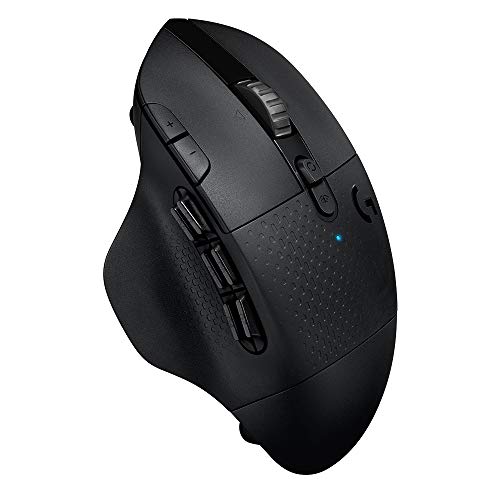
The Logitech G604 Lightspeed is the wireless alternative to a full MMO grid. It has 15 programmable controls, including six thumb buttons, in a right-handed ergonomic shell that weighs 135 g with its battery fitted. The six-button thumb cluster gives MMO, MOBA and battle royale players a compact set of extra inputs without the learning curve of a 12-button grid, and the remaining controls cover the primary buttons, scroll-wheel tilt and scroll inputs, DPI controls and mode switching.
Dual connectivity is the second strength. The mouse toggles between Bluetooth and ultra-fast 1 ms Lightspeed wireless, using a button below the scroll wheel to switch modes. Lightspeed uses the included USB receiver for low-latency play, while Bluetooth suits a laptop or a second machine. The HERO sensor is listed at up to 25,600 DPI after a free software update through Logitech G HUB, with 1:1 tracking and a tracking speed above 400 IPS. Earlier listings describe the same hardware as a HERO 16K sensor, so the 25,600 DPI figure applies to units with the update applied.
Battery life is a clear advantage. The mouse runs on a single AA battery, with a listed life of up to 240 hours in Lightspeed mode and up to 5.5 months in Bluetooth mode. The dual-mode hyper-fast scroll wheel switches between a ratcheted mode and a hyper-fast mode, and scroll-up and scroll-down inputs can hold key binds of their own. Onboard memory stores profiles, and Logitech G HUB handles button assignment, DPI steps and lighting.
Key specs:
- 15 programmable controls, including six thumb buttons
- HERO sensor, up to 25,600 DPI after the free G HUB software update, 1:1 tracking
- Dual connectivity: 1 ms Lightspeed wireless and Bluetooth, switchable on the mouse
- Up to 240 hours in Lightspeed mode and up to 5.5 months in Bluetooth mode on one AA battery, 135 g with battery
Razer Basilisk V3 Pro

Link: https://www.amazon.com/dp/B0B6Y3XYFG
The Razer Basilisk V3 Pro is the ergonomic wireless mouse in this guide, and it adds extra buttons in a different way from the MMO grid mice. It has 11 programmable buttons, including a DPI clutch on the left side, a thumb paddle and scroll-wheel tilt inputs. The HyperShift feature lets the thumb paddle double the function of the other buttons, so each input can hold a second assignment while the paddle is held.
The sensor is the Razer Focus Pro 30K optical sensor, with a listed range of 100 to 30,000 DPI, a tracking speed of 750 IPS and 70 G acceleration. Razer Optical Mouse Switches Gen-3 are listed with a 90-million-click lifecycle and infrared actuation with no debounce delay. The HyperScroll Tilt Wheel is a four-way wheel with electronically actuated notched and free-spin modes, plus a Smart Reel mode that switches between them automatically.
Connectivity covers HyperSpeed Wireless at 2.4 GHz, Bluetooth and wired USB-C. The polling rate is 1000 Hz by default and can reach 4000 Hz with the optional Mouse Dock Pro. Battery life is listed at up to 90 hours on HyperSpeed Wireless and up to 100 hours on Bluetooth with lighting switched off, and the mouse supports wireless charging with the optional dock and charging puck. Chroma RGB lighting covers 13 zones, including full underglow, and Razer Synapse 3 handles button assignment, lighting and profile storage. The mouse weighs 112 g and measures 130 mm long, 75.4 mm wide and 42.5 mm high.
Key specs:
- 11 programmable buttons, including a DPI clutch, thumb paddle and tilt-wheel inputs
- Focus Pro 30K optical sensor, 100 to 30,000 DPI, 750 IPS, 70 G acceleration
- HyperScroll Tilt Wheel with notched, free-spin and Smart Reel modes
- HyperSpeed Wireless, Bluetooth and wired USB-C, up to 90 hours on HyperSpeed and up to 100 hours on Bluetooth with lighting off, 112 g
Which One to Pick
Choose the Logitech G502 HERO for the most flexible all-round mouse here. Its 11 programmable buttons, DPI clutch, dual-mode scroll wheel and adjustable weights cover FPS, general play and light MMO use.
Choose the Razer Naga V2 Pro if MMO play comes first. Its swappable side plates fit a 12-button grid for a full action bar, a 6-button plate for a lighter setup, or a 2-button plate for other genres.
Choose the Corsair Scimitar RGB Elite for a dedicated MMO grid with a wired connection and a panel that slides to fit your thumb. The Key Slider system moves the 12-button cluster to match your reach, suiting raid and MOBA play.
Choose the Logitech G604 Lightspeed for wireless play, long battery life and a moderate button count. Six thumb buttons cover the most-used abilities in MMO, MOBA and battle royale games, and a quick AA battery swap restores use.
Choose the Razer Basilisk V3 Pro for an ergonomic wireless mouse with a versatile scroll wheel and a second layer of controls through HyperShift. It suits FPS and general play where a full thumb grid would feel too wide.
If you are still unsure, count the abilities you use most in your main game. Above ten, pick a grid mouse: the Naga V2 Pro or the Scimitar RGB Elite. Between five and ten, pick the G604 Lightspeed or the G502 HERO. Below five, with comfort first, pick the Basilisk V3 Pro.
Frequently Asked Questions
How many extra buttons do I need on a gaming mouse?
It depends on the games you play most. MMO players often use ten or more thumb inputs for a full action bar, so a 12-button grid suits them. MOBA and battle royale players often use five to eight extra inputs for items, abilities, healing and pinging, so a six-button cluster or an 11-button layout suits them. FPS players often use only a few extra inputs. Count your most-used commands first, then choose a mouse with at least that many reachable inputs.
Are MMO mice with a 12-button grid hard to learn?
A 12-button grid takes time to learn, because the thumb must find each button by feel. Begin by assigning only the most-used abilities to the centre buttons, then add more inputs as the layout becomes familiar. A sliding panel, such as on the Scimitar RGB Elite, or swappable plates, such as on the Naga V2 Pro, helps because you can move the grid to match your thumb reach. A six-button cluster is quicker to learn.
Is a wireless gaming mouse with extra buttons reliable for competitive play?
Wireless mice in this guide use a 2.4 GHz receiver mode designed for low-latency play, with a listed 1 ms report rate on the Lightspeed and HyperSpeed models. That mode is the right choice for competitive games. Bluetooth mode suits a laptop and casual play, and it extends battery life, but it is not the mode to choose for fast competitive matches. Keep the receiver close to the mouse.
Can I use these mice for work as well as gaming?
Yes, and the extra buttons are useful beyond games. The thumb buttons can hold copy, paste, undo, forward and back, window switching and application shortcuts. The scroll wheel can switch between a notched mode and a free-spin mode for long documents. A wireless model with Bluetooth, such as the G604 Lightspeed, the Naga V2 Pro or the Basilisk V3 Pro, is easy to move between a gaming PC and a laptop.
Related guides
More from Amazon
Programs that pair well with the guide above. Offers and eligibility are set by Amazon and may change.
Free shipping on eligible items, Prime Video and more. Eligible new members can start with a free trial.
Start a Prime free trialAd-free music streaming. Eligible new subscribers can start with a free trial.
Try Music Unlimited freeA Prime membership for ages 18-24 with a trial period. Eligibility is set by Amazon.
See Prime for Young AdultsAudiobooks and podcasts to listen to on the go. Eligible new members can start with a free trial.
Try Audible freeAs an Amazon Associate we earn from qualifying purchases.