Finding the best gaming mouse for Roblox is less about chasing the highest sensitivity number on a specification sheet and more about finding a mouse that feels comfortable during long sessions, tracks reliably when you turn quickly, and gives you enough programmable buttons for the games you play most. Roblox covers many experiences, from obstacle courses to shooting games, simulators, and building games. The right choice depends on your hand size, grip, and how you use extra buttons.
A good Roblox mouse should be light enough to move without tiring your wrist, responsive enough that the cursor follows your hand, and shaped to support your palm or fingers. The four mice below cover those needs in different ways.
Disclosure: As an Amazon Associate, we earn from qualifying purchases.
Before choosing, think about how you actually play Roblox. Do you spend most of your time in fast-paced games where you need to aim and turn quickly, or in slower building and role-playing games where comfort matters more than raw speed? Do you use side buttons for inventory, tools, and camera controls, or keep things simple? Answering those questions first makes the decision easier, because every mouse below is capable, and the differences are about fit and features.
Our Top Picks
 Razer Basilisk V3 Customizable RGB Wired Ergonomic GamingMouse2.96 x 5.12 x 1.67 inches0.2 poundsCheck on Amazon


Top 3 picks at a glance

How to Choose a Gaming Mouse for Roblox
Roblox does not demand the same hardware as a demanding competitive shooter, but a mouse built for gaming still makes a real difference. A gaming mouse with a clean optical sensor, a high polling rate, and a comfortable shape can make camera movement smoother and aiming more predictable.
Sensor and Sensitivity
The sensor reads movement and turns it into cursor movement on screen. All four mice in this guide use optical sensors with a maximum sensitivity far above what most Roblox players will ever need, so they can track cleanly at the lower and middle settings where most players feel most comfortable. Sensitivity is measured in DPI, or dots per inch. For Roblox, most players do well between 800 and 3200 DPI, depending on screen size, mousepad size, and personal preference. A dedicated button for switching sensitivity levels is helpful, letting you use a lower setting for aiming and a higher setting for fast turns without opening software mid-game. A polling rate of 1000 Hz, listed for all four mice here, means the mouse reports its position 1000 times per second.
Weight and Comfort
Weight matters in Roblox because sessions can last an hour or more. A lighter mouse is easier to lift and reposition, and it puts less strain on the wrist. A heavier mouse can feel more stable for aiming, but it can also feel tiring. The mice in this guide range from 82 grams to 121 grams before tuning weights, so there is a clear spread to choose from. Smaller hands and fingertip grips often suit a lighter, compact mouse, while larger hands and palm grips often suit a larger mouse with a fuller shape and a thumb rest. Shape matters as much as weight: ergonomic shapes support the palm and thumb, while symmetrical shapes often suit claw and fingertip grips.
Buttons and Software
Programmable buttons let you assign in-game actions to buttons easier to reach than keyboard keys. Two side buttons are enough for many players, for inventory, tools, or camera controls. More buttons give more options in games with many tools, but they take time to learn. Logitech G HUB and Razer Synapse let you change sensitivity, reassign buttons, adjust lighting, and save profiles. Some mice store profiles in onboard memory, so settings travel with the mouse. Lighting does not affect play; focus first on sensor, weight, shape, and buttons.
Wired Connection, Cable and Feet
All four mice in this guide are wired models, so they connect by USB and do not need charging or batteries. A wired connection is simple and reliable, and it removes any concern about battery life during a long session. The cable still matters, because a stiff cable can drag on the desk. Look for a flexible cable with enough slack to reach your computer without pulling tight. The feet also affect glide: most gaming mice use low-friction PTFE feet, so keep the feet and pad clean for smooth movement.
Hand Size, Grip, and Play Style
In a palm grip, the whole hand rests on the mouse. In a claw grip, the palm rests lightly on the back while the fingers arch over the buttons. In a fingertip grip, only the fingertips touch the mouse. Palm grips usually suit larger mice, while claw and fingertip grips usually suit smaller, lighter mice. Play style matters too: obstacle courses need quick turns, shooting games need steady aiming, and building games need comfort and buttons for tools. Choose a mouse that supports the games you play most.
Comparison Table
| Product | Key specs | Best for |
|---|---|---|
| Logitech G502 HERO | HERO 25K sensor, up to 25,600 DPI, 11 programmable buttons, 121 g plus tuning weights, 1000 Hz polling rate, wired USB | Players who want many programmable buttons and adjustable weight |
| Razer DeathAdder V2 | Focus+ 20K optical sensor, up to 20,000 DPI, 8 programmable buttons, 82 g, 1000 Hz polling rate, wired USB | Palm-grip players who want a comfortable ergonomic shape |
| Logitech G203 LIGHTSYNC | Optical sensor, up to 8,000 DPI, 6 programmable buttons, 85 g, 1000 Hz polling rate, wired USB | Smaller hands, claw and fingertip grips, and simple setups |
| Razer Basilisk V3 | Focus+ 26K optical sensor, up to 26,000 DPI, 11 programmable buttons, 101 g, HyperScroll Tilt Wheel, wired USB | Players who want many buttons and a versatile scroll wheel |
1. Logitech G502 HERO

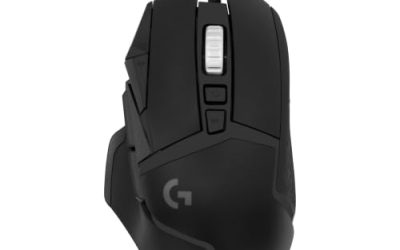
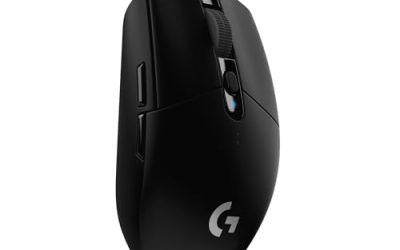
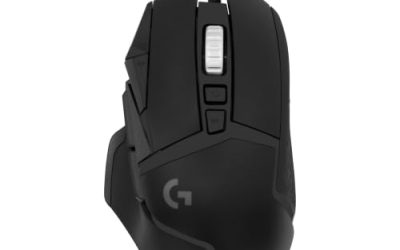
The Logitech G502 HERO is a wired gaming mouse with a HERO 25K optical sensor, 11 programmable buttons, and an adjustable weight system. It suits Roblox players who like to map many actions to the mouse and who want to fine-tune how heavy the mouse feels.
- Link: https://www.amazon.com/dp/B07GBZ4Q68
The HERO 25K sensor lists sensitivity up to 25,600 DPI, with tracking described by Logitech as having zero smoothing, filtering, or acceleration across the full DPI range. That headroom is far above what Roblox requires, so the sensor tracks cleanly at lower settings. The mouse also lists a 1000 Hz polling rate. Eleven programmable buttons include the main buttons, a clickable scroll wheel, buttons beside the left click, a DPI shift button, and thumb buttons. The dual-mode hyper-fast scroll wheel has tilt and switches between notched and free-spinning feels. Buttons can be reassigned in Logitech G HUB, and onboard memory holds up to five profiles.
Weight is a defining feature. The G502 HERO weighs 121 grams before tuning weights, and it includes five removable 3.6-gram weights that can bring the total to 139 grams. It is the heaviest mouse in this guide, and some players like that planted feel for steady aiming, while others may find it tiring. The shape is right-handed and full, with a thumb rest, and it suits medium to large hands and palm and claw grips. Model number 910-005469. The Amazon listing describes it as a wired gaming mouse for PC and Mac with RGB lighting, adjustable weights, 11 programmable buttons, and onboard memory. For Roblox, it works best for players who play many different games, with extra buttons for inventory, tools, emotes, and camera controls.
2. Razer DeathAdder V2
The Razer DeathAdder V2 is a wired ergonomic gaming mouse with a Focus+ 20K optical sensor, 8 programmable buttons, and a weight of 82 grams. It suits Roblox players who want a simple, reliable mouse that feels natural from the first session.
- Link: https://www.amazon.com/dp/B082G5SPR5
The Focus+ optical sensor lists sensitivity from 100 to 20,000 DPI, tracking up to 650 inches per second and 50 G acceleration, with 99.6 percent resolution accuracy. The sensor is the Razer Focus+ model, based on the PixArt PAW3399, and it supports a polling rate of up to 1000 Hz. That combination tracks cleanly during fast turns, which helps in obstacle courses and shooting games. Eight programmable buttons include the main buttons, a clickable scroll wheel, two DPI buttons, two side buttons, and a profile button underneath. The main switches are Razer Optical Mouse Switches, rated for 70 million clicks, using an infrared beam to register clicks. Buttons can be reassigned in Razer Synapse 3, along with sensitivity, polling rate, and lighting.
At 82 grams, the DeathAdder V2 is much lighter than the G502 HERO. Its right-handed ergonomic shape supports the palm, with rubberised grips and dimensions of 127 by 61.7 by 42.7 millimetres, suiting medium to large hands. The Razer Speedflex cable is soft and flexible, and the underside uses PTFE feet. Model number RZ01-03210100-R3U1. The Amazon listing describes it as a wired gaming mouse with a 20K DPI optical sensor, Chroma RGB lighting, 8 programmable buttons, and rubberised side grips. For Roblox, it works best for comfort-first players who play for long stretches.
3. Logitech G203 LIGHTSYNC
The Logitech G203 LIGHTSYNC is a compact wired gaming mouse with an optical sensor, 6 programmable buttons, and a weight of 85 grams. It is the smallest mouse in this guide, and it suits players with smaller hands, claw or fingertip grips, and players who want a simple mouse without many extra buttons.
- Link: https://www.amazon.com/dp/B07YN82X3B
The optical sensor lists sensitivity from 200 to 8,000 DPI, with a polling rate of 1000 Hz and a report rate of 1 millisecond. That maximum is lower than the other mice here, but it is still well above the 800 to 3200 DPI range most Roblox players use. Six programmable buttons include the main buttons, a clickable scroll wheel, a DPI button, and two side buttons. They can be reassigned in Logitech G HUB, and the mouse supports up to five DPI presets. The main switches are mechanical switches with a metal spring tensioning system to keep the click feel consistent.
At 85 grams, with compact dimensions of 116.6 by 62.15 by 38.2 millimetres, the G203 LIGHTSYNC is light and easy to lift and reposition. Its shape is symmetrical in outline, although the side buttons are on the left, so it is best suited to right-handed use. The cable is 2.1 metres long, and LIGHTSYNC RGB lighting runs along the side and through the logo. The Amazon listing for the black version describes it as a wired gaming mouse with 8,000 DPI, rainbow LIGHTSYNC RGB, 6 programmable buttons, onboard memory, screen mapping, and PC and Mac compatibility. This guide uses the black version, ASIN B07YN82X3B, to avoid mixing colour variants. For Roblox, it works best for younger players and smaller hands, especially in obstacle courses.
4. Razer Basilisk V3
The Razer Basilisk V3 is a wired ergonomic gaming mouse with a Focus+ 26K optical sensor, 11 programmable buttons, and a HyperScroll Tilt Wheel. It suits Roblox players who want many buttons, a versatile scroll wheel, and a comfortable right-handed shape for long sessions.
- Link: https://www.amazon.com/dp/B09C13PZX7
The Focus+ 26K optical sensor lists sensitivity up to 26,000 DPI, with 99.6 percent resolution accuracy, tracking up to 650 inches per second, and 50 G acceleration. That is the highest maximum in this guide, giving plenty of headroom for clean tracking at lower settings. The mouse supports a polling rate of up to 1000 Hz, and lift-off distance can be adjusted in Razer Synapse. Eleven programmable buttons include the main buttons, wheel presses, two buttons below the wheel, three buttons on the left, and a profile button underneath. The main switches are second-generation Razer Optical Mouse Switches, rated for 70 million clicks. Buttons can be reassigned in Synapse, the mouse stores up to five profiles, and Hypershift lets you assign a second function to each button.
The HyperScroll Tilt Wheel is the most distinctive feature. It is a four-way wheel, so you can tilt it left and right as well as scroll up and down, giving extra inputs for games, menus, and inventories. It has electronically actuated notched and free-spinning modes, and Smart-Reel mode switches to free-spinning when you flick the wheel quickly. At 101 grams, with dimensions of 130 by 60 by 42.5 millimetres, the Basilisk V3 is heavier than the DeathAdder V2 and G203 LIGHTSYNC but lighter than the G502 HERO with weights installed. It has a thumb rest, injection-moulded grips, a 6-foot Razer Speedflex cable, and Chroma RGB lighting in 11 zones. Model number RZ01-04000100-R3U1. For Roblox, it works best for medium to large hands, with the tilt wheel adding inputs for actions that are otherwise hard to reach.
Which One to Pick
Choosing the best gaming mouse for Roblox comes down to hand size, grip, and how many buttons you want. All four mice have optical sensors, polling rates of 1000 Hz, wired USB connections, and software for changing sensitivity and reassigning buttons. Shape, weight, button count, and the scroll wheel should guide your choice.
If you want the most buttons and control over weight, choose the Logitech G502 HERO. Its 11 programmable buttons, dual-mode scroll wheel, and adjustable weight system suit players who play many different Roblox games and like to map many actions to the mouse. It is the heaviest mouse here, so it suits players who like a planted feel and have medium to large hands. If you want comfort for long sessions and a natural palm-grip shape, choose the Razer DeathAdder V2. Its 82-gram weight, ergonomic curve, and 8 programmable buttons make it a straightforward middle ground.
If you have smaller hands, use a claw or fingertip grip, or want a simple and light mouse, choose the Logitech G203 LIGHTSYNC. Its 85-gram weight, compact shape, and 6 programmable buttons cover the essentials without bulk or complexity, and it is a good first gaming mouse. If you want many buttons and a versatile scroll wheel in a comfortable ergonomic shape, choose the Razer Basilisk V3. Its 11 programmable buttons, HyperScroll Tilt Wheel, and 101-gram weight suit players who like wheel inputs for fast-paced games and long building sessions.
A practical way to decide is to begin with hand size. Measure your hand from wrist to fingertip and compare it with the dimensions in the table above. If your hand is on the smaller side, begin with the G203 LIGHTSYNC. If your hand is medium to large and you use a palm grip, begin with the DeathAdder V2 or the Basilisk V3. If you want the most buttons and like a heavier mouse, begin with the G502 HERO. Give yourself a few sessions to adjust sensitivity and button assignments, because a new shape can feel unfamiliar at first.
Frequently Asked Questions
What DPI should I use for Roblox?
Most Roblox players do well between 800 and 3200 DPI, depending on screen size, mousepad size, and personal preference. A lower setting gives more control for careful aiming and building, while a higher setting lets you turn the camera quickly with less hand movement. All four mice here let you switch sensitivity with a dedicated button. Begin at 1600 DPI if you are unsure, and adjust in small steps.
Do I need a wireless mouse for Roblox?
No, a wired mouse works well for Roblox, and all four mice in this guide are wired models. A wired connection is simple and reliable, and it does not need charging or batteries. Choose a mouse with a flexible cable and give it enough slack so it does not pull during play. For most Roblox players a wired mouse is a practical choice.
How many programmable buttons do I need for Roblox?
Two side buttons are enough for many Roblox players, and they can open inventory, switch tools, use an emote, or toggle the camera. Six buttons, as on the G203 LIGHTSYNC, cover those actions plus a DPI switch and a scroll click. Eight buttons, as on the DeathAdder V2, add more options without much complexity. Eleven buttons, as on the G502 HERO and the Basilisk V3, are useful if you play games with many tools or abilities and want quick access from the mouse. More buttons are not always better, because they take time to learn, so choose a count that matches the actions you want on the mouse.
Is a lightweight mouse better for Roblox?
A lighter mouse is often easier to move quickly and to lift and reposition, which helps in obstacle courses and fast-paced games. A heavier mouse can feel more stable for careful aiming, and some players prefer the planted feel of a mouse like the G502 HERO. The mice in this guide range from 82 grams to 121 grams before tuning weights, so you can choose a weight that matches your grip and play style. For long sessions, a lighter mouse may reduce wrist strain, but shape and hand support matter just as much as weight.
Related guides
More from Amazon
Programs that pair well with the guide above. Offers and eligibility are set by Amazon and may change.
Free shipping on eligible items, Prime Video and more. Eligible new members can start with a free trial.
Start a Prime free trialAd-free music streaming. Eligible new subscribers can start with a free trial.
Try Music Unlimited freeA Prime membership for ages 18-24 with a trial period. Eligibility is set by Amazon.
See Prime for Young AdultsAudiobooks and podcasts to listen to on the go. Eligible new members can start with a free trial.
Try Audible freeAs an Amazon Associate we earn from qualifying purchases.