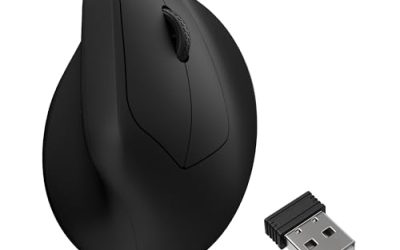
Glorious sells several mice that share the same BAMF 2.0 sensor and near-identical spec sheets, so the spec table alone will not tell you which one belongs on your desk. The deciding factor is shape: the symmetrical Model O shells, the right-handed Model D curve and the button-heavy Model I all put your hand in a different position, and each suits a different grip. Picking by grip first, then by weight and polling rate, is how you avoid buying a fast mouse that fights your hand.
This guide groups the current Glorious range by the players each shape serves best: fingertip and claw players who want the lightest shell, palm grippers who want a filled-out ergonomic curve, and MOBA or MMO players who need extra buttons under the thumb. Every pick is a Glorious mouse, and every specification below is taken from that product’s own Amazon listing, including the weight, sensor and battery figures quoted in its title and product details.
Top 3 picks at a glance


Quick Picks
As an Amazon Associate we earn from qualifying purchases
| Product | Best for | Key spec from title |
|---|---|---|
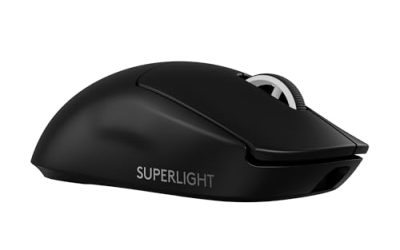
| Glorious Model O 2 Wireless (Black) | Claw players who switch between a gaming PC and a laptop | 68 g superlight, 26K BAMF 2.0 sensor |
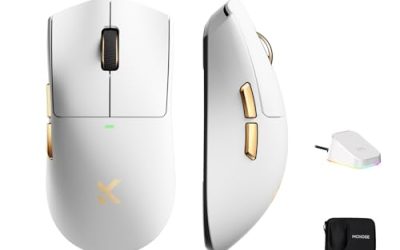
| Glorious Model O 2 PRO 4K/8K (White) | Fingertip players chasing the highest polling rate | 59 g ultralight, 4K/8K polling |
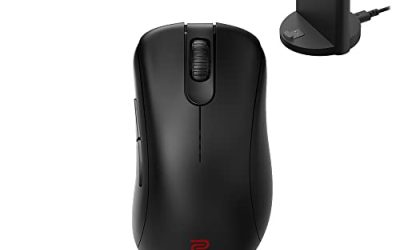
| Glorious Model D 2 PRO 4K/8K (Black) | Palm grip on a right-handed ergonomic shell | 62 g superlight, 4K/8K polling |
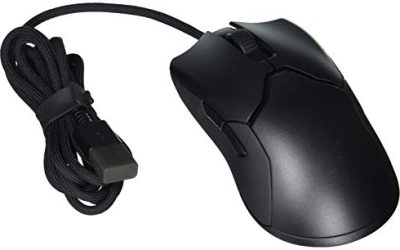
| Glorious Model I 2 Wireless (Black) | MOBA and MMO players who bind abilities to the thumb | 75 g, 9 programmable buttons |
| Glorious Model O Wireless (Matte Black) | Palm and claw fans of the original honeycomb shell | 69 g honeycomb, up to 71 hours battery |
How to Choose
Start with shape and grip
Grip decides which Glorious shell you should even consider. Palm grippers rest their whole hand on the mouse and steer with the arm, so they need a tall, filled-out body like the Model D or Model I. Claw players arch their fingers and steer with the wrist, which suits the lower, symmetrical Model O shells. Fingertip players never touch the mouse with their palm and make constant micro-corrections, so they benefit most from the shortest, lightest shells. Buying a sensor first and a shape second is how players end up with a fast mouse that cramps their hand inside a week.
Weigh the mouse against your hand size
Every mouse in this guide sits between 59 g and 75 g, and that spread matters more than it looks on paper. Lighter mice reduce the effort of stopping a fast flick, which fingertip and claw players feel immediately; heavier mice feel steadier for palm players making long, slow sweeps. Hand size matters just as much: the Model O 2 Pro suits medium hands, the Model D 2 Pro is built for medium to large hands, and a small hand on a large ergonomic shell ends up stretching for the side buttons. Measure your hand before you order.
Decide how much polling rate you actually need
Standard Glorious mice poll at 1,000 Hz, reporting position every millisecond. The Pro models raise that to 4,000 Hz wireless and 8,000 Hz wired, which smooths cursor movement on high-refresh monitors but drains the battery several times faster — the listings quote up to 80 hours at 1,000 Hz and roughly 35 hours at 4,000 Hz. Most players will not feel the jump from 1,000 Hz to 4,000 Hz unless the rest of their setup is already fast. If you play competitively on a 240 Hz or faster display, the Pro models make sense; otherwise the standard wireless models give you far longer between charges.
Count buttons and check the feet
Most Glorious mice carry six buttons: two main clicks, a wheel, a DPI button and two side buttons. That covers shooters and everyday play, but MOBA and MMO players who bind abilities to the mouse should look at the Model I 2 and its nine programmable buttons with swappable magnetic side pieces. Also check what is under the mouse: every pick here glides on PTFE feet, which wear down over time and change how the mouse feels on cloth pads. Replacement feet are cheap, but only if the model you buy still has them listed, so confirm that on the product page.
The 5 Best Options
Glorious Model O 2 Wireless (Black)

The Model O 2 Wireless is the middle ground of the Glorious range: a symmetrical shell with a gentle hump that sits under the fingers rather than filling the palm. That shape works for claw and relaxed fingertip grips on small to medium hands, and it still supports a loose palm grip if your hand is not large. You get the BAMF 2.0 sensor, both 2.4 GHz and Bluetooth connections, and RGB lighting the Pro models drop. For most players who do not know their grip yet, this is the safest Glorious shape to start with.
Specs
- Weight: 68 g
- Sensor: BAMF 2.0 optical, 100–26,000 DPI, 650 IPS tracking, 50G acceleration
- Connectivity: 2.4 GHz wireless, Bluetooth, wired USB-C
- Buttons: 6
- Battery life: up to 210 hours (Amazon listing figure)
- Feet: PTFE
- Lighting: RGB
- Model number: GLO-MS-OWV2-MB
Best for: Claw and fingertip players who want one mouse for a gaming PC and a laptop.
Watch out for: The listing’s dimension field shows a height of 0.1 inches, which is a data error, so check the shell measurements in the listing images before assuming it fits a large hand. The 210-hour battery figure is also the headline number and reflects low-power Bluetooth use, not 2.4 GHz gaming with RGB on.
ASIN: B0BLF5NH32
Glorious Model O 2 PRO 4K/8K (White)
The Model O 2 PRO 4K/8K strips the Model O shape down for competitive play: a solid shell with no RGB, optical switches, and a polling rate that reaches 4,000 Hz over its wireless receiver and 8,000 Hz wired. At 59 g it is the lightest symmetrical Glorious mouse in this guide, which suits fingertip and aggressive claw grips where the mouse is lifted and reset constantly. The trade-off is battery life at high polling rates and a plainer look. Players who compete in tactical shooters and already play at high refresh rates get the most from it.
Specs
- Weight: 59 g
- Sensor: BAMF 2.0 optical, 100–26,000 DPI, 650 IPS tracking, 50G acceleration
- Polling rate: up to 4,000 Hz wireless, 8,000 Hz wired
- Switches: Glorious optical, rated for 100 million clicks, 0.2 ms response time
- Buttons: 6
- Battery life: up to 80 hours at 1,000 Hz polling (listing figure)
- Connectivity: 2.4 GHz wireless, wired USB-C
- Lighting: none
Best for: Fingertip and claw players in competitive shooters who run a high-refresh monitor.
Watch out for: Battery life falls sharply at 4,000 Hz polling — the listing’s own copy puts it near 35 hours — and Glorious sells a separate 1K edition under a nearly identical name, so confirm the style name on the listing says 4K/8K before ordering.
ASIN: B0DCKS8C2N
Glorious Model D 2 PRO 4K/8K (Black)
Where the Model O shells are symmetrical, the Model D 2 PRO 4K/8K is sculpted for a right hand, with a higher, sloped body that fills the palm and a thumb area that supports a relaxed grip. It pairs that ergonomic shape with the same 4K/8K polling hardware and optical switches as the Model O 2 Pro, so palm and relaxed claw players do not give up speed for comfort. At 62 g it stays light enough for low-sensitivity arm aiming. Left-handed players should skip it entirely; the shape is right-hand only.
Specs
- Weight: 62 g
- Sensor: BAMF 2.0 optical, 100–26,000 DPI, 650 IPS tracking, 50G acceleration
- Polling rate: up to 4,000 Hz wireless, 8,000 Hz wired
- Switches: Glorious optical, rated for 100 million clicks
- Buttons: 6
- Battery life: up to 80 hours at 1,000 Hz polling, around 35 hours at 4,000 Hz
- Shape: ergonomic, right-handed
- Model number: GLO-MS-PDWV2-4K8K-B
Best for: Palm and relaxed claw players with medium to large right hands.
Watch out for: Glorious sells a 1K edition of this mouse under a nearly identical name; the 4K/8K edition is the one with the high polling rate, so check the style and the model number (GLO-MS-PDWV2-4K8K-B) on the listing before you buy.
ASIN: B0CJ5WBWC1
Glorious Model I 2 Wireless (Black)

The Model I 2 Wireless is the Glorious pick for players whose thumb does real work. Its right-handed ergonomic shell carries nine programmable buttons, including two magnetic side buttons you can swap or remove to change the layout, plus a sculpted thumb rest. That makes it the natural fit for MOBA and MMO players who bind abilities, items or push-to-talk to the mouse. It is the heaviest mouse here at 75 g, but the weight buys the extra inputs and a battery the listing rates at up to 210 hours over Bluetooth.
Specs
- Weight: 75 g
- Sensor: BAMF 2.0 optical, up to 26,000 DPI
- Buttons: 9 programmable, including 2 swappable magnetic side buttons
- Connectivity: 2.4 GHz wireless, Bluetooth, wired USB-C
- Battery life: up to 210 hours (listing figure, Bluetooth)
- Shape: ergonomic, right-handed, with thumb rest
- Feet: PTFE
- Model number: GLO-MS-IWV2-MB
Best for: MOBA and MMO players who want ability bindings under the thumb.
Watch out for: The swappable side buttons are magnetic and small; if you play with a hard claw grip, check the listing photos to see whether the button cluster sits where your thumb naturally rests, and keep the spare buttons somewhere safe.
ASIN: B0BLDXWC9D
Glorious Model O Wireless (Matte Black)
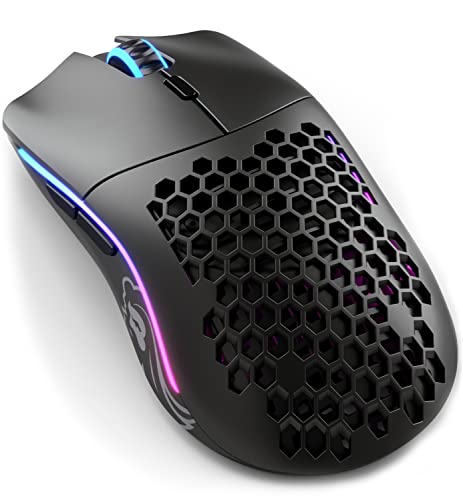
The original Model O Wireless is the honeycomb design that built Glorious’s reputation: a symmetrical, perforated shell at 69 g with RGB shining through the holes. Its BAMF sensor tops out at 19,000 DPI rather than the 26,000 DPI of the newer models, and there is no Bluetooth, but the shape remains a proven fit for palm and claw grips on medium to large hands. It suits players who like the airy feel of a perforated shell and a taller hump, and who mostly play at a single desk on the 2.4 GHz receiver.
Specs
- Weight: 69 g
- Sensor: BAMF optical, up to 19,000 DPI
- Connectivity: 2.4 GHz wireless, wired USB
- Battery life: up to 71 hours
- Buttons: 6
- Shell: honeycomb, ambidextrous
- Lighting: RGB
Best for: Palm and claw players who prefer a perforated honeycomb shell.
Watch out for: This is the older generation: no Bluetooth and a lower maximum DPI than the Model O 2 line, and the open honeycomb shell collects dust, so check the listing photos and plan on occasional cleaning.
ASIN: B098RDFP3J
Which One Fits Your Situation
Tactical shooters with a fingertip or claw grip
Pick the Model O 2 PRO 4K/8K. Its 59 g solid shell and low profile let your fingers drive every correction, and the 4,000 Hz wireless polling keeps the cursor settled during fast peeks on a high-refresh monitor. Keep the polling at 1,000 Hz for practice days to stretch the battery, and raise it for matches where you want the hardware at full speed.
Palm grip and long sessions
Pick the Model D 2 PRO 4K/8K. The sloped ergonomic body supports your whole hand instead of leaving your palm hovering, which reduces the slow ache that builds over a long evening of play. You still get the Pro line’s optical switches and high polling rates, so comfort does not cost you responsiveness. If you prefer a perforated shell and do not need the high polling rates, the original Model O Wireless is the alternative in this guide.
MOBA and MMO players who bind abilities to the mouse
Pick the Model I 2 Wireless. Nine programmable buttons, two of them swappable magnetic side pieces, give you room for abilities, items and a push-to-talk key without moving your hand off the mouse. The thumb rest keeps your grip planted during long fights, and Bluetooth means the same mouse can pair with a laptop for work between sessions without carrying the receiver.
One mouse for a gaming PC and a laptop
Pick the Model O 2 Wireless. Leave the 2.4 GHz receiver in your gaming PC, pair Bluetooth with your laptop, and switch connections instead of re-pairing or carrying a second mouse. The symmetrical shell works with claw, fingertip and relaxed palm grips, so it also covers the widest range of hands if the mouse gets shared around a household or a dorm desk.
Common Mistakes
- Choosing by DPI alone: every mouse here uses a sensor that tracks far beyond what any player can use, so shape and weight should decide first.
- Ordering the wrong Pro edition: the Model O 2 Pro and Model D 2 Pro each come in 1K and 4K/8K versions with near-identical names and listings.
- Ignoring hand size: a large ergonomic shell under a small hand pushes the side buttons out of reach and changes your grip without you noticing.
- Running 4,000 Hz polling full time: it cuts battery life to a fraction of the 1,000 Hz figure quoted in the listing title.
- Assuming every Glorious mouse has Bluetooth: the Pro models and the original Model O Wireless are 2.4 GHz and wired only.
Frequently Asked Questions
Are Glorious mice good for both palm and claw grip?
Yes, but not the same model. The Model D 2 Pro and Model I 2 are shaped for palm and relaxed claw grips, with bodies that support the whole hand. The Model O line is lower and symmetrical, which suits claw and fingertip grips better. Match the shell to your grip; the sensor is the same BAMF 2.0 unit across most of the range, so grip fit is the difference.
What is the difference between the Model O 2 Wireless and the Model O 2 Pro?
The Model O 2 Wireless is the flexible version: 68 g, RGB lighting, Bluetooth alongside 2.4 GHz, and a 1,000 Hz polling rate. The Pro drops the RGB and Bluetooth, cuts weight to 57–59 g, switches to optical switches rated for 100 million clicks, and adds 4,000 Hz wireless and 8,000 Hz wired polling on the 4K/8K edition. Choose the standard model for flexibility, the Pro for competitive play.
How long do Glorious wireless mice last on a charge?
The listings quote up to 210 hours for the Model O 2 Wireless and Model I 2 Wireless over Bluetooth, around 71 hours for the original Model O Wireless, and up to 80 hours at 1,000 Hz for the Pro models, falling to about 35 hours at 4,000 Hz. RGB and high polling shorten every figure, so treat headline numbers as best cases.
Can I use a Glorious mouse with a Mac or a laptop without the receiver?
Only the models with Bluetooth: the Model O 2 Wireless and Model I 2 Wireless pair directly with a Mac or laptop and still offer the 2.4 GHz receiver for a gaming PC. The Pro models and the original Model O Wireless have no Bluetooth, so they need the receiver or a cable. Note that Glorious Core is Windows-focused, so check the listing before planning to remap buttons on macOS.
Related guides
More from Amazon
Programs that pair well with the guide above. Offers and eligibility are set by Amazon and may change.
Free shipping on eligible items, Prime Video and more. Eligible new members can start with a free trial.
Start a Prime free trialAd-free music streaming. Eligible new subscribers can start with a free trial.
Try Music Unlimited freeA Prime membership for ages 18-24 with a trial period. Eligibility is set by Amazon.
See Prime for Young AdultsAudiobooks and podcasts to listen to on the go. Eligible new members can start with a free trial.
Try Audible freeAs an Amazon Associate we earn from qualifying purchases.