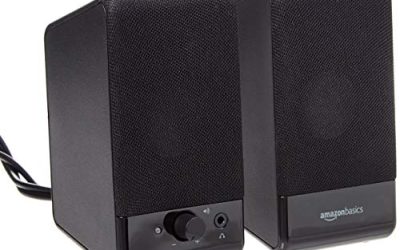
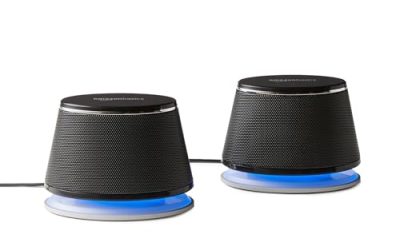
The best small computer speakers in 2026 give you clear voices and a tidy desk, and they do it by using the best driver you can fit in a small cabinet rather than by claiming bass they cannot produce. For most people that means the Audioengine A2+ for accuracy, the Creative Pebble V3 for the lowest cost, and the Kanto ORA or YU2 for style. This guide ranks seven compact pairs by footprint and bass reach and explains the physics that limits what small cabinets can do.
As an Amazon Associate we earn from qualifying purchases at no extra cost to you.


Our Top Picks


Top 3 picks at a glance
What “small” can and cannot do: driver size versus bass
A speaker’s bass reach depends mostly on how much air its woofer can move. Small cones must travel farther to move the same air, and they distort sooner. Published frequency-response specs follow a predictable pattern, shown below with approximate class values from manufacturer spec sheets.
| Woofer size | Typical low-frequency limit | What you hear | Example classes |
|---|---|---|---|
| 2 inches or less | about 120 to 150 Hz | Clear voices, almost no bass; male vocals sound thin | Basic USB desk speakers |
| 2.75 to 3 inches | about 65 to 90 Hz | Natural vocals and guitar, light bass | Audioengine A2+, compact Kanto models |
| 3.5 to 4 inches | about 55 to 65 Hz | Fuller bass, still limited kick drum weight | Edifier R1280DB (55 Hz to 20 kHz) |
| Small speaker plus 4 to 6-inch sub | about 40 to 50 Hz | Cinematic bass without large satellites | 2.1 compact sets |
The practical lesson: if you want strong bass, a small stereo pair is not the answer. Add a small subwoofer or accept the limitation, and use the saved space for better midrange clarity.
Quick comparison of seven compact options
| Pick | Layout | Rated power | Inputs | Best for | Price tier |
|---|---|---|---|---|---|
| Audioengine A2+ | 2.0, 2.75-inch woofers | 30 W RMS (60 W peak) | USB, 3.5 mm, RCA | Accuracy in minimal space | Mid to premium |
| Creative Pebble V3 | 2.0, compact orbs | 8 W RMS | USB-C, 3.5 mm, Bluetooth | Lowest cost, tiny desks | Budget |
| Creative Pebble Plus | 2.1 with small sub | Manufacturer-rated 2.1 USB system | USB, 3.5 mm | Adding bass cheaply | Budget |
| Logitech Z207 | 2.0 compact | 10 W RMS | 3.5 mm, Bluetooth | Simple wireless desk pair | Entry |
| Kanto ORA | 2.0 compact | Manufacturer-rated compact pair | Analog, USB, Bluetooth | Style and flexibility | Mid |
| Kanto YU2 | 2.0 bookshelf-class | Manufacturer-rated powered pair | Analog, USB, Bluetooth | A stronger sound in a small cabinet | Mid |
| IK Multimedia iLoud Micro Monitor | 2.0 studio-style | Manufacturer-rated 50 W total class | Balanced analog, Bluetooth | Flat sound for creators | Mid to premium |
Audioengine A2+: best small pair overall
Spec line: 2.0, 2.75-inch Kevlar woofers, 0.75-inch silk tweeters, 30 W RMS (60 W peak), built-in USB DAC, 3.5 mm and RCA inputs, frequency response listed from about 65 Hz upward.
Best for: writers, editors and anyone who sits 50 to 80 cm from their speakers and wants clarity without bulk.
Skip if: bass matters or the budget is tight.
- Pro: clean mids and highs that stand out among small speakers.
- Pro: USB DAC and headphone output are built in.
- Pro: one speaker houses the amplifier, which keeps the desk tidy.
- Con: costs more than larger rivals with more power.
- Con: no optical input.
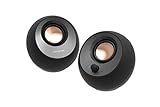
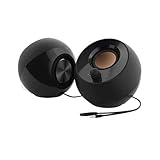
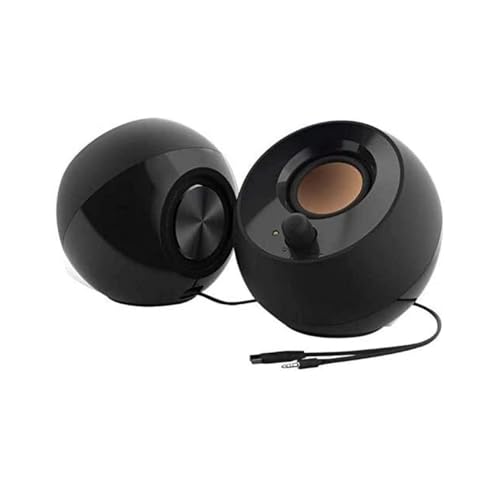
Creative Pebble V3: best budget compact pair
Spec line: 2.0, 8 W RMS, USB-C power and audio, 3.5 mm and Bluetooth, drivers angled upward.
Best for: laptops and dorm desks. A single USB-C connection powers the speakers and carries audio.
Skip if: you want volume above everyday desk levels.
- Pro: costs very little relative to the improvement over laptop speakers.
- Pro: ball-shaped cabinets take little desk space.
- Pro: Bluetooth and wired options.
- Con: thin bass and limited volume.
- Con: plastic build.
Creative Pebble Plus: best budget small speakers with a sub
Spec line: 2.1 USB-powered system with two compact satellites and a small down-firing subwoofer, manufacturer-listed inputs include USB and 3.5 mm.
Best for: people who want some bass from a compact set without paying for a full 2.1 system.
Skip if: you need high volume or fine detail.
- Pro: the subwoofer adds noticeable weight to movies.
- Pro: similar footprint to a normal compact pair plus a small sub.
- Pro: simple USB power.
- Con: the sub can sound boomy if placed against a wall.
- Con: build quality is basic.
Logitech Z207: simple Bluetooth compact pair
Spec line: 2.0, 10 W RMS, Bluetooth and 3.5 mm, wired volume dial.
Best for: small rooms where the aim is better sound than monitor speakers and an easy setup.
Skip if: you want USB audio, optical input or more than light bass.
- Pro: easy pairing and a practical control dial.
- Pro: low price for the brand.
- Pro: compact, clean design.
- Con: no USB or digital input.
- Con: modest detail at higher volumes.
Kanto ORA: the stylish compact option
Spec line: 2.0 powered desktop speakers with Bluetooth, analog and USB inputs, remote, several finishes.
Best for: desks where the speakers are on show and users want one pair for PC, phone and a turntable via a preamp.
Skip if: price per watt is your priority.
- Pro: premium finish and neat footprint.
- Pro: several inputs including Bluetooth.
- Pro: balanced tuning without harshness.
- Con: priced above larger-cabinet rivals.
- Con: limited bass without a sub.
Kanto YU2: more output from a small cabinet
Spec line: 2.0 powered pair with Bluetooth, analog and USB inputs, remote, bookshelf-class cabinets on the larger end of the compact range.
Best for: people who want fuller, louder sound than tiny speakers can provide but still need to keep the footprint small.
Skip if: the desk is shallower than about 50 cm, where the cabinets crowd the monitor.
- Pro: stronger bass and volume than orb-sized speakers.
- Pro: flexible inputs and a remote.
- Pro: attractive finishes.
- Con: larger than the ORA and Pebble class.
- Con: price is mid-range.
IK Multimedia iLoud Micro Monitor: small and flat
Spec line: compact studio-style monitors with 3-inch woofers, balanced analog inputs and Bluetooth, with onboard EQ switches according to the manufacturer.
Best for: creators who edit video, music or photos on a small desk and want a neutral, revealing sound.
Skip if: you prefer a warm, bass-forward sound for casual listening.
- Pro: honest tonal balance that is useful for editing decisions.
- Pro: small footprint with balanced inputs.
- Pro: onboard EQ for room correction at the desk.
- Con: the flat tuning sounds lean for music and games.
- Con: premium price for the size.
Power for tiny speakers: what a USB port can deliver
USB-powered speakers must fit their power in the supply limit, which explains why they stay quiet. A USB 2.0 port supplies 5 V at 500 mA, which is 2.5 W. A USB 3.0 port supplies 900 mA, about 4.5 W. A USB-C port can supply 3 A at 5 V, which is 15 W. An amplifier is typically 50 to 70 percent efficient, so a speaker drawing 15 W from USB-C might make 8 W RMS at best. That matches the Creative Pebble’s rating and shows why a USB 2.0 port cannot drive a loud pair. If the speakers cut out or distort when the bass hits, the port is limiting them. Move the cable to a rear USB 3 port or a powered hub, or use the supplied power adapter.
How to choose a small speaker by footprint and priority
- Measure first. Measure the width between the monitor and the desk edge, and the depth from the wall to the front edge. Speakers need 5 to 10 cm of clearance behind them if they have rear ports.
- Pick the driver size you can fit. 2.75 to 3 inches suits most desks. 4 inches needs a depth of at least 60 cm.
- Match the connection to your PC. USB and Bluetooth need no extra hardware. Analog needs a 3.5 mm output or a USB DAC.
- Decide on bass. If you want it, buy a 2.1 set or a small sub. Do not buy a bigger pair of small speakers and expect more bass.
- Consider the listening distance. Under 80 cm, 8 to 30 W RMS is sufficient.
Placement tricks that help small speakers
- Angle the speakers inward at about 30 degrees so the tweeters point at your ears.
- Raise them with small stands or foam pads so the tweeters sit at ear height. Raising by 5 to 10 cm often does more than adding power.
- Place them 10 to 15 cm from the wall behind them. Closer placement increases bass but can make it boomy.
- Do not set speakers on the same surface as a spinning hard drive or keyboard if you notice vibration.
- Use a short analog cable. Long, loose cables near power bricks pick up hum.
Small speakers versus monitor speakers and headphones
Most monitors with speakers deliver 2 to 5 W per channel with little bass and a narrow tonal range. A compact pair of 8 to 30 W RMS speakers makes a clear step up. Headphones remain better for late-night listening and for detail at a given cost, while small speakers win for comfort over long sessions and for shared listening. If you often switch, choose speakers with a headphone jack on the front, like the A2+, so you can mute the speakers instantly.
Decision matrix: match your desk to a pair
| Your situation | Depth available | Priority | Choose |
|---|---|---|---|
| Laptop on a narrow student desk | 40 to 50 cm | Lowest cost, USB-C | Creative Pebble V3 |
| Same desk, want some bass | 40 to 50 cm | Movies and games on a budget | Creative Pebble Plus |
| Home office, music all day | 55 to 70 cm | Clear vocals, low fatigue | Audioengine A2+ |
| Visible desk, design matters | 55 to 70 cm | Finish plus Bluetooth | Kanto ORA |
| Larger desk, want more punch | 65 cm or more | Volume without a sub | Kanto YU2 |
| Video, photo or audio editing | 55 to 70 cm | Neutral tone | IK Multimedia iLoud Micro Monitor |
| Simple wireless pair for a spare room | 40 to 50 cm | Easy pairing | Logitech Z207 |
Cables, adapters and DACs for compact setups
Small speakers often fail on the source side rather than the speaker side. A noisy 3.5 mm jack on a cheap motherboard adds a faint hiss that a small, sensitive tweeter reveals at low volume. Three fixes work in order of cost. First, use the speaker’s own USB input if it has one, since that moves the digital-to-analog conversion into the speaker. Second, add a small USB DAC dongle, which costs little and gives a clean analog line. Third, use optical output into a speaker with a digital input, which avoids electrical noise altogether but needs a model with that input.
For analog cables, short, shielded runs matter more than expensive brands. Keep audio cables under 1.5 m where possible and route them away from power bricks and monitor cables. If the speakers hum when the monitor turns on, plug both into the same power strip so they share the same ground reference.
Common mistakes with small speakers
- Buying on peak watts. A tiny pair marketed as 40 W peak is often 10 W RMS, and that figure is what sets the loudness.
- Placing the speakers on the floor or the keyboard shelf, where the tweeters point at your chest and the sound dulls.
- Pushing the bass knob up to compensate for missing low end, which creates distortion and a muddy midrange rather than depth.
- Powering from a front-panel USB port that shares bandwidth and power with other devices and causes crackle.
- Leaving the PC’s volume at a low level and the speaker’s at maximum. The right balance is the PC near 80 to 100 percent and the speaker knob controlling loudness, which keeps the signal strong relative to noise.
Frequently Asked Questions
What are the best small computer speakers?
The Audioengine A2+ is the best small pair for sound quality, and the Creative Pebble V3 is a strong low-cost option. For design, look at the Kanto ORA, and for a flat, creator-friendly sound look at the IK Multimedia iLoud Micro Monitor.
Do small speakers have enough bass?
Not for strong bass. Small woofers typically reach down to about 65 to 90 Hz, which covers vocals, guitars and most game dialogue but not deep kick drums or explosions. A small subwoofer, such as in the Creative Pebble Plus, fixes this at modest cost.
How loud can small USB speakers get?
Typically they reach comfortable desktop volume of about 75 to 85 dB at close range but lack headroom for a large room. Their power limit comes from the USB port and small amplifier.
Are small speakers better than my monitor’s built-in speakers?
Almost always. Monitor speakers are tiny, often rear- or downward-facing and tuned to avoid distortion rather than sound good. An 8 to 30 W pair of compact desktop speakers gives clearer vocals and wider stereo.
What size speaker fits behind a 27-inch monitor?
A 27-inch monitor is about 61 cm wide, so speakers on either side need about 10 to 15 cm each. Choose compact models with cabinets under about 12 cm wide, and place them just outside the monitor edges rather than behind it.
Should I buy a pair with a front headphone jack?
Yes if you switch between speakers and headphones during the day. A front jack lets you plug in without reaching behind the desk, and most pairs mute the speakers automatically when headphones are connected. Models without it can still work, but you will rely on the PC’s own output switching, which is slower and sometimes resets volume levels.
Related guides
- Best Soundbars for PC and Gaming Desks in 2026: Seven Bars, Fit Checks and Connection Rules: 4 Compared
- Best RGB Speakers for PC in 2026: Seven Lit Sets, Software Sync and Lighting Power Draw: 4 Compared
- Best PC Speakers for Gaming in 2026: Seven Sets Matched to Desk Size and Game Type: 4 Compared
- Best 5.1 and 7.1 Surround Sound PC Speakers in 2026: What Actually Works at a Desk: 4 Compared
More from Amazon
Programs that pair well with the guide above. Offers and eligibility are set by Amazon and may change.
Free shipping on eligible items, Prime Video and more. Eligible new members can start with a free trial.
Start a Prime free trialAd-free music streaming. Eligible new subscribers can start with a free trial.
Try Music Unlimited freeA Prime membership for ages 18-24 with a trial period. Eligibility is set by Amazon.
See Prime for Young AdultsAudiobooks and podcasts to listen to on the go. Eligible new members can start with a free trial.
Try Audible freeAs an Amazon Associate we earn from qualifying purchases.