The best RGB speakers for a PC in 2026 are the Logitech G560 for big, loud, screen-synced lighting, the Razer Nommo V2 for the best sound among RGB sets, and the Creative Pebble Pro or Edifier G2000 if you want modest lighting on a small desk. Pick the set whose software ecosystem matches the rest of your RGB gear: lighting that cannot sync with your keyboard, case fans and mouse ends up as a separate, annoying color scheme. This guide compares seven current options, shows how the lighting software and USB power interact, and gives a checklist so the speakers look as good as they sound.
As an Amazon Associate we earn from qualifying purchases at no extra cost to you.

Our Top Picks
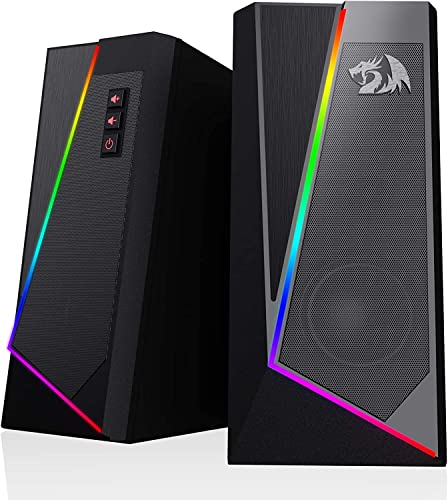 Redragon GS520 Wired 2.0 Channel Stereo Sound Desktop7.48 x 6.69 x 4.33 inches1.8 poundsCheck on Amazon
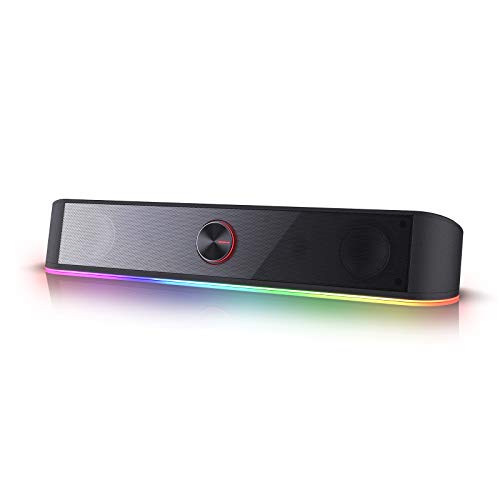
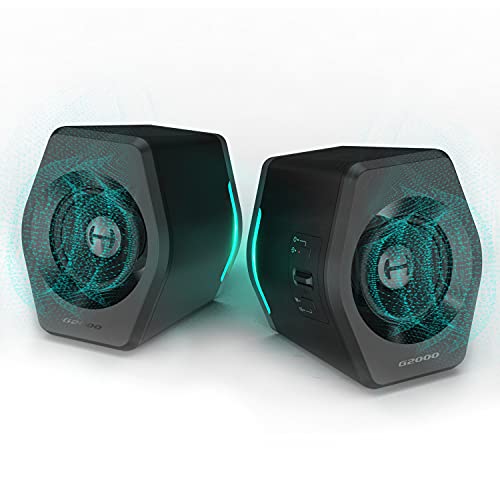
Top 3 picks at a glance
Seven RGB speaker sets at a glance
| Set | Layout and power | Lighting system | Connections | Price tier | Best for |
|---|---|---|---|---|---|
| Logitech G560 | 2.1, 120W RMS (240W peak) | LIGHTSYNC, four zones, G Hub | USB, 3.5mm, Bluetooth | Mid | Loudest synced lighting |
| Razer Nommo V2 | 2.1, 3.2-inch full-range satellites, 5.5-inch sub, 40-20,000 Hz | Chroma RGB, Synapse | USB, Bluetooth, 3.5mm | Premium | Sound quality plus Razer ecosystem |
| Razer Nommo V2 X | 2.0, 3-inch full-range, 75-20,000 Hz, 96 dB max SPL | Rear-projected Chroma RGB | USB, Bluetooth, external power adapter | Mid | Desk-friendly Chroma without a sub |
| SteelSeries Arena 7 | 2.1, 3-inch woofers, 6.5-inch down-firing sub, 35-20,000 Hz | PrismSync four-zone, GG software | USB, optical, 3.5mm, Bluetooth | Mid to premium | Bass plus optical for consoles |
| Creative Pebble Pro | 2.0, 10W RMS (30W with PD brick) | Built-in RGB, Creative app | USB-C, 3.5mm, Bluetooth 5.3 | Entry | Small desks, cheap lighting |
| Edifier G2000 | 2.0, 2.75-inch drivers, 16W RMS | Preset RGB modes | USB, 3.5mm, Bluetooth | Entry to mid | Balanced sound with lighting |
| JBL Quantum Duo | 2.0, 2.5-inch woofers, 0.75-inch tweeters, 20W RMS, 60-20,000 Hz | Customizable RGB with audio-sync | USB, 3.5mm, Bluetooth, headphone jack | Entry to mid | Compact lighting with headphone out |
Specs come from manufacturer pages and major reviews. Some brands do not publish a single RMS number, so where the table gives a frequency range or SPL instead, that is what the maker publishes.
Why the lighting ecosystem matters
Every brand ships its own lighting software: Logitech G Hub, Razer Synapse, SteelSeries GG, Creative’s app, and so on. Speakers sync perfectly with products inside the same ecosystem and poorly or not at all with others, unless you use a third-party tool or a platform that several brands support. Before buying, check what your keyboard, mouse, case fans and motherboard already use.
| If your gear already uses | Best match | Why | Watch out for |
|---|---|---|---|
| Logitech G Hub | G560 | Same LIGHTSYNC profiles and screen sampling | Surround processing needs Windows and USB |
| Razer Synapse and Chroma | Nommo V2 or V2 X | Chroma Studio effects across devices | Synapse is a heavy background app |
| SteelSeries GG | Arena 7 | PrismSync and GameSense integration | Optical and USB give flexible sources |
| Motherboard RGB (Aura, Mystic Light, Fusion) | Preset-mode sets (G2000, Pebble Pro) | No clash with a separate ecosystem | No sync, so pick a neutral color |
| No RGB gear at all | Any set | Choose by sound | Avoid paying for lighting you will turn off |
Best overall RGB set: Logitech G560
Spec line: 2.1, 120W RMS (240W peak), four speakers in two satellites (front- and rear-facing drivers) plus a subwoofer, USB, 3.5mm and Bluetooth, four-zone LIGHTSYNC with screen-reactive and audio-visualizer modes.
Best for: Players who want the most dramatic synced lighting and high output. Skip if: you do not want to run G Hub in the background.
- Lighting reacts to on-screen colors and in-game audio events.
- Rear-facing drivers widen the soundstage near a wall.
- Real subwoofer and large power headroom.
Cons: Bulky. Bass can be heavy and needs careful placement.
Best sound among RGB sets: Razer Nommo V2
Spec line: 2.1, two 3.2-inch full-range satellites, 5.5-inch down-firing wired subwoofer, 40-20,000 Hz, 98 dB max SPL, THX Spatial Audio, rear and underside Chroma lighting. The Nommo V2 Pro swaps in a wireless sub and control pod at a much higher price.
Best for: Razer-ecosystem desks where audio quality is the priority. Skip if: you want an inexpensive set.
- Deep, controlled low end.
- Clean full-range satellites.
- Strong integration with Chroma-enabled games.
Cons: Premium price tier. Heavy software.
Best compact Chroma: Razer Nommo V2 X
Spec line: 2.0, two 3-inch full-range drivers (about 83 mm), 75-20,000 Hz, 96 dB max SPL at 1 meter, THX Spatial Audio, USB or Bluetooth 5.0 input, external power adapter, rear-projected Chroma RGB.
Best for: A mid-priced desk pair without a subwoofer. Skip if: you want bass below 75 Hz.
- Compact enough for most desks.
- Chroma lighting projects onto the wall behind.
- THX Spatial Audio support.
Cons: No subwoofer. Needs a power adapter.
Best 2.1 with optical: SteelSeries Arena 7
Spec line: 2.1 with two 3-inch woofers and 0.75-inch tweeters, a 6.5-inch down-firing subwoofer, 35-20,000 Hz, USB, optical, 3.5mm and Bluetooth, four-zone PrismSync lighting. Listings quote different power figures, so judge by drivers and response rather than a single wattage.
Best for: A desk shared between a PC and a console or TV that outputs optical. Skip if: you do not use SteelSeries software.
- Real subwoofer extending to 35 Hz per the spec.
- Optical input suits TVs and monitors.
- Screen-reactive lighting.
Cons: Large and heavy. Power figures vary by source.
Best cheap RGB: Creative Pebble Pro
Spec line: 2.0, 80-20,000 Hz, 10W RMS (20W peak), up to 30W RMS (60W peak) with a PD brick, USB-C, 3.5mm and Bluetooth 5.3, headset and mic jacks, built-in RGB.
Best for: Small desks that need light accents. Skip if: you want bass.
- Headset jacks on the speaker are handy.
- Small footprint and USB-C power.
- Entry price tier.
Cons: Limited bass. Lighting control is simpler than premium ecosystems.
Best balanced pair with lighting: Edifier G2000
Spec line: 2.0, two 2.75-inch full-range drivers, 98-22,000 Hz, 16W RMS (32W peak), Game / Music / Movie modes, preset lighting effects, USB, 3.5mm and Bluetooth.
Best for: Gamers who want clear audio and tasteful lighting without more software. Skip if: you want synced effects across brands.
- Clear midrange and sound modes.
- Presets work without an ecosystem.
- Flexible inputs.
Cons: No deep bass. Lighting effects are preset-based.
Best compact with headphone out: JBL Quantum Duo
Spec line: 2.0, 2.5-inch woofers and 0.75-inch tweeters, 20W RMS, 60-20,000 Hz, USB, 3.5mm and Bluetooth, headphone jack, customizable RGB with audio-sync mode.
Best for: A compact set with built-in lighting and a headphone jack. Skip if: you need optical or deeper bass.
- Lighting synced to the audio.
- Headphone output on the speaker.
- Small footprint.
Cons: Older Bluetooth standard per the spec sheet. No optical.
Worked example: what does the lighting cost in power?
Lighting adds a small load on top of the amplifier. A typical addressable LED draws around 20-60 mA at full white. A speaker with 24 LEDs could draw 0.5-1.4A at 5V, which is 2.5-7W, though most effects run far below full white. On a USB-powered set that matters: if the speaker is rated for 10W RMS and the port supplies 15W, the lighting can eat a quarter of the budget when you set bright effects. This is why makers recommend a power brick or a USB-C PD supply, and why you may notice crackle at high volume when bright effects are on. If you hear that, lower the lighting brightness or switch to a static color.
| Mode | Typical LED draw | Effect on a 15W USB-C budget | Recommendation |
|---|---|---|---|
| Off | 0W | No impact | Best for critical listening |
| Static dim color (30 percent) | Under 1W | Minimal | Safe on any port |
| Rainbow, 70 percent | About 2-3W | Noticeable on small ports | Use a 5V 2A adapter |
| Full-white flashes | Up to 5-7W | Can starve the amp | Avoid on USB-powered sets |
Mains-powered sets such as the G560, Nommo V2 and Arena 7 do not have this problem.
Judge RGB sets by sound first: a quick ranking method
Because lighting is the easy part to advertise, use a short scoring method that keeps sound in charge. Give each candidate a score from 0 to 3 on four things, then add lighting last as a tiebreaker.
- Low-end reach. 0 for a response starting near 100 Hz (small 2.0 pairs), 1 for about 75-80 Hz (Nommo V2 X), 2 for about 50-60 Hz (Pebble Plus class), 3 for 35-40 Hz with a real sub (Arena 7, Nommo V2).
- Headroom. 0 for under 10W RMS, 1 for 15-20W RMS (G2000, Quantum Duo), 2 for 40W+, 3 for 100W+ (G560). Remember headroom matters most when you sit 1.5 m or more from the speakers.
- Inputs. 1 point each for USB, optical, 3.5mm and Bluetooth, capped at 3, so you can switch between a PC, console and phone.
- Software burden. Subtract 1 if basic functions such as input switching require a running background app.
| Set | Low-end | Headroom | Inputs | Software | Rough total |
|---|---|---|---|---|---|
| SteelSeries Arena 7 | 3 | 2-3 | 3 | -1 | 7-8 |
| Logitech G560 | 2 | 3 | 3 | -1 | 7 |
| Razer Nommo V2 | 3 | 2-3 | 3 | -1 | 7-8 |
| Razer Nommo V2 X | 1 | 1-2 | 2 | -1 | 3-4 |
| Edifier G2000 | 0 | 1 | 3 | 0 | 4 |
| JBL Quantum Duo | 0-1 | 1 | 2 | 0 | 3-4 |
| Creative Pebble Pro | 0 | 1-2 | 3 | 0 | 4-5 |
This is an editorial scoring method based on published specs, not a lab measurement. Its purpose is to make the trade-off visible: the three 2.1 sets score highest on sound capability, and the compact sets win on desk space and simplicity. If two sets tie, choose the one whose lighting ecosystem matches your gear.
Common RGB speaker problems and fixes
| Symptom | Likely cause | Fix |
|---|---|---|
| Lighting does not sync with the keyboard | Different ecosystems | Use the same brand, or set both to a static matching color |
| Lights flash but audio stutters | Software hogging CPU or USB bandwidth | Close extra lighting apps, update the app, use a rear USB port |
| Hiss or whine when lights are bright | Shared power with LEDs on a weak USB supply | Use a stronger adapter or lower brightness |
| Lighting resets after sleep | Profile not saved to the device | Save the profile to onboard memory in the app if offered |
| Surround processing sounds odd | Spatial effects stacked on Windows spatial sound | Use only one spatial processor at a time |
Placement for lighting that does not hurt your eyes
Aim for backlighting that washes the wall behind the monitor rather than lights that face your seat. A typical rule from lighting design is that the surface behind the screen should be about 10 percent of the screen’s brightness, which makes the display feel less harsh. At speaker-level distances of 0.6-1 m, bright effects can compete with the screen, so set speaker lighting well below the screen’s brightness in dark rooms.
How to set up RGB speakers well
- Place them so the glow lands on a wall, not your screen. Rear-projected lighting is easier on the eyes than lights that face you.
- Pick one color scheme. Run your keyboard, speakers and case fans from one ecosystem or set them all to the same static color.
- Use audio-reactive modes sparingly. They can be distracting in competitive play; set the brightness to 30-50 percent.
- Keep tweeters at ear height. Lighting is not a reason to put speakers on the floor.
- Update firmware and the lighting app. Many lighting glitches come from outdated drivers.
RGB gaming speakers: what to skip
- Sets whose only selling point is a light bar and a huge peak wattage number.
- RGB speakers that require an account and cloud login just to change colors.
- Models whose lighting stays on with no off switch in the app.
- Bluetooth-only RGB speakers for PC gaming; the delay is noticeable.
Frequently Asked Questions
Are RGB speakers worth it?
Lighting adds no sound quality, so choose the set by sound first. If the price difference is small and the lighting syncs with your other gear, it is a nice bonus; if it costs a lot or requires heavy software, a non-RGB pair at the same price usually sounds better.
Which RGB speakers sync with the rest of my PC?
Speakers sync best inside their own ecosystem: Logitech G560 with G Hub, Razer Nommo with Synapse and Chroma, SteelSeries Arena with GG. Third-party tools can bridge some ecosystems, but support is uneven.
Do RGB speakers affect sound quality?
Not directly. Lighting draws a little power, which can matter on USB-powered sets, and cheap sets may have audible whine from LED controllers. Mains-powered sets avoid most of that.
Can I turn the lighting off?
Yes on all sets listed here, either from software, a button or both. Check that the setting persists after a restart; some sets reset to a default effect when unplugged.
What is the best RGB speaker for a small desk?
The Creative Pebble Pro, Edifier G2000 and JBL Quantum Duo have small footprints and built-in lighting. The Razer Nommo V2 X is a bigger step up with Chroma support.
Do RGB speakers work with consoles?
Their audio does through 3.5mm, USB or optical, depending on the model; the lighting software usually runs on a PC only. The SteelSeries Arena 7 has an optical input, which suits consoles routed through a TV or monitor.
Bottom line
Choose the G560 for the brightest synced show, the Nommo V2 for the best sound with lighting, the Arena 7 for bass and optical, and the Pebble Pro, G2000 or Quantum Duo for small desks. Based on published specs and reviews, the sound-first approach wins: pick the pair that sounds right at your listening distance, then use the lighting as a bonus.
Related guides
- Best Soundbars for PC and Gaming Desks in 2026: Seven Bars, Fit Checks and Connection Rules: 4 Compared
- Best Small Computer Speakers for 2026: Compact Pairs Ranked by Footprint and Bass Reach: 4 Compared
- Best PC Speakers for Gaming in 2026: Seven Sets Matched to Desk Size and Game Type: 4 Compared
- Best 5.1 and 7.1 Surround Sound PC Speakers in 2026: What Actually Works at a Desk: 4 Compared
More from Amazon
Programs that pair well with the guide above. Offers and eligibility are set by Amazon and may change.
Free shipping on eligible items, Prime Video and more. Eligible new members can start with a free trial.
Start a Prime free trialAd-free music streaming. Eligible new subscribers can start with a free trial.
Try Music Unlimited freeA Prime membership for ages 18-24 with a trial period. Eligibility is set by Amazon.
See Prime for Young AdultsAudiobooks and podcasts to listen to on the go. Eligible new members can start with a free trial.
Try Audible freeAs an Amazon Associate we earn from qualifying purchases.