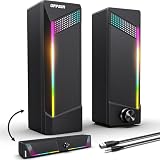
The Razer Leviathan V2 X is the best soundbar for most PC monitors in this group because it runs on a single USB-C cable for both power and audio, adds Bluetooth for a phone, and has a compact body that fits under a typical monitor. A PC soundbar is a slim, desktop-sized speaker meant to sit below or in front of a screen and replace a pair of separate speakers. If you want more stated wattage or wireless pairing, the Monster SD100 is the runner-up, and the budget USB bars below suit simple office desks.
Our Top Picks


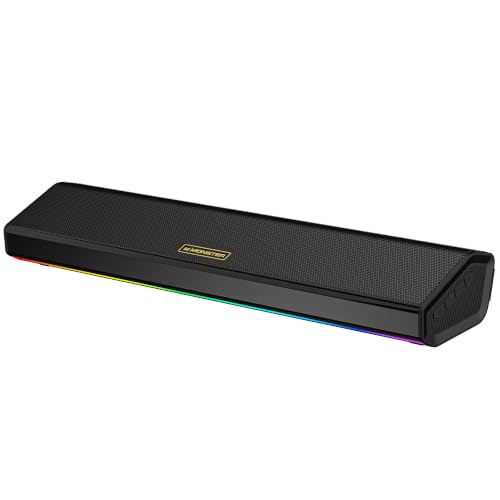



Top 3 picks at a glance
Quick List
- Redragon GS560 – best for RGB lighting with a physical volume knob
- Clip-on USB soundbar – best for saving desk space with a monitor-mounted design
- Monster SD100 – best for higher stated power and Bluetooth 6.0
- LENRUE A39PRO – best for a no-fuss, USB-powered desk bar
- Nylavee 4-driver bar – best for Bluetooth plus a built-in mic and headphone jack
- Razer Leviathan V2 X – best for gamers who want one USB-C cable and a brand app
Which One Is Right for You?
| If you… | Choose |
|---|---|
| want a single USB-C cable and a polished software app | Razer Leviathan V2 X |
| want the largest stated power rating and wireless pairing | Monster SD100 |
| care about desk lighting and a clear volume knob | Redragon GS560 |
| need to free up every inch of desk surface | Clip-on USB soundbar |
| want a mic and headphone jack built into the bar | Nylavee 4-driver bar |
| just need plug-in sound for office work | LENRUE A39PRO |
Decide first how the bar will connect: USB power with a 3.5 mm cable, a pure USB audio connection, Bluetooth, or USB-C. Then measure the space under your monitor, since a bar that is too tall will block the bottom bezel or the screen itself.
All 6 Picks in Detail
1. Redragon GS560 – Best for RGB lighting and a volume knob
As an Amazon Associate we earn from qualifying purchases at no extra cost to you.

The GS560 is a 2.0-channel desktop soundbar aimed at gaming desks. The listing highlights dynamic lighting that syncs with audio, touch controls, and a backlit volume knob. It is powered over USB, with sound carried by a 3.5 mm cable, so any PC or laptop with a headphone jack can drive it.
It suits builders who want a lit-up desk and a simple physical knob. Published specifications list the output at roughly 4 watts per channel and a signal-to-noise ratio around 65 dB, so expect clear everyday volume rather than room-filling sound.
Lighting is the main personality here, and the touch-sensitive controls let you cycle modes without software. If you work with the lights off or share a desk with someone sensitive to glare, check that the lighting can be switched off. Because the signal comes over an analog cable, the sound quality depends partly on your motherboard’s headphone output.
- 2.0-channel stereo with dual driver units
- USB for power, 3.5 mm cable for audio
- Touch-control lighting with several static and dynamic modes
- Roughly 15.8 inches wide, according to published specifications
- Metal and plastic body
- Output wattage differs between retailers, so confirm on the listing
Pros
- Physical volume control that is easy to find
- Lighting that responds to the music
Cons
- Modest output and bass
- Needs a USB port and a separate headphone jack
Compared with the LENRUE bar, it adds a knob and more lighting modes but needs two cables instead of one.
2. Clip-on USB computer soundbar – Best for saving desk space

This unbranded-looking soundbar is described as a wired USB bar for desktop PCs and laptops with adaptive channel switching, loud sound and deep bass claims, a USB-C adapter, and an easy clip-on design for the monitor. Its main selling point is placement: attaching it to the monitor keeps the desk surface clear.
It suits compact desks, shared workspaces and laptops docked beside an external display. The listing text we reviewed does not state wattage, driver size or dimensions, so treat any loudness claims cautiously and read the full product page before buying.
Clip-on bars work best on flat, standard-width monitor bezels, so measure the thickness of the top edge before choosing. The adaptive channel switching claim suggests the bar adjusts how it handles stereo and mono sources, but the listing excerpt gives no further detail. Anyone who needs verified numbers should favor one of the better documented bars in this list.
- Wired USB connection, with a USB-C adapter included
- Clip-on mounting for the top or edge of a monitor
- Adaptive channel switching described in the listing
- Wattage: confirm on listing
- Driver configuration: confirm on listing
- Monitor thickness limits for the clip: confirm on listing
Pros
- Frees desk space and puts sound near ear level
- Single wired connection
Cons
- Few specifications are stated
- The clip may not fit thick or curved monitors
It is the most space-efficient option here, but the Razer bar gives a clearer set of verified specifications.
3. Monster SD100 – Best for higher stated power and Bluetooth 6.0
The SD100 stands out for its listing claims: 28 watts of stereo output, Bluetooth 6.0, a 3.5 mm aux input, true wireless stereo pairing and a built-in microphone. It suits users who want one speaker for a PC, a phone and possibly a second matching unit for wider stereo.
The wireless features make it flexible for a desk that also serves as a living-room or bedroom setup. Keep in mind that Bluetooth adds delay, so for fast games or video editing use the wired input.
The wireless pairing feature is worth a note: two SD100 units can be linked as a stereo pair, which turns a small bar into a wider setup. That requires owning two units, and the listing excerpt does not describe how the second bar is powered. For a single desk, the 3.5 mm input and Bluetooth are the features you will use most.
- 28 W stereo output as stated in the listing title
- Bluetooth 6.0 and a 3.5 mm aux input
- TWS wireless pairing with a second unit
- Built-in microphone
- Driver sizes and dimensions: confirm on listing
- Power input type: confirm on listing
Pros
- Highest stated wattage in the group
- Multiple connection options
Cons
- Wattage figures may reflect peak, not continuous, output
- Bluetooth latency is not ideal for games
It offers more flexibility than the Nylavee but fewer verified driver details than the Razer.
4. LENRUE A39PRO – Best for a no-fuss USB desk bar

The LENRUE A39PRO is a simple USB-powered soundbar with 10 watts of stated stereo output and colorful lighting. The listing describes it as plug-and-play with no driver installation. It suits office and student desks where the goal is better sound than laptop speakers without extra setup.
Think of it as a step up from tinny monitor speakers, not as a serious gaming or music system. A USB 2.0 port is specified for 5 volts at 500 milliamps, or about 2.5 watts, so a 10 watt rating is a peak figure rather than something the port can supply continuously.
Color lighting is included, but check whether the lights follow the sound or simply cycle. Its simple USB design makes it a good second-system bar for a spare room or a work laptop. Anyone who wants Bluetooth, multiple inputs or a headphone jack should look at the Nylavee or Monster instead.
- 10 W stereo output as stated in the listing
- USB powered, wired connection
- LED lighting effects
- Plug-and-play without drivers
- Audio input type (USB audio or 3.5 mm): confirm on listing
- Dimensions: confirm on listing
Pros
- Very simple setup
- Compact enough for most desks
Cons
- Limited bass
- Few details stated beyond wattage
Next to the Redragon GS560, it is simpler and has fewer controls.
5. Nylavee 4-driver PC soundbar – Best for Bluetooth, mic and headphone jack

The Nylavee bar combines four drivers, Bluetooth, an aux input, a built-in microphone and a headphone jack. USB-A or USB-C power is supported. It suits remote workers who want a speaker that handles video calls and music from a phone as well as the PC.
Its four-driver layout is meant to widen the stereo image, but the listing excerpt we reviewed does not give wattage or Bluetooth version, so confirm those details before ordering.
A headphone jack on the bar itself is a quiet convenience: you can plug in headphones without reaching behind the PC. The built-in microphone means the bar can act as a basic speakerphone for calls from a paired phone. Because the listing mentions both USB-A and USB-C power, you can use a laptop port, a monitor’s USB hub or a wall charger.
- Four drivers in a hi-fi stereo layout
- Bluetooth and AUX inputs
- USB-A or USB-C power
- Built-in microphone and headphone jack
- Wattage: confirm on listing
- Bluetooth version: confirm on listing
Pros
- Handy headphone jack on the bar
- Works with phones and laptops
Cons
- Several specifications are unstated
- Bluetooth delay limits gaming use
It overlaps with the Monster SD100 but emphasizes drivers and ports over stated power.
6. Razer Leviathan V2 X – Best for gamers who want one USB-C cable

The Leviathan V2 X is a compact soundbar with full-range drivers, Chroma RGB, USB-C and Bluetooth 5.0. Razer’s specification page lists two full-range drivers and two passive radiators, a frequency response from 85 Hz to 20 kHz and a maximum sound pressure level of 90 dB.
It is a good fit for gamers who already use other Razer gear, since Razer Audio and Synapse give you an equalizer. Bluetooth supports the SBC codec only, so wired USB-C is the better choice for games.
One caution is wattage: retailer listings give conflicting figures, and Razer’s own specification table does not list one, so rely on the sound pressure and frequency response numbers instead. The single USB-C cable carries power and audio on supported ports, which makes cable management easy. Note that the bar sits fairly low and about 71 mm tall, so check clearance under your monitor.
- Two full-range drivers plus two passive radiators
- USB-C power and audio, with a USB-C cable in the box
- Bluetooth 5.0 with SBC
- Chroma RGB with 14 lighting zones
- About 400 mm wide and 845 g
- Output wattage: confirm on listing, as retailers disagree
Pros
- Clean single-cable setup
- Passive radiators add some low-end weight
Cons
- Bass still limited compared with a subwoofer
- Bluetooth is basic
Compared with the Monster SD100, it offers less wireless flexibility but more verified driver and software details.
Specs Compared
| Model | Connection | Drivers | Stated power | Bluetooth | Extras |
|---|---|---|---|---|---|
| Redragon GS560 | USB power, 3.5 mm audio | Dual units (2.0) | Confirm on listing | Not stated | RGB, touch controls, volume knob |
| Clip-on USB soundbar | Wired USB, USB-C adapter | Confirm on listing | Confirm on listing | Confirm on listing | Clip-on mounting |
| Monster SD100 | Bluetooth 6.0, 3.5 mm aux | Stereo, confirm on listing | 28 W | 6.0 | TWS pairing, built-in mic |
| LENRUE A39PRO | Wired USB | Stereo, confirm on listing | 10 W | Not stated | LED lighting |
| Nylavee 4-driver | Bluetooth, AUX, USB-A or USB-C power | 4 | Confirm on listing | Version: confirm on listing | Mic, headphone jack |
| Razer Leviathan V2 X | USB-C, Bluetooth 5.0 | 2 full-range plus 2 passive radiators | Confirm on listing | 5.0 (SBC) | Chroma RGB, Razer Audio app |
How We Chose These
We started from the six soundbars in current catalog listings and checked each against manufacturer pages, retailer specification fields and published product coverage. We favored a clear connection type, an identifiable driver layout and a size that suits a typical monitor stand. Because retailers sometimes list different wattage figures for the same model, we flagged those values to confirm on the listing and avoided ranking by wattage alone. We did not take our own measurements, and none of the sound descriptions here come from our own listening.
What to Look For
Size and placement
A soundbar should be narrower than your monitor and short enough to sit below the screen without blocking it. Monitor width is roughly 0.87 times the diagonal for a 16:9 screen, so a 27-inch monitor is about 23.5 inches wide and a 15.8-inch bar fits comfortably. For a 34-inch ultrawide, which is about 31 inches wide, you have more room for a longer bar. Measure the gap between the desk and the bottom bezel, since many monitors sit only two to four inches above the desk on their stand.
USB, USB-C and 3.5 mm connections
A USB-powered bar with a 3.5 mm cable uses the USB port only for power, while the audio travels over the headphone jack. A true USB audio bar carries sound digitally and appears as its own device in Windows. USB-C power delivery can supply far more than a basic USB-A port. As a rule of thumb, a USB 2.0 port provides about 2.5 watts and a USB 3.x port about 4.5 watts, so a high wattage claim on a USB-A bar usually describes peak output.
Drivers, passive radiators and bass
Small soundbars cannot move much air, so bass below roughly 80 Hz is limited on every model here. Passive radiators, like those on the Razer bar, help extend the low end without a port. More drivers do not guarantee better sound, but they can widen the stereo image. If you want real bass, plan to add a desktop subwoofer or choose larger bookshelf speakers instead.
Bluetooth, latency and codecs
Bluetooth is convenient for phones, but the common SBC codec adds noticeable delay, often over 100 milliseconds. That delay is fine for music and video that sync automatically, but not for fast games or video editing. Use the wired input for those jobs. A newer Bluetooth version, such as 6.0 on the Monster, can improve range and connection stability, but it does not remove codec delay.
Worked example: sizing a bar for a 27-inch desk
Say you own a 27-inch 16:9 monitor on a stand that leaves a 3-inch gap above the desk. The panel is about 23.5 inches wide, so a bar of 16 inches or less is centered with space on each side. A bar taller than 3 inches would sit in front of the bezel, so you would raise the monitor on a riser or choose a clip-on design. Add a USB-C or USB-A port within reach of the bar’s cable, since most cords are only about 1.5 meters long.
Sound quality expectations
Every bar in this list is a small near-field speaker, so think in terms of clarity at an arm’s length rather than room-filling volume. Look at the frequency response when a maker publishes it: a range starting around 85 Hz, as on the Razer bar, tells you the low bass is missing, which is normal at this size. Dialog and game effects tend to come through well, while music with deep bass lines sounds thinner. If you listen at low to moderate volume, small bars can sound perfectly pleasant, but pushing them to the maximum often adds distortion.
Lighting and controls
RGB lighting is a matter of taste, but make sure it can be turned off. A physical knob is faster than touch controls, particularly when you want to mute quickly during a call. Software EQ, as offered by Razer, helps compensate for thin bass or sharp highs. Finally, check cable length and whether the plug is a USB-A or USB-C connector, because adapters can add clutter behind a small desk.
Questions
Can a soundbar replace desktop speakers?
For casual listening, video calls and games, a good soundbar is enough. Separate speakers or a subwoofer still sound fuller for music.
Does a USB soundbar need a sound card?
No. USB bars either use the USB port for power while taking audio from a headphone jack, or carry audio over USB directly. Both work with the motherboard’s built-in audio.
Where should I place a PC soundbar?
Place it below the monitor, centered, and angled slightly toward your ears if possible. Keep it clear of the screen’s bottom edge, since a tall bar can block the picture.
Is Bluetooth good enough for gaming?
Usually not for fast-paced games, because delay is noticeable on common codecs such as SBC. Use the wired USB or 3.5 mm connection for gaming and keep Bluetooth for music and calls.
Why do wattage numbers differ between listings?
Some retailers list peak output, combined output or power adapter ratings instead of continuous output per channel. When a number looks too high for the stated power source, treat it as a marketing figure and compare other specifications such as drivers and frequency response.
Will these work with a Mac or console?
Most of these use standard USB, 3.5 mm or Bluetooth connections that work with many devices. Software features such as Razer’s app are typically limited to supported platforms, so check the product page.
Update History
- October 20, 2026 – Initial publication; product set drawn from current catalog listings.
- Check the product page for current specifications and availability before buying.
Sources
- Manufacturer product and specification pages for Razer
- Retailer listing titles and specification fields for Redragon, Monster, LENRUE and Nylavee models
- Published product coverage of the Razer Leviathan V2 X
- USB power specifications for USB 2.0 and USB 3.x ports