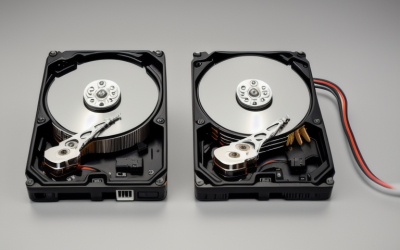
CMR (conventional magnetic recording) drives write each data track separately, while SMR (shingled magnetic recording) drives overlap tracks like roof shingles to squeeze in more capacity. For game libraries and archives, SMR is perfectly workable; for anything that writes constantly or rebuilds arrays, CMR is the safer pick.
If you have ever seen a hard drive spec sheet that mentioned neither, you are not alone. Recording method is often buried in a datasheet rather than the product title. This guide explains what the difference means for a gaming desktop, a game-library drive or a small home server, and how to find out which type you are really buying in 2026.
How the Two Recording Methods Work
Conventional recording (CMR)
On a CMR drive, the data tracks sit side by side with small gaps between them. Each track can be rewritten independently without touching its neighbors, so writing a small file in the middle of the disk costs about the same as writing one anywhere else.
Shingled recording (SMR)
On an SMR drive, the write head is wider than the read head, so each new track partially overlaps the previous one. Reading is unaffected, but rewriting a track means also rewriting the overlapping tracks that follow it. To make this manageable, the drive groups tracks into zones and rewrites a whole zone when data inside it changes.
The cache that hides the cost
Most consumer SMR drives are device-managed, meaning the drive handles the shingling itself and the operating system just sees an ordinary disk. They keep a small area written in the conventional way as a landing zone, then move data into the shingled zones during idle time. This works smoothly until a long, sustained write fills the landing zone, at which point speed can drop sharply.
SMR vs CMR Compared
| Factor | CMR | SMR |
|---|---|---|
| Capacity for the cost | Good | Often better |
| Sustained writing | Steady | Can slow dramatically once the cache fills |
| Random small writes | Handled predictably | Weaker, because of zone rewrites |
| Reading large files | Strong | Strong |
| RAID or NAS rebuilds | Preferred | Risky, rebuilds can drag on or fail |
| Game library storage | Excellent | Usually fine |
| Labeling on product pages | Often stated | Often not stated clearly |
What This Means for a Gaming PC
Game libraries and media
Installing a game is mostly a long sequential write, followed by lots of reading. Once the files are on the disk, an SMR drive reads them just as well as a CMR one. The weak point is a very large install or patch that pours data in for a long time. That is when an SMR drive may stall for a while.
Backups and archives
Write-once, read-rarely storage is where SMR shines. Capture footage, old screenshots, installers and backup images tolerate slower sustained writes because you rarely rewrite them. The extra capacity per drive can be a real advantage here.
Video recording and streaming
Recording gameplay to a hard drive is a steady stream of writes. A short clip is fine, but long sessions can overrun the landing zone on an SMR model. Many players record to a solid-state drive instead and move finished files to a hard drive later.
NAS, RAID and servers
This is where the difference bites. Rebuilding a mirrored or parity array means a very long period of constant writing and random access. SMR drives can take far longer than CMR drives for this, and some arrays treat the slowdown as a fault. If you run a home server, favor CMR drives.
How to Tell Which Type You Are Buying
- Search the exact model number on the manufacturer’s site and read the datasheet or product brief, which often states the recording method.
- Look for the manufacturer’s published lists that name which models use shingled recording.
- Be cautious with drives sold for desktop use at a very low cost per terabyte, since high capacity and low cost often go hand in hand with shingling.
- Treat NAS-marketed and enterprise-marketed lines as more likely to use conventional recording, but still confirm the model.
- If the listing is silent and the use is demanding, choose a drive that clearly states conventional recording.
Before You Buy Checklist
- Decide what the drive will do: mostly store and read, or constantly write.
- Confirm the recording method from the datasheet, not from the product title.
- Check capacity, rotation speed and cache size against your needs.
- Check the interface and mounting size your case and motherboard can take.
- Plan a solid-state drive for the operating system and active games, with the hard drive as bulk storage.
- Keep a second copy of anything important regardless of drive type.
Common Misunderstandings
“SMR drives are defective”
They are not. Shingling is a legitimate technique that trades write flexibility for density. The complaint buyers raise is about unclear labeling and unsuitable use, not a fault in the technology.
“SMR is always slower”
For reading, it is not. The slowdown appears with long sustained or heavily random writing, so a drive that mostly sits idle or reads data may never show it.
“A bigger cache fixes it”
A larger cache delays the point at which the drive slows down, but it does not remove the underlying rewrite cost once the cache fills.
Real-World Scenarios
A big library drive for a gaming desktop
You install a game once, play it for weeks, and occasionally patch it. That pattern is read-heavy, so an SMR drive is a perfectly reasonable bulk store. If installs feel slow during a very large download, that is the landing zone filling up, and the speed typically recovers once the drive catches up in the background.
A drive for capture and clips
Recording long gameplay sessions pushes continuous writes onto the disk for hours. A conventional drive keeps a steadier rate, while an SMR drive may eventually fall behind and cause dropped frames. Recording to a solid-state drive, then moving finished clips to the hard drive, avoids the problem altogether.
A backup target
Weekly or nightly backups write large sequential files and then sit idle, which gives an SMR drive time to reorganize itself between jobs. That is the ideal workload for shingled recording, and it is why many archive drives use it.
A home media server
Streaming movies and music from a server is mostly reads. Adding new files in occasional bursts is fine. The risk appears only when the drive sits in a parity or mirrored array that needs to rebuild after a failure.
Why Manufacturers Use Shingling at All
Hard drive makers are always trying to fit more data onto the same platter. Overlapping tracks lets them increase density without redesigning the entire head and media, which means a larger drive at a lower cost per terabyte. For workloads that mostly read and rarely rewrite, the trade is sensible. The complaint from buyers is not that the technology exists, but that it has sometimes shown up in drive lines used for tasks it handles poorly, with little warning on the product page. Reading the datasheet closes that gap.
Related guides
- How To Set Up Computer Speakers For Better Sound At Your Desk
- How To Check Whether Your Ram Is Running At Its Rated Speed
- How To Choose The Right Monitor Riser Height For Your Desk
Frequently Asked Questions
Can I use an SMR drive as a game drive?
Yes, for most players. Games are installed once and read many times, which suits shingled drives well. Expect slower behavior only during large installs or heavy simultaneous writing.
Is SMR bad for a NAS?
It can be, mainly because rebuilding an array involves long, intensive writes. Manufacturers of network storage generally steer buyers toward conventional recording, so check the model before you commit.
How do I find out which my current drive is?
Read the model number from the label, then look it up in the maker’s datasheet. Some drive utilities also report the model, which makes the lookup easy.
Is a hard drive still worth it for gaming?
For bulk storage, yes. Many players pair a fast solid-state drive for active titles with a large hard drive for the rest of the library, accepting longer load times on the older games.
Related guides
More from Amazon
Programs that pair well with the guide above. Offers and eligibility are set by Amazon and may change.
Free shipping on eligible items, Prime Video and more. Eligible new members can start with a free trial.
Start a Prime free trialAd-free music streaming. Eligible new subscribers can start with a free trial.
Try Music Unlimited freeA Prime membership for ages 18-24 with a trial period. Eligibility is set by Amazon.
See Prime for Young AdultsAudiobooks and podcasts to listen to on the go. Eligible new members can start with a free trial.
Try Audible freeAs an Amazon Associate we earn from qualifying purchases.