Most new motherboards, mini PCs, and Wi-Fi access points now ship with a 2.5 gigabit Ethernet port, yet the old gigabit switch under the desk quietly caps all of them at one gig. A 2.5GbE switch removes that ceiling without forcing you into costly 10 gigabit gear or thick Cat6A cabling. The real decision is which flavor: a simple unmanaged box, a small managed unit with VLANs, or a model with faster uplink ports for a NAS or server that has to feed several clients at once.
This list is for home lab builders, gamers with a 2.5G motherboard port, remote workers moving big project files, and anyone who bought a multi-gig router or access point and wants the wiring to keep up. Six distinct switches are compared below using only what their listing titles state, such as port count, uplink type, management features, and cooling design, so you can judge fit before you shop and avoid paying for ports or features you will never plug into.
Our Top Picks
 TRENDnet 5-Port Unmanaged 2.5G Gaming Switch5-Port6.29 x 0.98 x 4.29 inches0.8 poundsCheck on Amazon
 6 Port 2.5G Unmanaged Ethernet Switch4x2.5G +2x10G SFP5.2 x 2.6 x 1.26 inches1.1 poundsCheck on Amazon
 TRENDnet 8-Port 2.5Gb Multi-Gigabit Unmanaged Gaming Switch8-Port9.4 x 4 x 1.02 inchesCheck on Amazon


Top 3 picks at a glance
Quick Picks
As an Amazon Associate we earn from qualifying purchases at no extra cost to you.



| Product | Best for | Key spec from the listing |
|---|---|---|
| Omada ES210X-M2 | Light management and VLANs | 8 ports 2.5G, 2x10G SFP+, IGMP snooping |
| NICGIGA 10 Port | Many 2.5G devices plus fast uplink | 2x10Gb RJ45 plus 8×2.5Gb Base-T |
| TRENDnet TEG-S350 | Small desk setups | 5×2.5GBASE-T, 25Gbps switching capacity |
| NICGIGA 6 Port | Compact NAS and PC link | 2x10Gb RJ45 plus 4×2.5Gb Base-T |
| YuanLe 6 Port | Fiber or DAC uplink | 4×2.5G Base-T, 2x10G SFP, VLAN |
| TRENDnet TEG-S380 | Plug-and-play all-2.5G wiring | 8×2.5GBASE-T, 25Gbps switching capacity |
How to Choose
Port count and uplink speed
Count every device that will use a 2.5G link today: PC, NAS, access point, console dock, and one spare. Five ports covers a single desk, eight handles a small office, and ten leaves room to grow. Then look at the uplinks. A pair of 10G ports lets a NAS or server talk at full speed to several 2.5G clients at once, while an all-2.5G box is perfectly fine when every device tops out at 2.5G. Do not pay for a 10G port you have no device to attach to it. A useful rule is to count the ports you need, then add two for future gear such as a second access point or a capture box, since swapping a switch later means rewiring.
RJ45 versus SFP+ uplinks
Copper 10G RJ45 ports accept ordinary Ethernet cable, which suits most homes. SFP and SFP+ ports expect a fiber module or a direct-attach cable, and they shine for short runs between a switch and a NAS in the same rack. The catch is that SFP ports need extra parts, so confirm what your other gear uses before choosing, and do not assume a cable you already own will plug in. Matching connector types on both ends saves a return trip. If a NAS or server card already has RJ45 ports, a copper uplink keeps the build simple, while an SFP+ card points toward a switch with SFP slots.
Unmanaged, easy managed, and VLAN support
Unmanaged switches need no setup and suit nearly all households. If you want to isolate smart-home devices or guests, look for VLAN support, and for multicast streaming and IPTV, IGMP snooping helps. Loop prevention saves you when a cable is plugged back into the same switch by mistake. Skip managed features entirely if you will never log in to a web interface, because unused settings add cost without adding speed. Neither managed nor unmanaged status changes raw transfer speed; it only changes how much control you get over traffic, which is why a simple switch is the sensible default for a household.
Cooling, mounting, and build
Fanless designs stay silent, which matters on a desk or in a living room. Metal housings shed heat better than plastic, and wall-mount tabs keep things off the floor. Budget models cut corners on enclosure quality, port labeling, and warranty length, so look for a stated multi-year or lifetime protection plan. Also check the switching capacity figure: it should equal the sum of all ports running at full speed in both directions, otherwise busy moments will bottleneck. Ignore marketing terms like gaming mode on a plain switch; the number of ports and the quality of the cabling matter far more than the label on the box.
The 6 Best Options
Omada ES210X-M2
The listing calls this an 8 port 2.5G easy managed switch with two 10G SFP+ uplinks, VLAN, automatic loop prevention, and IGMP snooping. It has a fanless metal body with shielded ports, which points to a design aimed at long-term desk or shelf use rather than throwaway budget gear. Shielded ports are a sensible detail where cables run near power lines or other interference. It fits buyers who want a modest taste of network control without moving to full enterprise software.
- Strength: Management features such as VLAN and IGMP snooping give room to grow.
- Strength: Fanless metal build stays quiet.
- Trade-off: SFP+ uplinks need modules or direct-attach cables, adding cost.
Skip it if you want a plug-in box with no settings, or if you have no fiber or DAC hardware and do not plan to buy any.
NICGIGA 10 Port Unmanaged
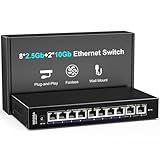
This ten-port unit pairs two 10Gb RJ45 ports with eight 2.5Gb Base-T ports and mounts on a desk or wall. Because the fast ports use regular copper jacks, a NAS with a 10GbE card can connect without any fiber hardware, while eight 2.5G ports fan out to PCs, access points, and consoles without sharing a bottleneck. That makes it a sensible hub behind a multi-gig Wi-Fi router.
- Strength: Eight 2.5G ports leave space for a full home office.
- Strength: Copper 10G uplinks use standard cable.
- Trade-off: Unmanaged, so there are no VLANs to separate guest or IoT traffic.
Skip it if you need network segmentation, traffic reporting, or a rack-mount form factor.
TRENDnet TEG-S350
A five-port unmanaged switch with 5×2.5GBASE-T, quoted at 25Gbps switching capacity, and sold with lifetime protection. The title adds NDAA and TAA compliance, which matters to some offices with procurement rules, and the gaming label signals it targets low-latency desk setups where a PC, console, and access point share one tidy box. Because the five ports share the same speed, every connected device gets identical bandwidth, which keeps the layout easy to reason about.
- Strength: Compact five-port size fits a monitor shelf.
- Strength: Lifetime protection and compliance labels add confidence.
- Trade-off: Only five ports, and all are the same speed, so no faster uplink.
Skip it if you already own more than four multi-gig devices or plan to attach a 10G NAS.
NICGIGA 6 Port Unmanaged
The smaller sibling to the ten-port model has two 10Gb RJ45 ports and four 2.5Gb ports, designed for desk or wall mounting. A common use is linking a NAS and a workstation at 10G while three clients run at 2.5G, which gives an editing setup quick file access without any rack or fiber work. It is a natural pick for a video editor with a small NAS under the monitor and a couple of other 2.5G devices.
- Strength: Two 10G copper ports for a NAS plus a fast workstation.
- Strength: Small enough to hide behind a TV or monitor.
- Trade-off: Four 2.5G ports fill quickly in a busy home.
Skip it if you plan to add several access points, cameras, or consoles later.
YuanLe 6 Port
This six-port unmanaged unit offers four 2.5G Base-T ports and two 10G SFP slots, remains compatible with 100/1000/2500Mbps devices, and lists VLAN and a fanless build. It suits setups where the uplink goes to a fiber module or short DAC cable, such as a shelf next to a NAS that already uses SFP+. A DAC cable is usually the cheapest way to link two nearby devices, and it avoids the heat and cost of optical modules on a very short run.
- Strength: SFP slots allow fiber or DAC links to a NAS or core switch.
- Strength: Backward compatible with slower devices on the same switch.
- Trade-off: SFP modules or cables are not included in the title.
Skip it if your only 10G gear uses RJ45 copper ports, since you would need converters.
TRENDnet TEG-S380
The eight-port companion to the S350 carries 8×2.5GBASE-T and the same 25Gbps switching capacity, with NDAA and TAA compliance in the title. It is a straightforward answer for a network where every device is 2.5G and nothing needs an uplink above that, such as a small studio of PCs and access points. Since all ports run at the same speed, you can plug any device into any port without checking which jack is the fast one.
- Strength: Eight equal ports give flexible placement.
- Strength: Splitter-style plug-and-play design needs no configuration.
- Trade-off: No 10G port, so a NAS connection is limited to 2.5G.
Skip it if you plan to add a 10GbE NAS or server in the near future.
Which One Fits Your Situation
You have a 10GbE NAS and several 2.5G PCs
The NICGIGA 10 Port gives the NAS a 10G copper link and eight 2.5G ports for everything else, without any SFP hardware. That split keeps backup jobs from crowding out regular browsing and gaming.
You want VLANs for guests and smart-home gear
Choose the Omada ES210X-M2, since it is the one model here with easy management, IGMP snooping, and loop prevention. Setting up a separate guest segment becomes a short job in its web interface.
You need a switch for a single gaming desk
The TRENDnet TEG-S350 is the neat answer: five ports, no fuss, and enough room for a PC, console, and access point. It will not crowd the desk or add fan noise.
Your NAS sits in a rack and uses SFP+
Pick the YuanLe 6 Port, which includes SFP slots for a short fiber or DAC run while still serving four 2.5G copper clients nearby.
Common Mistakes
- Pairing a 2.5G switch with old Cat5 cable that cannot hold the speed reliably over longer runs.
- Assuming SFP ports accept standard Ethernet cable without a module.
- Buying five ports and running out as soon as a console or camera is added.
- Paying for management features that never get configured.
- Forgetting that the router, not just the switch, must have a 2.5G or faster port for the full benefit.
Related guides
- Noctua Nh-D15 Vs Thermalright Peerless Assassin 120
- Sustainable Gaming Pc Power Supply Efficiency Guide
- Managed Ethernet Switches For Small Business
Frequently Asked Questions
Will a 2.5GbE switch speed up my internet?
Only if your plan and router support more than one gigabit. For local transfers between a PC and a NAS, it helps right away. It does not make a slower internet service faster.
Do I need Cat6 cable?
Cat5e usually handles 2.5G over typical home distances, but Cat6 gives more margin. Use Cat6 or better for 10G copper links, especially on longer runs through walls.
Is an unmanaged switch enough?
For most homes, yes. Choose managed or easy managed only if you want VLANs, multicast control, or loop protection. Everything else works the moment you plug it in.
Should I buy in 2026 or wait for 10GbE to get cheaper?
If your devices have 2.5G ports now, a 2.5G switch pays off immediately. Models with a pair of 10G uplinks give a middle path toward future upgrades without replacing the whole box.
Related guides
More from Amazon
Programs that pair well with the guide above. Offers and eligibility are set by Amazon and may change.
Free shipping on eligible items, Prime Video and more. Eligible new members can start with a free trial.
Start a Prime free trialAd-free music streaming. Eligible new subscribers can start with a free trial.
Try Music Unlimited freeA Prime membership for ages 18-24 with a trial period. Eligibility is set by Amazon.
See Prime for Young AdultsAudiobooks and podcasts to listen to on the go. Eligible new members can start with a free trial.
Try Audible freeAs an Amazon Associate we earn from qualifying purchases.