Ray tracing turns lighting, reflections, and shadows into calculations the graphics card has to finish for every frame, which is why it is the feature that separates a card that merely runs a game from one that runs it with the visual effects switched on. Hardware support arrived on both AMD and NVIDIA several generations ago, and Intel’s Arc line joined in. The practical question for a buyer is no longer whether a card supports ray tracing, but how much headroom it has once the setting is enabled and the resolution goes up.
This guide is for gamers and creators who want ray tracing hardware at a sensible tier, from an entry card for 1080p to a 16GB RDNA 4 card aimed at higher settings. One workstation option is included because its title explicitly calls out ray tracing. Everything is drawn from the listing titles alone, so there are no frame rate claims here. Use the specs to shortlist, then check case clearance, power connectors, and the games you actually play before you order in 2026.
Our Top Picks
 ASUS Prime Radeon RX 9070 XT 16GB GDDR6RX9070XT|OC|Black12.3 x 5.1 x 2 inches3.3 PoundsCheck on Amazon


Top 3 picks at a glance
Quick Picks
As an Amazon Associate we earn from qualifying purchases at no extra cost to you.


| Product | Best for | Key spec from the title |
|---|---|---|
| ASRock Radeon RX 9070 Challenger 16GB OC | High-setting ray tracing on RDNA 4 | 16GB GDDR6, 256-bit, PCIe 5.0 |
| ASRock Radeon RX 7600 Challenger Pro 8GB OC | Entry ray tracing at 1080p | 8GB GDDR6, RDNA 3, PCIe 4.0 |
| PNY NVIDIA RTX A4500 20GB | Rendering and professional work | 20GB GDDR6, Ampere, ray tracing workstation |
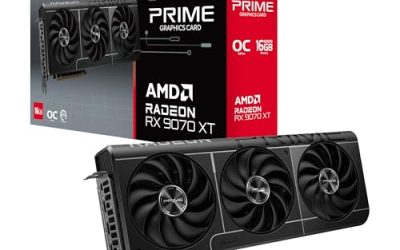
| ASUS PRIME Radeon RX 9070 XT 16GB OC | Top RDNA 4 tier with quality cooling | 16GB GDDR6, PCIe 5.0, HDMI/DP 2.1 |
| ASRock Intel Arc B570 Challenger 10GB OC | Value pick with modern ports | 10GB GDDR6, 19 Gbps memory, DP 2.1 |
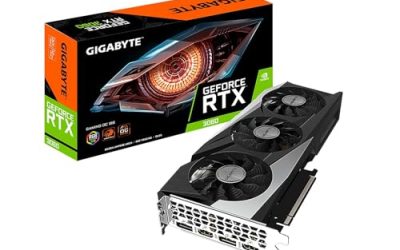
| MSI GeForce RTX 3060 Ventus 2X 12G OC | Proven Ampere ray tracing | 12GB GDDR6, 192-bit, twin fan |
How to Choose
Look at video memory first
Ray tracing consumes extra video memory on top of textures, so capacity matters more with the setting on. Eight gigabytes is a workable floor for 1080p, ten to twelve gigabytes gives breathing room at 1440p, and sixteen gigabytes or more suits high-resolution textures with ray tracing and upscaling together. A fast core with too little memory runs into stutter long before the processor does.
Match the architecture to the feature set
Newer architectures such as RDNA 4 are built with stronger ray tracing hardware than older generations. Older cards still support the feature but have less room at high settings. Look for the generation in the title, and weigh it against the memory bus width and memory type. Ampere cards, like the RTX 3060 and the A4500, have mature driver support and cover many ray tracing titles.
Check the interface, ports, and power fit
PCIe 5.0 on a newer card is backward compatible with older slots, so an older board still works, though the interface may be used at a lower generation. Check that the output ports match your display, such as HDMI 2.1 or DisplayPort 2.1 for high refresh rate monitors. Also check physical size and power connectors, since a 2.5-slot cooler needs room and the right cables from your supply.
Know where budget models cut corners and what to ignore
Entry cards trim memory capacity, bus width, and cooling, which is where ray tracing starts to hurt first. Features like zero-RPM fan modes and metal backplates are about noise and rigidity, not frame rates. Ignore factory boost clock bragging in isolation, because a few percent of clock speed rarely matters more than memory capacity or architecture generation.
One last consideration is the monitor. A 1080p screen asks far less of a card than a 1440p or 4K panel, and ray tracing multiplies that gap. Decide your target resolution first, then pick the lowest tier that leaves memory to spare, so you are not paying for headroom you will never use.
The 6 Best Options
ASRock Radeon RX 9070 Challenger 16GB OC
This is the high-tier RDNA 4 pick. The title lists 16GB of GDDR6 on a 256-bit interface, a 2520MHz boost clock, a PCIe 5.0 connection, triple fans with a 0dB silent mode, and an LED indicator.
- Strength: 16GB of memory and a 256-bit bus give ample room for ray tracing at higher resolutions.
- Strength: Triple fans and a 0dB mode suit a quiet desktop during light use.
- Trade-off: It sits in a higher spending tier than the entry cards and needs a roomy case.
It fits a gamer building around a 1440p monitor who wants ray tracing without constant setting compromises. Pair it with a current processor and a supply sized for a high-tier card so the rest of the system does not hold it back. Skip it if you play at 1080p only or have a small case and a modest power supply.
ASRock Radeon RX 7600 Challenger Pro 8GB OC
The RX 7600 is the entry-level ray tracing choice. The title lists RDNA 3, 8GB of GDDR6, PCIe 4.0, triple fans with a 0dB mode, and a 2695MHz boost clock.
- Strength: Triple-fan cooling and a zero-RPM mode keep light use quiet.
- Strength: Eight gigabytes of GDDR6 is a workable floor for 1080p ray tracing.
- Trade-off: Older RDNA 3 hardware and 8GB memory leave little room for heavy effects.
It suits someone building a budget 1080p system who wants to try ray tracing in lighter titles. Turning on upscaling features in supported games is the usual way to stretch a card of this tier. Skip it if you want comfortable 1440p effects or plan to keep the card for many years.
PNY NVIDIA RTX A4500 20GB
The A4500 is a workstation card with a title that calls out Ampere ray tracing. It lists 20GB of GDDR6 in an OEM package.
- Strength: 20GB of video memory is the largest in this group, useful for big scenes.
- Strength: Workstation positioning suits rendering and design software.
- Trade-off: It is priced and built for professional work rather than gaming value.
It fits a designer, animator, or engineer who renders ray traced scenes and needs lots of memory. The OEM label in the title also suggests the packaging may be plain, so ask about warranty and accessories before buying. Skip it if gaming is your main goal, since a gaming card gives more value for play.
ASUS PRIME Radeon RX 9070 XT 16GB OC
The ASUS Prime 9070 XT is the higher tier of the RDNA 4 pair. The title lists 16GB of GDDR6, PCIe 5.0, HDMI and DisplayPort 2.1, a 2.5-slot design, Axial-tech fans, and dual-ball fan bearings.
- Strength: Dual-ball bearings and Axial-tech fans point to durable, steady cooling.
- Strength: HDMI and DisplayPort 2.1 outputs suit high refresh monitors.
- Trade-off: A 2.5-slot cooler needs a spacious case and good airflow.
It suits an enthusiast who wants the stronger RDNA 4 tier and prefers a well-known board partner. Compared with the RX 9070 Challenger, the title suggests the choice is mostly about cooler design and brand preference, so decide whether the extra bearing quality is worth the extra spending. Skip it if you have a compact case or are working with a tight budget.
ASRock Intel Arc B570 Challenger 10GB OC
The Arc B570 is the value pick. The title lists 10GB of GDDR6, a 2600MHz GPU clock, 19 Gbps memory, a dual-fan cooler, a metal backplate, HDMI 2.1a, and DisplayPort 2.1.
- Strength: 10GB of memory beats many entry cards for ray tracing at 1080p and light 1440p.
- Strength: Modern HDMI 2.1a and DisplayPort 2.1 ports cover current monitors.
- Trade-off: Intel’s graphics driver history is shorter, so game compatibility deserves a check.
It fits a budget builder who values memory capacity and modern ports. It also makes sense for anyone building a quiet, modern-port setup on a short budget, since the zero-RPM fan mode keeps idle noise down. Skip it if you rely on older games where mature drivers matter most.
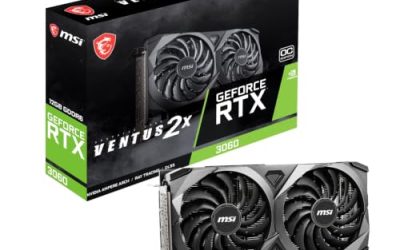
MSI GeForce RTX 3060 Ventus 2X 12G OC
This is the familiar Ampere choice. The title lists 12GB of 15 Gbps GDDR6, a 1807MHz boost clock, a 192-bit interface, HDMI and DisplayPort, PCIe 4, and a Torx twin fan design.
- Strength: 12GB of memory is generous for the tier and helps with ray tracing textures.
- Strength: NVIDIA’s Ampere architecture has mature driver support.
- Trade-off: It is an older generation than the RDNA 4 and Arc cards.
It suits a 1080p or light 1440p gamer who wants NVIDIA features and a compact twin-fan card. It is a sensible match for a mid-size case with a modest supply, because twin-fan cards of this style are generally easier to fit. Skip it if you want the newest architecture or the strongest ray tracing performance.
Which One Fits Your Situation
You want ray tracing at 1440p
The ASRock Radeon RX 9070 Challenger 16GB OC or the ASUS PRIME Radeon RX 9070 XT 16GB OC offer the memory and architecture for it.
You are building a 1080p machine on a budget
The ASRock Intel Arc B570 Challenger 10GB OC gives extra memory over the RX 7600, while the RX 7600 is the simple low-tier option for lighter ray tracing titles.
You work in rendering or design
The PNY NVIDIA RTX A4500 20GB brings the most memory for large scenes and professional ray tracing software.
You prefer NVIDIA and a smaller card
The MSI GeForce RTX 3060 Ventus 2X 12G OC offers 12GB of memory in a twin-fan design.
Common Mistakes
- Buying on memory clock or boost numbers while ignoring video memory capacity.
- Expecting an entry card to hold ray tracing at high resolutions.
- Forgetting to check case clearance for a 2.5-slot cooler.
- Pairing a high-tier card with a power supply that lacks the right connectors.
- Choosing a workstation card for gaming when a gaming model offers more value.
Related guides
- Noctua Nh-D15 Vs Thermalright Peerless Assassin 120
- Sustainable Gaming Pc Power Supply Efficiency Guide
- Thermal Paste Application Method For Lga1851
Frequently Asked Questions
How much video memory do I need for ray tracing?
Eight gigabytes is a floor for 1080p, while ten to sixteen gigabytes suits higher resolutions. More memory reduces stutter when effects are enabled, and it also helps when you add upscaling or high-resolution texture packs on top of the ray tracing setting.
Do all of these cards support ray tracing?
The architectures listed, RDNA 3, RDNA 4, Ampere, and Arc, include ray tracing hardware. Performance varies widely by tier.
Will a PCIe 5.0 card work in an older slot?
Yes, it is backward compatible. It may run at a lower interface generation, but the effect is usually modest for gaming, so an older board is rarely a reason to skip a newer card. Confirm the physical slot and your power supply connectors instead.
Is a workstation card good for gaming?
It can run games, but it is aimed at professional software and certified workflows. A gaming card usually suits play better at a lower tier, with more attention paid to fan noise and display outputs.