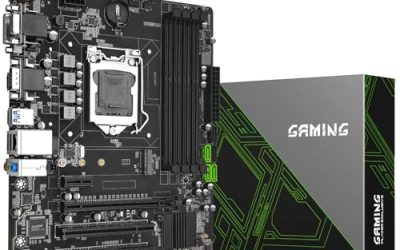
The B550 chipset sits in an odd but useful spot: it is the last mainstream AM4 platform that brings PCIe 4.0 to the graphics slot and the first M.2 slot, yet boards using it are now sold on the strength of what they let you keep, not what they add. If you already own a Ryzen 3000, 4000G or 5000 chip and DDR4 memory, a B550 board is the cheapest way to refresh the platform without replacing the processor or the RAM kit. The real decision is which B550 board matches your build, because the spread between them is wide.
This guide is for builders who want an AM4 board in 2026 for a gaming rig, a home office machine, or a second system built from parts they already have. The choice usually comes down to three questions: ATX or micro-ATX, how much power delivery your CPU needs, and whether built-in Wi-Fi saves you buying a card. The eight boards below cover that range, from basic micro-ATX options to ATX models with faster networking and extra firmware tools.
Our Top Picks
 GIGABYTE B550M K AMD AM4 Micro-ATX MotherboardmATX10.43 x 10.43 x 2.12 inches1.7 poundsCheck on Amazon
 ASUS TUF Gaming B550-PLUS WiFi II AMD AM4B550-Plus|M.2x2|D4|WiFi610.75 x 2.75 x 13.5 inches1.27 poundsCheck on Amazon


Top 3 picks at a glance
Quick Picks
As an Amazon Associate we earn from qualifying purchases at no extra cost to you.


| Product | Best for | Key spec from the title |
|---|---|---|
| GIGABYTE B550 Eagle WIFI6 | Balanced ATX build | 10+3 power phase, 2x M.2, WiFi 6 |
| ASUS ROG Strix B550-F Gaming WiFi II | Feature-rich gaming ATX | WiFi 6E, 2.5Gb LAN, BIOS Flashback |
| GIGABYTE B550M K | Compact budget build | Micro-ATX, 3+3 power phase |
| MSI B550 Gaming WIFI6E | Wireless ATX gaming rig | WiFi 6E, Ryzen 5000 support |
| MSI PRO B550M-P | Basic micro-ATX system | Micro-ATX, DDR4 Memory Boost |
| ASUS TUF Gaming B550-PLUS WiFi II | Durable all-rounder | 2.5Gb LAN, USB 3.2 Gen 2, WiFi 6 |
| GIGABYTE B550 Gaming X V2 | Wired ATX value | 10+3 power phase, 2x M.2 |
| ASUS Prime B550M-A WiFi II | Small build with ECC option | ECC memory, HDMI 2.1, WiFi 6 |
How to Choose
Match the board to your processor generation
Every board here lists Ryzen 5000, 4000 or 3000 support, but the exact list differs. Some titles name 5000 G-Series, 4000 G-Series and 3000 G-Series parts separately, which matters if you plan to run an APU without a graphics card. Check the manufacturer’s CPU support page for the specific chip and the BIOS version it needs. Boards shipped from older stock may need a BIOS update before a Ryzen 5000 chip will boot, and the BIOS Flashback feature on the ASUS boards lets you do that without any CPU installed.
Judge power delivery by the CPU you actually own
A listing that says 10+3 power phase signals a heavier setup than one that says 3+3. For a six-core chip running near stock speeds, either is workable. For an eight-core or twelve-core Ryzen 5000 processor under sustained load, or for any manual overclock, look for the larger phase count and a board with good VRM heatsinks. Do not read phase counts as a performance guarantee, since the quality of the parts matters as much as the number.
Count storage, slots and ports
PCIe 4.0 on the main graphics slot is useful for current GPUs, but the first M.2 slot is where it pays off for a fast NVMe drive. Several of these boards list 2x M.2, which is enough for an OS drive plus a game library drive. Micro-ATX boards usually trim PCIe slots and fan headers, so list what you need first: a capture card, a sound card, extra case fans, or an RGB strip header. Front-panel USB Type-C support depends on both the board header and the case, so confirm both.
Decide whether built-in networking is worth it
Wi-Fi 6 is plenty for a typical home network; Wi-Fi 6E adds the 6 GHz band, which only helps if your router supports it. A 2.5Gb LAN port helps if your router or switch also runs at that speed, and does nothing if it is gigabit. Where budget boards cut corners is mostly here: no wireless, fewer USB ports on the rear panel, and simpler heatsinks. Ignore marketing terms such as gaming branding on the box; the spec sheet is what counts.
The 8 Best Options
GIGABYTE B550 Eagle WIFI6
This ATX board suits builders who want a sensible middle path: solid power delivery, wireless networking included, and two M.2 slots for storage growth. The title lists support for Ryzen 5000, 4000 and 3000 processors, DDR4 memory and PCIe 4.0, so it fits most AM4 upgrade plans.
- Strength: 10+3 power phase design gives headroom for mid-range and higher core counts.
- Strength: WiFi 6 and USB-C are included, so no add-in card is needed.
- Trade-off: the title does not list a 2.5Gb LAN port or BIOS Flashback, which the ASUS boards highlight.
Skip it if you want the fastest wired or wireless networking available on the chipset, or a compact micro-ATX footprint.
ASUS ROG Strix B550-F Gaming WiFi II
The feature set here targets enthusiasts building a showpiece gaming PC. The title lists PCIe 4.0, WiFi 6E, 2.5Gb LAN, BIOS Flashback and HDMI 2.1, which covers networking, firmware recovery and display output in one ATX package.
- Strength: WiFi 6E plus 2.5Gb LAN gives the strongest networking line-up of the eight.
- Strength: BIOS Flashback makes upgrading to a newer Ryzen chip safer on older firmware.
- Trade-off: it sits in the premium group of this list, so buyers on a tight build budget will feel the cost.
Skip it if you only need basic connectivity and would rather spend the difference on a graphics card or faster storage.
GIGABYTE B550M K
This micro-ATX board is meant for compact, no-frills systems where cost is the main filter. It supports Ryzen 5000, 4000 and 3000 series chips, DDR4, 2x M.2 and PCIe 4.0, so storage and graphics capabilities are not stripped away.
- Strength: two M.2 slots on a small board keep upgrade options open.
- Strength: micro-ATX size fits smaller cases and school or office towers.
- Trade-off: the 3+3 power phase layout is lighter than the 10+3 boards, so pair it with a modest CPU, not a top-end chip.
Skip it if you plan to overclock or run a high-core-count Ryzen 5000 under heavy loads.
MSI B550 Gaming WIFI6E
An ATX board for gamers who want wireless built in and a clear compatibility list. The title names support for Ryzen 5000, 5000 G-Series, 4000 G-Series and 3000 Series processors on AM4 with DDR4 memory, a broader list than some competitors spell out.
- Strength: WiFi 6E gives access to the 6 GHz band on a compatible router.
- Strength: explicit G-Series support helps APU-based builds.
- Trade-off: the title gives few details on power phases or ports, so confirm the rear I/O on the spec sheet.
Skip it if you want a documented 2.5Gb LAN port or flashback tools in the listing.
MSI PRO B550M-P
The PRO B550M-P is a micro-ATX board aimed at straightforward productivity and light gaming builds. The title lists Ryzen 5000, 5000 G-Series, 4000 G-Series and 3000 G-Series support, DDR4 Memory Boost and the AM4 socket.
- Strength: micro-ATX size suits small cases and compact office builds.
- Strength: broad APU support makes it a reasonable base for a build with integrated graphics.
- Trade-off: no wireless networking is mentioned, so plan for a wired connection or a separate card.
Skip it if you need Wi-Fi on the board or want to fill many expansion slots.
ASUS TUF Gaming B550-PLUS WiFi II
This ATX model is a middle ground between value and flagship boards. The title lists PCIe 4.0, WiFi 6, 2.5Gb LAN, BIOS Flashback and USB 3.2 Gen 2, which covers the connections most builders use daily.
- Strength: 2.5Gb LAN and USB 3.2 Gen 2 provide faster wired and external storage links.
- Strength: BIOS Flashback adds a safety net when upgrading the processor.
- Trade-off: it uses WiFi 6 instead of 6E, so the 6 GHz band is not available.
Skip it if a 6 GHz wireless connection matters to you or if you need a compact board.
GIGABYTE B550 Gaming X V2
A wired-focused ATX option for builders who plan to use Ethernet and skip wireless features. It shares the 10+3 power phase layout and 2x M.2 slots with the Eagle model, plus PCIe 4.0 and support for Ryzen 5000, 4000 and 3000 chips.
- Strength: strong power phase count for a board in this group.
- Strength: front USB support is listed in the title, which helps with modern cases.
- Trade-off: wireless is not listed in the title, so add a card if the PC will not sit next to the router.
Skip it if your desk has no Ethernet drop and you want Wi-Fi on the board.
ASUS Prime B550M-A WiFi II
A micro-ATX board with some unusual extras for its size. The title lists ECC memory support, HDMI 2.1, an RGB header, PCIe 4.0 and WiFi 6, which suits a compact workstation or home server build.
- Strength: ECC memory support is rare on boards at this level and helps data-sensitive tasks.
- Strength: HDMI 2.1 and Wi-Fi arrive on a small footprint.
- Trade-off: ECC use also requires a compatible processor and memory modules, so check both.
Skip it if you want a full-size ATX layout with more expansion slots.
Which One Fits Your Situation
You are upgrading from a Ryzen 3000 chip to a Ryzen 5000 chip
Pick the ASUS TUF Gaming B550-PLUS WiFi II. BIOS Flashback is listed in the title, which removes the worry about whether the board will boot with the new processor.
You are building a small office or school PC
The MSI PRO B550M-P covers the basics on a micro-ATX board, and its G-Series support lets you run on integrated graphics at first.
You want the strongest networking for gaming and streaming
Go with the ASUS ROG Strix B550-F Gaming WiFi II, which pairs WiFi 6E with a 2.5Gb LAN port.
You want a quiet value ATX build with room for two NVMe drives
The GIGABYTE B550 Eagle WIFI6 offers 2x M.2 slots, a 10+3 power phase design and built-in wireless in a single board.
Common Mistakes
- Buying a board without checking whether it needs a BIOS update to support the processor you own.
- Assuming every B550 board has the same number of M.2 slots; some list two, others do not say.
- Paying for 2.5Gb LAN when your router and switch only run at gigabit speed.
- Forgetting that micro-ATX boards offer fewer slots and fan headers than ATX models.
- Pairing a light 3+3 power phase board with a high-core-count processor and heavy overclocking.
Related guides
- Noctua Nh-D15 Vs Thermalright Peerless Assassin 120
- Sustainable Gaming Pc Power Supply Efficiency Guide
- Thermal Paste Application Method For Lga1851
Frequently Asked Questions
Is B550 still worth buying today?
It makes sense when you already own AM4 parts such as a Ryzen 5000 chip and DDR4 memory. If you are buying every part new, compare the cost of a newer platform before committing to AM4.
Do B550 boards support DDR5?
No. All eight boards use DDR4 memory, as their titles state. DDR5 requires a newer platform and processor.
What is the difference between WiFi 6 and WiFi 6E?
WiFi 6E adds the 6 GHz band to the 2.4 and 5 GHz bands of WiFi 6. You only benefit if your router also supports 6E, and the range is shorter through walls.
Do I need ATX or micro-ATX?
Choose ATX if you want more expansion slots and fan headers, and micro-ATX if your case is small. Confirm the case supports the board size before ordering.