Playing at 1080p is the sweet spot where graphics card spending stops paying off quickly. A 1920 by 1080 frame has about half the pixels of a 1440p frame, which means a mid-range card can hold high settings while a flagship sits mostly idle. The real decision for a 1080p player is therefore not how to get the most power but how much headroom to buy for the next few years, and whether memory size, upscaling support, or cooler noise matters more to you than raw speed.
This guide is written for budget and mid-range builders, esports players chasing high refresh rates on a 144Hz or 240Hz panel, and upgraders coming from an older card. The six boards below range from entry-level Ampere cards to current-generation Radeon and Intel Arc designs. Every statement is based on what the listing says, so use this as a shortlist and confirm case clearance and power connectors for your build in 2026.
Our Top Picks
 msi Gaming RTX 3050 Ventus 2X 6G OC1.7" x 4.3" x 7.4"7.4 x 4.3 x 0.1 inches1.3 poundsCheck on Amazon
 ASUS Dual Radeon RX 9060 XT 16GB GDDR6RX9060XT|16GB|Black8 x 4.7 x 1.9 inches1.3 PoundsCheck on Amazon
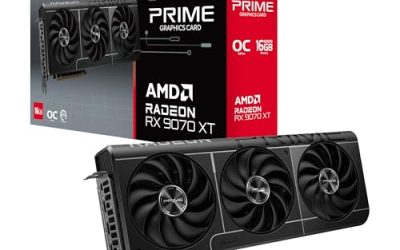
 ASUS Prime Radeon RX 9070 XT 16GB GDDR6RX9070XT|OC|Black12.3 x 5.1 x 2 inches3.3 PoundsCheck on Amazon
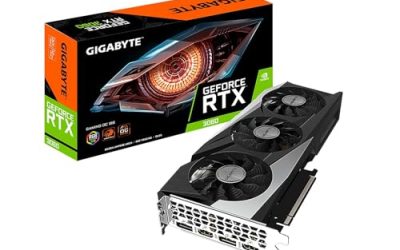
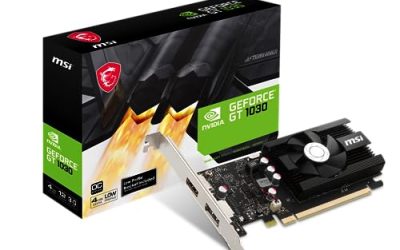
 GIGABYTE GeForce RTX 3050 WINDFORCE OC V2 6GStandard7.5 x 4.4 x 0.1 inches0.88 PoundsCheck on Amazon


Top 3 picks at a glance
Quick Picks
As an Amazon Associate we earn from qualifying purchases at no extra cost to you.





| Product | Best for | Key spec from the listing |
|---|---|---|
| MSI RTX 3050 Ventus 2X 6G OC | Entry-level 1080p play | 6GB GDDR6, 96-bit, boost 1492 MHz |
| MSI RTX 3060 Ventus 2X 12G OC | Memory headroom at 1080p | 12GB GDDR6, 192-bit, boost 1807 MHz, PCIe 4 |
| ASUS Dual Radeon RX 9060 XT 16GB | Future-minded 1080p and beyond | 16GB GDDR6, PCIe 5.0, DisplayPort 2.1a |
| ASRock Intel Arc B570 Challenger | Budget-minded current architecture | 10GB GDDR6, 19 Gbps, 2600 MHz, 0dB mode |
| ASUS PRIME Radeon RX 9070 XT 16GB | High refresh at 1080p with room to grow | 16GB GDDR6, PCIe 5.0, 2.5-slot cooler |
| GIGABYTE RTX 3050 WINDFORCE OC V2 6G | Compact, simple 1080p card | 6GB GDDR6, 96-bit, dual WINDFORCE fans |
How to Choose
Memory capacity is the first threshold
At 1080p, 6GB of video memory can run most current titles at medium or high settings, but newer games with large textures may force you to lower options. Cards with 10GB, 12GB, or 16GB, like the Arc B570, the RTX 3060, and the two Radeon boards, leave more room for texture packs and ray-traced scenes. If you plan to keep the card for four or five years, treat 8GB as a practical minimum and favor the larger options. If you replace cards often and play mostly esports titles, 6GB is serviceable. A simple way to decide is to list the three heaviest games you expect to play over the next two years, look up the video memory listed on each publisher’s system requirements page, and add a safety margin for patches and texture packs that arrive after launch. If every game on the list asks for 8GB or less, a smaller card is fine; if even one asks for more, move up a tier now instead of upgrading early.
Bus width and memory speed
Capacity is only half the picture. The RTX 3050 cards list a 96-bit interface, the RTX 3060 lists a 192-bit interface at 15 Gbps, and the Arc B570 lists 19 Gbps memory. A wider bus or faster memory moves data more quickly, which helps at higher refresh rates. Do not compare boost clocks across vendors, because architecture differences make a lower number on one card faster than a higher number on another. Use clock speeds only to compare variants of the same GPU. Your monitor’s refresh rate also sets the target: a 60Hz panel is satisfied by a modest card, while a 240Hz panel rewards the fastest option you can afford because every frame the card fails to deliver is wasted screen capability.
Physical size, power, and connectors
The two ASUS Radeon cards use a 2.5-slot design, so check both card length and the space next to your motherboard slot. Power supply capacity matters more as you move up the list. The entry boards sip power, while the RX 9070 XT class will want a robust unit and the right power leads. For displays, look for HDMI 2.1 and DisplayPort 2.1 if you use a high refresh monitor or plan an upgrade to higher resolutions. The ASUS and ASRock listings name those standards, while the MSI and GIGABYTE entries list HDMI and DisplayPort only. If your monitor is an older 1080p panel, none of that matters, and a standard HDMI or DisplayPort cable will work fine. Also verify that the cables you already own match the ports on the card’s bracket before ordering.
Noise, features, and what to ignore
Several coolers advertise 0dB technology, meaning the fans stop at low loads, which is nice for a quiet desktop. Ignore marketing terms like OC Edition if you care about stability over a few percent of speed, and do not pay for a card far beyond what a 1080p monitor can use. An RX 9070 XT class card is capable of far more than 1080p, so it makes sense only if you intend to move to a higher resolution monitor soon. Budget cards cut corners on backplates, fan bearings, and cooler mass, which shows up as louder operation under load. Upscaling features are worth a look too, since modern upscalers let a modest card hold higher frame rates, but the supported technology depends on the GPU maker, so check which one your favorite games implement.
The 6 Best Options
MSI RTX 3050 Ventus 2X 6G OC
This MSI card lists 6GB of GDDR6 at 14 Gbps, a 96-bit bus, a 1492 MHz boost clock, HDMI and DisplayPort, and Ampere architecture. It suits a first gaming build or an upgrade from integrated graphics where 1080p at moderate settings is the target, such as a student build or a family PC that also plays popular multiplayer titles. A 144Hz monitor is a reasonable partner if you favor lighter esports games over the newest releases.
- Strength: a major brand with a twin-fan Ventus cooler.
- Strength: modest requirements make it easy to fit in many systems.
- Trade-off: 6GB on a 96-bit bus limits headroom in newer, texture-heavy games.
Skip it if you want to turn settings up in recent releases or plan to move to 1440p.
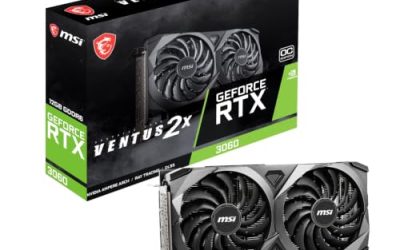
MSI GeForce RTX 3060 Ventus 2X 12G OC V1
Here you get 12GB of GDDR6 at 15 Gbps on a 192-bit bus, a 1807 MHz boost clock, PCIe 4, and a Torx twin fan cooler. It targets players who want comfortable memory headroom at 1080p and an option to try higher settings, a profile that suits someone keeping a card through several game cycles. The 12GB pool is its main argument, since texture-heavy titles are where smaller cards exhaust their memory first.
- Strength: 12GB of memory and a 192-bit bus are generous for the resolution.
- Strength: dual-fan cooling from a known brand.
- Trade-off: it is an older Ampere design compared with the newer boards here.
Skip it if you want current-generation display standards like DisplayPort 2.1.
ASUS Dual Radeon RX 9060 XT 16GB
ASUS lists 16GB of GDDR6, PCIe 5.0, HDMI 2.1b, DisplayPort 2.1a, a 2.5-slot design, Axial-tech fans, and 0dB technology. It is built for players who want current-generation features and a large memory buffer that will last well beyond 1080p. A buyer planning to keep the card through a future jump to 1440p will appreciate the headroom, and the quiet fan-stop behavior suits living-room and bedroom desks.
- Strength: 16GB of memory is generous for any 1080p workload.
- Strength: modern display outputs and a fan-stop mode for quiet operation.
- Trade-off: the 2.5-slot cooler needs space and the card likely costs more than 1080p strictly demands.
Skip it if your case is cramped or your budget is tight.
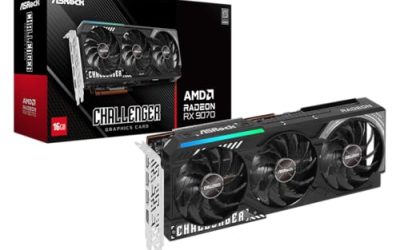
ASRock Intel Arc B570 Challenger 10GB OC
ASRock pairs 10GB of GDDR6 at 19 Gbps with a 2600 MHz GPU clock, a dual-fan cooler, a metal backplate, HDMI 2.1a, DisplayPort 2.1, and 0dB mode. It appeals to buyers who want a modern architecture and a decent memory pool without spending on top-tier cards. It is the sort of board a budget builder considers when 6GB feels tight but a flagship does not fit the plan, and the 0dB label helps keep the build quiet during light use.
- Strength: 10GB of memory and fast 19 Gbps modules at a budget-aware tier.
- Strength: metal backplate and modern outputs.
- Trade-off: Intel graphics drivers and game compatibility deserve a check for your favorite titles.
Skip it if you rely on older games with narrow driver support.
ASUS PRIME Radeon RX 9070 XT 16GB OC Edition
The listing shows 16GB of GDDR6, PCIe 5.0, HDMI and DisplayPort 2.1, a 2.5-slot design, Axial-tech fans, and dual-ball fan bearings. It is for 1080p players who run very high refresh rates or who want to step up to a higher resolution later. Think of it as a card for someone buying once for a long stretch, who would rather overbuy now than revisit the graphics slot in two years.
- Strength: the most capable card in this group by a wide margin.
- Strength: dual-ball bearings suggest a durability focus.
- Trade-off: it is overkill for 1080p alone and demands a strong power supply.
Skip it if you will stay at 1080p with a 60Hz or 144Hz monitor.
GIGABYTE GeForce RTX 3050 WINDFORCE OC V2 6G
This board lists 6GB of GDDR6 on a 96-bit bus and two WINDFORCE fans. It is the second RTX 3050 option and fits builders who prefer GIGABYTE’s cooler design and warranty path. It makes sense in a mid-size case with moderate airflow, where a pair of fans is enough for a card with modest power needs and where price sensitivity outweighs the pull of newer architectures.
- Strength: dual-fan cooling suits long gaming sessions.
- Strength: straightforward specs and a familiar model number, GV-N3050WF2OCV2-6GD.
- Trade-off: it shares the memory limits of the other RTX 3050.
Skip it if you want more than entry-level capability.
Which One Fits Your Situation
You are building on a tight budget
Choose between the two RTX 3050 cards, the MSI Ventus or the GIGABYTE WINDFORCE, and pick the one that fits your case. Both are 6GB, so decide on cooler preference and warranty comfort.
You want longevity at 1080p
The MSI RTX 3060 with 12GB or the ASRock Arc B570 with 10GB offer more memory, which helps as game requirements rise.
You play with a high refresh rate monitor
The ASUS Radeon RX 9060 XT gives modern outputs and large memory. If you also plan to move to a larger display soon, the RX 9070 XT is the room-to-grow option.
You care about a quiet PC
The ASUS and ASRock boards advertise 0dB technology, which stops the fans at idle and light loads. For a desktop in a bedroom or shared office, that matters more than a few percent of extra speed, and the ASRock Arc B570 is the more modest-sized way to get it.
Common Mistakes
- Spending on a card far above what a 1080p monitor can use when a mid-range board would last as long.
- Ignoring video memory and buying a 6GB board for a long-term build.
- Comparing boost clocks between different brands as if they were equal.
- Forgetting to check card thickness and power connectors against the case and power supply.
- Buying for display standards the monitor cannot use, such as DisplayPort 2.1, without needing them.
Related guides
- Sustainable Gaming Pc Power Supply Efficiency Guide
- Noctua Nh-D15 Vs Thermalright Peerless Assassin 120
- Thermal Paste Application Method For Lga1851
Frequently Asked Questions
How much video memory do I need for 1080p?
Six gigabytes handles most games at moderate settings, but eight or more is safer. The listings here range from 6GB to 16GB.
Is the RX 9070 XT too much for 1080p?
For a standard monitor, yes, it is more power than the resolution needs. It makes sense if you plan to upgrade the display or run very high refresh rates.
Do I need PCIe 5.0 for these cards?
No. The ASUS listings name PCIe 5.0, but cards are designed to work in older slots, usually with little real-world difference at 1080p. Do confirm that a full-length x16 slot is free and that the cooler thickness does not block neighboring slots.
What does 0dB technology do?
The fans stop spinning at low temperatures, such as at idle or during light tasks, and start when the card heats up.