A budget of under 300 dollars sits in an awkward but interesting part of the graphics card market. It is too low for the newest high-end silicon, yet high enough to land a card with 8GB or even 12GB of memory that can handle 1080p gaming at healthy settings and, in some cases, step into 1440p. The danger at this level is that the cheapest listings and the most capable listings share the same shelf, and a quick glance can make a decade-old design look like a bargain. The decision is less about finding the fastest card and more about avoiding the wrong compromise.
This guide is for first-time builders, upgraders refreshing an aging gaming PC, and families putting together a capable machine without stretching the budget. Street prices for graphics cards shift week to week, so compare each listing against your cap on the day you buy; the cards here are the ones that belong to this tier of the market, from a bare-bones display adapter up to 12GB models. Pay particular attention to memory size and the generation of the chip, because those two details separate a card that will still feel useful in 2026 from one that struggles with a modern game on day one.
Our Top Picks
 GIGABYTE GeForce RTX 3050 WINDFORCE OC V2 6GStandard7.5 x 4.4 x 0.1 inches0.88 PoundsCheck on Amazon




Top 3 picks at a glance
Quick Picks
As an Amazon Associate we earn from qualifying purchases at no extra cost to you.








| Product | Best for | Key spec from the title |
|---|---|---|
| MSI RTX 3060 Ventus 2X 12G OC V1 | 12GB value for 1080p and some 1440p | 12GB GDDR6, 192-bit, 1807MHz boost |
| Gigabyte RTX 3050 WINDFORCE OC V2 6G | Entry gaming at 1080p | 6GB GDDR6, 96-bit, 2X fans |
| XFX Speedster SWFT210 RX 7600 | AMD 1080p with plenty of outputs | 8GB GDDR6, RDNA 3, HDMI plus 3 DP |
| ASUS Dual RTX 5050 8GB OC | Newest platform in this budget class | 8GB GDDR6, PCIe 5.0, 2-slot |
| Gigabyte RTX 3060 Gaming OC 12G | Cooler running 12GB card | 12GB 192-bit GDDR6, 3X fans |
| MOUGOL Radeon RX 580 8GB | Tightest budgets, older games | 8GB GDDR5, 256-bit, HDMI/DP/DVI |
| MSI GeForce GT 1030 4GB | Basic display and light use | 4GB DDR4, 64-bit, single fan |
| Gigabyte RTX 3060 WINDFORCE OC 12G Rev 2.0 | Compact 12GB option | 12GB 192-bit GDDR6, 2X fans |
How to Choose
Memory capacity and bus width tell you more than the model number
Modern games reserve a large share of video memory for textures, and 8GB has become the practical floor for new releases at 1080p with high settings. A 12GB card gives you breathing room for higher textures and the occasional 1440p session, while a 4GB or 6GB card will need lower texture settings. Bus width also matters: a 192-bit or 256-bit path moves data more freely than a 64-bit or 96-bit one, which is why a card with a skinny bus can disappoint even if its memory total looks fine. When two listings carry the same memory, the wider bus usually wins; when one has more memory and a narrower bus, think about whether your games are limited by texture storage or by data flow.
Chip generation decides features, not just speed
Newer generations bring better upscaling support, more efficient power use, and newer display outputs. A card from the latest generation, such as the one listing PCIe 5.0 and DisplayPort 2.1b, will receive driver attention longest. Older designs, like a card built on GDDR5 memory, can still run older and esports titles but tend to run hotter for their performance and lack newer features. For a budget of this size, decide whether you want the oldest cards with big memory or the newest one with a modest memory pool. Neither answer is wrong; the right one follows the games you play. A player with a library of older titles and a 1080p monitor is well served by a big pool of memory, while someone who keeps a card for five years may value the newer feature set.
Check physical size, power connectors, and your power supply
Dual-fan cards are common and fit most mid-tower cases, while triple-fan cards are longer. Compare the card’s length and slot width against your case, and verify that your power supply has the needed connector and enough wattage; a card with a higher power draw can quietly outgrow an old, low-wattage supply. A low-profile card, signaled by an LP tag in the model code, is an option for small office-style cases that cannot take a full-height bracket. Look at the output list as well: if you plan to connect an older monitor, a DVI port saves you an adapter, and if you use a recent high-refresh display, HDMI 2.1 or DisplayPort 2.1 outputs matter more.
Ignore the factory overclock and watch where corners are cut
An OC label means a small clock increase that rarely changes what you see in games. Budget cards cut corners on cooler mass, fan count, and board quality, and unfamiliar brands often leave out detailed specifications and warranty terms. Pick a card from a known manufacturer when you can, and keep in mind that a very low price on an older chip is not a saving if it cannot run the games you want.
The 8 Best Options
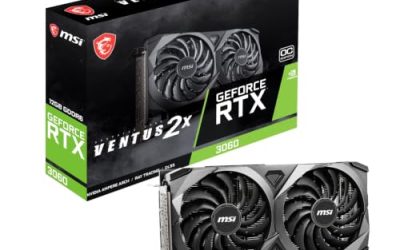
MSI GeForce RTX 3060 Ventus 2X 12G OC V1
This MSI card lists 12GB of GDDR6 at 15Gbps on a 192-bit bus, a boost clock of 1807MHz, HDMI and DisplayPort outputs, a PCIe 4 interface, and Torx twin fans on Ampere architecture. It suits a builder who wants a generous memory pool in a standard dual-fan design for 1080p and light 1440p.
- Strength: 12GB of memory on a 192-bit bus is generous for this budget tier.
- Strength: twin-fan design fits most mid-size cases.
- Trade-off: Ampere is a previous generation, so newer features arrive on later cards.
Skip it if you want the newest platform and display standards. The V1 designation in the name is worth noting, since revised versions of a card can differ in small ways from earlier runs of the same model.
Gigabyte GeForce RTX 3050 WINDFORCE OC V2 6G
The title lists 6GB of GDDR6 on a 96-bit bus with two WINDFORCE fans. It is an entry-level way into RTX hardware for esports and lighter 1080p play, and it suits small, low-demand builds.
- Strength: RTX-branded architecture at an entry-level cost.
- Strength: dual-fan cooling keeps the design manageable.
- Trade-off: 6GB on a 96-bit bus will force lower texture settings in recent games.
Skip it if you want to play new releases at high settings. Buyers who can stretch toward a 12GB model will find that extra memory matters more over the life of the card than the small difference in brand or cooler.
XFX Speedster SWFT210 Radeon RX 7600
This AMD card lists 8GB of GDDR6, RDNA 3 architecture, and a generous output panel of HDMI plus three DisplayPort connectors. It is a good fit for an AMD-leaning build with several monitors, and for a player at 1080p who values display flexibility.
- Strength: HDMI plus three DisplayPort outputs support multi-monitor desks.
- Strength: RDNA 3 is a more recent design than the RTX 3000 generation.
- Trade-off: 8GB offers less long-term headroom than the 12GB RTX 3060 cards.
Skip it if you need more than 8GB of video memory. It is also worth confirming that your power supply has the connector the card needs, since AMD and Nvidia boards in this tier differ in how they draw power.
ASUS Dual GeForce RTX 5050 8GB OC Edition
The newest platform here lists 8GB of GDDR6, PCIe 5.0, HDMI 2.1b, DisplayPort 2.1b, a 2-slot body, Axial-tech fans, and 0dB technology. It is built for buyers who want modern display outputs and a quiet card for a compact 1080p system.
- Strength: HDMI 2.1b and DisplayPort 2.1b outputs are future-friendly.
- Strength: 0dB mode stops the fans at idle for quiet desktop use.
- Trade-off: 8GB is the same memory size as cheaper older cards.
Skip it if raw memory capacity matters more than newer connections. Anyone buying mainly to play older libraries at 1080p may get more value from a 12GB previous-generation card in the same budget.
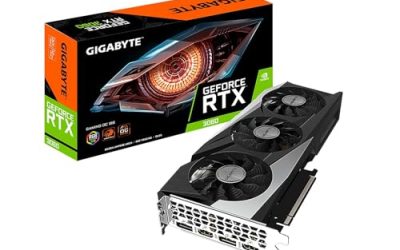
Gigabyte GeForce RTX 3060 Gaming OC 12G (Rev 2.0)
This version carries 12GB of 192-bit GDDR6 and three WINDFORCE fans. The larger fan array targets cooler, quieter operation under long gaming sessions, which suits a builder with a roomy case.
- Strength: three fans spread heat across a larger cooler.
- Strength: 12GB memory with a 192-bit bus.
- Trade-off: a longer card needs more case clearance than the dual-fan models.
Skip it if your case is compact. Lower fan speeds from the larger cooler also tend to keep noise down, which matters for a desk setup where the tower sits close to your head.
MOUGOL AMD Radeon RX 580 8GB
The RX 580 is listed with 8GB of GDDR5, a 256-bit bus, 2048 stream processors, and HDMI, DisplayPort, and DVI outputs in a white dual-fan design. It is the tightest-budget choice for older and esports titles and for builders who need a DVI port for a legacy monitor.
- Strength: DVI plus HDMI and DisplayPort outputs cover older displays.
- Strength: 8GB on a 256-bit bus is a generous memory spec for an inexpensive card.
- Trade-off: an older architecture and an unfamiliar brand with limited title detail.
Skip it if you want recent features or a recognizable manufacturer.
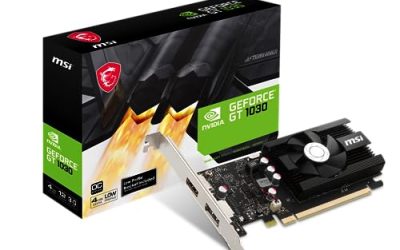
MSI GeForce GT 1030 4GB DDR4
This low-end MSI card lists 4GB of DDR4 on a 64-bit bus with DisplayPort and HDMI, a single fan, and DirectX 12 support. It is a display adapter with light gaming ability, suited to office machines, media PCs, and old titles.
- Strength: single-fan design suits small and quiet builds.
- Strength: a very low power requirement makes it easy to add to older systems.
- Trade-off: DDR4 memory on a 64-bit bus is far too limited for modern games.
Skip it if you plan to play recent titles. If the goal is to revive an old office computer so it can drive a monitor and play video, though, it does the job without demanding a bigger power supply.
Gigabyte GeForce RTX 3060 WINDFORCE OC 12G (Rev 2.0)
The WINDFORCE edition mirrors the 12GB, 192-bit GDDR6 specification but uses a two-fan cooler. It is a middle path between the compact twin-fan and larger triple-fan cards and suits mid-size cases.
- Strength: 12GB of memory with a 192-bit bus.
- Strength: two fans keep it more compact than the triple-fan variant.
- Trade-off: it shares the previous-generation platform with the other RTX 3060 cards.
Skip it if you want the newest generation. Because the three RTX 3060 listings share a core specification, the choice among them comes down to case size, fan noise preferences, and which one is available closest to your cap.
Which One Fits Your Situation
You want the most memory for the money
Any of the three RTX 3060 12GB models works. The Gigabyte WINDFORCE is the middle size, the MSI Ventus 2X is the straightforward twin-fan choice, and the Gigabyte Gaming OC suits a roomy case.
You are building a quiet, modern 1080p system
Choose the ASUS Dual RTX 5050, which offers 0dB operation and the latest display connections.
You run multiple monitors
The XFX Speedster RX 7600 stands out with HDMI plus three DisplayPort connectors.
You are on the tightest possible budget or fixing an office PC
The MOUGOL RX 580 handles older games with a big memory pool, while the MSI GT 1030 only covers basic display and light work.
Common Mistakes
- Choosing the cheapest listing without reading the memory bus, which can leave a card with 4GB on a 64-bit path.
- Assuming a newer name always means faster; a newer entry-level model can have less memory than an older mid-range one.
- Forgetting to verify the power supply connector and wattage before buying.
- Overlooking card length and slot thickness, then finding it will not fit the case.
- Paying more for a factory overclock that makes no visible difference in games.
Related guides
- Noctua Nh-D15 Vs Thermalright Peerless Assassin 120
- Sustainable Gaming Pc Power Supply Efficiency Guide
- Thermal Paste Application Method For Lga1851
Frequently Asked Questions
Is 8GB enough for a graphics card under 300 dollars?
For 1080p, yes, though some recent games ask for more at high texture settings. A 12GB card gives you more comfortable room as games continue to grow.
Should I buy a newer card with less memory or an older one with more?
It depends on your use. Memory-hungry games favor the larger pool, while buyers who value modern display ports and driver support may lean toward the newer design.
Can I use these cards in an older PC?
PCIe cards are generally backward compatible, but your power supply and case must still handle the card. An old, low-wattage supply is the most common hidden obstacle.
Is the GT 1030 a gaming card?
It can run older and light titles, but its DDR4 memory and 64-bit bus limit it sharply. It is better viewed as a display adapter for media and office use.