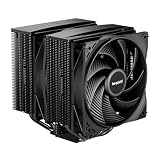
The Thermalright Peerless Assassin 120 SE is the best overall CPU cooler for an AM5 build: a dual-tower air cooler with six heat pipes, two 120 mm PWM fans, AM5 mounting hardware in the box, and a height of about 155 mm that fits most mid-tower cases. AM5 is AMD’s current Ryzen desktop socket, and its processors run hot under load, so a cooler with plenty of heat-pipe area matters. If you want a liquid cooler, the ARCTIC Liquid Freezer III Pro 360 is the strongest option here, and the be quiet! Pure Rock Pro 3 is the quieter, understated air-cooling alternative.
Our Top Picks
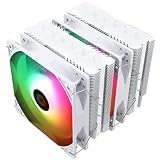
 Thermalright Peerless Assassin 120 SE ARGB CPU Air6 Heat Pipe4.92 x 5.31 x 6.1 inches2 PoundsCheck on Amazon
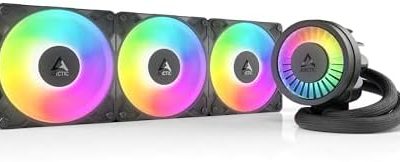
 ARCTIC Liquid Freezer III Pro 360 A-RGBLiquid Freezer III Pro 360 A-RGB15.7 x 4.7 x 2.9 Inches4.5 PoundsCheck on Amazon



Top 3 picks at a glance
Quick List
- Thermalright Peerless Assassin 120 SE – best overall air cooler for most AM5 builds
- Thermalright Assassin X120 Refined SE – best for compact builds and mid-range Ryzen chips with one fan
- Thermalright Peerless Assassin 120 Vision MAX ARGB – best for showcase builds that want a built-in LCD screen
- Thermalright Peerless Assassin 120 SE ARGB – best for lit builds that want the SE cooler with ARGB fans
- ARCTIC Liquid Freezer III Pro 360 A-RGB – best for high-power Ryzen 9 chips and a clear top-of-case layout
- be quiet! Pure Rock Pro 3 Black – best for a restrained, quiet-focused air cooler with a 250 W rating
Which One Is Right for You?
| If you… | Choose |
|---|---|
| Run a Ryzen 9 and want the strongest cooling in the group | ARCTIC Liquid Freezer III Pro 360 |
| Want a quiet, plain black tower from a respected German brand | be quiet! Pure Rock Pro 3 Black |
| Want the best all-round air cooler for a mid-tower | Thermalright Peerless Assassin 120 SE |
| Want ARGB lighting on a dual-tower cooler | Thermalright Peerless Assassin 120 SE ARGB |
| Want a screen on the cooler for system stats or animations | Thermalright Peerless Assassin 120 Vision MAX ARGB |
| Build with a Ryzen 5 or a 65 W part and want a smaller, single-fan cooler | Thermalright Assassin X120 Refined SE |
| Need to verify case height before you buy anything | Thermalright Assassin X120 Refined SE |
For most AM5 builds the real decision is the case, not the brand. Measure the maximum CPU cooler height your case allows, check the clearance over the memory slots, and decide whether you want the noise profile of air or the layout flexibility of a liquid radiator. A cooler that fits and runs quietly beats one that wins on paper but touches your side panel.
All 6 Picks in Detail
1. Thermalright Peerless Assassin 120 SE – Best overall air cooler
As an Amazon Associate we earn from qualifying purchases at no extra cost to you.

The PA120 SE is a dual-tower air cooler with six 6 mm heat pipes, an aluminum fin stack and two 120 mm TL-C12C PWM fans rated at 1550 RPM. Thermalright lists AMD AM4 and AM5 and Intel LGA 1700, 1851 and older sockets, with metal fasteners for installation. Retail data gives the heatsink size as roughly 125 by 110 by 155 mm. Retailers quote a 265 W cooling rating, but that figure does not appear on Thermalright’s own pages, so treat it as a retailer claim. It suits a builder with a Ryzen 7 or Ryzen 9 who wants strong air cooling and clean memory access in a standard case.
Fan specifications from the listing include up to 66.17 CFM and 25.6 dBA maximum noise. There are later versions of this cooler with different fans, so confirm which variant you are buying.
- Heat pipes: six 6 mm, AGHP technique per the listing
- Fans: two 120 mm TL-C12C PWM, 1550 RPM, 4-pin
- Height: about 155 mm per retail data
- Sockets: AM4/AM5 and recent Intel per the listing
- Airflow and noise: up to 66.17 CFM, up to 25.6 dBA per the listing
- Cooling rating: 265 W per retailers; not on the maker pages we found
Pros
- Two fans and six heat pipes in a standard tower size
- Wide socket support
Cons
- 155 mm height can be tight in small cases
- Variants with different fans exist
Compared with the SE ARGB, it is the plain-looking version, while the ARGB model adds lighting.
2. Thermalright Assassin X120 Refined SE – Best compact single-fan cooler

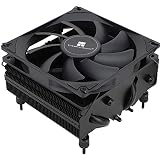
The Assassin X120 Refined SE is a single-tower cooler with four heat pipes, one TL-C12C PWM fan and an aluminum cover on top. Thermalright lists AM4 and AM5 compatibility, and a separate product page covers AM4/AM5 hardware. The heatsink height is about 148 mm and the fan is the same 1550 RPM design used on the PA120 SE. A UK retailer lists a 225 W maximum rating, but that figure was not found on Thermalright’s own pages. It suits a Ryzen 5 or a 65 W Ryzen 7 in a case with limited height, or a builder who wants a smaller footprint and good access to the memory slots.
Weight is listed inconsistently across sources, from about 460 to 645 grams, which probably reflects different measurements. If a heavier cooler worries you because of a vertical GPU or a moving build, confirm the number on the product page.
- Heat pipes: four 6 mm, AGHP technique
- Fan: one 120 mm TL-C12C PWM, 1550 RPM
- Height: about 148 mm per retail data
- Sockets: AMD AM4/AM5 and recent Intel
- Cooling rating: 225 W per a retailer; confirm
- Weight: listed inconsistently
Pros
- Shorter than the dual-tower models
- Single tower leaves room around memory
Cons
- Fewer heat pipes, so less headroom on a 170 W chip
- Single fan limits sustained load performance
Compared with the PA120 SE, it trades cooling headroom for a smaller size, so it fits more cases.
3. Thermalright Peerless Assassin 120 Vision MAX ARGB – Best for a built-in screen

The Vision MAX is a PA120-style twin-tower cooler with a 5-inch IPS LCD of 480 by 854 pixels on top, TL-K12 fans rated up to 2150 RPM, six heat pipes and AM4, AM5 and recent Intel mounting. Thermalright lists the screen as able to show system themes, logos, video and animations, and it connects through a 9-pin USB 2.0 motherboard header. The height with the screen is about 164 mm, which is more than most cooler limits in compact cases. It suits a showcase build in a roomy case where you want a display for temperatures and custom visuals.
The faster fans give more airflow at higher noise than the SE fans, and the screen adds one more cable to manage. Software for the display is Windows-focused, so confirm how it works on your operating system.
- Screen: 5-inch IPS, 480 by 854 per the listing
- Fans: TL-K12, up to 2150 RPM, up to about 69 CFM per retail data
- Height: about 164 mm including the screen
- Heat pipes: six 6 mm
- Screen connection: 9-pin USB 2.0 header
- Sockets: AM4/AM5 and Intel LGA 1700/1851 per the listing
Pros
- Display on the cooler with a custom theme option
- Higher fan speed ceiling
Cons
- 164 mm height is too tall for many cases
- Extra USB header and software needed
Compared with the PA120 SE ARGB, it is a style upgrade that needs more case room and more setup.
4. Thermalright Peerless Assassin 120 SE ARGB – Best SE cooler with lighting

This is the PA120 SE with dual TL-C12C-S ARGB PWM fans and an aluminum top cover. It lists the same six-heat-pipe design and AGHP technology, along with AM4 and AM5 support and a height of about 155 mm. Retail data shows a slightly wider body than the plain SE, around 135 mm instead of 110 mm, probably because of the fan frames, so check the width against your memory or the neighboring component. It suits a builder who wants the cooling of the SE cooler and lighting that syncs through the ARGB header on the motherboard.
It uses a 3-pin 5 V ARGB connector for the lighting, which must be plugged into a matching ARGB header and not a 12 V RGB header. The fans themselves use a normal 4-pin PWM plug.
- Heat pipes: six 6 mm, AGHP technique
- Fans: two TL-C12C-S PWM with ARGB
- Height: about 155 mm
- Width: about 135 mm per retailers; confirm
- Sockets: AM4/AM5 and recent Intel
- Lighting: ARGB, 5 V 3-pin header
Check that your case side panel clears the lit fan on the far side, since the added thickness can matter in tight cases.
Pros
- Same cooling layout as the SE with lighting
- Works with motherboard lighting software
Cons
- Needs an ARGB header
- Slightly wider than the plain SE
Compared with the plain SE, it adds a little complexity for the lighting, so pick it only if you want the glow.
5. ARCTIC Liquid Freezer III Pro 360 A-RGB – Best liquid cooler

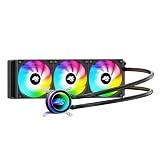
This is a 360 mm all-in-one liquid cooler with a 38 mm-thick aluminum radiator, three P12 Pro A-RGB fans running 600 to 3000 RPM, a PWM pump, and a small VRM fan that blows over the motherboard power stage. ARCTIC lists AMD AM5 and AM4 plus Intel LGA 1851 and 1700 support, with an offset mounting that shifts the cold plate toward the processor’s hot spot, and a six-year warranty. Retail data gives the radiator size as 398 by 120 by 38 mm and the tubes as 450 mm long. It suits a Ryzen 9 build in a case with room for a 360 mm radiator at the top or front.
The contact frame in the package is for Intel sockets, and AM5 uses the standard mounting. As with any AIO, check your case’s radiator support and the clearance for memory and the top fans before ordering.
- Radiator: 360 mm, 38 mm thick, aluminum
- Fans: three P12 Pro A-RGB, 600 to 3000 RPM
- Pump: PWM, about 800 to 2800 RPM per ARCTIC
- VRM fan: 400 to 2500 RPM, PWM
- Sockets: AM5/AM4, Intel LGA 1851/1700
- Warranty: six years per retail data
Pros
- Large radiator with a VRM fan
- Offset mounting and long warranty
Cons
- Needs 360 mm radiator support in the case
- More installation work than an air cooler
Compared with the PA120 SE, it offers more cooling headroom for high-power chips, while the air cooler is simpler to install and has no pump to fail.
6. be quiet! Pure Rock Pro 3 Black – Best understated quiet air cooler

The Pure Rock Pro 3 is a double-tower air cooler rated at 250 W, with six 6 mm heat pipes and two Pure Wings 3 120 mm PWM fans. Specifications from retail and press coverage show a height of about 155 mm, a width of about 124 mm and a depth of about 139 mm, with a fan that can be raised to clear memory adding a few millimeters of height. The fans reach about 2000 RPM and the noise is listed at 14 dBA at 50 percent speed, rising to about 35 dBA at full speed. It suits a builder who wants a low-key black cooler for a Ryzen 7 or Ryzen 9 and cares about a quiet profile.
It supports AM4, AM5 and recent Intel sockets, and be quiet! lists offset mounting for AM5. The package does not include extra thermal paste in some listings, so check what the box contains.
- Cooling rating: 250 W per the maker
- Heat pipes: six 6 mm, nickel-plated base
- Fans: two Pure Wings 3 120 mm PWM, up to about 2000 RPM
- Height: about 155 mm
- Noise: about 14 to 35 dBA across the speed range per press data
- Sockets: AM4/AM5 and Intel up to LGA 1851
Pros
- Quiet-focused fan curve
- Black finish with a conservative look
Cons
- No lighting
- Same 155 mm height as other dual towers
Compared with the PA120 SE, it leans toward lower noise, while the Thermalright usually offers more fan airflow on paper.
Specs Compared
| Model | Type | Heat pipes or radiator | Fans | Height or radiator size | Lighting or extras |
|---|---|---|---|---|---|
| Peerless Assassin 120 SE | Dual-tower air | Six 6 mm heat pipes | Two 120 mm, 1550 RPM | About 155 mm | None |
| Assassin X120 Refined SE | Single-tower air | Four 6 mm heat pipes | One 120 mm, 1550 RPM | About 148 mm | None |
| Peerless Assassin 120 Vision MAX ARGB | Dual-tower air | Six 6 mm heat pipes | Two 120 mm, up to 2150 RPM | About 164 mm with screen | 5-inch IPS screen, ARGB |
| Peerless Assassin 120 SE ARGB | Dual-tower air | Six 6 mm heat pipes | Two 120 mm ARGB; speed confirm on listing | About 155 mm | ARGB |
| ARCTIC Liquid Freezer III Pro 360 | 360 mm AIO liquid | 38 mm thick radiator | Three 120 mm, 600 to 3000 RPM | 398 by 120 by 38 mm radiator | A-RGB, VRM fan |
| be quiet! Pure Rock Pro 3 Black | Dual-tower air | Six 6 mm heat pipes | Two 120 mm, up to about 2000 RPM | About 155 mm | None; 250 W rating |
How We Chose These
This ranking is based on research, not on mounting the coolers in our own systems. We began with the six AM5-compatible cooler listings assigned to this topic and read each listing name closely. We then compared them with manufacturer pages and retailer specification fields, noting heat-pipe count, fan size and speed, stated height, socket support and any built-in extras. Where a cooling rating appears only on retailer pages, the text says so. We gave weight to published case-fit dimensions, since fit is the most common reason a cooler does not work, and to clear AM5 support. Details not stated in a listing are marked for confirmation on the product page.
What to Look For
Case and memory clearance
Measure before you buy. Most mid-tower cases list a maximum CPU cooler height, commonly between 155 and 170 mm, and a cooler plus its side panel gap must fit inside it. A worked example: if your case lists 160 mm, a 155 mm dual-tower cooler fits with 5 mm to spare, while a 164 mm cooler with a built-in screen does not. Also check memory: a dual-tower cooler with a fan on the near side may overhang the first memory slot, so you may need to raise the fan or use low-profile RAM. Liquid coolers avoid this, but they need radiator mounting space.
AM5 mounting and the socket
AM5 processors sit in an LGA socket with 1718 contacts, and AMD kept the same cooler mounting hole spacing as AM4, so many AM4 coolers work with the right brackets. Most coolers here ship with AM5-ready hardware, but always confirm that the listing names AM5. The processor’s heat spreader on AM5 is thick and has capacitors around its edge, so tighten the cooler evenly and do not use excessive force. Apply a pea-sized amount of paste in the center, unless the cooler has pre-applied paste, and remove the plastic film from the base before mounting.
Matching cooling to the processor
Ryzen 5 and 65 W Ryzen 7 parts are comfortable with a single-tower cooler. Ryzen 9 chips with a 170 W rated TDP can pull more under load, so a dual-tower or 280 to 360 mm liquid cooler gives more headroom and lower noise. A cooler’s wattage rating is a marketing figure, because there is no single standard for measuring it. Use it only as a rough comparison inside one brand’s lineup. Chips with stacked cache, such as the X3D models, run cooler under gaming load but still benefit from a good cooler.
Noise and fan control. Larger coolers with two fans can run slower and quieter for the same temperature. Connect the fans to the CPU fan header and set a fan curve in the BIOS so they stay low at idle and rise smoothly. Fans with fluid or hydraulic bearings tend to last longer than sleeve bearings. A small AM5 chip rarely needs a fan above 1,000 to 1,200 RPM in a well-ventilated case.
Air versus liquid
Air coolers are simple, have no pump to fail and need little maintenance. Liquid coolers move heat to a radiator at the case edge, which helps in tight spaces around the socket and with very hot chips. They need more installation steps and a case with radiator support. Mount the radiator so the pump is not the highest point of the loop, which keeps air away from it. Neither type reduces your processor’s power use; they only change how heat leaves the case.
Installation tips that save time
Build outside the case if you can: install the memory, the processor and the cooler brackets on the motherboard first, then mount the board. For dual-tower air coolers, fit the fan clips and connect the CPU fan header before the graphics card goes in, because the first tower can block your screwdriver. Follow the cross-pattern when tightening mounting screws, a little at a time, so the base presses flat on the heat spreader. After the first boot, check CPU temperatures in the BIOS at idle. A reading that jumps quickly into the 80s under a light load usually means the cooler is not seated flat or the plastic film was left on the base.
Questions
Do all CPU coolers fit AM5?
Most coolers that fit AM4 also fit AM5 because the mounting holes are the same, but the retention hardware can differ. Check that the listing names AM5 or includes AM5 brackets. All six coolers here list AM5 support.
Is a 360 mm AIO necessary for a Ryzen 7?
No. A good dual-tower air cooler or a 240 mm AIO is enough for most Ryzen 7 chips. A 360 mm radiator is useful for Ryzen 9 chips, heavy workloads or quieter operation at the same temperature.
Should I replace the stock cooler that comes with my Ryzen CPU?
Some Ryzen chips ship with a cooler and many do not. A third-party tower is usually quieter and cooler under load than a stock cooler, so it is worth it for gaming and workstation use.
Can I install a tall air cooler in a small case?
Only if the case lists enough clearance. Measure the CPU cooler height limit in the case manual and add a few millimeters of margin. If the numbers are tight, choose the single-tower model or a liquid cooler.
Do I need to add thermal paste to these coolers?
Most coolers include a small tube of paste, but check the listing. If paste is not included, buy a reputable one. Apply a small amount in the center, then mount the cooler straight down and tighten the screws evenly.
What does the cooler TDP rating mean?
It is the maker’s estimate of how much heat the cooler can handle under its own measurement method. Because methods differ, use the number only as a rough guide and weigh it alongside heat-pipe count, fan size and your processor’s power draw.
Update History
- October 20, 2026 – Initial publication; product set drawn from current catalog listings.
- Check the product page for current specifications and availability before buying.
Sources
- Manufacturer product and specification pages for Thermalright, ARCTIC and be quiet!
- Retailer listing titles and specification fields
- Published hardware coverage and component databases, used to cross-check dimensions, fan specifications and ratings