
For most current builds, a mini-ITX board on AM5 with a B850 chipset is the most straightforward choice, because it supports current Ryzen processors, DDR5 memory, and PCIe 5.0 storage in a small footprint. Intel buyers who want a Core Ultra 200S processor have a mini-ITX option on LGA 1851, but the board range is narrower, and the chipset tier matters more on that platform.
This guide explains which mini-ITX boards reviewers and guides name, how compatibility works in small cases, and what to check before buying a board for a compact build.
As an Amazon Associate we earn from qualifying purchases at no extra cost to you.



Our Top Picks
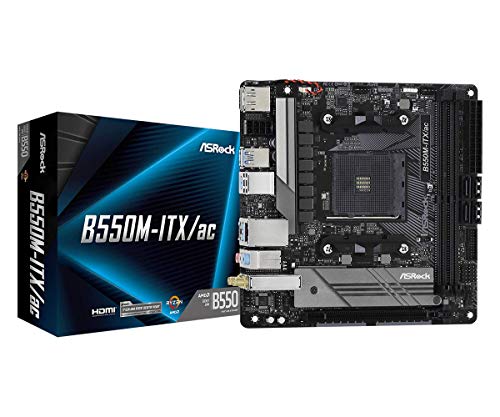 ASRock B550M-ITX/AC Supports 3rd Gen AMD AM4 Ryzen™700W11 x 8.5 x 2.5 inches0.9 poundsCheck on Amazon


Top 3 picks at a glance
At a Glance
| Board | Platform | Tier | Stated features | Best for |
|---|---|---|---|---|
| ASUS ROG Strix B850-I Gaming WiFi | AM5, B850 | Premium | 170 x 170 mm; 10+2+1 power stages rated 70 A; two PCIe 5.0 M.2 slots; 2.5GbE; Wi-Fi 7 | High-end compact gaming build |
| ASRock B850I Lightning WiFi | AM5, B850 | Budget to mid-range | 12-phase voltage regulator; named by Tom’s Hardware as its best Mini-ITX B850 board | Value-focused AM5 build |
| Gigabyte B850I AORUS PRO | AM5, B850 | Mid-range | One PCIe 5.0 x16 slot; two DDR5 slots up to 128 GB; PCIe 5.0 x4 M.2; 2.5GbE; Wi-Fi 7 | Balanced AM5 build with storage room |
| Gigabyte A620I AX | AM5, A620 | Budget | Named by PC Gamer as the budget AM5 pick | Lower-cost AM5 build |
| ASRock Phantom Gaming B860I Lightning WiFi | LGA 1851, B860 | Mid-range | Core Ultra 200S support; PCIe 5.0; USB4 | Compact Intel build |
AM5 Boards: The Main Route
The ASUS ROG Strix B850-I Gaming WiFi is the board most often named as the best AM5 mini-ITX option for gaming. ASUS lists support for Ryzen 9000 processors, PCIe 5.0, DDR5 with up to 128 GB of memory, and Wi-Fi 7 with 160 MHz bandwidth. Reviewers also cite its power stages, its dual PCIe 5.0 M.2 slots, and its 2.5GbE port as the features that set it apart in a compact board. Its 170 by 170 mm footprint is the reference size for mini-ITX cases.
The ASRock B850I Lightning WiFi is the value-focused alternative. Tom’s Hardware names it as its best Mini-ITX B850 board, citing a 12-phase voltage regulator and full support for AM5 processors. It fits builders who want a capable AM5 platform without the premium board’s extras.
The Gigabyte B850I AORUS PRO sits between those two. Its listed features include one PCIe 5.0 x16 slot, two DDR5 slots, two M.2 slots including a PCIe 5.0 x4 slot, 2.5GbE, and Wi-Fi 7. A longer warranty term is stated in some listings, so confirm the warranty on the maker’s page.
For budget AM5 builds, PC Gamer names the Gigabyte A620I AX as its pick. A620 is a lower-tier chipset, so the board suits lighter processors and modest power budgets rather than the highest-end chips.
Intel Boards: A Narrower Choice
Intel’s mini-ITX choices follow the newer socket rather than the older one, so a builder moving to Intel should start from the processor family. Core Ultra 200S processors use LGA 1851, and the board’s chipset tier then decides which features and overclocking controls are available. Because the Intel mini-ITX range is smaller than the AM5 range, the choice often comes down to one or two boards.
On the Intel side, coverage of mini-ITX boards is thinner. One guide names the ASRock Phantom Gaming B860I Lightning WiFi as the best Core Ultra mini-ITX board, citing LGA 1851, Core Ultra 200S support, PCIe 5.0, and USB4. The Z890 chipset is the only LGA 1851 tier that allows overclocking of the CPU cores and base clock, and Z890 boards are mostly full-size ATX. Buyers who want Intel in a compact case should therefore confirm the chipset and board size together.
Compatibility Notes for Small Cases
- Case size: Mini-ITX boards are 170 by 170 mm. Confirm that the case lists mini-ITX support and that the front and rear I/O match the board.
- CPU cooler: Compact cases limit cooler height. Check the cooler’s listed height and the case’s CPU cooler clearance, and confirm that the cooler includes a bracket for the socket.
- GPU length and slot: A mini-ITX board has one PCIe x16 slot, so the graphics card must fit the case’s GPU length and thickness. Check the card’s listed dimensions, and note that some cases require a riser or a shorter model.
- Power supply: Many mini-ITX cases use SFX or SFX-L units. Confirm the PSU form factor and the 8-pin CPU power connector on the board before buying.
- Memory: AM5 boards use DDR5. Check the board maker’s memory support list for the speeds and kit sizes you plan to use, since high-speed kits may need manual tuning.
- Storage and heat: PCIe 5.0 M.2 slots can run hot. Choose a case with airflow near the storage and confirm whether the board includes M.2 heatsinks.
- Verification: Check the board maker’s CPU and memory support lists before buying, since compatibility depends on the exact model and BIOS version.
Trade-offs by Budget
Budget tier: An A620-class AM5 board covers modest builds. It works best with mid-range processors and lighter graphics cards, and it suits office or light gaming systems.
Mid-range tier: A B850 board with a 12-phase or larger regulator and PCIe 5.0 M.2 support gives a balanced platform for most gaming builds in a small case.
Premium tier: The ASUS ROG Strix B850-I Gaming WiFi offers the most extras in this list of compact boards, including dual PCIe 5.0 M.2 slots and a 10+2+1 power stage design rated at 70 A per stage. It suits buyers who want the full feature set in a small build.
Pick the Right Board If
| Your situation | Pick |
|---|---|
| High-end compact gaming build with dual fast storage | ASUS ROG Strix B850-I Gaming WiFi |
| Value-focused AM5 build with full platform support | ASRock B850I Lightning WiFi |
| Balanced AM5 build with storage room and 2.5GbE | Gigabyte B850I AORUS PRO |
| Lower-cost AM5 build with modest power needs | Gigabyte A620I AX |
| Core Ultra 200S processor in a compact case | ASRock Phantom Gaming B860I Lightning WiFi |
Thermals and Airflow in Small Cases
A compact case concentrates heat from the processor, graphics card, VRM area, and M.2 drives into a small volume. Choose a case that lists enough fan positions for intake and exhaust, and keep the GPU’s intake path clear of the front panel where possible. Check the board’s VRM heatsink and the cooler’s height together, since a tall air cooler can block airflow across the board.
Storage needs attention too. PCIe 5.0 M.2 drives can run hot under sustained writes, so a board with a heatsink on the slot, or a case with airflow near the drive, reduces throttling risk. Small builds generally have less airflow margin than full-size systems, so thermal planning should happen before the parts are chosen.
Alternatives Worth Comparing
The ASUS ROG Strix X870-I Gaming WiFi is the premium AM5 option PC Gamer names as its best Mini-ITX board overall. It sits on the X870 chipset, a higher tier than B850, and is the choice for buyers who want more platform features.
The ASRock B850I Lightning WiFi is the closest value alternative to the ASUS premium board, and it suits builders who want a capable AM5 platform without the premium price.
The Gigabyte A620I AX is the budget route on AM5, and it fits lighter builds where the savings matter more than extra features.
Frequently Asked Questions
Which mini-ITX motherboard is best for a gaming build?
The ASUS ROG Strix B850-I Gaming WiFi is the most often named AM5 mini-ITX board for gaming, with dual PCIe 5.0 M.2 slots and strong power stages. The ASRock B850I Lightning WiFi is the value alternative. The right board depends on your processor, storage plan, and budget tier.
Is AM5 or Intel better for a mini-ITX build?
AM5 offers the wider mini-ITX board selection in current coverage, and one guide says AM5 is confirmed for support through 2029. Intel’s LGA 1851 platform is a valid choice for buyers who want Core Ultra 200S processors, but the mini-ITX options are fewer and the best overclocking tier is on larger boards. Compare the platform based on the processor you want.
Will a full-size graphics card fit a mini-ITX case?
Not always. Mini-ITX cases have limited GPU clearance, so the card’s listed length and thickness must fit the specific case. Check the case’s maximum GPU length, and choose a shorter partner model if clearance is tight.
Do mini-ITX boards need an SFX power supply?
Many mini-ITX cases use SFX or SFX-L power supplies, so the PSU form factor must match the case. Confirm the PSU’s wattage against the maker’s guidance for your processor and graphics card. Check the board’s 8-pin CPU connector before buying the PSU.
Does a mini-ITX board give up performance?
Mini-ITX boards have one PCIe x16 slot and less board area for power components than full-size boards, which can limit heavy overclocking and expansion. A B850 board with a strong regulator handles most current mid-range processors. Heavy overclocking or high-end processors may run better on a larger board.
How do I confirm a board supports my memory and processor?
Check the board maker’s CPU and memory support lists for the exact model and BIOS version. Support for high-speed DDR5 kits varies by board, so confirm the kit size and speed before buying. Update the BIOS only with the maker’s official files.









