The be quiet! Pure Power 13 M 1000W is the best overall pick here for most high-end gaming builds: it is fully modular, certified 80 Plus Gold with a Cybenetics Platinum efficiency listing, and it uses a semi-passive fan for quiet idle behavior. If you want the most refined electronics and don’t mind a premium tier, the ASUS ROG Strix 1000W Platinum is the stronger choice. A 1000W power supply (PSU) is rated to deliver up to 1,000 watts continuously, which suits a flagship graphics card paired with a fast CPU and leaves real headroom for power spikes.
Our Top Picks


Top 3 picks at a glance
Quick List
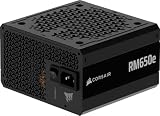
- Corsair RM1000e (Black) – best for a quiet, simple, fully modular build with a native 12V-2×6 cable
- be quiet! Pure Power 13 M 1000W – best overall for efficiency, low noise and a long warranty
- 1000W Gold ATX 3.1 unit (brand not named in the listing title) – best for buyers who want the spec sheet of a modern 1000W unit and accept less independent data
- Corsair RM1000x – best for builders who want a long warranty and a magnetic-levitation-bearing fan
- ASUS ROG Strix 1000W Platinum – best for premium builds that prioritize voltage stability and a Platinum-class design
- Corsair RM1000e (White) – best for white-themed builds that want the same electronics as the black RM1000e
Which One Is Right for You?
| If you… | Choose |
|---|---|
| want the best balance of efficiency, noise and warranty | be quiet! Pure Power 13 M 1000W |
| are building a premium rig and want Platinum-class efficiency and GaN-based design | ASUS ROG Strix 1000W Platinum |
| want a straightforward black Corsair unit with a 12V-2×6 cable | Corsair RM1000e (Black) |
| are building around a white case and white cables | Corsair RM1000e (White) |
| care most about the warranty length and Corsair’s x-series fan design | Corsair RM1000x |
| want a modern feature list from a lesser-known brand and will read the fine print | 1000W Gold ATX 3.1 unit (brand not named in the title) |
All six are fully modular, ATX 3.1 class units, so the choice comes down to efficiency tier, fan behavior, warranty and appearance. If you are unsure, start with the Pure Power 13 M and move up to the ROG Strix only if its extras matter to you. Treat the lesser-known brand as the one that needs the most checking on the product page.
All 6 Picks in Detail
1. Corsair RM1000e (Black) – Best for a Simple, Quiet Modular Build
As an Amazon Associate we earn from qualifying purchases at no extra cost to you.

The 2025 RM1000e is Corsair’s value-oriented 1000W line, and the listing states ATX 3.1 and PCIe 5.1 readiness. It suits builders pairing a high-end GPU with a mainstream or enthusiast CPU who want clean cabling and low noise without paying for extras like a digital interface.
Where it fits best: a mid-tower with a tall GPU and a single 12V-2×6 plug, where a compact 140mm-long body leaves room behind the motherboard tray for cable bundles. Because it is the value member of Corsair’s lineup, it skips extras such as a digital monitoring link; what you get is a clean modular set and a quiet zero-RPM idle. If you plan to keep the PSU through two or three graphics card generations, weigh its warranty length against the 10-year units further down this list.
- 1000W output, 80 Plus Gold per Corsair’s materials
- Fully modular with a native 12V-2×6 GPU cable
- 120mm fan with a zero-RPM mode at low to moderate loads (per Corsair’s specification page)
- Compact 140mm-long body, easier to fit than many 1000W units
- Warranty length: Corsair’s spec sheet lists 7 years, so confirm on the listing
Pros
- Short chassis helps in tighter cases
- Zero-RPM mode keeps idle builds quiet
Cons
- Shorter warranty than the x-series and be quiet! units
- Rifle-bearing fan rather than a fluid or magnetic design
Compared with the RM1000x, it trades a shorter warranty and a simpler fan for a more modest design.
2. be quiet! Pure Power 13 M 1000W – Best Overall for Efficiency and Noise

The listing states 80+ Gold, Cybenetics Platinum, PCIe 5.1, ATX 3.1, fully modular design, LLC topology and semi-passive cooling. That combination makes it the most balanced unit on this list, and it suits builders who want a quiet, efficient PSU for a flagship GPU build that runs for long gaming sessions.
Installation notes: the roughly 160mm body is longer than the Corsair e-series, so measure the space between the back of the case and the drive cage or fan hub before buying. The semi-passive fan means a silent PC during web browsing and light work, with spin-up only under sustained load. Reviewers describe the fan as a 120mm rifle-bearing model; if long-term bearing wear is a worry, the 10-year coverage offers some reassurance.
- 1000W continuous output; a single 12V rail
- Gold on the box, with Cybenetics listing the unit at its Platinum efficiency level
- Semi-passive operation with a 120mm fan that stays off at low and moderate loads
- Fully modular with a 12+4-pin (12V-2×6) cable rated for 600W
- 10-year warranty, per be quiet!’s product materials; the chassis is about 160mm deep
Pros
- High efficiency lowers heat and fan work
- Long warranty and a quiet-focused design
Cons
- Longer chassis can be tight in small cases
- Gold on the packaging while the independent lab lists a higher tier can confuse comparison shopping
Against the ROG Strix, it gives up some premium engineering but keeps most of the efficiency advantage in a simpler package.
3. 1000W Gold ATX 3.1 Unit (Brand Not Named in the Title) – Best for Spec-Sheet Shoppers

The listing title advertises a 1000W fully modular unit with 80+ Gold certification, ATX 3.1 and PCIe 5.1 readiness, a 12V-2×6 connector, a 140mm low-noise fan and 105C Japanese capacitors. On paper it matches the mainstream feature set. We could not verify independent lab data or the warranty length for it, so it is a candidate for buyers who will check the manufacturer details first.
Because the title names neither a brand nor a warranty term, treat this as a unit to research before you commit. Look for the manufacturer’s own specification sheet, a stated warranty period, protection features such as over-current, over-voltage, short-circuit and over-temperature shutdown, and any third-party efficiency or noise listing. If those details are missing or vague, one of the established units above is the lower-risk choice for a system that may hold a very expensive graphics card.
- 1000W, fully modular
- 80+ Gold claim in the listing title
- ATX 3.1 and PCIe 5.1 readiness claimed; native 12V-2×6 connector
- 140mm low-noise fan
- Warranty, ripple and noise data: confirm on listing
Pros
- Modern connector and standards on the spec sheet
- Large 140mm fan is useful for low noise
Cons
- Little independent lab data was found for this model
- Brand and warranty terms are not stated in the title
Compared with the Corsair RM1000e, it matches the headline spec but offers a less established support record.
4. Corsair RM1000x – Best for a Long Warranty and Proven Layout

The RM1000x in this ATX 3.1 form is Corsair’s step-up line. It suits owners of heavy gaming and workstation-style systems who value a long warranty and a fan designed for quiet running.
The RM1000x sits above the e-series in Corsair’s catalog and is usually chosen for its fan and warranty rather than any gaming performance edge. Its body is longer than the RM1000e, so check case depth. Because sources describe its fan size and efficiency labeling differently across product generations, make sure the listing you open shows ATX 3.1, and do not confuse it with older RM1000x generations that had shorter warranties and ATX 2.x designs.
- 1000W with ATX 3.1 and PCIe 5.1 support in the listing name
- Single 12V rail, up to 83.3A, per reviews of this generation
- Fully modular with Type 4 braided cables and a native 12V-2×6 connector
- 135mm magnetic levitation bearing fan, with a zero-RPM mode, according to most sources; fan size is reported differently in some places, so confirm
- 10-year warranty per reviewers; efficiency class is Gold-level, confirm exact certification
Pros
- Long warranty and robust build
- Fan control behavior designed for low noise
Cons
- Larger body than the RM1000e
- Efficiency label differs between sources, so read the exact certification
Compared with the RM1000e, you gain a longer warranty and a different fan design at the cost of a bigger chassis.
5. ASUS ROG Strix 1000W Platinum – Best for Premium Builds

This is the highest-efficiency unit in the group: the listing states 80 Plus Platinum, Cybenetics Lambda A+, GaN MOSFET and a GPU-First design. It suits builders with a flagship graphics card who want strong voltage regulation and a quiet fan profile.
This is the unit to consider when the graphics card is the most expensive part of the build and you want every electrical margin. The 135mm fan and 0dB mode keep the PC quiet at light load, and ASUS specifies a roughly 160mm body, so measure your case. The GaN design and Platinum certification matter most for long daily sessions; a casual player who games a few hours a week will gain less from them.
- 1000W, fully modular, ATX 3.1 with a native 12V-2×6 connector
- 80 Plus Platinum plus Cybenetics Lambda A+ for noise
- GaN MOSFET design to improve switching efficiency
- 135mm fan with a 0dB mode at low loads, according to ASUS’s materials
- 10-year warranty per ASUS; about 160mm deep
Pros
- Highest efficiency tier on this list
- Strong electrical design and long warranty
Cons
- Typically the most expensive option of the group
- Gains over Gold units are modest for typical gaming loads
Compared with the Pure Power 13 M, it adds a higher efficiency tier and extra features, but the practical gaming difference is small.
6. Corsair RM1000e (White) – Best for White-Themed Builds

This is the white version of the 2025 RM1000e, with the same listed ATX 3.1 and PCIe 5.1 readiness. It suits case builds where a white PSU shroud and cables matter for the look of the build.
White PSUs are about looks, so check the details that differ from the black version: the shroud is white, but the cable sleeves may remain black, and you should confirm that on the product page. Because the electronics and layout match the black RM1000e, the same notes apply: zero-RPM idle, a native 12V-2×6 cable and a body that suits tighter cases. A white PSU also shows dust more readily, so plan to wipe the shroud and clean the filter now and then.
- 1000W, fully modular
- Same electronics as the black RM1000e, per the product naming
- Native 12V-2×6 cable
- 120mm fan with zero-RPM mode, as on the black model
- Cable color: confirm on listing, since cables may be black or white
Pros
- Matches white cases and builds
- Same compact body as the black model
Cons
- White finish is a cosmetic choice only
- Same shorter warranty as the black unit
Compared with the black RM1000e, choose it purely for appearance.
Specs Compared
| Model | Wattage | Efficiency (listing) | Modularity | ATX / PCIe | Fan | 12V-2×6 |
|---|---|---|---|---|---|---|
| Corsair RM1000e (Black) | 1000W | 80 Plus Gold | Fully modular | ATX 3.1 / PCIe 5.1 | 120mm, zero-RPM mode | Native cable |
| be quiet! Pure Power 13 M | 1000W | 80+ Gold, Cybenetics Platinum | Fully modular | ATX 3.1 / PCIe 5.1 | 120mm, semi-passive | Native 12+4-pin |
| 1000W Gold unit (brand not named) | 1000W | 80+ Gold | Fully modular | ATX 3.1 / PCIe 5.1 | 140mm | Native |
| Corsair RM1000x | 1000W | Gold-class, confirm on listing | Fully modular | ATX 3.1 / PCIe 5.1 | 135mm, zero-RPM mode (confirm) | Native |
| ASUS ROG Strix 1000W Platinum | 1000W | 80 Plus Platinum, Cybenetics Lambda A+ | Fully modular | ATX 3.1 | 135mm, 0dB mode | Native |
| Corsair RM1000e (White) | 1000W | 80 Plus Gold | Fully modular | ATX 3.1 / PCIe 5.1 | 120mm, zero-RPM mode | Native cable |
How We Chose These
We built this list from the products in the current catalog and compared them using manufacturer specification pages, retailer listing fields and independent published reviews and lab certifications. We looked first at wattage and standards (ATX 3.1, PCIe 5.1 and the 12V-2×6 connector), then efficiency certification, fan behavior, modular cabling, size and warranty. We did not run our own bench measurements, and we have not claimed any. Where sources disagreed, for example on fan size or warranty length, we say so and ask you to confirm on the product page. Brand-name recognition counted for support reasons, but we flagged units with little independent data.
What to Look For
How much headroom 1000W actually gives you
A good rule of thumb is to add the maximum power of your graphics card, the sustained power of your CPU and roughly 100W for everything else, then leave 20 to 30 percent spare. As an illustration, a 450W graphics card, a 250W CPU under heavy load and 100W for the board, drives and fans comes to about 800W, which fits comfortably in 1000W. Power supplies also run most efficiently at roughly the middle of their load range, so a 1000W unit that normally sees 400 to 600W is working in its comfortable zone. If your total peak is below about 650W, an 850W unit is usually enough and can cost less.
ATX 3.1, PCIe 5.1 and the 12V-2×6 connector
ATX 3.1 is the current power-supply design standard. It tightens how a unit must handle short power excursions from modern graphics cards and requires a longer hold-up time so the PC rides through brief power dips. PCIe 5.1 is the matching graphics-power specification. The 12V-2×6 connector replaced the earlier 12VHPWR design and can carry up to 600W through a single cable. For safety, use the cable that came with your PSU, because modular connectors are not interchangeable between brands even when they fit. Push the 12V-2×6 plug in until it is fully seated with no visible gap, and avoid sharp bends right next to the connector: leave a straight run of about 35mm before any bend. Do not use daisy-chained adapters or bend the cable hard against a side panel. A loose or bent connector concentrates heat on the pins.
Efficiency tiers and what they mean
80 Plus Gold requires about 87 to 90 percent efficiency across typical loads on 115V input, and Platinum requires about 89 to 92 percent. Cybenetics runs a separate scheme with its own efficiency and noise grades, so a unit can carry Gold from one and a higher tier from the other. The practical benefit of a higher tier is a little less waste heat and fan work. For a gaming PC that draws 500W during play, the difference between Gold and Platinum is only a few percentage points of that wattage, so do not pay a large premium for the label alone.
Fan design, noise and size
Larger 135mm and 140mm fans can move the same air at lower speeds, which usually means less noise. Semi-passive or zero-RPM modes keep the fan off at low load. Check chassis depth too: some 1000W units are 160mm deep, which can collide with drive cages or radiator mounts. Finally, verify the cable count. You need two 8-pin CPU connectors for some high-end boards and enough PCIe connectors if you have a card that uses older 8-pin plugs instead of a 12V-2×6.
Installing safely
Switch the PSU off at its rear switch and unplug the power cord before touching any internal cable. Never open the PSU case, because its capacitors can hold charge after unplugging. Plug the power cord into a wall outlet or a surge protector with a suitable rating, and avoid cheap extension cords for a high-wattage system.
Warranty, protections and ripple
Good power supplies include over-current, over-voltage, under-voltage, short-circuit and over-temperature protection, usually abbreviated OCP, OVP, UVP, SCP and OTP. Over-power protection is a common sixth. Warranty length is a useful signal: 7 to 10 years suggests the maker expects the unit to last. Ripple, the small voltage wobble on each rail, is measured by independent labs, and lower is better for component longevity. If a listing does not name the maker or warranty, you cannot judge any of this, which is why established brands lead our list.
Questions
Is a 1000W power supply too much for a gaming PC?
Not if you run a high-end graphics card and a fast CPU, since 1000W gives headroom for power spikes. A mid-range system that peaks around 500W will work fine on 1000W but may also be well served by 750W or 850W. An oversized PSU does not draw extra power on its own; the system only pulls what it needs.
Do I need ATX 3.1 for a new graphics card?
It is not strictly required, but it is the safer choice because ATX 3.1 units are designed for the short power spikes of modern cards and include the 12V-2×6 cable. Older PSUs can work with an adapter, though a native cable is cleaner and reduces connection points.
Can I use cables from another power supply?
No. Modular PSU cables can have different pin layouts on the PSU side even when the plug looks identical. Using a mismatched cable can damage components. Always use the cables supplied with the specific unit or an official replacement from the same manufacturer and model line.
Is Platinum worth it over Gold at 1000W?
For most gamers the practical difference is small, mostly a bit less heat and fan noise. It can make sense if the PC runs long hours at high load or if the Platinum unit also has better voltage regulation and a longer warranty. Judge the whole package rather than the label.
How long should a 1000W PSU last?
Warranty length is a rough guide to the maker’s confidence: 7 to 10 years is common for good units in this class. Replace a PSU if you notice burning smells, repeated shutdowns under load or a failing fan, and keep dust out with regular cleaning.
Why does my new PSU fan not spin at idle?
Semi-passive and zero-RPM modes switch the fan off below a certain load or temperature. That is normal behavior. If the fan never starts even under heavy load and the unit becomes hot, power the PC down and contact the manufacturer.
Update History
- October 14, 2026 – Initial publication; product set drawn from current catalog listings.
- Check the product page for current specifications and availability before buying.
Sources
- Manufacturer product and specification pages for Corsair, be quiet! and ASUS ROG
- Retailer listing titles and specification fields
- Independent published hardware reviews from Tom’s Hardware, KitGuru and Hardware Busters
- 80 Plus and Cybenetics efficiency and noise certification programs