
A custom loop looks intimidating because it is a shopping list of unfamiliar parts that all have to be compatible with one another. Miss one fitting size or undersize a radiator and the build stalls. This checklist walks through every component a first custom loop needs, what each one does, and the rough budget and sizing to plan around before you place an order.
As an Amazon Associate we earn from qualifying purchases at no extra cost to you.


Our Top Picks

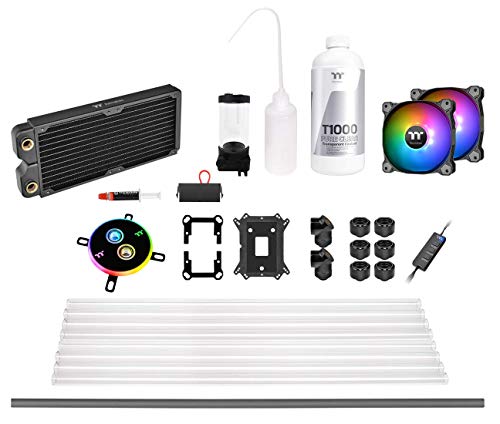
The core components
Every loop, no matter how fancy, is built from the same handful of parts. Understand these and the rest is detail.
| Part | Job | Beginner guidance |
|---|---|---|
| Water block(s) | Pulls heat off CPU/GPU | Match socket and GPU model exactly |
| Radiator(s) | Rejects heat to air | Plan ~120mm of rad per ~100–150W |
| Pump | Circulates coolant | D5 for flexibility, DDC for compact |
| Reservoir | Holds coolant, aids filling | Combo pump-res simplifies mounting |
| Tubing | Connects everything | Soft tubing is far easier first time |
| Fittings | Seals tube-to-part joints | Buy the right size for your tubing |
| Coolant | Transfers heat, resists growth | Premix is simplest to start |
| Fans | Airflow across radiators | Static-pressure fans for rads |
Sizing the loop correctly
Radiator surface is the single most important sizing decision. As a rough rule, plan for around 120mm of radiator length per 100–150W of heat you intend to cool. A CPU-only loop can be happy with a single 240–360mm radiator, while a CPU-plus-GPU loop typically wants 720mm or more of total radiator spread across two units. Under-radiate and your fancy loop performs no better than a good AIO.
Soft versus hard tubing
Beginners should start with soft tubing. It bends around corners without heat-forming tools, tolerates small mistakes, and drains and reassembles easily. Hard tubing looks cleaner but requires bending, measuring, and cutting acrylic or PETG precisely, which is a skill best learned after your first loop. Whatever you choose, your fittings must match the tubing’s inner and outer diameter exactly.
Do not forget the small stuff
The parts that stall builds are usually the cheap ones. Budget for extra fittings and a couple of spare lengths of tube, a fill funnel or bottle, and a way to leak-test. A drain valve or drain port saves enormous hassle at maintenance time. Anti-kink coils help soft tubing hold tight bends. Distilled water plus a biocide, or a quality premix, keeps algae and biofilm out; never use tap water, which leaves deposits and invites growth.
Assembly and first fill
Plan the loop path before buying so you know how many fittings and how much tube you need. After assembly, always leak-test with the pump running but the rest of the system unpowered — jump the PSU so only the pump spins, and let it run for a few hours while you check every joint. Only power the full system once you are confident there are no drips.
Frequently asked questions
Is a custom loop worth it over a good AIO for gaming?
For pure gaming performance, rarely — a quality 360mm AIO cools most CPUs comfortably for far less money and effort. Custom loops make sense when you want to cool CPU and GPU together, run near-silent under heavy load, or value the aesthetics and are willing to maintain the loop.
How often does a custom loop need maintenance?
Plan to inspect it periodically and flush and refresh coolant roughly once a year, sooner if you see any discoloration or buildup. A drain port makes this routine. Neglecting maintenance lets biofilm and residue accumulate, which restricts flow and undermines the cooling you paid for.
Bottom line
A first custom loop needs water blocks, radiators, a pump, a reservoir, tubing, matched fittings, coolant, and static-pressure fans — plus spares, a fill and drain plan, and a leak test. Size your radiators generously, start with soft tubing, and use distilled-plus-biocide or premix. Respect the checklist and the build goes smoothly; skip a step and you will be waiting on a single missing fitting while your parts sit idle.









