An SSD enclosure looks like a simple aluminum shell, yet the decision behind it splits in two right away: do you own a 2.5-inch SATA drive, or an M.2 NVMe stick? Those two drive types are not interchangeable, and picking the wrong enclosure means a returned box. A USB-C port on your laptop or console only describes the plug, not how fast the case can move data, so the speed label on the enclosure matters as much as the connector.
This guide is for anyone repurposing an old laptop SSD into a portable drive, building an external game library, or carrying large project files between machines. It sorts eight enclosures into SATA and NVMe camps, and every judgment below comes from the listed interface, drive size support and included extras, with no claims about measured speeds beyond what each title states. If your drive came out of a recent laptop, you likely need an M.2 case; if it came from an older notebook, SATA is the safer assumption.
Our Top Picks
 SABRENT USB-C NVMe Enclosure & Reader10Gbps NVMe Only4.59 x 1.24 x 0.6 inches0.2 poundsCheck on Amazon


Top 3 picks at a glance
Quick Picks
As an Amazon Associate we earn from qualifying purchases at no extra cost to you.


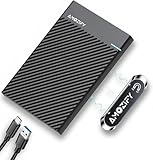
| Product | Best for | Key spec from title |
|---|---|---|
| UGREEN 2.5″ SATA Aluminum Enclosure | Reusing an old laptop SATA drive | USB 3.1 Gen 2, UASP, aluminum |
| SABRENT EC-PNVO | NVMe with cooling at 10Gbps | M.2 PCIe, 10Gbps, tool-free, aluminum cooling |
| UGREEN M.2 NVMe 10Gbps | Flexible M and B+M key support | 10Gbps, 2230/2242/2260/2280 sizes |
| BENFEI 2.5″ SATA Tool-Free | Quick swaps with USB-C or USB-A hosts | USB Type-C/Type-A to SATA, UASP |
| Cable Matters Aluminum 10Gbps | 2.5″ SSD/HDD with cables included | 10Gbps, USB-C and USB cables included |
| ORICO 25PW1-C3 | Budget SATA III case | USB 3.1 Gen 1, 9.5mm/7mm drives |
| Magnetic Stick-On SATA Enclosure | Clipping a drive to a laptop lid | Magnetic, tool-free, USB-C 3.1 |
| UGREEN M.2 NVMe 20Gbps | Highest-speed NVMe workflows | 20Gbps, up to 8TB, M/B+M key |
How to Choose
Start with the drive inside the case
A 2.5-inch SATA SSD needs a SATA enclosure; an M.2 NVMe stick in 2230, 2242, 2260 or 2280 length needs an NVMe one. Some M.2 SATA drives exist as well, so confirm the key type and protocol before ordering. The listing for the 20Gbps UGREEN names M and B+M key support, which covers a wider range of sticks than an M-key-only shell.
Match the interface speed to the drive
A SATA III drive tops out around the 6Gbps ceiling, so a case labeled 10Gbps will not make it faster. NVMe sticks can use 10Gbps or 20Gbps if the host port supports it. Check your laptop or console port: a slower port caps the whole chain, no matter how fast the enclosure is.
Look for UASP and cooling
UASP, listed on several of these titles, reduces protocol overhead on SATA transfers and is worth having. NVMe sticks run warm during long file copies, which is why the SABRENT title highlights aluminum cooling. Thicker metal shells spread heat better than plastic cases.
Weigh convenience features against cost
Tool-free latching saves a screwdriver. Included USB-C and USB-A cables remove a hunt for compatible leads. Budget cases usually cut corners on thermal design and cable quality, so a mid-range aluminum case is a sensible target for frequent use.
The 8 Best Options
UGREEN 2.5″ SATA Aluminum Enclosure
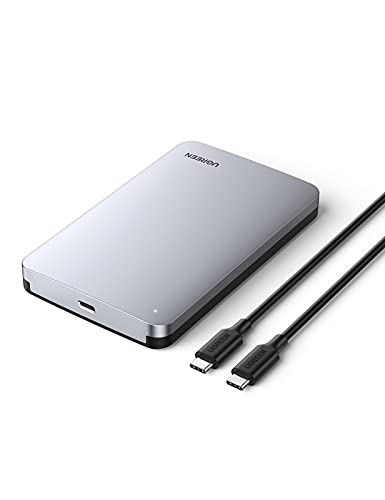
This case suits anyone turning a spare SATA laptop drive into a portable one. The title states USB 3.1 Gen 2, UASP support and an aluminum body, with compatibility called out for MacBook Pro and Air.
- Strength: UASP support helps SATA transfers run efficiently.
- Strength: Aluminum construction and Mac compatibility make it a clean fit for laptop users.
- Trade-off: SATA-only, so M.2 sticks will not fit.
Skip it if your drive is an M.2 NVMe stick, or if you need the headroom of a faster interface. It is the kind of case that suits a student or home-office user who wants a second life for a retired notebook drive, with a familiar metal shell that matches a MacBook finish.
SABRENT EC-PNVO NVMe Enclosure
Designed for M.2 PCIe SSDs, this tool-free enclosure supports 2230 through 2280 sizes at 10Gbps over USB 3.2 Gen 2. The title notes aluminum cooling, which matters for sustained copying.
- Strength: Tool-free installation accepts a wide range of M.2 lengths.
- Strength: Aluminum cooling is written right into the product title.
- Trade-off: 10Gbps is the ceiling, so very fast NVMe drives will outrun the link.
Skip it if you only have SATA drives or want the fastest tier of enclosure. Photographers and video editors who offload footage in long sessions are the natural audience, since a case designed around heat is less likely to throttle partway through a big copy.
UGREEN M.2 NVMe 10Gbps Enclosure
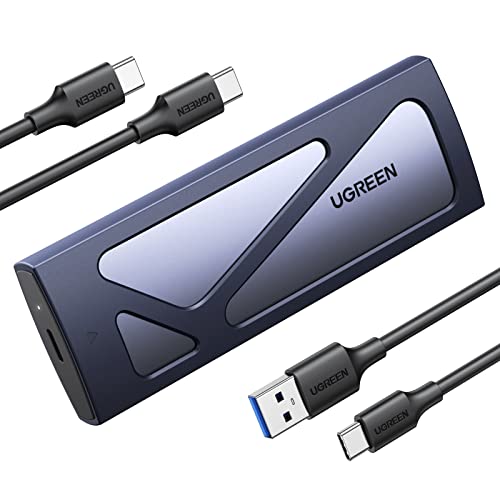
A tool-free reader that lists support for both M and B+M key SSDs, in 2230, 2242, 2260 and 2280 sizes. That wide acceptance makes it handy if you swap between drives from different sources.
- Strength: M and B+M key compatibility covers more drives.
- Strength: Tool-free design and 10Gbps rating suit everyday backups.
- Trade-off: Not the newest 20Gbps speed tier.
Skip it if your workflow needs maximum bandwidth for large video files. It fits hobbyists and tinkerers who keep a drawer of mismatched M.2 sticks from old builds and want one reader that can handle them all without hunting for a different shell each time.
BENFEI 2.5 Inch SATA Tool-Free Enclosure
BENFEI keeps things simple with a tool-free case for 2.5-inch SSDs. The title lists USB Type-C and Type-A connection to SATA, optimization for SSDs and UASP over SATA III.
- Strength: Both Type-C and Type-A connection options cover older and newer hosts.
- Strength: Tool-free installation speeds up a drive swap.
- Trade-off: SATA III speed limits apply, and the title lists no cooling features.
Skip it if you want an NVMe case or expect extended heavy transfers. It works best as a utility case for office desks and older PCs, where a mix of USB-A and USB-C ports means one cable choice never fits every machine you touch in a week.
Cable Matters Aluminum 10Gbps Enclosure
This is the pick for people who prefer accessories included. The listing states a premium aluminum build, 10Gbps rate for 2.5-inch SSDs and HDDs, and USB-C and USB cables in the box, with Thunderbolt compatibility mentioned.
- Strength: Both cable types come with the enclosure.
- Strength: Aluminum build supports both SSDs and HDDs.
- Trade-off: A 10Gbps label on a SATA case does not exceed what the drive itself can deliver.
Skip it if your storage is M.2 or you already own good cables. It appeals to buyers who dislike piecing a setup together, such as a first-time upgrader who wants everything needed to reach a working external drive on the first evening.
ORICO 25PW1-C3
A low-cost SATA III option with USB 3.1 Gen 1 and UASP, suited to 9.5mm and 7mm drives. It is the straightforward budget case for light backups.
- Strength: Tool-free installation and UASP listed in the title.
- Strength: Supports both common 2.5-inch drive heights.
- Trade-off: Gen 1 is the slower USB generation compared with Gen 2 cases.
Skip it if you need Gen 2 speeds or plan to move large files often. Think of it as a spare-parts solution: a document archive, a family photo library or a periodic system image where waiting a bit longer for a transfer does not matter.
Magnetic Stick-On SATA Enclosure
The unusual feature here is the magnetic stick-on design for laptops, paired with a tool-free USB-C 3.1 case for 2.5-inch SATA drives. It is meant for people who want the drive to ride along on a metal surface.
- Strength: Magnetic attachment keeps the drive from dangling.
- Strength: Tool-free USB-C design stays simple.
- Trade-off: A magnet only helps if you have a compatible metal surface.
Skip it if you want a conventional all-aluminum case or an NVMe slot. It is a gadget-minded choice for remote workers who hop between cafes and want a small drive that stays put rather than sliding around a bag or desk.
UGREEN M.2 NVMe 20Gbps Enclosure
The performance option. The title lists 20Gbps, M and B+M key support, sizes 2230 through 2280 and capacity up to 8TB, which positions it for big libraries and creator workflows.
- Strength: 20Gbps ceiling leaves headroom for fast NVMe drives.
- Strength: Up to 8TB support suits large archives.
- Trade-off: Full speed needs a compatible 20Gbps host port.
Skip it if your laptop only has an older USB-C port that cannot use the extra speed. It targets people building a portable game or project library on a large drive, who would rather pay once for a case with room to grow than replace it when capacities rise.
Which One Fits Your Situation
You pulled a SATA SSD out of an older laptop
The UGREEN 2.5″ SATA Aluminum Enclosure or the Cable Matters Aluminum 10Gbps give you a clean path to a portable drive, with cables included in the latter.
You carry large photo or video projects on NVMe
The SABRENT EC-PNVO adds cooling for sustained copies, while the UGREEN 20Gbps version offers more headroom if your port supports it.
You need the cheapest path to a backup drive
The ORICO 25PW1-C3 meets basic SATA backups without extra features.
You want a drive that sticks to a laptop lid
The Magnetic Stick-On SATA Enclosure is the only option built around that idea, so it suits someone who treats the external drive as a permanent companion to a metal-backed notebook.
Whichever route you take, treat the enclosure as a long-term part of your storage kit. A good case outlives several drives, so buying for the interface you expect to use through 2026 and beyond is cheaper than replacing a cheap shell after a year.
Common Mistakes
- Buying an NVMe case for a SATA drive, or the reverse.
- Assuming a 10Gbps label will speed up a SATA III drive.
- Ignoring the host port speed, which can cap a fast enclosure.
- Skipping cooling on an NVMe case used for long transfers.
- Forgetting to check that the case supports your drive height or M.2 length.
Related guides
- Noctua Nh-D15 Vs Thermalright Peerless Assassin 120
- Sustainable Gaming Pc Power Supply Efficiency Guide
- Managed Ethernet Switches For Small Business
Frequently Asked Questions
Can I put an M.2 SSD in a SATA enclosure?
No. SATA enclosures are built for 2.5-inch drives, while M.2 NVMe sticks require an NVMe enclosure. Read the drive label first to learn whether it is SATA or NVMe, then pick the case that names the same interface.
Does UASP matter?
It reduces overhead on SATA transfers and is a worthwhile feature when listed. Most modern operating systems support it automatically.
Do I need a Thunderbolt port?
No. These enclosures work on standard USB-C ports, though Thunderbolt-capable ports are listed as compatible by some titles. What matters most is the USB generation your port supports, since that sets the real ceiling for transfers. Check your laptop or console manual for the port rating before choosing a 10Gbps or 20Gbps case.
Is an aluminum case necessary?
It is helpful because metal spreads heat, especially for NVMe sticks during large transfers. Plastic cases can work for light SATA backups, but a metal shell is the safer default for frequent use. Cooling mentions in a title, as on the SABRENT, are a good sign for long copies.
Related guides
More from Amazon
Programs that pair well with the guide above. Offers and eligibility are set by Amazon and may change.
Free shipping on eligible items, Prime Video and more. Eligible new members can start with a free trial.
Start a Prime free trialAd-free music streaming. Eligible new subscribers can start with a free trial.
Try Music Unlimited freeA Prime membership for ages 18-24 with a trial period. Eligibility is set by Amazon.
See Prime for Young AdultsAudiobooks and podcasts to listen to on the go. Eligible new members can start with a free trial.
Try Audible freeAs an Amazon Associate we earn from qualifying purchases.