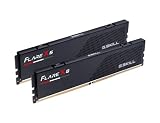
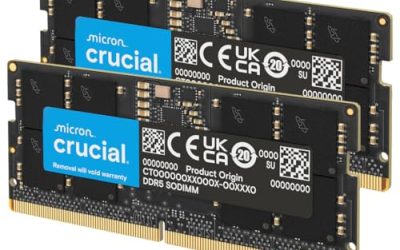
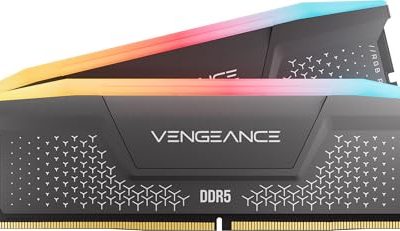
The best RAM kit for gaming in 2026 is a 32GB DDR5 kit running at CL30-CL34 timings and 6000-6400 MT/s for most builds, while 64GB only pays off if you stream, run background VMs, or edit footage between gaming sessions. Speed and latency both matter, but at matched capacity, latency improvements usually move frame rates less than people expect, and tall heat spreaders can quietly block your air cooler’s fan. Here’s how to pick the right kit without guessing.
As an Amazon Associate we earn from qualifying purchases at no extra cost to you.


Our Top Picks
 CORSAIR Vengeance RGB DDR5 RAM 32GB32GB (2 x 16GB)5.43 x 0.27 x 1.77 inches0.11 PoundsCheck on Amazon


Top 3 picks at a glance
32GB vs 64GB: What Actually Changes Your Frame Rate
Capacity itself rarely raises FPS once you clear 16GB, since most games don’t touch more than 10-14GB even at 4K with texture packs loaded. What capacity does affect is 1% low frame times when you’re alt-tabbing, running Discord, OBS, and a browser with forty tabs alongside the game. 64GB gives you headroom so the OS doesn’t start paging, but it does nothing for raw average FPS over 32GB in a clean benchmark run.
Speed (MT/s) and latency (CL) interact instead of acting alone. The number that actually predicts real-world responsiveness is true latency in nanoseconds, calculated as:
True latency (ns) = (CL ÷ MT/s) × 2000
Run that formula across common kits and the gap narrows a lot:
| Kit | Speed | CL | True Latency | Typical 1080p gaming FPS gain vs CL34/5600 |
|---|---|---|---|---|
| DDR5-5600 CL34 | 5600 MT/s | 34 | 12.14 ns | Baseline |
| DDR5-6000 CL32 | 6000 MT/s | 32 | 10.67 ns | +2-4% |
| DDR5-6400 CL32 | 6400 MT/s | 32 | 10.00 ns | +4-6% |
| DDR5-6000 CL30 | 6000 MT/s | 30 | 10.00 ns | +4-6% |
| DDR5-7200 CL34 | 7200 MT/s | 34 | 9.44 ns | +5-7% |
Notice that DDR5-6400 CL32 and DDR5-6000 CL30 land on nearly identical true latency and deliver nearly identical FPS gains, even though one kit has a 400 MT/s speed advantage. This is why chasing MT/s numbers alone without checking CL is a common mistake. For AMD Ryzen builds, matching RAM speed to a 1:1 FCLK ratio (usually up to DDR5-6000) tends to help more than going faster and losing sync, since the infinity fabric divider penalty costs more FPS than the extra bandwidth gains.
Do You Need 32GB or 64GB? Decision Matrix
Match your situation to the row below instead of defaulting to the biggest kit on the shelf.
| Your situation | Recommended capacity | Why |
|---|---|---|
| Pure gaming, single monitor, no streaming | 32GB (2x16GB) | Covers every current game with margin; extra RAM sits idle |
| Gaming + streaming with OBS and overlays | 32GB, consider 64GB if also encoding | OBS plus browser sources can add 4-8GB on top of the game |
| Gaming + video editing or 3D rendering between sessions | 64GB (2x32GB) | Timeline caches and render previews consume RAM fast |
| Running local AI models or multiple VMs alongside gaming | 64GB or more | Model weights and VM allocations can exceed 32GB alone |
| Budget build, 1080p, mainstream GPU | 32GB | GPU and CPU will bottleneck before RAM capacity does |
Heat-Spreader Height vs Air Cooler Clearance
This is the spec sheets rarely flag clearly, and it causes real build problems. DDR5 kits with tall aluminum or RGB heat spreaders can physically collide with the first fan on a dual-tower or large single-tower air cooler, especially in the memory slot closest to the CPU socket. Check the kit’s listed height in millimeters against your cooler’s stated RAM clearance before buying.
| Cooler (popular air coolers) | Rated RAM clearance | Safe for tall RGB kits (44-48mm)? |
|---|---|---|
| Noctua NH-D15 / NH-D15 chromax | ~32-37mm (lower fan can be raised) | Only if fan is raised or removed on one side |
| Noctua NH-U12S | ~45mm | Yes, with most tall kits |
| be quiet! Dark Rock Pro 5 | ~34mm | No, low-profile only unless slot is spaced out |
| Cooler Master Hyper 212 series | ~47-52mm | Yes |
| Deepcool AK620 | ~42-50mm (fan adjustable) | Mostly yes if fans are raised slightly |
Common DDR5 heat spreader heights run as follows:
- Low-profile kits: 32-35mm, safe under almost any cooler
- Standard kits with heat spreader: 38-42mm
- Tall RGB flagship kits: 44-48mm, the ones that cause clearance fights
If your motherboard’s first DIMM slot sits close to the CPU socket (common on compact ATX and most Micro-ATX boards), subtract roughly 5mm of safety margin from the cooler’s rated clearance before comparing it to the RAM height. A cooler rated for 42mm clearance should be treated as a ~37mm practical limit if you want zero risk of the fan nudging the heat spreader.
Picking by Budget
Rather than naming exact SKUs that rotate stock constantly, here’s how to shop by spec class and expected price band in 2026:
Quick Buying Checklist
- Confirm your motherboard’s QVL (qualified vendor list) includes the kit at your target speed, especially above DDR5-6400
- For AMD Ryzen, prioritize hitting the 1:1 FCLK sync speed over chasing higher MT/s past that point
- For Intel, raw speed scales a bit more linearly, so DDR5-6400 or higher is easier to justify
- Measure your case and cooler clearance in millimeters before buying tall RGB kits, not after
- Buy a single kit (2x16GB or 2x32GB) rather than mixing modules, since dual-rank matched kits train more reliably at rated XMP/EXPO speeds
Frequently asked questions
Can I use four RAM modules instead of a matched kit?
A single matched kit is the safer choice for reliable operation at rated XMP or EXPO speeds. The article recommends buying either two matched modules for a 32GB kit or two matched modules for a 64GB kit rather than mixing modules. Matched kits train more reliably, while mixed modules can make reaching the advertised speed less predictable.
What does XMP or EXPO mean when choosing DDR5 memory?
XMP and EXPO are the rated memory profiles you should consider when checking compatibility and target speed. The article advises confirming that your motherboard’s QVL includes the kit at its target speed, particularly above DDR5-6400. It also recommends choosing a single matched kit so the modules can train more reliably at their rated XMP or EXPO settings.
Why should I check my motherboard’s QVL before buying RAM?
You should check the QVL to confirm that your motherboard lists the memory kit at the speed you want to use. This matters especially above DDR5-6400, where compatibility and memory training can be more demanding. The article treats QVL verification as a buying step, alongside checking cooler clearance and selecting a matched kit.
Does higher RAM speed always make a gaming PC faster?
No. Speed and latency work together, so a higher MT/s rating does not automatically mean a meaningful gaming improvement. DDR5-6400 CL32 and DDR5-6000 CL30 have nearly identical true latency in the article’s comparison and deliver nearly identical FPS gains. On AMD Ryzen, maintaining the recommended 1:1 FCLK relationship can matter more than exceeding that speed.
Can I install tall RGB RAM under any air cooler?
No. Tall RGB kits can collide with the first fan of a large air cooler, particularly when the nearest memory slot sits close to the CPU socket. Compare the memory’s listed height with the cooler’s RAM clearance, and allow roughly 5mm of extra practical margin. Raising or removing a cooler fan may be necessary when clearance is limited.
Related guides
- 4 Best RAM Kits for Gaming and PC Builds (October 2026) Reviews & Picks
- Crucial CT2K16G56C46S5 Review: A 32GB DDR5 Laptop Upgrade With Compatibility Checks
- Corsair Vengeance RGB RS DDR5 16GB Review: Check Profiles and Clearance First
- Thermal Paste vs Thermal Pad for Gpu Memory: Which Is Right for Your Home