
The ASUS Pro WS WRX90E-SAGE SE is the best true workstation board in this group: it is built for AMD Threadripper PRO 7000 WX-series processors, takes ECC registered DDR5, and offers seven PCIe 5.0 x16 slots for multi-GPU rendering, AI and simulation rigs. EATX is the larger board standard, about 12 by 13 inches, that gives workstation boards room for extra memory channels and slots. If you want an extended board without leaving the consumer AM5 platform, the GIGABYTE X870E AORUS Xtreme X3D AI TOP and MSI MEG X870E GODLIKE MAX are the picks, and the GIGABYTE TRX50 AERO D sits in the middle.
Our Top Picks


Top 3 picks at a glance
Quick List
- ASUS Pro WS WRX90E-SAGE SE – best for multi-GPU Threadripper PRO workstations
- MSI MEG X870E GODLIKE MAX – best for an extreme AM5 flagship with fast networking
- ASUS Pro WS WRX80E-SAGE SE WIFI – best for reusing DDR4 and an older Threadripper PRO platform
- MSI MEG Z890 GODLIKE – best for an Intel Core Ultra flagship build
- GIGABYTE TRX50 AERO D – best for a Threadripper 7000 desktop with four memory channels
- GIGABYTE X870E AORUS Xtreme X3D AI TOP – best for storage-heavy AM5 builds
Which One Is Right for You?
| If you… | Choose |
|---|---|
| need ECC memory, remote management and many GPUs or add-in cards | ASUS Pro WS WRX90E-SAGE SE |
| want a Threadripper 7000 build without paying for eight memory channels | GIGABYTE TRX50 AERO D |
| already own DDR4 ECC memory and a WRX80-era Threadripper PRO | ASUS Pro WS WRX80E-SAGE SE WIFI |
| want the biggest Ryzen 9000 or 7000 board with dual fast LAN and five M.2 slots | GIGABYTE X870E AORUS Xtreme X3D AI TOP |
| want an AM5 flagship with Wi-Fi 7 and 10G plus 5G Ethernet | MSI MEG X870E GODLIKE MAX |
| prefer Intel Core Ultra (Series 2) and Thunderbolt connectivity | MSI MEG Z890 GODLIKE |
The first question is the processor platform: Threadripper PRO for the most memory and PCIe lanes, Threadripper for a middle tier, or a mainstream consumer socket with an oversized board. Second, check whether your case accepts the board size. Several of these boards use the larger EEB or EATX dimensions, and many cases only list standard ATX.
The consumer flagships are better value for content creators who need fast storage and networking, but they do not offer registered ECC memory or a pile of x16 slots. If your work depends on those, the Threadripper boards are the only real option here.
Budget the rest of the system as well. Threadripper processors and registered memory cost far more than consumer parts, and the power supply, cooler and case must all be sized for the platform. If you are unsure, list the exact applications you run and check whether they scale with cores, memory or GPUs before choosing a platform.
All 6 Picks in Detail
1. ASUS Pro WS WRX90E-SAGE SE – Best for multi-GPU Threadripper PRO workstations
As an Amazon Associate we earn from qualifying purchases at no extra cost to you.

Who it suits: professionals building a rendering, simulation, AI or video workstation who need eight memory channels, ECC and many fast slots. The listing names the EEB form factor, Threadripper PRO 7000 WX-series support, ECC R-DIMM DDR5, a 32 power-stage design and seven PCIe 5.0 x16 slots.
ASUS’s product page adds details that explain the price class: eight DIMM slots with up to 2 TB of memory, four PCIe 5.0 M.2 slots, dual 10 Gb LAN, USB4, and an onboard BMC with IPMI remote management. Puget Systems notes that one of the seven x16 slots is functionally x8, so confirm lane splits before planning a four-GPU layout. The board is large, so the case must explicitly support EEB or SSI-EEB boards, and the CPU needs a matching high-power supply.
- Socket and form factor: sTR5, EEB (about 12 by 13 inches)
- Processor support: Threadripper PRO 7000 WX-series per the listing
- Memory: eight slots of ECC registered DDR5, up to 2 TB per ASUS
- Expansion: seven PCIe 5.0 x16 slots (one runs at x8 per Puget Systems)
- Management: onboard BMC with IPMI and dual 10 Gb LAN
Pros
- Eight-channel ECC memory and remote management
- Seven PCIe 5.0 x16 slots for multi-GPU work
Cons
- Needs a large, EEB-ready case and a very strong power supply
- No Wi-Fi
It is the sensible step up from the GIGABYTE TRX50 AERO D when memory bandwidth and slot count outweigh the cost.
2. MSI MEG X870E GODLIKE MAX – Best for an extreme AM5 flagship with fast networking
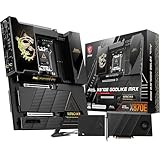
Who it suits: creators and enthusiasts who want the most feature-rich AM5 board. The listing describes an E-ATX board for Ryzen 9000, 8000 and 7000 processors with Dynamic Dashboard III, EZ Slide M.2, a 64MB BIOS ROM and a 110A SPS power design.
This is a consumer flagship, not a workstation board. It has four DDR5 slots, dual-channel memory and up to 256 GB, so it will not match the memory capacity of a Threadripper board. What it offers is a heavy VRM, two USB4 40 Gbps ports, Wi-Fi 7 and a 10G plus 5G LAN pair, plus the M.2 XPANDER-Z SLIDER Gen5 add-in card for extra drives. Its width is closer to 11 inches than the full 13 of an EATX board, but it is still larger than ATX, so the case should list E-ATX support.
- Socket and form factor: AM5, E-ATX
- Power design: 110A smart power stages per the listing
- Memory: four DDR5 slots, up to 256 GB, dual channel
- Networking: Wi-Fi 7, 10G and 5G LAN, two USB4 ports
- Storage: multiple M.2 slots plus an included Gen5 expansion card (confirm count on the product page)
Pros
- Top-tier AM5 power delivery and networking
- Built-in display for diagnostics and monitoring
Cons
- No registered ECC support and only four DIMM slots
- Limited PCIe x16 slot count
Compared with the GIGABYTE X870E AORUS Xtreme X3D AI TOP, it leans on networking and an included M.2 card, while the GIGABYTE offers more native M.2 slots.
3. ASUS Pro WS WRX80E-SAGE SE WIFI – Best for reusing DDR4 and an older Threadripper PRO platform
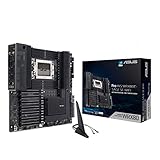
Who it suits: owners of WRX80-era Threadripper PRO processors and eight-channel DDR4 ECC memory who need a replacement or a used-parts build. The listing names PCIe 4.0, ASMB9-iKVM remote management, two 10Gb LAN ports and seven PCIe 4.0 x16 slots.
This is a runner-up for a new build because it is built on an older platform, not because it is weak. ASUS lists eight DIMM slots of DDR4 with up to 2 TB capacity, support for both ECC and non-ECC modules, three M.2 slots, two U.2 ports and eight SATA ports, plus Wi-Fi 6 and dual Intel 10G LAN. Memory is DDR4, which is cheaper if you already own it but does not carry forward to newer Threadripper generations. Confirm the processor list and BIOS version on the support page before pairing it with any specific chip.
- Socket: sWRX8 (WRX80), EATX-class workstation board
- Memory: eight DIMM slots of DDR4 ECC-capable memory, up to 2 TB per ASUS
- Expansion: seven PCIe 4.0 x16 slots
- Storage: three M.2, two U.2 and eight SATA ports per ASUS
- Networking: dual 10G LAN and Wi-Fi 6
Pros
- Eight-channel memory with cheap DDR4
- Wide storage options including U.2
Cons
- Older PCIe 4.0 and DDR4 generation
- Platform is not the one Threadripper 7000 uses
Next to the ASUS WRX90E-SAGE SE, it keeps the layout and management features but gives up PCIe 5.0 and DDR5.
4. MSI MEG Z890 GODLIKE – Best for an Intel Core Ultra flagship build

Who it suits: builders choosing Intel Core Ultra (Series 2) processors who want a fully loaded extended board. The listing describes an E-ATX board for LGA 1851, Dynamic Dashboard III, EZ Slide M.2 and DDR5 rated to 9200+ MT/s with overclocking.
This is the one board in the list that does not use an AMD socket, so it only makes sense with Intel Core Ultra chips. MSI lists a 26+2+1+1 power design, four DDR5 slots up to 256 GB, 10G and 5G LAN, Wi-Fi 7, and Thunderbolt 4 on the rear panel. An included Thunderbolt 5 add-in card adds two ports at 80 Gb/s. It is a strong choice for creators who rely on Thunderbolt storage and displays. As with the AM5 flagships, there is no registered ECC support, and some resellers list the board as end of life, so check availability.
- Socket and form factor: LGA 1851, E-ATX
- Processor support: Intel Core Ultra (Series 2) per the listing
- Memory: four DDR5 slots, up to 256 GB
- Connectivity: Wi-Fi 7, 10G plus 5G LAN, Thunderbolt 4
- Expansion: PCIe 5.0 graphics slot and extra M.2 capacity via the included card
Pros
- Thunderbolt 4 and a Thunderbolt 5 card for fast external storage
- Very heavy power delivery
Cons
- Intel-only and not a workstation platform
- Possible limited availability
It is the Intel counterpart to the MSI MEG X870E GODLIKE MAX, trading Ryzen support for Thunderbolt features.
5. GIGABYTE TRX50 AERO D – Best for a Threadripper 7000 desktop with four memory channels

Who it suits: creators and engineers who want Threadripper cores and PCIe lanes without the cost of the full WRX90 platform. The listing names the sTR5 socket, TRX50 chipset, E-ATX size, DDR5, PCIe 5.0 M.2, USB4, Wi-Fi 7 and Marvell 10GbE.
TRX50 is the middle tier of the Threadripper 7000 family. ServeTheHome notes that it is limited to four memory channels compared with eight on WRX90, which is a real difference for memory-bound work but fine for rendering, compiling and video editing. GIGABYTE lists three x16 slots, two at PCIe 5.0 and one at PCIe 4.0, plus four M.2 slots and eight SATA ports. Puget Systems calls the form factor CEB instead of E-ATX, so check case support for both names.
- Socket and chipset: sTR5, TRX50
- Memory: four DDR5 slots across four channels, registered ECC supported per Puget Systems
- Expansion: two PCIe 5.0 x16 and one PCIe 4.0 x16 slot
- Storage: M.2 PCIe 5.0 and 4.0 slots plus eight SATA ports
- Connectivity: USB4, Wi-Fi 7, 10G and 2.5G LAN
Pros
- Threadripper power with Wi-Fi 7 and 10G LAN
- Fewer memory modules to buy than WRX90
Cons
- Only four memory channels
- Three x16 slots limit multi-GPU plans
Compared with the ASUS WRX90E-SAGE SE, you give up memory bandwidth, slot count and IPMI in exchange for a smaller, simpler platform.
6. GIGABYTE X870E AORUS Xtreme X3D AI TOP – Best for storage-heavy AM5 builds
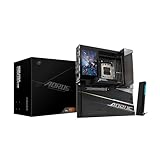
Who it suits: AM5 builders who want a huge feature set and plenty of NVMe capacity. The listing describes an E-ATX board with a 24+2+2 power design, five M.2 slots, PCIe 5.0 and USB4 Type-C for Ryzen 9000, 8000 and 7000 processors.
GIGABYTE adds dual 10G Ethernet, Wi-Fi 7, a large LCD, 12 fan headers and an ESS audio DAC. Memory is four DDR5 slots up to 256 GB with overclocking up to DDR5-9000 per GIGABYTE, so treat the speed as a ceiling. Two M.2 slots run at PCIe 5.0 and three at PCIe 4.0. The board has just two SATA ports, so users with a lot of 2.5-inch drives will want a different option. It also has no registered ECC support, so it is a creator board more than a workstation board.
- Socket and form factor: AM5, E-ATX
- Power design: 24+2+2 phases with 110A stages per GIGABYTE
- Storage: five M.2 slots, two PCIe 5.0 and three PCIe 4.0
- Networking: dual 10G LAN and Wi-Fi 7
- Expansion: one PCIe 5.0 x16, one PCIe 5.0 x8 and one PCIe 4.0 x4 slot
Pros
- Five M.2 slots and dual 10G LAN
- Very strong power delivery for Ryzen 9
Cons
- Only two SATA ports
- Few full-length expansion slots
It differs from the MSI MEG X870E GODLIKE MAX mainly by offering more built-in M.2 slots and dual 10G Ethernet.
Specs Compared
| Board | Socket | Form factor | Memory | Max RAM | PCIe highlights | Networking |
|---|---|---|---|---|---|---|
| ASUS Pro WS WRX90E-SAGE SE | sTR5 (WRX90) | EEB | 8-channel ECC R-DIMM DDR5 | up to 2 TB | 7 x PCIe 5.0 x16 | Dual 10G LAN, no Wi-Fi |
| MSI MEG X870E GODLIKE MAX | AM5 | E-ATX | DDR5, 2-channel | 256 GB | confirm on listing | Wi-Fi 7, 10G and 5G LAN |
| ASUS Pro WS WRX80E-SAGE SE WIFI | sWRX8 (WRX80) | EATX | 8-channel DDR4 ECC-capable | up to 2 TB | 7 x PCIe 4.0 x16 | Dual 10G LAN, Wi-Fi 6 |
| MSI MEG Z890 GODLIKE | LGA 1851 | E-ATX | DDR5, 2-channel | 256 GB | PCIe 5.0 x16 and x8 (confirm on listing) | Wi-Fi 7, 10G and 5G LAN |
| GIGABYTE TRX50 AERO D | sTR5 (TRX50) | E-ATX | 4-channel DDR5 | confirm on listing | 2 x PCIe 5.0 x16, 1 x PCIe 4.0 x16 | Wi-Fi 7, 10G and 2.5G LAN |
| GIGABYTE X870E AORUS Xtreme X3D AI TOP | AM5 | E-ATX | DDR5, 2-channel | 256 GB | PCIe 5.0 x16 and x8 | Wi-Fi 7, dual 10G LAN |
How We Chose These
This list is based on research into published specifications and the catalog listings, not on in-house trials of the boards. The criteria were extended board size, the processor platform and its memory channels, memory type and capacity, the number of PCIe x16 slots, M.2 and SATA storage options, built-in networking, and management features such as a baseboard controller. Specifications come from the manufacturers’ product pages and established hardware reviews, and any value that sources disagreed on is flagged for you to confirm. Two boards are consumer flagships and one is on an older platform, and the article says so plainly in each section.
What to Look For
EATX, EEB and what fits your case
The EATX standard measures about 12 by 13 inches, roughly 305 by 330 mm, while ATX is 12 by 9.6 inches. Many consumer boards marketed as E-ATX are narrower, closer to 11 inches wide, but they still need mounting points and clearance that a standard ATX case lacks. Server-derived EEB boards share the 12 by 13 footprint and use extra standoffs.
A practical rule: read the case’s specifications for the exact words EATX, E-ATX, EEB or SSI-EEB, and check the maximum board width in millimeters. Also confirm that cable routing cutouts, front fans and radiators leave room for the extra width.
Platform choice: Threadripper PRO, Threadripper or consumer
WRX90 supports eight memory channels and a large number of PCIe 5.0 lanes, which suits multi-GPU and memory-heavy work. TRX50 supports four channels and fewer lanes. Consumer AM5 and LGA 1851 give two memory channels and a small number of CPU lanes, so a second x16 graphics card runs at x8 at best.
Use this rule of thumb: if your workload scales with memory bandwidth or needs more than two GPUs or several high-speed cards, choose a Threadripper board. If you need fast storage, fast single-thread speed and good networking, a consumer flagship is cheaper to build around and quicker for typical creative apps.
Memory: ECC, registered and capacity
Registered ECC DIMMs, called R-DIMMs, correct single-bit errors and allow far larger capacities, up to 2 TB on the WRX boards here. They are more expensive and cannot be mixed with standard desktop DIMMs. Consumer flagships take standard unbuffered DIMMs up to 256 GB, which is plenty for most video and design work.
Example: a simulation workload needing 512 GB of reliable memory can only be built on a WRX board, while a 64 GB video editing machine does not need ECC and is better served by an AM5 or Intel flagship.
Power, cooling and the rest of the build
Extended boards usually need two 8-pin CPU power connectors and a power supply sized for the processor plus every GPU. High-core-count Threadripper chips can draw several hundred watts, so budget for a power supply with headroom and a cooler rated for the sTR5 socket. Check the board’s lane map before adding cards, because M.2 and U.2 slots can share lanes with PCIe slots.
Plan for airflow too. Large boards with many drives and cards produce plenty of heat, so a case with strong front intake and a few top or rear exhaust fans keeps temperatures steady.
Finally, think about service and drivers. Workstation boards often include remote management and long-lived BIOS support, which matters in a business setting where downtime is costly. Consumer flagships update more often with new CPU support, which suits enthusiasts who upgrade processors.
Questions
What is the difference between EATX and E-ATX?
They mean the same thing in everyday use: an extended ATX board that is wider than a standard ATX board. Actual widths vary by maker, so verify the board dimensions against your case’s stated limit.
Can I use an EATX board in an ATX case?
Usually not. An EATX board is wider than an ATX case’s standoff layout and tray, so only cases that list EATX or EEB support will take it.
Do I need ECC memory?
Only for work where a flipped bit could corrupt results, such as scientific computing or servers. Most creative and gaming users do not need it, and the AM5 and Intel boards here use standard memory.
Is the WRX80 board still worth buying?
It can make sense if you already own compatible DDR4 ECC memory and a WRX80-era processor. For a fresh build, the newer WRX90 platform gives DDR5 and PCIe 5.0, so it is the better long-term base.
Why choose a consumer E-ATX board over a workstation board?
Consumer flagships offer faster single-thread speed, more M.2 slots and fast networking for less money. They give up memory capacity, ECC and the number of full-speed slots, so they fit creators better than render farms.
Do these boards need special power supplies?
Most need two 8-pin CPU connectors, and the Threadripper boards also supply extra power for slots. Use a quality power supply with enough wattage for the CPU and every graphics card, and check the board manual for connector requirements.
Update History
- October 14, 2026 – Initial publication; product set drawn from current catalog listings.
- Check the product page for current specifications and availability before buying.
Sources
- Manufacturer product and specification pages for ASUS, MSI and GIGABYTE
- Retailer listing titles and specification fields
- Published workstation and motherboard reviews from established hardware outlets, including a system builder’s parts pages









