A tri-band router carries three separate wireless bands instead of two, and that third band changes how a busy home network behaves. With a dual-band router, every phone, laptop, console, television and smart home gadget shares two lanes. With a tri-band router, the traffic spreads across three, so a video call in one room does not have to fight a game download in another. The extra band also gives mesh nodes a private lane to talk to each other, which keeps more of the wireless capacity free for your devices.
This guide compares five tri-band routers that are listed on Amazon US, from WiFi 6 gaming flagships to a WiFi 6E model that adds the 6 GHz band. Every specification below comes from the product listing or the maker’s published data, and any figure the listing does not state is marked as not stated rather than filled in with a guess. The five picks cover two band layouts: 2.4 GHz plus two 5 GHz bands, and 2.4 GHz plus 5 GHz plus 6 GHz. Both layouts count as tri-band, and the right one depends on whether your devices can use 6 GHz yet.
Top 3 picks at a glance

What to look for
Band layout. A tri-band router runs one 2.4 GHz band and two more bands. On WiFi 6 models the two extra bands are both 5 GHz, with combined throughput figures such as AX6600 or AX11000. On WiFi 6E models one of the extra bands moves to 6 GHz, which is quieter because fewer neighbouring networks use it. If your phones and laptops are WiFi 6E capable, the 6 GHz lane is a real advantage. If they are not, a 2.4 plus 5 plus 5 layout gives you more 5 GHz capacity for the devices you already own.
Streams and processor. The stream count tells you how many simultaneous data paths the router can hold open. Eight-stream routers such as the ones in this guide handle many active devices at once, while a quad-core processor keeps traffic shaping, security checks and quality-of-service rules from slowing the network down. Look for the processor and stream count in the listing before you look at the headline throughput number, because the headline number is a combined total across all three bands, not the speed any single device will see.
Wired ports. Wireless gets the attention, but the wired side decides how fast a gaming PC or a network drive can actually move data. A 2.5G port matters once your internet plan passes gigabit, and a 10G port matters for a home server or a wired backhaul between two routers. Count the LAN ports too: four is the norm here, and link aggregation on some models lets two ports combine into one faster wired link.
Coverage and antennas. More antennas generally mean a stronger signal at range, but placement matters just as much. A router with eight adjustable antennas can aim its signal, while a six-antenna design with a cleaner shape may suit a living room shelf better. Check the coverage figure the maker states, then remember that walls, floors and neighbouring networks all shrink real-world reach.
Security and controls. Every router in this guide includes a security suite and parental controls of some kind. Check whether those features need a subscription or are included for the life of the router, and check whether the listing names a VPN feature if you want one. AiProtection, HomeShield and the NETGEAR Armor trial differ in what they include and for how long, so read the listing rather than assuming.
Mesh expansion. Several tri-band routers can join a mesh system later, which turns the third band into a dedicated backhaul lane between nodes. If you may add a node in another room later, pick a router from a mesh family now so the two units can work together.
ASUS ROG Rapture GT-AX11000 Pro

The GT-AX11000 Pro is the strongest pick in this guide and the most complete gaming router of the five. It is a tri-band WiFi 6 router with a 10G port and a 2.5G port, so a wired gaming PC and a fast internet connection both have room to breathe. ASUS RangeBoost Plus extends the reach of the signal, and triple-level game acceleration prioritises gaming traffic from the device through the router to the game server. The security suite is subscription-free, and the router works with AiMesh if you add another ASUS node later.
The Pro is a later and faster take on the GT-AX11000 below, with a 10G port that the earlier model lacks and a newer processor. Its three bands run 2.4 GHz plus two 5 GHz bands, which suits homes where most devices are WiFi 6 rather than WiFi 6E. Eight antennas give the signal a wide spread, and the Aura RGB lighting marks it out as a ROG product for a gaming desk setup. The listing states a 2.0 GHz quad-core processor, which keeps the acceleration and security features running without choking throughput when many devices are active at once.
This is the pick for a gaming household that wants the fastest wired options and the deepest game-focused feature set. It is also the largest and most power-hungry style of router in this guide, so it suits a desk or a shelf with room around it rather than a cramped media cabinet. Confirm the exact model number on the listing before buying, because ASUS sells the earlier GT-AX11000 and the Pro side by side and the two look alike at a glance.
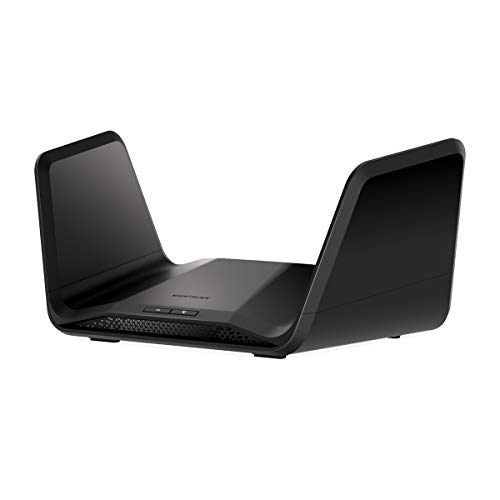
NETGEAR Nighthawk RAX70
The Nighthawk RAX70 is an AX6600 tri-band WiFi 6 router with eight streams and a 1.5 GHz quad-core processor. Its three bands combine to 6.6 Gbps across 2.4 GHz and two 5 GHz bands, with the fastest 5 GHz band carrying the heaviest traffic. The listing states coverage for up to 2,500 square feet and up to 40 devices, which fits a large family home with phones, laptops, consoles, televisions and smart home gadgets all connected at once.
Four Gigabit LAN ports sit on the back, alongside a Gigabit WAN port, so wired consoles and PCs connect without a separate switch for a small setup. The wing-shaped side panels hold the antennas inside the body, which gives the RAX70 a cleaner look than the eight-antenna designs in this guide and lets it sit on an open shelf without antenna clutter. NETGEAR Armor security is included, and the Nighthawk app handles setup and monitoring from a phone.
The RAX70 is the pick for a home that wants tri-band capacity without gaming-specific extras. It has no 2.5G port, so a connection faster than gigabit will not reach full speed over a wire, and it has no 6 GHz band, so WiFi 6E devices will connect on 5 GHz. For most homes those are fair trade-offs against a simpler design and a strong set of listing figures. The listing was first available in October 2020, so this is a mature model with a long record on Amazon, and the listing still shows steady recent demand.
ASUS RT-AXE7800
The RT-AXE7800 is the only WiFi 6E pick in this guide, and it is the one to choose if your newest devices can use the 6 GHz band. Its three bands are 2.4 GHz, 5 GHz and 6 GHz, with a combined AXE7800 figure. The 6 GHz lane is almost empty in most homes, so a WiFi 6E laptop or phone gets a quiet channel with very little contention from neighbours. A 1.7 GHz quad-core processor drives the radio, and six antennas spread the signal.
A 2.5G WAN and LAN port lets a wired connection faster than gigabit pass through, and link aggregation can combine two Gigabit LAN ports into a faster wired link for a network drive. AiProtection Pro guards the network, Instant Guard gives a sharable secure VPN, and Safe Browsing blocks known harmful sites. The router also supports AiMesh, so a second ASUS node can join later and use the tri-band layout for backhaul.
The RT-AXE7800 measures 9.49 by 8.27 by 2.44 inches, which makes it a substantial box that needs shelf space and airflow around it. It suits a home that is already moving to WiFi 6E and wants the quiet 6 GHz band now rather than later. If none of your devices supports 6 GHz, the 5 GHz capacity here is smaller than on the 2.4 plus 5 plus 5 models, so check your devices before choosing this layout.
ASUS ROG Rapture GT-AX11000

The original ROG Rapture GT-AX11000 is a tri-band WiFi 6 gaming router with an AX11000 combined figure: 1,148 Mbps on 2.4 GHz and 4,804 Mbps on each of the two 5 GHz bands. A 1.8 GHz quad-core processor runs the show, and eight swivelling antennas shape the signal. A 2.5G LAN port gives a wired gaming PC a faster lane than Gigabit, and two USB 3.0 ports take a drive or a printer.
WTFast game acceleration is built in, and the listing names lifetime internet security with AiProtection, so the security features do not expire into a subscription. Aura RGB lighting runs across the top of the unit, and dynamic frequency selection unlocks 15 channels in the least congested 5 GHz bands, which helps in a building full of neighbouring networks. The router works with AiMesh, so it can join a mesh setup later.
This model first appeared on Amazon in December 2018, which makes it the oldest pick in this guide, and the Pro model above is its direct successor with a 10G port and a newer processor. The earlier model still earns its place because its listing remains live with full product details and because its three-band layout and gaming features match the newer model closely. Check the listing for the exact model number, since the base model and the Pro share a name and a look.
TP-Link Archer AX90
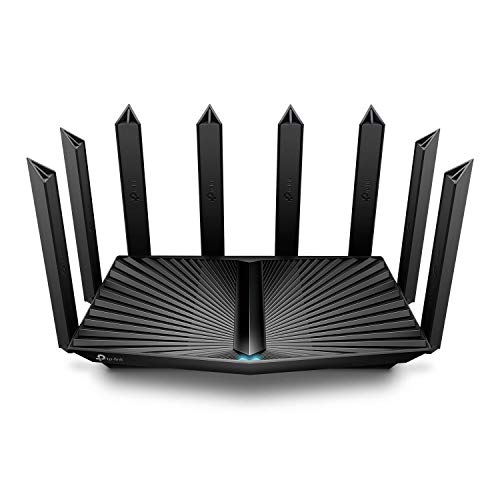
The TP-Link Archer AX90 is an AX6600 tri-band WiFi 6 router with eight streams and a 1.5 GHz quad-core processor. Its three bands run 574 Mbps on 2.4 GHz, 1,201 Mbps on one 5 GHz band and 4,804 Mbps on the second 5 GHz band. Eight high-gain antennas spread the signal, and beamforming focuses it toward active devices. A 2.5G WAN and LAN port handles wired traffic faster than Gigabit, and OFDMA and MU-MIMO let the router serve many devices at once without making each one wait its turn.
HomeShield security and parental controls are included, with WPA3 encryption on the wireless side. OneMesh support lets the AX90 join a TP-Link mesh network later, with the third band acting as backhaul between nodes. The listing describes the router as an 8-stream gigabit router with a VPN feature, which suits a home that wants a straightforward tri-band upgrade without gaming branding.
The AX90 is the weakest pick in this guide on evidence, not on specification: the direct Amazon page could not be opened during research, and the most recent evidence is a set of mirrors listing the ASIN plus a third-party page showing an Amazon figure as of October 2026. Nothing in the evidence points to a dead listing, which is why it is included, but open the listing and confirm a live buying option before ordering. It is the pick for a buyer who wants TP-Link’s ecosystem and a 2.5G port at an AX6600 tier.
Comparison table
| Router | Bands | Wi-Fi | Wired ports | Antennas |
|---|---|---|---|---|
| ASUS ROG Rapture GT-AX11000 Pro | 2.4 + 5 + 5 GHz | WiFi 6, AX11000 | 10G + 2.5G | 8 |
| NETGEAR Nighthawk RAX70 | 2.4 + 5 + 5 GHz | WiFi 6, AX6600 | 4x Gigabit LAN | Internal |
| ASUS RT-AXE7800 | 2.4 + 5 + 6 GHz | WiFi 6E, AXE7800 | 2.5G + Gigabit LAN | 6 |
| ASUS ROG Rapture GT-AX11000 | 2.4 + 5 + 5 GHz | WiFi 6, AX11000 | 2.5G + Gigabit LAN | 8 |
| TP-Link Archer AX90 | 2.4 + 5 + 5 GHz | WiFi 6, AX6600 | 2.5G WAN/LAN | 8 |
Frequently asked questions
What makes a router tri-band?
A tri-band router broadcasts three wireless bands at once instead of two. The usual layouts are 2.4 GHz plus two 5 GHz bands, or 2.4 GHz plus 5 GHz plus 6 GHz on WiFi 6E models. The third band gives busy networks more room: one band can carry the heaviest traffic while the others serve phones, smart home gadgets and guests. In a mesh setup the third band often becomes a private backhaul lane between nodes, which keeps more capacity free for devices.
Do I need WiFi 6E, or is WiFi 6 enough?
WiFi 6E adds the 6 GHz band, which is quieter than 5 GHz because fewer devices and neighbours use it. It helps if your phones, laptops or headsets already support WiFi 6E. If they do not, a WiFi 6 tri-band router with two 5 GHz bands gives you more capacity on the bands your devices can actually use. WiFi 6E routers still serve older devices on 2.4 GHz and 5 GHz, so nothing you own stops working.
Can a tri-band router join a mesh network later?
Most of the routers in this guide can. The ASUS models work with AiMesh, the TP-Link model works with OneMesh, and the NETGEAR model works within the Nighthawk family. Adding a node later is worth planning for if your home has dead zones, because the third band gives the nodes a dedicated lane to talk to each other. Check that the node you add comes from the same family, since mesh systems from different makers do not link together.
How to choose
Begin with your devices. If several of them support WiFi 6E, the ASUS RT-AXE7800 puts the quiet 6 GHz band to work. If your devices are WiFi 6, choose between the two 5 GHz layouts: the ASUS ROG Rapture GT-AX11000 Pro leads on wired speed with its 10G port and game acceleration, the NETGEAR Nighthawk RAX70 leads on clean design and simple tri-band capacity, and the original GT-AX11000 gives you the same gaming feature set as the Pro without the 10G port. The TP-Link Archer AX90 fits a home that wants a 2.5G port and TP-Link’s mesh family at the AX6600 tier, with a live listing check before ordering.
Then count your wired devices and your internet plan. A 2.5G port only helps if your plan or your home server can use it, and four LAN ports only cover four wired devices before you need a switch. Finally, measure the shelf: these are large routers with antennas that need space and airflow, and a router buried inside a closed cabinet will underperform no matter how strong its specifications look on the listing.
Disclosure: As an Amazon Associate, we may earn a commission from qualifying purchases made through links in this article, at no additional cost to you.
Related guides
More from Amazon
Programs that pair well with the guide above. Offers and eligibility are set by Amazon and may change.
Free shipping on eligible items, Prime Video and more. Eligible new members can start with a free trial.
Start a Prime free trialAd-free music streaming. Eligible new subscribers can start with a free trial.
Try Music Unlimited freeA Prime membership for ages 18-24 with a trial period. Eligibility is set by Amazon.
See Prime for Young AdultsAudiobooks and podcasts to listen to on the go. Eligible new members can start with a free trial.
Try Audible freeAs an Amazon Associate we earn from qualifying purchases.