Choosing a budget SSD in late 2026 is less about finding the fastest drive and more about avoiding the wrong one. Prices across the entry tier have climbed sharply this year, so a drive that counts as low cost now is simply one that sits below midrange and flagship models while still covering everyday work: quick boots, fast game loads and responsive file handling.
This list suits three kinds of buyer: owners of ageing laptops and desktops replacing a mechanical hard drive, builders with an empty M.2 slot and a fixed parts budget, and anyone adding a second drive for a growing game library. Many readers land here through a search phrase that recalls AnandTech’s long-running storage coverage; that site stopped publishing in 2024, so every figure below comes from the Amazon product listings themselves, checked model by model.
Our Top Picks
 Crucial BX500 1TB 3D NAND SATA 2.5-Inch Internal1TB3.95 x 0.27 x 2.75 inches0.1 poundsCheck on Amazon

Top 3 picks at a glance
Quick Picks
As an Amazon Associate we earn from qualifying purchases.
| Product | Best for | Key spec |
|---|---|---|
| Kingston A400 960GB | Reviving an older laptop or desktop | SATA III, up to 500 MB/s read |
| Crucial BX500 1TB | A full 1TB of SATA capacity | Up to 540 MB/s read |
| Kingston NV3 1TB | A first step into Gen4 NVMe | Up to 6,000 MB/s read |
| TEAMGROUP MP44L 1TB | Gen4 write speed with SLC caching | Up to 5,000 MB/s read |
| WD Blue SN580 1TB | A mainstream brand on a budget | Up to 4,150 MB/s read |
How to Choose
Match the Interface to Your Machine
The first decision is physical, not financial. Older laptops and desktops usually accept a 2.5-inch SATA drive like the A400 or BX500, which drops into the bay left by a mechanical hard drive. Newer systems add an M.2 slot for NVMe drives such as the NV3, MP44L and SN580, which are faster but useless if your board has no slot for them. Check your manual or spec sheet before ordering, and note the slot’s PCIe generation as well: a Gen4 drive in a Gen3 slot still works, but at reduced bandwidth.
Choose Capacity by What You Actually Store
Capacity decides how soon you repeat this purchase. An operating system, office software and a few applications fit comfortably in a few hundred gigabytes, but modern games routinely claim large chunks of a drive each, so a gaming system fills 500GB faster than most buyers expect. The 960GB A400 and the 1TB drives here are effectively the same class of space; the real question is whether one drive must hold everything or whether a second drive can join later. Leaving roughly a fifth of the drive free also helps any SSD maintain its everyday responsiveness.
Read the Speed Figures the Right Way
Every number in this article is a sequential rating taken from the product listing, and sequential figures describe best-case transfers of large files, not the mixed small-file work an operating system does all day. SATA drives are capped by their connection, which is why the A400 and BX500 cluster near the same ceiling. Entry NVMe drives lean on a fast cache for short bursts; the MP44L lists its SLC Cache openly. Treat the headline figures as a way to sort drives into tiers, then weigh interface fit, capacity and endurance alongside them.
Weigh Endurance, Warranty and the Live Offer
Endurance and warranty separate careful picks from gambles at this tier. The A400 lists 300 TBW of endurance and both Kingston drives here carry three-year warranties, figures worth comparing against how much you write to the drive. Just as important in the current market: SSD prices moved sharply during late 2026, so judge value against the live listing in front of you rather than prices you remember from last year. Confirm the seller, the condition and the exact capacity variant on the product page before you pay.
The 5 Best Options
Kingston A400 960GB

The A400 is the drive for the simplest upgrade job on this list: pulling a mechanical hard drive out of an older laptop or desktop and dropping in solid-state storage that wakes the machine up. Its listed sequential speeds of up to 500 MB/s read and 450 MB/s write sit near the practical ceiling of the SATA III connection, so the interface, not the drive, sets the limit. The 960GB capacity gives most single-drive systems room for the operating system, applications and a modest game library, and the listed 300 TBW endurance covers years of ordinary home use.
Specs
- Capacity: 960GB
- Interface: SATA III (SATA 3)
- Form factor: 2.5-inch
- Sequential read: up to 500 MB/s
- Sequential write: up to 450 MB/s
- Endurance: 300 TBW
- Warranty: 3 years
- Model: SA400S37/960G
Best for: Owners of older SATA-only laptops and desktops replacing a mechanical hard drive.
Watch out for: Some tracker headlines round this model up to 1TB; the listing itself is 960GB, so confirm the capacity on the product page before ordering.
ASIN: B079XC5PVV
Crucial BX500 1TB
The BX500 takes the same SATA upgrade idea and stretches it to a full 1TB, which suits buyers whose photo, video or game folders have outgrown smaller drives. Its listed figures of up to 540 MB/s read and 500 MB/s write edge slightly ahead of the A400 on paper, and its 3D NAND design is the mainstream construction for this tier. Because it uses the standard 2.5-inch SATA format, it fits the same drive bays and cages as the hard drives it usually replaces, with no adapter or firmware quirks to plan around.
Specs
- Capacity: 1TB
- Interface: SATA
- Form factor: 2.5-inch
- NAND type: 3D NAND
- Sequential read: up to 540 MB/s
- Sequential write: up to 500 MB/s
- Model: CT1000BX500SSD1
Best for: Buyers who need a full 1TB of SATA storage for a media or game library in an older machine.
Watch out for: Availability signals for this ASIN conflict — one tracker labels its tracked offer as used — so check the product page carefully and confirm the offer is the new retail listing before you order.
ASIN: B07YD579WM
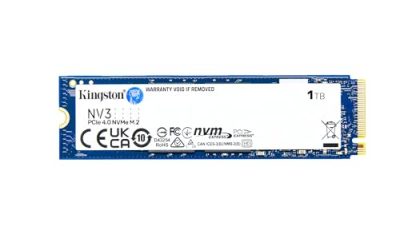
Kingston NV3 1TB
The NV3 is where this list leaves SATA behind. It is an M.2 2280 drive on a PCIe 4.0 Gen 4×4 interface, with listed speeds of up to 6,000 MB/s read and 4,000 MB/s write — a different league from the 2.5-inch drives above, provided your motherboard or laptop has an M.2 slot that can use it. For a budget build or a laptop upgrade, that makes it the natural first NVMe step: modern interface, a full 1TB of space and a three-year warranty, without stepping up into midrange pricing territory.
Specs
- Capacity: 1TB
- Interface: NVMe PCIe 4.0 Gen 4×4
- Form factor: M.2 2280
- Sequential read: up to 6,000 MB/s
- Sequential write: up to 4,000 MB/s
- Warranty: 3 years
- Model: SNV3S/1000G
Best for: Budget builders and laptop owners with a free M.2 slot who want Gen4 speed.
Watch out for: On a PCIe 3.0 slot the drive still works but runs at reduced bandwidth, so check your board’s slot generation if the full listed speed matters to you.
ASIN: B0DBR3DZWG
TEAMGROUP MP44L 1TB

The MP44L is TEAMGROUP’s entry Gen4 drive, built on the NVMe 1.4 standard with a PCIe Gen4x4 connection and listed speeds of up to 5,000 MB/s read and 4,500 MB/s write. Its listed SLC Cache feature is the detail that matters most at this tier: entry drives lean on a fast cache for everyday bursts of activity, and TEAMGROUP states the mechanism plainly on the product page. In M.2 2280 form, it suits compact builds and laptops alike, and its balance of read and write ratings is the strongest pairing among the budget NVMe picks here.
Specs
- Capacity: 1TB
- Interface: PCIe Gen4x4, NVMe 1.4
- Form factor: M.2 2280
- Sequential read: up to 5,000 MB/s
- Sequential write: up to 4,500 MB/s
- Cache: SLC Cache
- Model: TM8FPK001T0C101
Best for: Buyers who want strong Gen4 write figures for installs and file transfers on a strict budget.
Watch out for: Price trackers disagree on this ASIN — one shows only third-party history while others track a live Amazon offer — so confirm the seller and the offer on the Amazon page at checkout, and make sure the 1TB variant is selected, since the 500GB version carries a lower write rating.
ASIN: B0B9Y3DB2K
WD Blue SN580 1TB

The WD Blue SN580 brings a mainstream storage brand into the budget Gen4 tier. Its listing rates the 1TB model at up to 4,150 MB/s read on a PCIe Gen4 x4 connection, in the standard M.2 2280 size that fits most current laptops and desktops. Those figures trail the NV3 and MP44L on paper, but paper figures are peak sequential numbers; for operating-system duty, game installs and everyday loading, this drive sits comfortably in the same practical class. It is the pick for buyers who prefer a familiar brand name at the entry level.
Specs
- Capacity: 1TB
- Interface: PCIe Gen4 x4 NVMe
- Form factor: M.2 2280
- Sequential read: up to 4,150 MB/s
- Model: WDS100T3B0E
Best for: Buyers who want a WD Blue drive for a budget Gen4 build or laptop upgrade.
Watch out for: The 4,150 MB/s rating belongs to the 1TB and 2TB models and the smaller variants are rated lower, so confirm the 1TB option is selected, and pass over the bulk pack listing if you only need a single drive.
ASIN: B0C8XMH264
Which One Fits Your Situation
Your Old Laptop Still Runs a Spinning Hard Drive
Pick between the two SATA drives. The Kingston A400 960GB is the straightforward revival: it fills the existing bay, needs no adapters and covers a typical system with room to spare. If your files already crowd a smaller drive, the Crucial BX500 stretches the same job to a full 1TB — just confirm the offer on its page is the new retail listing before ordering.
You Are Building a Budget Gaming PC With One M.2 Slot
Go straight to the Gen4 drives, since a new board will have the slot to use them. The Kingston NV3 carries the highest listed read figure here and suits a build where game loading is the priority. The TEAMGROUP MP44L answers with the stronger listed write figure, which helps when you install and move large game files often.
Your Game Library Has Outgrown the Boot Drive
Add a second drive rather than replacing a healthy one. If your M.2 slots are full but a SATA bay is free, the Crucial BX500 1TB works well as library storage at SATA speeds. If a slot remains open, the MP44L gives that library Gen4 pace instead. Either way, keep the operating system on your existing drive and move only the games across.
You Want a Known Brand Without Leaving the Entry Tier
The WD Blue SN580 is your pick. Its listed read figure is the most modest of the three Gen4 drives here, yet it remains far beyond SATA territory, and the WD Blue name carries the familiarity many buyers want for a main system drive. Select the 1TB option carefully at checkout, because the smaller variants carry lower listed ratings.
Common Mistakes
- Ordering an M.2 NVMe drive for a machine that only has SATA bays, or a 2.5-inch drive for a laptop with no bay at all.
- Judging what counts as low cost by prices remembered from early 2025, when the entry tier has moved sharply since then.
- Selecting the wrong capacity variant at checkout, where a smaller version of the same model may carry lower listed speeds.
- Treating peak sequential figures as guaranteed everyday performance, when entry drives rely on a cache that fills during long writes.
- Skipping the seller and condition check on the product page, even though used or third-party offers circulate for some budget models.
Frequently Asked Questions
Is a SATA SSD still worth buying in 2026?
Yes, when the machine only offers SATA. A drive like the A400 or BX500 transforms a system that boots from a mechanical hard drive, and the connection itself caps speeds near the figures these drives list. It makes less sense in a new build with a free M.2 slot, where a budget Gen4 drive costs similar money within the entry tier.
Will a PCIe 4.0 drive work in an older PCIe 3.0 slot?
Yes. NVMe drives are backward compatible, so the NV3, MP44L and SN580 all function in a Gen3 slot; they simply run at the older interface’s bandwidth instead of their listed Gen4 figures. That makes a Gen4 drive a reasonable purchase today if you expect to move it into a newer machine later.
How much SSD capacity does a budget build need?
For an office or study machine, the 960GB to 1TB class in this list is generous. For gaming, treat 1TB as the practical floor: a handful of large titles plus the operating system can consume most of a smaller drive. If your library keeps growing, plan for a second drive rather than stretching one small drive thin.
Why have budget SSD prices risen, and how should I judge value?
Storage prices moved sharply upward through late 2026, which pushed the whole entry tier with them, so yesterday’s budget figures no longer apply. Judge value relatively: compare the live listings of entry-tier models against each other on interface, capacity, listed speeds and warranty, and confirm the seller, condition and variant on the page before paying.
Related guides
More from Amazon
Programs that pair well with the guide above. Offers and eligibility are set by Amazon and may change.
Free shipping on eligible items, Prime Video and more. Eligible new members can start with a free trial.
Start a Prime free trialAd-free music streaming. Eligible new subscribers can start with a free trial.
Try Music Unlimited freeA Prime membership for ages 18-24 with a trial period. Eligibility is set by Amazon.
See Prime for Young AdultsAudiobooks and podcasts to listen to on the go. Eligible new members can start with a free trial.
Try Audible freeAs an Amazon Associate we earn from qualifying purchases.