Video editing lives or dies on storage speed and space. A drive that is too slow turns a simple 4K timeline into stuttering playback, dropped frames and long waits every time you scrub, while a drive that is too small forces you to delete finished projects just to make room for the next shoot. The real decision is not which drive is fastest in a headline number, but which combination of a fast timeline drive and a roomy archive drive fits the footage you actually shoot.
This guide is for desktop editors, laptop editors and creators who shoot on location, from beginners cutting their first 1080p projects to editors working with 4K footage every week. Each drive below was picked from its name and specifications on its Amazon product page, with capacity, interface and listed transfer speed checked against the role it would play in an editing workflow.
Our Top Picks


Top 3 picks at a glance
Quick Picks
As an Amazon Associate we earn from qualifying purchases.
| Product | Best for | Key spec from title |
|---|---|---|
| Samsung 990 PRO 2TB | Fast 4K timeline editing on a desktop | Up to 7,450 MB/s |
| SanDisk Extreme Portable SSD 2TB | Editing on location from a laptop | Up to 1050 MB/s |
| Seagate BarraCuda 2TB | Extra internal capacity on a budget | 7200 RPM |
| WD My Book 8TB | Archiving finished projects at home | 8TB desktop external hard drive |
How to Choose
Timeline Speed Comes First for Active Projects
Your timeline drive does the hardest work in editing, reading large video files the moment you press play and writing temporary files as you cut. A slow drive shows up as stuttering playback, audio falling out of sync and long waits when you scrub through 4K clips. For active projects, choose the fastest drive your computer supports, such as an NVMe SSD in a desktop or a USB 3.2 Gen 2 portable SSD on a laptop. Archive drives can be slower, because finished footage only needs to open once, not play back frame by frame.
Capacity Needs Room for Footage, Proxies and Exports
Video files grow faster than almost any other kind of file, and a single afternoon of 4K shooting can fill hundreds of gigabytes before you have cut a single clip. Add proxy files for smooth editing, project files, music, graphics and several exported versions, and a drive that looked generous on day one can feel cramped within a month. Check how much space your last three projects used, then buy at least twice that amount for the drive that holds active work. A roomy archive drive matters just as much, because deleting finished projects to free space is how footage gets lost.
The Connection Sets the Speed Limit
A fast drive behind a slow connection still runs slowly, so the port and cable matter as much as the drive itself. An internal NVMe drive needs a free M.2 slot with enough PCIe lanes, while a SATA hard drive needs a spare SATA port and a 3.5-inch bay in a desktop case. External drives are limited by their USB port, so a portable SSD rated for USB 3.2 Gen 2 only reaches its listed speed on a matching port with a matching cable. Before you buy, check which ports your computer actually has, and remember that a hub or a long extension cable can slow the connection further.
Endurance, Backup and Portability Decide the Long Term
Speed and capacity decide how editing feels today, but endurance and backup decide whether your footage survives the year. Hard drives wear with use and every drive fails eventually, so no single drive should hold the only copy of a project you cannot reshoot. Keep active projects on a fast drive, finished projects on a large archive drive, and a second copy somewhere else, even if that second copy is a simple external drive on a shelf. If you travel to shoots, a rugged portable SSD that survives drops and rain matters more than a small speed advantage on paper.
The 4 Best Options
Samsung 990 PRO 2TB

The 990 PRO 2TB is the drive to put under an active timeline when a desktop has a free M.2 slot. Its PCIe 4.0 interface and listed read speed of up to 7,450 MB/s keep 4K footage playing smoothly while the editor scrubs, cuts and renders, and 2TB of space holds several current projects plus their proxy files without constant juggling. It sits inside the computer, so there is no cable to knock loose and no port to share with other gear. Editors who work with high-bitrate footage or multicam timelines will feel the difference most, especially when the alternative is an older SATA drive.
Specs
- 2TB capacity
- PCIe 4.0 x4, NVMe 2.0, M.2 2280
- Sequential read up to 7,450 MB/s
- Sequential write up to 6,900 MB/s
- Model MZ-V9P2T0B/AM, without heatsink
Best for: Desktop editors who want the fastest drive for active 4K timelines.
Watch out for: It needs a free M.2 2280 NVMe slot, and this version ships without a heatsink, so check your motherboard cooling first.
SanDisk Extreme Portable SSD 2TB
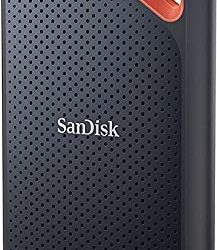
This pocket-sized SSD is built for editors who carry footage between shoots, laptops and desktops. Its listed transfer speed of up to 1050 MB/s is fast enough to edit 4K footage directly from the drive, and the USB-C connection works with modern laptops without an adapter hunt. The IP65 water and dust resistance, plus a design meant to survive drops, makes it a safer travel companion than a bare hard drive in a bag. At 2TB it holds a full shoot plus proxies, though editors with larger libraries will still need a bigger drive back at the desk.
Specs
- 2TB capacity
- Up to 1050 MB/s transfer speed
- USB-C, USB 3.2 Gen 2
- IP65 water and dust resistance
- Model SDSSDE61-2T00-G25
Best for: Laptop editors and shooters who need a fast, rugged drive on location.
Watch out for: Real speed depends on the laptop port and cable, and the drive fills quickly on multi-day shoots, so plan a backup routine.
Seagate BarraCuda 2TB
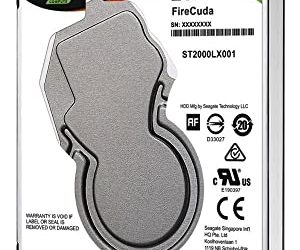
The BarraCuda 2TB is a straightforward internal hard drive for a desktop that needs more room without a big outlay. It spins at 7200 RPM with a 256MB cache and a listed read speed of up to 220 MB/s, which is enough for storing footage, holding finished projects and playing back 1080p timelines, though it will not match an SSD on a demanding 4K timeline. It fits a standard 3.5-inch bay and connects over SATA 6Gb/s, so installation is a familiar job on most desktops. For editors on a budget, it is the simplest way to add real capacity inside the case.
Specs
- 2TB capacity
- 3.5-inch internal hard drive, SATA 6Gb/s
- 7200 RPM, 256MB cache
- Read speed up to 220 MB/s
- Model ST2000DM008, 2-year limited warranty
- Frustration Free Packaging
Best for: Desktop editors who need affordable internal space for footage and finished projects.
Watch out for: Sustained writes can slow as the drive fills, so keep it as storage and proxies rather than the main 4K timeline drive.
WD My Book 8TB

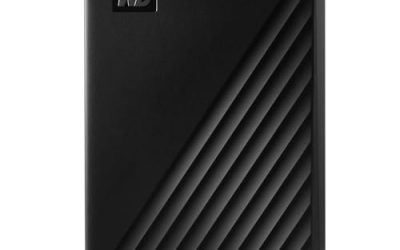
The My Book 8TB is a desktop external drive for the other end of the workflow: keeping finished projects, raw footage and backups in one large place. Its 8TB capacity swallows whole seasons of shoots that would fill several smaller drives, and the USB 3.0 connection moves large folders across without tying up an internal bay. Password protection and included backup software help keep the archive organised and harder to open by accident. It needs mains power and a desk spot, so it stays at home, but for an editor building a library, that trade is usually worth making.
Specs
- 8TB capacity
- Desktop external hard drive, USB 3.0
- Password protection
- Backup software included
- 256-bit AES hardware encryption
- Model WDBBGB0080HBK-NESN
Best for: Home editors who want one large drive for finished projects and footage archives.
Watch out for: It needs external power and stays on a desk, so it cannot replace a portable drive for location work.
Which One Fits Your Situation
Editing 4K on a Desktop Every Day
Choose the Samsung 990 PRO 2TB as the timeline drive, with the BarraCuda 2TB alongside it for storage. The NVMe drive keeps 4K playback smooth while the hard drive holds footage, proxies and finished exports at a lower cost per terabyte. Add the My Book 8TB later for archiving, once projects pile up.
Shooting on Location with a Laptop
Take the SanDisk Extreme Portable SSD 2TB. It is fast enough to edit from directly, small enough to carry in a pocket, and tough enough for field work. Copy each day’s footage to a second drive at night, because a single portable drive on a shoot is one drop away from losing a day of work.
Building a Large Footage Archive at Home
Pick the WD My Book 8TB as the archive drive. Eight terabytes holds whole projects, raw camera files and exports without splitting them across small drives, and the backup software keeps copies organised. Keep the fast SSD or NVMe drive for active edits, and move finished work to the My Book when a project wraps.
On a Tight Budget
Begin with the Seagate BarraCuda 2TB inside a desktop, and add a portable SSD only when location work demands it. The hard drive gives real capacity for footage and exports at the lowest outlay, and it is enough for 1080p timelines and lighter 4K work with proxies. Upgrade the timeline drive first when stuttering playback begins costing editing time.
Common Mistakes
- Editing 4K footage from a slow external hard drive and blaming the editing software when playback stutters.
- Buying a drive that barely fits one project, then deleting finished work to make room for the next shoot.
- Keeping the only copy of a project on a single drive, with no backup anywhere else.
- Filling the timeline drive with system software, apps, cache files and footage all at once.
- Plugging a fast SSD into a slow USB port or an old hub, then wondering why transfers crawl.
Frequently Asked Questions
How much storage do I need for video editing?
Begin with at least 2TB for active work if you edit 4K, because raw footage, proxies and exports add up fast. Editors who shoot every week should add a separate archive drive of 8TB or more, so finished projects never compete with current work for space. Check the size of your last three projects before deciding.
Is an SSD or a hard drive better for video editing?
An SSD is better for the active timeline, because it reads large video files fast enough for smooth playback and scrubbing. A hard drive is better for archives, because it holds far more space for finished projects and raw footage at a lower cost per terabyte. Most editors end up using both, each for the job it suits.
Can I edit video directly from an external drive?
Yes, if the drive and the connection are fast enough. A portable SSD on USB 3.2 Gen 2 handles 4K timelines well, while an older external hard drive usually stutters on anything beyond simple 1080p cuts. Use the fastest port on your computer, a short quality cable, and proxy files when the footage is demanding.
Do I need an NVMe drive for 4K editing?
Not always, but it helps the most on demanding timelines. A SATA SSD or a fast portable SSD can handle many 4K projects, especially with proxies, while an NVMe drive shines with high-bitrate footage, multicam edits and heavy effects work. If your desktop has a free M.2 slot, an NVMe drive is the simplest speed upgrade.
Related guides
More from Amazon
Programs that pair well with the guide above. Offers and eligibility are set by Amazon and may change.
Free shipping on eligible items, Prime Video and more. Eligible new members can start with a free trial.
Start a Prime free trialAd-free music streaming. Eligible new subscribers can start with a free trial.
Try Music Unlimited freeA Prime membership for ages 18-24 with a trial period. Eligibility is set by Amazon.
See Prime for Young AdultsAudiobooks and podcasts to listen to on the go. Eligible new members can start with a free trial.
Try Audible freeAs an Amazon Associate we earn from qualifying purchases.