Side buttons turn a wireless gaming mouse into a control deck for the thumb. A pair of well placed thumb buttons handles reload, crouch, melee, and push to talk without moving the hand from the main clicks, and a larger bank of side buttons puts a whole ability bar under one finger. For MMO and MOBA players, that layout shortens the distance between an idea and an action. For FPS players, it keeps movement keys free for the keyboard hand. The best wireless models pair those buttons with a fast sensor and a connection that keeps up with quick flicks.
Wireless no longer means compromise. Modern gaming mice use low latency wireless links, and battery life now stretches across many long sessions on a single charge. The five mice in this guide all connect wirelessly, all carry programmable side buttons, and all come from listings currently sold on Amazon US. Each one suits a different hand size, grip style, and game genre, so the right pick depends on how many buttons are wanted and how the mouse should feel during a long session.
As an Amazon Associate, we earn from qualifying purchases.
Our Top Picks
 Logitech G502 LIGHTSPEED Wireless Gaming MouseWireless5.19 x 2.95 x 1.57 inches0.81 poundsCheck on Amazon

Top 3 picks at a glance
How to Choose
Count the side buttons honestly
Two thumb buttons cover the basics, and most FPS players never need more. Four to six side buttons suit players who bind abilities, items, and voice chat to the mouse. MMO players often want a full thumb grid of six or more buttons. More buttons add weight and a learning curve, so match the count to the games actually played.
Check the sensor and the wireless link
A modern optical sensor tracks cleanly at high sensitivity, and the top models in this guide reach 18,000 DPI or higher. The wireless link matters just as much. A dedicated 2.4 GHz receiver gives the lowest latency, while Bluetooth works well for travel and for switching between two computers.
Match the shape to the grip
Palm grip players need a taller, fuller shell that fills the hand, while claw and fingertip players often prefer a lower profile. Right handed ergonomic shapes support the thumb and place the side buttons where they fall naturally under it. A heavier mouse stays steady for tracking, while a lighter one moves faster for flick shots.
Look at battery life and charging
Battery life ranges from around 50 hours on RGB heavy models to 240 hours on efficient single battery designs. A mouse that charges over USB-C is easy to top up between sessions, and models that support wireless charging pads or PowerPlay style systems can stay charged without ever plugging in.
Consider the software
Companion software assigns macros, remaps every button, tunes DPI steps, and stores profiles on the mouse itself. Onboard memory means the setup travels with the mouse to another computer without reinstalling anything.
Logitech G502 LIGHTSPEED
The Logitech G502 LIGHTSPEED is the classic side button mouse, and it remains one of the most flexible options on the market. Eleven programmable buttons include two large thumb buttons, a DPI shift button beside the left click, and a sniper button on the thumb rest that drops sensitivity while held. The HERO 25K sensor tracks up to 25,600 DPI with clean 1 to 1 tracking, and the LIGHTSPEED wireless link reports at a fast rate that keeps input lag out of the picture.
The shape is a right handed ergonomic design with a wide thumb rest, and the weight can be tuned with small weights stored in the base. The dual mode scroll wheel switches between a notched ratchet for weapon selection and a free spinning mode for long documents. LIGHTSYNC RGB lights the logo and the side strip, and the mouse works with PowerPlay charging pads. Battery life reaches up to 60 hours on a single charge.
For side button use, the G502 LIGHTSPEED puts the most used controls within easy thumb reach without crowding them. The two main thumb buttons are large and easy to find by feel, the DPI shift button sits under the index finger, and the sniper button gives FPS players a precise aiming mode without opening a menu.
| Spec | Detail |
|---|---|
| Brand | Logitech G |
| Sensor | HERO 25K optical |
| Max DPI | 25,600 |
| Programmable buttons | 11 |
| Side buttons | 2 thumb buttons, DPI shift, sniper button |
| Wireless | LIGHTSPEED 2.4 GHz |
| Battery life | Up to 60 hours |
| Charging | USB, PowerPlay compatible |
| Lighting | LIGHTSYNC RGB |
| ASIN | B07L4BM851 |
Who It Suits
This mouse suits FPS players who want a sniper button and a tunable weight, and anyone who wants a proven ergonomic shape with plenty of programmable controls. It fits medium to large hands and palm or claw grips, and it works well as a daily driver for work and play. Players who want the lightest possible mouse should look elsewhere.
Razer Basilisk V3 Pro
The Razer Basilisk V3 Pro is a wireless ergonomic mouse built around a thumb cluster that feels designed for long sessions. Eleven programmable buttons include two thumb buttons, a clutch button on the thumb rest, and a four way tilt wheel that adds left and right tilt inputs. The Focus Pro 30K optical sensor reaches 30,000 DPI, and the HyperScroll tilt wheel switches between tactile notched scrolling and free spin mode.
Three connection modes cover every setup: HyperSpeed wireless through a 2.4 GHz receiver, Bluetooth for laptops and tablets, and wired USB-C for charging while playing. Battery life reaches up to 110 hours on HyperSpeed wireless and up to 150 hours on Bluetooth. Razer Synapse software handles button remapping, macros, DPI stages, and onboard profiles. The shell weighs 112 grams and fits medium to large right hands.
The thumb buttons sit in a natural arc, so each one is easy to reach without shifting the grip. The clutch button lowers sensitivity while held, which helps with precise long range shots, and the tilt wheel adds two more inputs that suit weapon switching and leaning.
| Spec | Detail |
|---|---|
| Brand | Razer |
| Sensor | Focus Pro 30K optical |
| Max DPI | 30,000 |
| Programmable buttons | 11 |
| Side buttons | 2 thumb buttons, clutch button, 4-way tilt wheel |
| Wireless | HyperSpeed 2.4 GHz, Bluetooth, USB-C |
| Battery life | Up to 110 hours HyperSpeed, up to 150 hours Bluetooth |
| Weight | 112 g |
| Lighting | 13-zone Chroma RGB |
| ASIN | B0B6Y3XYFG |
Who It Suits
This mouse suits players who want a comfortable ergonomic wireless mouse with a strong thumb cluster and long battery life. It fits medium to large hands and works well for FPS, action, and adventure games. Players who prefer a lightweight symmetrical shape should consider a different model.
Logitech G604 LIGHTSPEED
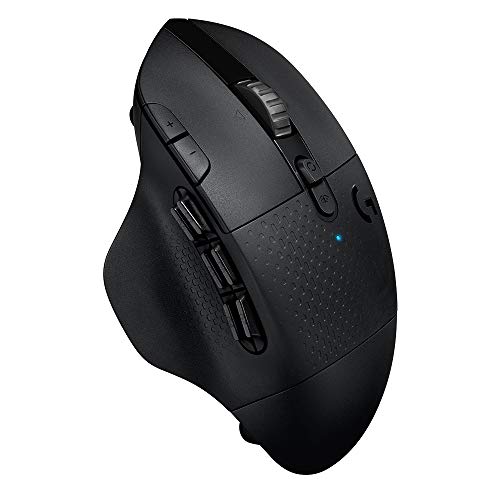
The Logitech G604 LIGHTSPEED is the button heavy option in this guide, with 15 programmable controls and six thumb buttons arranged in two rows on the side. That layout gives MMO and MOBA players a full set of abilities under the thumb, and battle royale players can bind healing, armor, and utility items without reaching for the keyboard. The HERO 25K sensor reaches 25,600 DPI, and the metal hyper fast scroll wheel toggles between a notched ratchet and free spin.
Dual connectivity sets the G604 apart. It switches between LIGHTSPEED wireless for low latency gaming and Bluetooth for a second device, so one mouse can serve a gaming PC and a laptop. Battery life reaches up to 240 hours on a single AA battery, which means months of play for most players before a battery change. G HUB software assigns macros and DPI stages to every button and stores profiles on the mouse.
The six thumb buttons sit in two rows of three, and the shape includes a wide thumb rest that supports the hand during long sessions. The two buttons beside the left click handle DPI changes by default, and the wheel tilts left and right for two more inputs.
| Spec | Detail |
|---|---|
| Brand | Logitech G |
| Sensor | HERO 25K optical |
| Max DPI | 25,600 |
| Programmable buttons | 15 |
| Side buttons | 6 thumb buttons in two rows |
| Wireless | LIGHTSPEED 2.4 GHz, Bluetooth |
| Battery life | Up to 240 hours |
| Battery | 1 AA battery |
| Scroll wheel | Hyper-fast, tilt left and right |
| ASIN | B07QN369XX |
Who It Suits
This mouse suits MMO, MOBA, and battle royale players who want many side buttons for abilities and items. It fits medium to large hands and palm or claw grips, and the long battery life suits players who dislike charging. Players who want a light FPS mouse should look at a lighter model instead.
Logitech G502 X LIGHTSPEED

The Logitech G502 X LIGHTSPEED is the updated version of the G502 line, and it refines the side button layout with a cleaner, lighter shell. Thirteen buttons include two thumb buttons, a DPI shift button, and a dual mode scroll wheel that switches between ratcheted and free spin. The HERO 25K sensor reaches 25,600 DPI, and LIGHTFORCE hybrid optical mechanical switches combine fast actuation with a crisp click feel.
Battery life reaches up to 140 hours on a single charge, and the mouse charges over USB-C. It works with PowerPlay charging pads for wireless charging during play, and the LIGHTSPEED receiver stores inside the mouse for travel. The shell keeps the familiar G502 ergonomic shape with a thumb rest, and the side buttons are easy to find by touch. G HUB software handles remapping, macros, and DPI profiles.
Compared with the original G502 LIGHTSPEED, the X version feels more modern, with a cleaner button layout and a longer battery life. The two thumb buttons are large and well spaced, the DPI shift button sits under the index finger, and the overall design suits players who want the G502 experience with current hardware.
| Spec | Detail |
|---|---|
| Brand | Logitech G |
| Sensor | HERO 25K optical |
| Max DPI | 25,600 |
| Programmable buttons | 13 |
| Side buttons | 2 thumb buttons, DPI shift button |
| Wireless | LIGHTSPEED 2.4 GHz |
| Battery life | Up to 140 hours |
| Charging | USB-C, PowerPlay compatible |
| Switches | LIGHTFORCE hybrid optical-mechanical |
| ASIN | B092CRH1RX |
Who It Suits
This mouse suits players who like the G502 shape but want newer switches, longer battery life, and USB-C charging. It fits medium to large hands and works well for FPS, action, and strategy games. Players who want a full thumb grid for MMO play should choose the G604 instead.
Corsair Dark Core RGB Pro SE
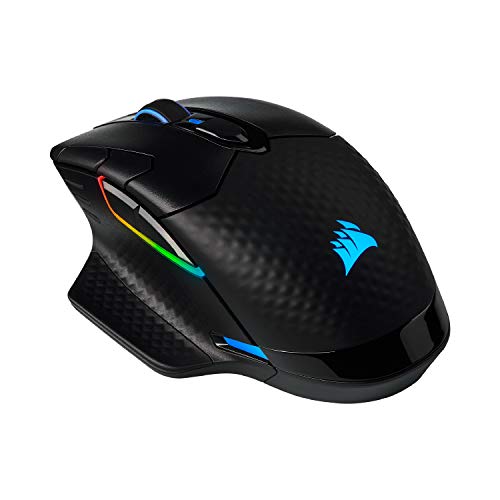
The Corsair Dark Core RGB Pro SE brings a different shape to this guide, with a contoured right handed shell and two interchangeable side grips. One grip is flat and the other is contoured, so the feel of the thumb area can be adjusted to the hand. Eight programmable buttons include two side buttons, DPI controls beside the left click, and a sniper button on the thumb rest. The custom 18,000 DPI optical sensor tracks in fine steps, and the mouse connects through sub 1ms SLIPSTREAM wireless, Bluetooth, or wired USB-C.
The SE version adds Qi wireless charging, so the mouse can charge on a Qi charging pad between sessions. Battery life reaches up to 50 hours, and the nine zone RGB lighting covers the palm rest, the scroll wheel, and a light bar along the side. iCUE software assigns macros and lighting effects to every button and stores up to three profiles on the mouse itself.
The Dark Core shape suits palm grip players with medium to large hands, and the interchangeable grips help fine tune the fit. The two thumb buttons are easy to reach, the sniper button drops sensitivity for precise shots, and the onboard profile storage makes it a good pick for players who switch between computers.
| Spec | Detail |
|---|---|
| Brand | Corsair |
| Sensor | Custom optical |
| Max DPI | 18,000 |
| Programmable buttons | 8 |
| Side buttons | 2 thumb buttons, sniper button |
| Wireless | SLIPSTREAM 2.4 GHz, Bluetooth, USB-C |
| Battery life | Up to 50 hours |
| Charging | USB-C, Qi wireless charging |
| Lighting | 9-zone RGB |
| ASIN | B082LVNJ4W |
Who It Suits
This mouse suits palm grip players who want an ergonomic wireless mouse with adjustable side grips and Qi charging. It fits medium to large hands and works well for FPS and MOBA games. Players who want a large bank of thumb buttons should choose a model with more side controls.
How the Five Compare
The five mice in this guide cover different button counts, and the right choice follows the number of controls wanted. The G604 leads with 15 programmable controls and six thumb buttons, which suits MMO and MOBA players who bind many abilities. The G502 X LIGHTSPEED and the original G502 LIGHTSPEED sit in the middle with 13 and 11 buttons, and both suit FPS players who want a sniper button and a DPI shift control. The Basilisk V3 Pro also carries 11 buttons, with a tilt wheel that adds two more inputs. The Dark Core RGB Pro SE has the fewest buttons at eight, but its interchangeable grips and Qi charging set it apart.
Battery life also separates the group. The G604 lasts up to 240 hours on one AA battery, the Basilisk V3 Pro reaches up to 150 hours on Bluetooth, the G502 X LIGHTSPEED reaches up to 140 hours, the G502 LIGHTSPEED reaches up to 60 hours, and the Dark Core RGB Pro SE reaches up to 50 hours. Charging options differ too, with PowerPlay support on the Logitech models, Qi charging on the Corsair, and USB-C on all five. Sensor ceilings range from 18,000 DPI on the Corsair to 30,000 DPI on the Basilisk V3 Pro.
FAQ
How many side buttons does a wireless gaming mouse need?
Two thumb buttons cover the basics for most FPS players, handling reload, melee, and push to talk. Four to six side buttons suit players who bind abilities and items, while MMO players often want six or more.
Does wireless add lag compared with a wired mouse?
Modern wireless gaming mice use low latency 2.4 GHz links that report movement at high rates, and the models in this guide are built for competitive play. A dedicated receiver gives the lowest latency, while Bluetooth suits travel and secondary devices.
Can side buttons be programmed for non gaming tasks?
Yes, companion software can assign macros, keyboard shortcuts, media controls, and application commands to any button. Common assignments include copy and paste, browser back and forward, volume control, and push to talk. Profiles stored on the mouse keep those assignments working on another computer.
Which wireless mouse with side buttons lasts longest on a charge?
Battery life depends on lighting, polling rate, and use. In this guide, the Logitech G604 LIGHTSPEED leads with up to 240 hours on a single AA battery, followed by the Razer Basilisk V3 Pro at up to 150 hours on Bluetooth and the Logitech G502 X LIGHTSPEED at up to 140 hours.
Final Verdict
The best wireless gaming mouse with side buttons depends on how many controls are wanted and how the mouse should feel. The Logitech G604 LIGHTSPEED is the pick for players who want the most side buttons, with six thumb buttons and 15 programmable controls plus the longest battery life in this guide. The Razer Basilisk V3 Pro suits players who want a premium ergonomic mouse with a tilt wheel, long battery life, and a strong sensor. The Logitech G502 X LIGHTSPEED is the best all round choice, with a proven shape, 13 buttons, and modern switches and charging. The original Logitech G502 LIGHTSPEED remains a solid value with a tunable weight and PowerPlay support. The Corsair Dark Core RGB Pro SE suits palm grip players who want adjustable side grips and Qi charging. Any of the five works well for FPS, MMO, and everyday play.
Product and ASIN Reference
| Product | ASIN |
|---|---|
| Logitech G502 LIGHTSPEED | B07L4BM851 |
| Razer Basilisk V3 Pro | B0B6Y3XYFG |
| Logitech G604 LIGHTSPEED | B07QN369XX |
| Logitech G502 X LIGHTSPEED | B092CRH1RX |
| Corsair Dark Core RGB Pro SE | B082LVNJ4W |
Related guides
More from Amazon
Programs that pair well with the guide above. Offers and eligibility are set by Amazon and may change.
Free shipping on eligible items, Prime Video and more. Eligible new members can start with a free trial.
Start a Prime free trialAd-free music streaming. Eligible new subscribers can start with a free trial.
Try Music Unlimited freeA Prime membership for ages 18-24 with a trial period. Eligibility is set by Amazon.
See Prime for Young AdultsAudiobooks and podcasts to listen to on the go. Eligible new members can start with a free trial.
Try Audible freeAs an Amazon Associate we earn from qualifying purchases.