
A mouse with lots of buttons turns a crowded ability bar into something the thumb can reach without looking at the keyboard. In an MMO raid or a long Path of Exile session, the difference between a mouse with two side buttons and one with a full thumb grid is the difference between hunting for keys and playing by feel. The decision is not how many buttons the box claims, since a grid that is too tight becomes a guessing game under pressure.
This guide is for MMO and ARPG players who want every skill on the thumb, for strategy players who bind camera and unit commands to the mouse, and for players who work with macros and shortcuts all day. The five mice below were chosen from the names and specifications on their Amazon product pages, with button layout, sensor, switch type and battery life compared side by side so the trade-offs stay visible.
Top 3 picks at a glance


Quick Picks
As an Amazon Associate we earn from qualifying purchases.
| Product | Best for | Key spec from title |
|---|---|---|
| Razer Naga V2 Pro | MMO players who want swappable thumb plates | 19+1 buttons, Focus Pro 30K sensor |
| Logitech G600 | Players who want a 12-button thumb grid on a budget | 20 buttons, RGB backlit thumb grid |
| Corsair Scimitar RGB Elite | MOBA and MMO players who want a sliding thumb panel | 17 buttons, 18,000 DPI optical sensor |
| Redragon M913 Impact Elite | Players who want a wireless MMO mouse with 12 side buttons | 16 buttons, 16,000 DPI, 45-hour battery |
| UtechSmart Venus Pro | Players who want a wireless thumb-grid mouse with long battery | 16 buttons, 16,000 DPI, 70-hour battery |
How to Choose
Thumb grid layout
The thumb grid is where a many-button mouse succeeds or fails, because twelve small buttons only help when the thumb can tell them apart by touch. A grid with clear spacing and a slight dish under the thumb lets the hand learn positions within a few sessions, while a flat, cramped grid keeps misfiring. The Logitech G600 uses a 3-by-4 grid with a raised ridge that guides the thumb, and the Corsair Scimitar RGB Elite adds a sliding panel so the grid meets different thumb lengths. The Razer Naga V2 Pro goes further with swappable plates in 2, 7 and 12-button layouts, so one mouse can serve a shooter and an MMO later.
Button count and software
More buttons only help when the software makes them easy to assign, and that is where the brands separate. Razer Synapse, Logitech G HUB and Corsair iCUE all let every button take a key, a macro or a DPI shift, and all three store profiles on the mouse so the bindings travel between computers. The Naga V2 Pro carries 19-plus-1 programmable inputs, the G600 carries 20, and the Scimitar RGB Elite carries 17, yet the raw count matters less than whether the thumb can reach each one without shifting the grip. Look for a mouse that lets the software remap the thumb grid per game, and check that the profile memory survives unplugging the mouse.
Sensor and polling
A button-heavy mouse still needs a sensor that tracks cleanly, because ability spam means nothing if the cursor drifts during a boss mechanic. Modern sensors in this guide reach 16,000 to 30,000 DPI, yet most players settle near 800 to 1,600 DPI for precise targeting, so the sensor’s real job is stable tracking at high speed with no smoothing. Polling at 1,000 Hz is smooth enough for MMO and strategy play, where the action is slower than in a twitch shooter. The Naga V2 Pro and the Scimitar RGB Elite both pair strong sensors with reliable wireless or wired links, and neither will drop a click during a long encounter.
Weight, shape and battery
Button-heavy mice are larger and heavier than esports shells, and the shape has to support the hand through hours of clicking. The Naga V2 Pro weighs 134 grams, which sounds heavy beside a 54-gram shooter mouse, yet the weight steadies the hand during precise thumb presses. The G600 is a wired mouse, so battery never enters the question, while the wireless picks here run 45 to 300 hours depending on lighting and polling. Check the grip before buying: a wide right-handed shell suits palm grips, while a narrower body suits claw grips, and a mouse that is too wide will strain the thumb after an hour.
The 5 Best Options
Razer Naga V2 Pro

The Naga V2 Pro is the most flexible many-button mouse available, because its three swappable side plates turn it into a 2-button shooter mouse, a 7-button hybrid or a full 12-button MMO mouse. The Focus Pro 30K sensor tracks precisely, the Gen-3 optical switches stay crisp, and the HyperScroll Pro wheel switches between tactile steps and free spin for long inventories. With a 300-hour battery, it runs for weeks between charges, and the wireless connection holds steady in crowded setups. It is the one mouse here that can genuinely cover every genre on the desk.
Specs
- 19-plus-1 programmable buttons with swappable side plates
- Focus Pro 30K optical sensor
- HyperScroll Pro wheel with free-spin mode
- Gen-3 optical switches
- 300-hour battery life
- HyperSpeed wireless and Bluetooth
Best for: MMO players who want one mouse that adapts to every game with swappable plates.
Watch out for: At 134 grams it is heavy for fast shooters, and the side plates are small parts that can be misplaced.
Logitech G600
The G600 has been the affordable thumb-grid standard for years, and it still earns its place with a 12-button grid that the thumb learns quickly. Twenty programmable buttons cover an entire ability bar, the G-Shift button doubles the grid’s function, and the RGB lighting marks the active profile at a glance. The laser sensor is older than the optical sensors in this guide, yet it tracks reliably at the DPI levels MMO players actually use. It is a wired mouse, which removes battery worries entirely, and its sculpted shape supports the hand through long raids.
Specs
- 20 programmable buttons with 12-button thumb grid
- G-Shift button doubles thumb-grid functions
- RGB backlit buttons
- Laser sensor with up to 8,200 DPI
- Wired USB connection
- Onboard memory for profiles
Best for: Players who want a proven 12-button thumb grid without paying flagship money.
Watch out for: The laser sensor is an older design, and the wired cable can drag across the desk during fast swipes.
Corsair Scimitar RGB Elite
The Scimitar RGB Elite solves the hardest problem in thumb-grid design, which is that every thumb is a different length. Its 12-button Key Slider panel moves forward and back by 8 millimetres, so the grid lands exactly under the thumb instead of forcing the hand to stretch. Seventeen programmable buttons cover abilities, items and macros, the 18,000 DPI optical sensor tracks cleanly, and iCUE software stores profiles on the mouse. The braided cable and the textured side grips keep the mouse planted during long sessions, and the RGB lighting marks the active profile.
Specs
- 17 programmable buttons with sliding 12-button panel
- 18,000 DPI optical sensor
- Key Slider panel adjusts 8 mm
- iCUE software with onboard profile storage
- Braided cable
- Dynamic RGB backlighting
Best for: MOBA and MMO players whose thumbs never quite fit a fixed thumb grid.
Watch out for: It is wired only, so players who want wireless should look at the Scimitar Elite Wireless instead.
Redragon M913 Impact Elite
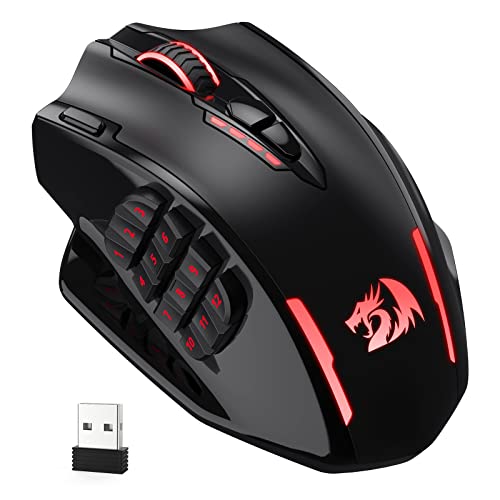
The M913 Impact Elite brings a 12-button thumb grid to a wireless mouse at a lower tier than the Razer and Corsair flagships. Sixteen programmable buttons cover an MMO rotation, the 16,000 DPI sensor tracks steadily, and the mouse works wired or wireless over 2.4 GHz. A 45-hour battery covers a week of evening play, and the RGB lighting can be dimmed or switched off to stretch that further. The ergonomic shell suits palm grips, and the side buttons have a firm click that resists accidental presses during fast combat.
Specs
- 16 programmable buttons with 12 side buttons
- 16,000 DPI optical sensor
- Wired and 2.4 GHz wireless modes
- 45-hour battery life
- RGB lighting
- Ergonomic right-handed shell
Best for: Players who want a wireless MMO mouse with a full thumb grid at a modest tier.
Watch out for: The 45-hour battery is the shortest among the wireless picks here, so heavy users will charge it weekly.
UtechSmart Venus Pro

The Venus Pro pairs a 12-button thumb grid with a 70-hour battery, which is the longest run among the affordable wireless picks in this guide. Sixteen programmable buttons cover abilities and macros, the 16,000 DPI optical sensor tracks cleanly, and the 2.4 GHz connection stays stable across the room. The ergonomic shell fits palm grips, and the RGB lighting cycles through 16 million colours without needing software running in the background. It is a strong pick for players who want the thumb grid and the wireless freedom without the flagship cost.
Specs
- 16 programmable buttons with 12 side buttons
- 16,000 DPI optical sensor
- 2.4 GHz wireless connection
- 70-hour battery life
- 16 million colour RGB lighting
- Ergonomic right-handed shell
Best for: Players who want a wireless thumb-grid mouse that runs for weeks between charges.
Watch out for: The software is basic beside Razer Synapse and iCUE, so complex macro chains take more setup work.
Which One Fits Your Situation
An MMO raider who needs every ability on the thumb
Pick the Razer Naga V2 Pro. Its 12-button plate puts a full rotation under the thumb, the 300-hour battery never interrupts a raid week, and the swappable plates let the same mouse serve a shooter on off nights. The Focus Pro 30K sensor keeps the cursor steady during boss mechanics.
A player who wants the classic thumb grid for less
Pick the Logitech G600. Its 3-by-4 grid is the layout every other MMO mouse copied, the G-Shift button doubles the grid, and the wired connection removes battery from the equation entirely. It is the cheapest way into a full thumb grid that still feels deliberate.
A player whose thumb never fits a fixed grid
Pick the Corsair Scimitar RGB Elite. The sliding Key Slider panel moves the 12-button grid to meet the thumb, which ends the stretching and mis-presses that fixed grids cause. The 17 programmable buttons and the iCUE profile memory cover every ability and macro a MOBA or MMO demands.
A player who wants wireless and a long battery
Pick the UtechSmart Venus Pro. Its 70-hour battery outlasts the other affordable wireless picks, the 12-button grid covers a full rotation, and the 2.4 GHz link stays stable. It is the pick for players who hate cables and hate charging in equal measure.
Common Mistakes
- Buying the mouse with the highest button count, then discovering the thumb cannot reach the back row without shifting the whole grip.
- Binding every ability on day one, which turns the first week into a memory test instead of letting the thumb learn the grid gradually.
- Ignoring the software, then finding the macro editor cannot chain the commands the build actually needs.
- Choosing a heavy MMO mouse for fast shooters, where the weight slows flicks that a light shell would win.
- Forgetting that a wired mouse still needs cable management, and letting the cable drag across the desk during a boss fight.
Frequently Asked Questions
How many buttons does an MMO mouse really need?
Twelve thumb buttons cover most MMO rotations, matching the standard action bar and letting each ability sit under one finger. More buttons help when the build uses flasks, potions and mounts, yet a grid larger than twelve becomes hard to learn by touch. Serious MMO players should favour a clean twelve-button grid over a crowded layout the thumb cannot reach.
Can one mouse work for MMOs and shooters?
Yes, when the side plates swap. The Naga V2 Pro changes from a 12-button MMO plate to a 2-button shooter plate in seconds, freeing the thumb for aiming. Fixed grids still work in shooters, but the extra buttons under the thumb can cause accidental presses during fast flicks. Players who split time evenly should pick a swappable design.
Is wireless reliable enough for raiding?
Modern 2.4 GHz wireless holds a stable connection through long encounters, and the mice in this guide report at the same rates as wired models. The real risk is a dead battery mid-raid, which is easy to avoid by charging on off nights. Wired mice remove that risk entirely, so players who raid on a strict schedule may still prefer a cable.
Do thumb-grid mice work for small hands?
They can, but the fit matters more than the button count. A sliding panel like the Scimitar’s helps, because it brings the grid to a shorter thumb, and a narrower shell keeps the buttons within reach. Players with small hands should measure the thumb reach before buying, and favour an adjustable panel or a smaller shell.
Related guides
More from Amazon
Programs that pair well with the guide above. Offers and eligibility are set by Amazon and may change.
Free shipping on eligible items, Prime Video and more. Eligible new members can start with a free trial.
Start a Prime free trialAd-free music streaming. Eligible new subscribers can start with a free trial.
Try Music Unlimited freeA Prime membership for ages 18-24 with a trial period. Eligibility is set by Amazon.
See Prime for Young AdultsAudiobooks and podcasts to listen to on the go. Eligible new members can start with a free trial.
Try Audible freeAs an Amazon Associate we earn from qualifying purchases.








