
Path of Exile asks more of a mouse than almost any other game, because a single map demands movement, a full skill rotation, flasks, a loot filter and a portal, all while the screen fills with enemies. A mouse with two side buttons forces the left hand to do everything, while a mouse with a thumb grid puts the whole build within reach. The choice comes down to how many skills and flasks the player wants on the thumb, and whether the hand can still play comfortably after three hours of mapping.
This guide is for Exiles who run maps for hours, for new-league players who want flasks and movement skills on the mouse, and for players who bind auras, curses and totems to thumb buttons. The five mice below were chosen from the names and specifications on their Amazon product pages, with button layout, sensor, battery and shape compared so the trade-offs stay clear.
Our Top Picks
 Razer Naga V2 HyperSpeed Wireless MMO Gaming MouseNaga V2 HyperSpeed (Mouse)4.71 x 2.96 x 1.71 inches0.2 poundsCheck on Amazon

Top 3 picks at a glance

Quick Picks
As an Amazon Associate we earn from qualifying purchases.
| Product | Best for | Key spec from title |
|---|---|---|
| Razer Naga V2 HyperSpeed | Exiles who want a light wireless MMO mouse | 19 buttons, Focus Pro 30K sensor |
| Razer Naga V2 Pro | Players who want swappable plates for any build | 19+1 buttons, 300-hour battery |
| Corsair Scimitar Elite Wireless | Players who want a wireless thumb grid with a sliding panel | 26,000 DPI, 16 buttons, 150-hour battery |
| Logitech G600 | Players who want a wired thumb grid that never needs charging | 20 buttons, RGB backlit thumb grid |
| Redragon M913 Impact Elite | Players who want a wireless MMO mouse for less | 16 buttons, 16,000 DPI, 45-hour battery |
How to Choose
Thumb buttons and flask bindings
In Path of Exile the thumb grid carries the build, so its layout decides if flasks fire on time. Twelve buttons in a 3-by-4 grid map neatly onto five flasks and a movement skill. The Naga V2 HyperSpeed and the Naga V2 Pro both carry 19 buttons with a 12-button thumb grid, while the Scimitar Elite Wireless carries 16 buttons with the same 12-button layout. The G600 adds a G-Shift button that doubles the grid, which suits players who run two flask sets. Bind flasks to the buttons the thumb reaches most easily, and keep movement skills on the largest, most distinct button in the grid.
Sensor accuracy at high speed
Mapping sessions push the cursor across the screen constantly, from picking up loot to dodging telegraphed attacks, so the sensor has to track cleanly at speed. The Naga V2 HyperSpeed and the Naga V2 Pro use the Focus Pro 30K sensor, the Scimitar Elite Wireless reaches 26,000 DPI, and the G600 and M913 reach 8,200 and 16,000 DPI. Most Exiles play between 800 and 1,600 DPI, so the headline number matters less than stable tracking with no acceleration. A sensor that holds its line during fast flicks keeps the cursor on the right flask and the right enemy, which is what mapping actually rewards.
Battery life for long sessions
A league launch can mean eight-hour sessions, and a mouse that dies mid-map is a real problem. The Naga V2 Pro runs for 300 hours, the Scimitar Elite Wireless for 150 hours, and the Naga V2 HyperSpeed for 400 hours, which means weeks between charges even with heavy play. The M913 runs for 45 hours, so it needs a weekly charge, while the G600 is wired and never needs one at all. Check whether the mouse charges over USB-C and whether it works while plugged in, because a mouse that stops working during charging forces a break at the worst moment.
Shape and comfort over hours
A mouse that feels fine for twenty minutes can become painful after three hours of mapping, so the shape matters as much as the buttons. The Naga V2 models weigh 134 and 140 grams, which steadies the hand during precise clicks yet can tire a wrist that flicks constantly. The Scimitar Elite Wireless is a wide right-handed shell that suits palm grips, while the G600 is narrower and suits players with smaller hands. Test the grip style first: a palm grip spreads the load across the hand, while a claw grip keeps the fingers ready for fast clicks, and the wrong shape will ache long before the session ends.
The 5 Best Options
Razer Naga V2 HyperSpeed
The Naga V2 HyperSpeed is the lightest way into a full thumb grid, weighing 140 grams yet feeling nimble beside the wired G600. Its 19 buttons put flasks, movement skills and auras under the thumb, the Focus Pro 30K sensor tracks precisely through dense packs, and the HyperSpeed wireless link stays steady in crowded setups. With a 400-hour battery, it runs for weeks between charges, and the Gen-2 mechanical switches stay crisp through thousands of flask presses. It is the pick for Exiles who want the MMO layout without the flagship cost of the Naga V2 Pro.
Specs
- 19 programmable buttons with 12-button thumb grid
- Focus Pro 30K optical sensor
- HyperSpeed wireless and Bluetooth
- 400-hour battery life
- Gen-2 mechanical switches
- HyperScroll wheel
Best for: Exiles who want a light wireless MMO mouse with a 400-hour battery.
Watch out for: It has no swappable side plates, so players who also play shooters cannot slim it down like the Naga V2 Pro.
Razer Naga V2 Pro
The Naga V2 Pro is the most adaptable mouse for Path of Exile, because its three swappable side plates let one mouse serve a flask-heavy mapper, a totem build and a shooter. The 12-button plate covers the full rotation, the Focus Pro 30K sensor tracks cleanly, and the HyperScroll Pro wheel switches between tactile steps and free spin for long inventories. Its 300-hour battery covers a whole league launch week, and the Gen-3 optical switches keep every click consistent. It is the most expensive mouse in this guide, yet it is also the only one that changes shape to match the build.
Specs
- 19-plus-1 programmable buttons with swappable side plates
- Focus Pro 30K optical sensor
- HyperScroll Pro wheel with free-spin mode
- Gen-3 optical switches
- 300-hour battery life
- HyperSpeed wireless and Bluetooth
Best for: Players who want one mouse that adapts to any Path of Exile build.
Watch out for: At 134 grams it is heavy for fast shooters, and the side plates are small parts that can be misplaced.
Corsair Scimitar Elite Wireless
The Scimitar Elite Wireless brings the sliding thumb panel to a wireless mouse, which is the feature that matters most for long mapping sessions. Its 12-button Key Slider panel moves 8 millimetres to meet the thumb, so flasks sit exactly where the hand expects them. Sixteen programmable buttons cover the rotation, the 26,000 DPI sensor tracks precisely, and the 150-hour battery lasts weeks. The iCUE software stores profiles on the mouse, so the bindings travel between computers, and the wireless link holds steady through dense encounters. It is the best wireless pick for Exiles with hands that never fit a fixed grid.
Specs
- 16 programmable buttons with sliding 12-button panel
- 26,000 DPI optical sensor
- Key Slider panel adjusts 8 mm
- 150-hour battery life
- iCUE software with onboard profile storage
- Slipstream wireless and Bluetooth
Best for: Players who want a wireless thumb grid that slides to fit their thumb.
Watch out for: The 150-hour battery is shorter than the Naga models, so heavy players will charge it more often.
Logitech G600

The G600 is the wired classic that still earns its place in Path of Exile, because its 12-button thumb grid and G-Shift button cover more bindings than any other mouse in this guide. Twenty programmable buttons hold flasks, skills, auras and portal macros, the RGB lighting marks the active profile, and the wired connection never drops or runs flat. Its laser sensor is older than the optical sensors here, yet it tracks reliably at the DPI levels Exiles actually use. The sculpted shape supports the hand through long sessions, and the wired connection removes battery from the list of worries entirely.
Specs
- 20 programmable buttons with 12-button thumb grid
- G-Shift button doubles thumb-grid functions
- RGB backlit buttons
- Laser sensor with up to 8,200 DPI
- Wired USB connection
- Onboard memory for profiles
Best for: Players who want the most bindings possible and never want to charge a mouse.
Watch out for: The laser sensor is an older design, and the cable can drag during fast swipes across a large map.
Redragon M913 Impact Elite
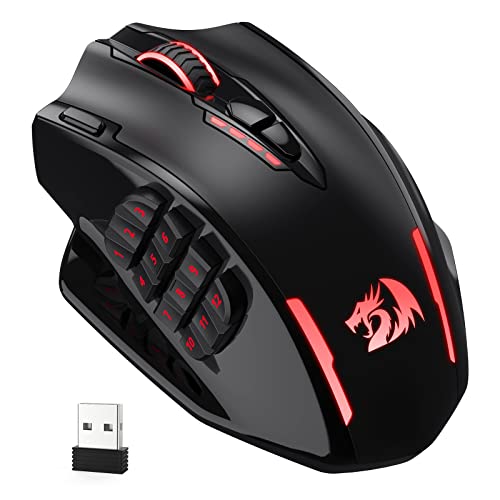
The M913 Impact Elite is the affordable wireless entry into thumb-grid play for Path of Exile. Its 12-button side grid covers flasks and skills, the 16,000 DPI sensor tracks steadily through dense packs, and the mouse works wired or wireless over 2.4 GHz. A 45-hour battery covers a week of evening mapping, and the RGB lighting can be dimmed to stretch it further. The ergonomic shell suits palm grips, and the side buttons have a firm click that resists accidental presses when the fight gets hectic. It is the pick for Exiles who want the MMO layout without paying flagship money.
Specs
- 16 programmable buttons with 12 side buttons
- 16,000 DPI optical sensor
- Wired and 2.4 GHz wireless modes
- 45-hour battery life
- RGB lighting
- Ergonomic right-handed shell
Best for: Players who want an affordable wireless MMO mouse for Path of Exile.
Watch out for: The 45-hour battery is the shortest in this guide, so league launch weeks will need a mid-week charge.
Which One Fits Your Situation
A mapper who wants the longest battery
Pick the Razer Naga V2 HyperSpeed. Its 400-hour battery outlasts every other mouse in this guide, the 19 buttons cover flasks and skills, and the Focus Pro 30K sensor tracks cleanly through dense packs. It is the pick for Exiles who map for hours and never want to think about charging.
A player who runs several builds
Pick the Razer Naga V2 Pro. Its swappable side plates let one mouse serve a flask-heavy mapper, a totem build and a shooter, and the onboard profile memory keeps the bindings for each build ready. The 300-hour battery covers a whole league launch week without a charge.
A player whose thumb never fits a fixed grid
Pick the Corsair Scimitar Elite Wireless. The sliding Key Slider panel moves the 12-button grid to meet the thumb, which ends the stretching and mis-presses that fixed grids cause. The 150-hour battery and the wireless freedom make it the comfortable pick for long sessions.
A player who wants the most bindings and no charging
Pick the Logitech G600. Its 20 buttons and G-Shift function hold more bindings than any other mouse here, and the wired connection never runs flat. It is the cheapest way into a full thumb grid that still feels deliberate after hours of mapping.
Common Mistakes
- Binding flasks to the hardest-to-reach buttons, then missing them when a boss fight gets hectic.
- Setting DPI too high for mapping, which makes the cursor overshoot loot and misclick during fast fights.
- Ignoring battery life before a league launch, then losing a map to a dead mouse at the worst moment.
- Choosing a heavy MMO mouse for a build that needs constant flicking, where the weight slows every movement.
- Forgetting to save profiles to the mouse, then losing every binding the first time the software is reinstalled.
Frequently Asked Questions
How many buttons do I need for Path of Exile?
Twelve thumb buttons cover most builds, because five flasks, a movement skill and a few auras fit a 3-by-4 grid. Builds with totems, curses and multiple auras benefit from more buttons, which is why the G600’s twenty inputs help. Players should bind flasks to the easiest buttons first, then add skills once the thumb has learned the grid.
Is a wireless mouse reliable for mapping?
Yes, modern 2.4 GHz wireless holds a stable connection through long sessions, and the mice in this guide report at the same rates as wired models. The real risk is a dead battery, avoided by charging on off nights. Wired mice remove that risk entirely, so strict-schedule players may still prefer a cable.
Should I use macros on my mouse?
Macros can bind a flask rotation to one button, which helps players with hand strain, yet must stay within the game’s rules. Path of Exile allows one action per key press, so one click pressing several flasks is not permitted. Players should bind each flask to its own button and press them manually, keeping the setup safe and honest.
Does DPI matter for Path of Exile?
DPI matters less than most players expect, because mapping rewards steady cursor control rather than fast flicks. Most Exiles play between 800 and 1,600 DPI, which keeps the cursor on loot and enemies without overshooting. A higher DPI helps on very large monitors, yet the sensor’s stability at low DPI is what actually decides whether the cursor lands where it should.
Related guides
More from Amazon
Programs that pair well with the guide above. Offers and eligibility are set by Amazon and may change.
Free shipping on eligible items, Prime Video and more. Eligible new members can start with a free trial.
Start a Prime free trialAd-free music streaming. Eligible new subscribers can start with a free trial.
Try Music Unlimited freeA Prime membership for ages 18-24 with a trial period. Eligibility is set by Amazon.
See Prime for Young AdultsAudiobooks and podcasts to listen to on the go. Eligible new members can start with a free trial.
Try Audible freeAs an Amazon Associate we earn from qualifying purchases.








