Most gaming boards ship with a 1GbE or 2.5GbE port, and for online play that is plenty. A 10GbE card solves a different problem: moving big files. If you copy game libraries to a NAS, edit video from network storage, or back up several machines, a 10 gigabit link removes the bottleneck. The decision is not just which card to buy but which connector, which slot, and what sits at the other end of the cable.
This guide is for desktop owners adding 10GbE to a PC, with attention to the details that trip people up: RJ45 copper versus SFP+ fiber, single versus dual port, and PCIe lane requirements. All eight cards below come from product listings that name their controller or slot type, and the comparisons rely on those published specs rather than measured throughput numbers.
Our Top Picks


Top 3 picks at a glance
Quick Picks
As an Amazon Associate we earn from qualifying purchases at no extra cost to you.



| Product | Best for | Key feature from the listing |
|---|---|---|
| TP-Link TX401 | Easy single-port copper upgrade | Windows 11 to 7 and Linux support, CAT6A cable included |
| BrosTrend 10GB PCIe | Compact builds and small cases | PCIe 4.0 x1, extra low-profile design |
| Gigaplus X540-T2 | Dual 10GBASE-T ports | Dual RJ45 with X540 controller |
| VunLink RTL8127AT | Multi-speed home networks | 10G, 5G, 2.5G, and 1G on PCIe 4.0 x1 |
| 10Gtek X540 Dual RJ45 | Intel X540-T2 compatibility | Compared to Intel X540-T2 by the listing |
| ASUS NADACA0140 | Simple branded adapter | 100 Mbps to 10 Gbps range |
| X520-DA2 SFP+ | Fiber or DAC links to a switch | Dual SFP+ ports, Intel 82599ES controller |
| VIMIN X540-T2 | Dual copper ports in x8 or x16 slots | Intel X540-T2 controller, VMware support |
How to Choose
Copper RJ45 or SFP+ Fiber
RJ45 cards use ordinary Ethernet cable, ideally CAT6A for runs up to 100 meters at 10 gigabits. SFP+ cards need either direct attach copper cables or optical transceivers, which are cheaper and cooler for short rack-style connections but add parts to buy. Pick the connector that matches your switch or the device at the other end.
Slot Type and Lanes
Check how many PCIe lanes the card requires. Newer single-port cards listing PCIe 4.0 x1 can work in a short slot, while older dual-port designs such as the X540 and 82599 families are listed for x8 slots. Make sure your motherboard has a free slot of the right length that is wired for the lanes you need, since a graphics-card slot may disable others.
Operating System Support
Read the driver line. Some cards list Windows 11 and 10 only, others add Server editions, ESX, or VMware. Linux support can depend on kernel version, as one listing names kernel 6.16 or newer. If your system runs an older distribution, confirm the driver before purchase.
Ports, Heat, and What to Ignore
Dual-port cards are useful for bonding or connecting two networks, but most home users need only one port. Ten-gigabit copper controllers can run warm, so leave airflow near the card. Ignore marketing about gaming latency; a faster port helps file transfers more than ping times. Budget cards sometimes cut corners with bare heatsinks and minimal documentation.
The 8 Best Options
TP-Link TX401
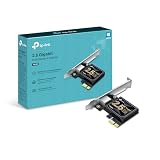
A good first 10GbE card for a desktop that connects to a copper switch. The listing names Windows 11 down to 7, several Server versions, and Linux, and includes a CAT6A cable so you can start right away.
- Strength: a cable is included in the box.
- Strength: wide operating system and server version coverage.
- Trade-off: the title does not state the lane count, so confirm slot compatibility.
It fits buyers upgrading a single desktop who want a card with few surprises. Skip it if you need two ports, or if your case has no free slot long enough for a standard-height bracket.
BrosTrend 10GB PCIe
This card lists PCIe 4.0 x1 and an extra low-profile design, which suits small cases and boards with limited full-length slots. Windows 11, 10, and Server 2022 are named, with plug-and-play Linux on kernel 6.16 or newer.
- Strength: x1 interface frees up longer slots.
- Strength: low-profile form factor for compact builds.
- Trade-off: Linux support depends on a very recent kernel.
Skip it if you run an older Linux distribution, or if your motherboard offers only older, slower slot generations where a PCIe 4.0 x1 design may not reach its full speed.
Gigaplus X540-T2
A dual-port RJ45 card using an X540 controller, suited to a workstation that connects to two networks or a switch plus a direct link to a NAS. Windows, Linux, and ESX servers are named.
- Strength: two 10G copper ports on one card.
- Strength: established controller family with broad server support.
- Trade-off: dual-port cards are larger and draw more power than single-port models.
Think of it as a workstation or home server card rather than a simple gaming upgrade. Skip it if you only need one port and a compact card, since the extra port adds heat and size without helping a single-connection setup.
VunLink RTL8127AT
This single-port RJ45 card uses a Realtek RTL8127AT chip and negotiates 10G, 5G, 2.5G, and 1G, which helps if your network is mixed. It lists PCIe 4.0 x1 and Windows 10, 11, and Linux.
- Strength: multi-gig fallback speeds for older switches.
- Strength: x1 interface for flexible placement.
- Trade-off: a newer chip with less track record than the Intel designs.
It makes sense for a mixed home network where some links are still 2.5G. Skip it if you want an Intel controller for server use or a design with years of driver history behind it.
10Gtek X540 Dual RJ45
Described as a comparable alternative to the Intel X540-T2, this dual-port copper card suits home labs. It lists Windows, Linux, and ESX server support.
- Strength: dual RJ45 with an X540 controller.
- Strength: a familiar design for virtualization hosts.
- Trade-off: it is a compatible clone rather than the original Intel card.
Buyers who want the X540-T2 feature set without the original card’s brand cost tend to look at models like this one. Skip it if you require a genuine Intel-branded card for warranty or compliance reasons.
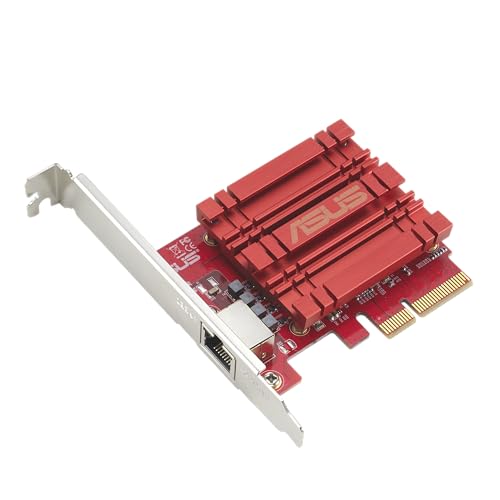
ASUS NADACA0140
A branded adapter whose title lists 100 Mbps through 10 Gbps speeds. The title offers little else, so it suits buyers who prefer a familiar motherboard brand.
- Strength: a recognized brand name.
- Strength: backward-compatible speed range.
- Trade-off: the listing gives no controller, slot, or operating system detail.
It works as a low-drama choice if you already trust the manufacturer and your motherboard documentation confirms an open slot. Skip it if you need controller, lane, and operating system specifics before ordering.
X520-DA2 SFP+
A dual SFP+ card using the Intel 82599ES controller on a PCIe x8 interface. It targets servers and desktops that link to a fiber or direct attach switch.
- Strength: two SFP+ ports for fiber or DAC cables.
- Strength: Intel controller named in the title.
- Trade-off: no RJ45 port, so it will not accept regular Ethernet cable.
This is the card for people already running fiber or short direct attach links between a PC and a switch. Skip it if your switch or NAS uses copper ports, because you would need extra modules to bridge the gap.
VIMIN X540-T2
Another dual-port copper card with an Intel X540-T2 controller, listed for PCI-E x8 and x16 slots. Windows, Windows Server, Linux, and VMware are named.
- Strength: Intel X540-T2 controller named.
- Strength: VMware support listed.
- Trade-off: needs a long slot and extra cooling space.
It suits a tower with spare slots that doubles as a virtualization box. Skip it if you have a compact case or a board where the long slot is already taken by a graphics card.
Which One Fits Your Situation
You Have a Small Form Factor PC
Pick the BrosTrend. Its x1 interface and low-profile design are meant for boards where space is limited, and the listing names Windows 11 support.
You Are Building a Home Lab in 2026
The VIMIN X540-T2 or the Gigaplus X540-T2 gives two copper ports and server operating system support, so you can host virtual machines and still connect a switch and NAS.
Your Switch Uses SFP+ Ports
Choose the X520-DA2. With dual SFP+ ports and an Intel 82599ES chip, it fits fiber or direct attach cabling, saving you from a copper conversion step.
Common Mistakes
- Forgetting that a 10GbE card also needs a 10GbE switch or direct partner to deliver the speed.
- Buying an SFP+ card without transceivers or cables.
- Using older CAT5e cabling and expecting full 10 gigabit speeds over long runs.
- Installing a card in a slot that shares lanes with an NVMe drive.
- Skipping airflow around a hot dual-port controller.
Related guides
- How To Set Up Computer Speakers For Better Sound At Your Desk
- How To Check Whether Your Ram Is Running At Its Rated Speed
- How To Choose The Right Monitor Riser Height For Your Desk
Frequently Asked Questions
Do I need 10GbE for gaming?
No. Online games rarely need more than 1GbE. A 10GbE card helps with file transfers, backups, and NAS access.
Can I use a PCIe x1 card in a longer slot?
Yes, a short card fits longer slots. Be sure the slot is not disabled by other devices and meets the generation the card expects.
What cable should I use for RJ45 10GbE?
CAT6A is the common choice for longer runs, and CAT6 can work over shorter distances. The TP-Link listing includes a CAT6A cable.
Is dual port better than single port?
Only if you plan to use both. Single-port cards are cooler, smaller, and simpler for most desktops.
Related guides
More from Amazon
Programs that pair well with the guide above. Offers and eligibility are set by Amazon and may change.
Free shipping on eligible items, Prime Video and more. Eligible new members can start with a free trial.
Start a Prime free trialAd-free music streaming. Eligible new subscribers can start with a free trial.
Try Music Unlimited freeA Prime membership for ages 18-24 with a trial period. Eligibility is set by Amazon.
See Prime for Young AdultsAudiobooks and podcasts to listen to on the go. Eligible new members can start with a free trial.
Try Audible freeAs an Amazon Associate we earn from qualifying purchases.