Plenty of desktop gaming PCs are built without any wireless hardware, and the router rarely sits where an Ethernet cable can reach the case. A USB WiFi adapter fixes that in a minute: plug it into a port, install a driver if needed, and the PC joins the network. The decision behind this keyword is how much speed and range you need, and whether you are buying into WiFi 5 or the newer WiFi 6 standard.
The eight adapters here span compact AC600 sticks, AC1300 models with high-gain antennas, and WiFi 6 units listed at AX900 and AX1800. Most are from TP-Link, with UGREEN, NETGEAR and Nineplus rounding out the group. The guidance below explains what the numbers mean for a PC under a desk, so you can match the adapter to your router and your operating system in 2026.
Our Top Picks
 TP-Link AC600 USB WiFi Adapter for Desktop PCAC600, WiFi 52.28 x 0.71 x 6.83 inches0.04 poundsCheck on Amazon
 TP-Link AC1300 USB WiFi Adapter for Desktop PCAC13001.59 x 0.78 x 0.41 inches0.02 poundsCheck on Amazon
 TP-Link USB WiFi 6 Adapter for PC-1800 MbpsAX1800, WiFi 63.07 x 1.69 x 0.53 inches0.06 poundsCheck on Amazon


Top 3 picks at a glance
Quick Picks
As an Amazon Associate we earn from qualifying purchases at no extra cost to you.



| Product | Best for | Key feature from the title |
|---|---|---|
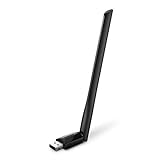
| TP-Link Archer T2U Plus AC600 | Basic gaming and browsing | Dual band, 5dBi high-gain antenna |
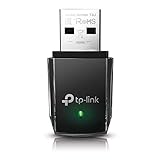
| TP-Link Nano AC600 | Travel and small ports | Travel-size nano, 2.4G and 5G |
| TP-Link Archer T3U AC1300 | Faster WiFi 5 without an antenna | MU-MIMO, USB 3.0, dual band |
| UGREEN AX900 WiFi 6 | Entry WiFi 6 | AX900, built-in driver for Windows 10 and 11 |
| NETGEAR Nighthawk A7500 | Strong WiFi 6 from a known brand | AX1800, USB 3.0, plug and play |
| TP-Link Archer TX30U Plus | WiFi 6 with antennas | 1800 Mbps, high-gain antennas, WPA3 |
| TP-Link Archer T3U Plus AC1300 | Range on a WiFi 5 router | High-gain antenna, MU-MIMO, USB 3.0 |
| Nineplus 1300Mbps Adapter | Extra range with two antennas | Dual 5dBi antennas, 5G and 2.4G |
How to Choose
Match the adapter to your router, not the other way around
A WiFi 6 adapter on a WiFi 5 router will work, but it connects using the older standard. If your router is a recent WiFi 6 model, the AX900 and AX1800 adapters can use its extra efficiency. If your router is older, an AC1300 adapter is often sufficient. Check which bands your router offers, since 5GHz is quicker at close range and 2.4GHz travels farther. If your router combines both bands under one network name, the adapter will pick for you, but splitting them lets you choose manually and often solves stubborn disconnects.
Understand the speed numbers
AC600, AC1300 and AX1800 are combined theoretical speeds across bands, not what you will see in a download. Real throughput depends on distance, walls and interference. Use these labels to rank adapters against each other rather than to predict your speed. A USB 3.0 interface is preferable for faster models because USB 2.0 can bottleneck them.
Antennas, placement and USB ports
External high-gain antennas can help when the PC is under a desk or in a corner, but a compact nano adapter placed behind a metal case may struggle. Use a rear port or a short extension to lift the adapter higher. Compact sticks protrude only slightly, which suits laptops and cramped ports, but they have less room for antennas. A short USB extension cable or a small cradle that lifts the adapter above the desk surface is a cheap way to improve reception without changing the adapter itself.
Operating system support and where budget models cut corners
Windows 10 and 11 are covered across the group, but some older-looking listings also mention XP, 7 and macOS versions up to 10.14 or 10.15, which are not current. The Archer TX30U Plus lists Windows 11 and 10 only. Budget adapters tend to skimp on driver updates, so favor brands that publish them, and ignore broad claims of “gaming performance” unless a spec backs them.
The 8 Best Options
TP-Link Archer T2U Plus AC600
This adapter is an AC600 dual-band model with a 5dBi high-gain antenna and a listed Windows 11, 10, 8.1, 8, 7 and XP range. It is a basic upgrade for a desktop that needs reliable wireless for browsing, streaming and casual gaming.
- Dual band with a high-gain antenna
- Broad Windows version support
- Trade-off: AC600 is the slower class here
Skip it if you have a fast router and want to use its full bandwidth.
TP-Link Nano AC600 USB WiFi Adapter
The Nano is a small travel-size dongle with 2.4G and 5G dual band. It stays out of the way behind a case or on a laptop, and is easy to move between machines.
- Very compact design
- Dual band support
- Trade-off: no external antenna, so range may be shorter in a corner
Skip it if the PC sits far from the router or behind metal.
TP-Link Archer T3U AC1300
The T3U steps up to AC1300 with MU-MIMO and a USB 3.0 connection, without an external antenna. It is a neat, compact route to faster WiFi 5 performance.
- AC1300 class with MU-MIMO
- USB 3.0 interface
- Trade-off: no antenna to adjust for range
Skip it if the router is more than a couple of rooms away.
UGREEN AX900 USB WiFi 6 Adapter
This UGREEN model offers WiFi 6 at AX900 across 5GHz and 2.4GHz, with a built-in driver for Windows 10 and 11. The built-in driver suits buyers who dislike installing software.
- WiFi 6 at an entry level
- Built-in driver for Windows 10 and 11
- Trade-off: AX900 is below the AX1800 models
Skip it if you want the fastest WiFi 6 class in this group.
NETGEAR Nighthawk A7500 WiFi 6
A WiFi 6 AX1800 adapter with USB 3.0 and plug-and-play setup for Windows 10 and 11. It is aimed at desktops that need current-generation wireless from a recognizable networking brand.
- AX1800 class with USB 3.0
- Plug-and-play setup
- Trade-off: the title does not mention external antennas
Skip it if you want visible antennas to adjust.
TP-Link Archer TX30U Plus WiFi 6
This TP-Link lists 1800 Mbps WiFi 6, high-gain antennas, USB 3.0 and WPA3 support, for Windows 11 and 10 only. It is a strong all-round option for a modern desktop and router pair.
- WiFi 6 with high-gain antennas
- WPA3 security support
- Trade-off: Windows 11 and 10 only, so older systems are out
Skip it if you run Windows 7 or macOS.
TP-Link Archer T3U Plus AC1300
The T3U Plus adds a high-gain antenna to the AC1300 formula, with MU-MIMO, USB 3.0 and dual-band support. It gives more range than the T3U for a PC placed away from the router.
- High-gain antenna plus MU-MIMO
- USB 3.0 for faster models
- Trade-off: WiFi 5, not WiFi 6
Skip it if your router and network are WiFi 6.
Nineplus 1300Mbps Wireless USB Adapter
The Nineplus lists 1300Mbps dual-band operation with two 5dBi antennas for desktop and laptop use on Windows 11, 10 and 7. Two separate antennas let you aim each one differently, which can help for a desk in an awkward corner.
- Dual 5dBi antennas
- Dual band 5G and 2.4G
- Trade-off: the title says nothing about USB 3.0 or WiFi 6, so check the listing for the interface
Skip it if you want WiFi 6 or a manufacturer you already trust for driver updates.
Which One Fits Your Situation
Modern WiFi 6 router and Windows 11 PC
The TP-Link Archer TX30U Plus and NETGEAR Nighthawk A7500 are the best match, since both list WiFi 6 with USB 3.0. The TX30U adds visible antennas and WPA3, while the Nighthawk is the simpler plug-and-play pick for buyers who want a networking brand they already know.
Older WiFi 5 router and a PC under the desk
The TP-Link Archer T3U Plus gives a high-gain antenna and an AC1300 class, which is plenty for a WiFi 5 network and easier to place than a nano. If the PC is in a back room with several walls to cross, the Nineplus with its two antennas is another option to consider for aiming the signal.
Light use or a second PC
The TP-Link Nano AC600 or the T2U Plus covers streaming and browsing at a modest level, and either is easy to swap between machines. Both are reasonable if the PC mostly handles video calls, email and web pages rather than competitive online games.
Common Mistakes
- Plugging a fast adapter into a USB 2.0 port and wondering why speeds are low.
- Expecting a WiFi 6 adapter to speed up a WiFi 5 router.
- Hiding the adapter behind the metal tower where signal is blocked.
- Ignoring the operating system list on the listing.
- Comparing AC1300 to AX1800 numbers as real download speeds.
Related guides
- How To Set Up Computer Speakers For Better Sound At Your Desk
- How To Check Whether Your Ram Is Running At Its Rated Speed
- How To Choose The Right Monitor Riser Height For Your Desk
Frequently Asked Questions
Is a USB WiFi adapter as good as Ethernet?
Wired Ethernet is usually more stable and has lower delay. A good adapter works fine for most gaming and streaming but cannot match a cable in every situation. If you can run a cable, even a long flat one along the wall, that remains the safer option for competitive play, with the adapter as a fallback.
Do I need a driver?
Some listings include a built-in driver, others need an install from the manufacturer. Check your Windows version first, and if the PC has no internet at all yet, download the driver on another device and copy it over on a flash drive.
Does an antenna really help?
External antennas can improve signal in awkward spots, particularly if you can aim them. Placement of the adapter often matters as much.
Will it work on Mac or Linux?
Some listings mention older macOS versions. Support for Linux is not stated here, so check the manufacturer before buying.
Related guides
More from Amazon
Programs that pair well with the guide above. Offers and eligibility are set by Amazon and may change.
Free shipping on eligible items, Prime Video and more. Eligible new members can start with a free trial.
Start a Prime free trialAd-free music streaming. Eligible new subscribers can start with a free trial.
Try Music Unlimited freeA Prime membership for ages 18-24 with a trial period. Eligibility is set by Amazon.
See Prime for Young AdultsAudiobooks and podcasts to listen to on the go. Eligible new members can start with a free trial.
Try Audible freeAs an Amazon Associate we earn from qualifying purchases.