A touchscreen monitor changes how a desk behaves. Instead of reaching for a mouse to drag a timeline, sign a PDF, tap through a point-of-sale menu, or scrub a music mixer, you simply press the glass. The decision this keyword implies is not just which panel looks sharpest; it is which size, resolution, and connection type will keep a touch surface comfortable for hours, and whether the monitor will be a main display, a second screen, or a kiosk that stays bolted to a wall.
This guide suits home-office workers adding a tablet-like surface to a Windows desktop, small shops building a checkout counter, creators who sketch or edit by hand, and travelers who want a portable second screen. Eight models are compared below using only what their listing titles state, from a compact 16 inch panel up to a 34 inch ultrawide, so you can match the screen to the job instead of buying the biggest number on the page in 2026.
Our Top Picks
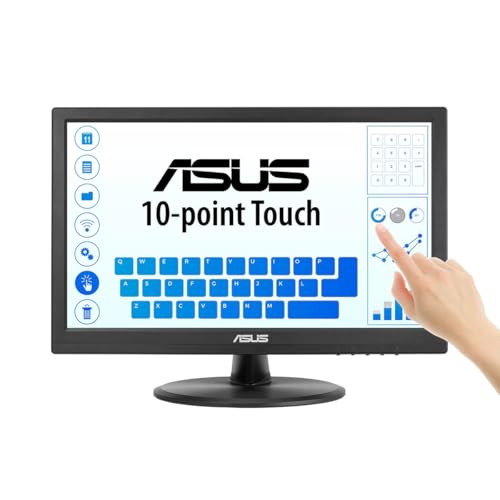
 ASUS VT229H 22 Inch 1080P FHD IPS Touchscreen22 Inch19.4 x 8 x 11.8 inches7.01 poundsCheck on Amazon


Top 3 picks at a glance
Quick Picks
As an Amazon Associate we earn from qualifying purchases at no extra cost to you.



| Product | Best for | Key spec from the title |
|---|---|---|
| CUNPU 24 Inch Touchscreen | Shops and warehouses | 24 inch IPS, 1080P, 10-point touch, 75Hz |
| Pisichen 27 Inch QHD Touch | Sharp desk work and play | 2560×1440 IPS, 100Hz, USB-C, HDMI, DP |
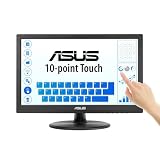
| ASUS VT229H | Everyday office touch | 22 inch FHD IPS, 10-point, built-in speakers |
| 24 Inch VA Touch Monitor | Adjustable stand setups | VA panel, 3000:1 contrast, pivot and height adjust |
| ASUS BE24ECSBT | One-cable laptop docking | 24 inch IPS, webcam, USB-C 80W power delivery |
| ASUS VT169HE | Tight counters and carts | 16 inch FHD IPS, 10-point touch |
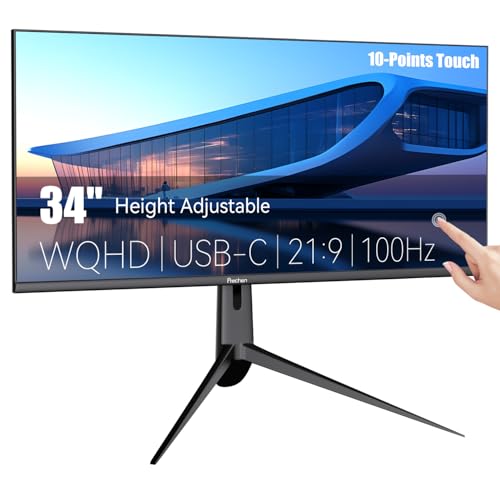
| 34 Inch Touch Monitor | Wide editing workspace | 3440×1440, 100Hz, HDR 400, DP and Type-C |
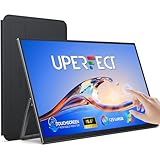
| UPERFECT 15.6 Inch Portable | Travel second screen | 15.6 inch touch, USB-C and HDMI, stand included |
How to Choose
Panel type and viewing angle
Touch use means people lean in from the side, so wide viewing angles matter more than on a normal monitor. IPS panels, such as those in the ASUS and CUNPU models, keep color steady from off-axis, and the ASUS titles cite a 178 degree viewing angle. VA panels trade that for deeper contrast; the 3000:1 contrast figure on the generic 24 inch model is the draw. If several people will touch the same screen, lean IPS.
Resolution and size
At 22 to 24 inches, 1080p is sharp enough for touch because your finger hides pixel-level detail anyway. At 27 inches, 2560×1440 keeps text crisp from arm’s length, and the 34 inch ultrawide listing quotes 3440×1440. Note that this listing also says 4K in its name, which does not match 3440×1440, so confirm the real resolution before purchase. Below 16 inches, touch targets get small, so expect to scale up the interface.
Ports and power
Look for the connection your computer actually has. HDMI and VGA suit older towers, DisplayPort and USB-C suit modern laptops. A USB-C port with power delivery, as on the BE24ECSBT at 80W, can carry video, touch data, and charge a laptop over one cable. Remember that touch itself usually needs a separate USB connection unless a single USB-C link carries it, so read the cable list.
Stand, mounting, and where budget models cut corners
A touch screen gets pushed, so a wobbly stand ruins the point. Tilt-only stands are common on budget units; height, pivot, and swivel adjustment, as listed on the generic 24 inch model and the 34 inch model, are worth paying for. VESA mounting, noted on the CUNPU and UPERFECT, lets you flip the screen onto an arm or wall. Refresh rates of 75Hz or 100Hz matter little for office touch work.
The 8 Best Options
CUNPU 24 Inch Touchscreen
The CUNPU listing positions this 24 inch IPS panel for office, business, and warehouse use, with 1080P resolution, 10-point touch, 75Hz, and 100% sRGB. A small retailer or workshop that needs a sturdy, wall-mountable touch terminal will find the VGA, HDMI, and USB connections familiar and easy to wire. Think of a parts counter where staff tap quantities all day: an IPS panel and tilt stand matter more there than gaming-style speed.
- Strength: VESA mounting and tilt adjustment suit counters and walls.
- Strength: VGA, HDMI, and USB inputs cover older and newer computers.
- Trade-off: 1080P stretched across 24 inches is plain rather than razor sharp.
Skip it if you want a USB-C single-cable setup for a modern laptop.
Pisichen 27 Inch QHD Touch
Pisichen offers a 27 inch IPS touch monitor at 2560×1440 and 100Hz, with USB-C, HDMI, and DisplayPort inputs. A designer or home-office user who wants a roomy canvas for spreadsheets, timelines, and light creative work gets more room than a 1080p panel can offer, while the faster refresh keeps scrolling smooth. A freelance illustrator who sketches thumbnails with a finger, or a teacher annotating slides in front of a class, can park it on an arm and still keep a keyboard in reach.
- Strength: QHD resolution at 27 inches keeps text and icons crisp.
- Strength: three video inputs, including USB-C, handle laptops and desktops alike.
- Trade-off: a large touch screen on a desk means a longer reach to the top corners.
Skip it if your desk is shallow or you mainly want a compact kiosk.
ASUS VT229H
This 22 inch ASUS is a straightforward FHD IPS touch monitor with 10-point touch, built-in speakers, a frameless design, and HDMI plus VGA. It suits a home desk, a reception area, or a family computer where a recognizable brand and simple setup matter more than extras. A parent setting up a shared family computer, for instance, gets touch for kids and a normal keyboard for adults without any exotic cabling.
- Strength: 178 degree viewing angles and an IPS panel keep colors consistent from the side.
- Strength: built-in speakers remove the need for separate desk speakers.
- Trade-off: there is no USB-C or DisplayPort in the listed inputs.
Skip it if you plan to dock a thin modern laptop over one cable.
24 Inch VA Touch Monitor
This unbranded 24 inch screen uses a VA panel with 3000:1 contrast and 99% sRGB, with height, pivot, swivel, and tilt adjustment. Someone who wants to rotate the screen into portrait for reading documents or checking code will value the stand more than the badge. Portrait mode is genuinely useful for long documents, and tapping to scroll feels natural there.
- Strength: full height, pivot, swivel, and tilt adjustment improves ergonomics.
- Strength: high contrast for darker scenes and text on dark backgrounds.
- Trade-off: VA panels typically show weaker off-angle color than IPS, which matters for shared touch use.
Skip it if multiple people view the screen from the side.
ASUS BE24ECSBT
The BE24ECSBT is a 24 inch 1080P IPS touch monitor with a built-in webcam, USB-C with 80W power delivery, HDMI, and eye care features. It is aimed at hybrid workers who want video calls, charging, and touch through a single cable from a laptop. A consultant who bounces between hotel rooms and a client office can leave the dock plugged in and simply connect one cable on arrival.
- Strength: 80W USB-C power delivery can charge a laptop while it carries the picture.
- Strength: the built-in webcam removes a separate accessory from the desk.
- Trade-off: it costs more complexity than plain monitors, so budget accordingly.
Skip it if you already own a webcam and only need basic touch.
ASUS VT169HE
At 16 inches, this ASUS FHD IPS touch monitor is among the smallest desktop-class options, with 10-point touch, wide viewing angles, a frameless look, HDMI, and VGA. It fits cramped counters, a bedside smart-home control panel, or a sidecar screen next to a main display. A mechanic logging jobs on a rolling cart, or a hobbyist running a smart-home dashboard beside the workbench, would use it in exactly this way.
- Strength: the compact footprint fits where larger monitors cannot.
- Strength: IPS and a wide viewing angle keep the picture legible from any side.
- Trade-off: small touch targets mean you may scale the interface up.
Skip it if you want a primary work screen with plenty of room.
34 Inch Touch Monitor
This ultrawide lists 3440×1440, 100Hz, 10-point touch, HDMI, DisplayPort, Type-C, HDR 400, and a height-adjustable, rotatable stand. A video editor or trader who wants a single wide workspace and the option to tap timeline controls will find the range of inputs useful. Because the stand rotates and adjusts in height, you can raise the lower edge closer to your hands for touch work and lower it again for keyboard sessions.
- Strength: the ultrawide canvas fits side-by-side windows without a second monitor.
- Strength: DisplayPort and Type-C inputs support modern graphics cards and laptops.
- Trade-off: the title mixes 4K and WQHD labels, so verify the actual resolution.
Skip it if you want a monitor you can reach across comfortably for touch.
UPERFECT 15.6 Inch Portable
The UPERFECT is an ultra-slim 15.6 inch portable touchscreen with 125% sRGB, an adjustable stand, a speaker, VESA mounting, and USB-C plus HDMI. It is made for laptop users who want a second touch display in a hotel room, a coworking space, or a small apartment desk. Since it also lists VESA mounting, it can double as a fixed secondary display on an arm once you are home.
- Strength: slim body and included stand make it easy to carry and set up.
- Strength: USB-C and HDMI work with laptops, phones, and consoles.
- Trade-off: a portable panel usually relies on the host device for power.
Skip it if you want a permanent, large primary display.
Which One Fits Your Situation
You are building a small checkout or shop terminal
The CUNPU 24 Inch Touchscreen is the sturdier answer, thanks to VESA mounting and familiar ports. If the counter is narrow, step down to the ASUS VT169HE.
You work from a laptop and want one cable
The ASUS BE24ECSBT handles video, charging, and a webcam over USB-C. That is hard to beat for a hybrid desk.
You edit video or run several windows at once
The 34 Inch Touch Monitor gives the most horizontal room, and the Pisichen 27 Inch QHD is a calmer alternative if you do not need ultrawide.
You travel and need a second screen
The UPERFECT 15.6 Inch Portable packs into a bag and still gives you touch input.
Common Mistakes
- Assuming every touch monitor needs only a video cable; most also need a USB connection for touch.
- Choosing a VA panel for a shared kiosk, where side viewing angle matters most.
- Buying 27 inches or larger for a shallow desk and then struggling to reach the top edge.
- Trusting a headline resolution without checking the specification line, especially when titles mix labels.
- Overpaying for a high refresh rate that office touch work never uses.
Related guides
- Noctua Nh-D15 Vs Thermalright Peerless Assassin 120
- Sustainable Gaming Pc Power Supply Efficiency Guide
- Managed Ethernet Switches For Small Business
Frequently Asked Questions
Do touchscreen monitors work with any computer?
Most work with Windows and many with macOS, but touch drivers vary. Read the compatibility line and confirm which operating systems the maker lists.
What does 10-point touch mean?
It means the screen can track up to ten fingers at once. That supports pinch, rotate, and multi-finger gestures in drawing and design apps.
Are glossy touch screens harder to read?
Touch glass can reflect lights and windows. Position the screen away from direct glare, and wipe fingerprints off regularly.
Is a bigger touch monitor always better?
No. Past about 27 inches, touch becomes tiring because of the reach. Choose size based on how far your arm can comfortably travel.
Related guides
More from Amazon
Programs that pair well with the guide above. Offers and eligibility are set by Amazon and may change.
Free shipping on eligible items, Prime Video and more. Eligible new members can start with a free trial.
Start a Prime free trialAd-free music streaming. Eligible new subscribers can start with a free trial.
Try Music Unlimited freeA Prime membership for ages 18-24 with a trial period. Eligibility is set by Amazon.
See Prime for Young AdultsAudiobooks and podcasts to listen to on the go. Eligible new members can start with a free trial.
Try Audible freeAs an Amazon Associate we earn from qualifying purchases.