
The Edifier MR3 is the best studio monitor pair for most desktops in this group. It combines 3.5-inch woofers and 1-inch silk dome tweeters with balanced TRS, RCA and 3.5 mm inputs, Bluetooth 5.4 and a front headphone output, so it works with an audio interface, a PC and a phone. A studio monitor is an active speaker designed for flat, revealing sound at close range, which makes it useful for music production, editing and critical listening as well as everyday PC audio. If you want a more traditional production brand, the PreSonus Eris 3.5 is a close second.
Our Top Picks
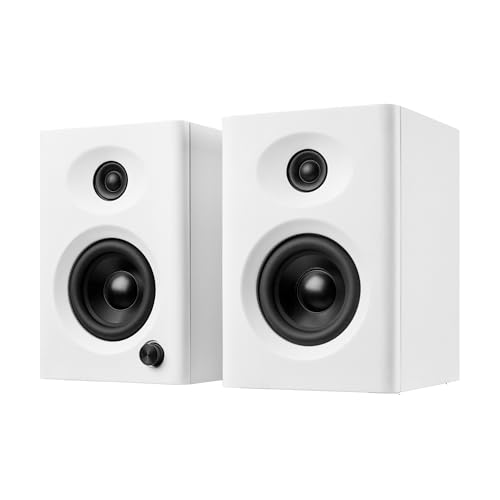 NSY Audio Powered Computer Speakers for Desktop PC3 inches5 x 4.8 x 6.9 inches6 PoundsCheck on Amazon
 Edifier R1280T Powered Bookshelf Speakers -2.0 Near Field6.9 x 9.5 x 5.8 inches10.8 poundsCheck on Amazon


Top 3 picks at a glance
Quick List
- PreSonus Eris 3.5 – best for music production on a small desk
- Edifier MR3 – best for flexible inputs, Bluetooth and balanced connections
- NSY Audio 60W wood-finish speakers – best for a warm look with USB-C and Bluetooth
- Edifier R1280T – best for a wired two-source setup with a remote
- Ortizan C7 (white) – best for a bright desk with Bluetooth and TRS inputs
- Ortizan C7 (black) – best for the same speakers in a dark finish
Which One Is Right for You?
| If you… | Choose |
|---|---|
| connect an audio interface with balanced outputs and also stream from a phone | Edifier MR3 |
| record or mix music and want a familiar studio brand | PreSonus Eris 3.5 |
| want to play from both a PC and a turntable preamp or console with RCA cables | Edifier R1280T |
| like wood finishes and need a USB-C connection | NSY Audio 60W |
| want a white desk setup with Bluetooth and TRS inputs | Ortizan C7 (white) |
| want the same Ortizan model to match black gear | Ortizan C7 (black) |
All of these are active speakers, so you need only a power outlet and a source. Decide how many sources you have, whether you want wireless streaming, and how much desk depth you can spare.
All 6 Picks in Detail
1. PreSonus Eris 3.5 – Best for music production on a small desk
As an Amazon Associate we earn from qualifying purchases at no extra cost to you.

The Eris 3.5 is a pair of compact active near-field monitors, and the listing positions them for music production, gaming, movies and hi-fi listening. PreSonus specifies a 3.5-inch woven composite woofer and a 1-inch silk dome tweeter, with 50 watts of total power from Class AB amplifiers.
These suit producers, streamers and students who want a recognizable studio design on a small desk. The front panel has a volume knob, an auxiliary input and a headphone jack that mutes the speakers when in use, while rear knobs let you adjust the highs and lows to suit your room.
Protection circuits and a power-saver mode are part of the design, according to PreSonus, and the listing lists a pair rather than a single speaker. The 98 dB peak level is plenty for a desk, and the rear EQ switches are useful if the speakers sit close to a wall and sound boomy. If you want Bluetooth, PreSonus sells a separate version, but this listing does not mention it.
- 3.5-inch woven composite woofer, 1-inch silk dome tweeter
- 50 W total power, about 25 W per side
- Balanced 1/4-inch TRS and unbalanced RCA inputs on the rear
- Front 3.5 mm aux input and headphone output
- Frequency response of about 80 Hz to 20 kHz per PreSonus
- Rear-ported MDF cabinet; keep a few inches from the wall
Pros
- Balanced inputs for audio interfaces
- Room-tuning EQ switches on the back
Cons
- No Bluetooth on this version
- Limited low bass below 80 Hz
Compared with the Edifier MR3, it is more of a studio tool and offers fewer wireless conveniences.
2. Edifier MR3 – Best for flexible inputs and Bluetooth

The MR3 is the most versatile pair here. The listing calls it a Hi-Res Audio Certified active 2.0 speaker with Bluetooth 5.4, a headphone output, and RCA, AUX and balanced TRS inputs. Edifier’s own specification gives 18 watts RMS per speaker, 3.5-inch mid-low drivers and 1-inch silk dome tweeters.
That mix makes it a strong match for desktops that are used for both producing and relaxing. You can connect an audio interface through TRS, a PC through the 3.5 mm input, and a phone through Bluetooth, all without swapping cables, and the app offers room compensation and EQ.
The MR3 also supports two Bluetooth connections at once and carries a front headphone jack, which is handy when you need quiet monitoring. Note that the listing mentions a higher maximum wattage than Edifier’s own RMS rating, so judge loudness by the manufacturer’s figures. The cabinets are MDF, which keeps resonance low for the price class.
- 3.5-inch drivers with 1-inch silk dome tweeters in an MDF enclosure
- 18 W x 2 RMS per Edifier, which differs from some retailer wattage figures
- Frequency response of 52 Hz to 40 kHz per Edifier
- Balanced TRS, RCA and 3.5 mm inputs, plus a front headphone output
- Bluetooth 5.4 with the SBC codec and two-device connection
- Hi-Res certified; app control for EQ
Pros
- Widest range of verified inputs
- Extended frequency response for the size
Cons
- Bluetooth is SBC only
- RMS power is lower than some rivals’ headline numbers
It is more flexible than the Eris 3.5, though the Eris has a more established studio reputation.
3. NSY Audio 60W wood-finish speakers – Best for a warm look with USB-C
The NSY Audio pair is described as active 60 watt powered computer speakers with a wood finish, bass control, Bluetooth 5.3, and USB-C, RCA and AUX inputs. The white pair targets users who want a furniture-friendly look rather than a pro-studio style. The listing name uses the studio-monitor idea loosely, so treat it as a desktop hi-fi speaker.
It suits shared offices and living spaces where a bass control knob matters more than flat response. Sibling listings from the same brand describe 3-inch drivers and a 1-inch tweeter, but you should confirm the driver sizes for this specific listing.
A bass knob lets you tune the low end to the room, which is helpful if the desk is against a wall. The USB-C input is useful for laptops that have limited audio jacks, and RCA and AUX inputs cover older sources like a turntable preamp or a console. Do not expect the neutral, analytical response of dedicated studio monitors from a model tuned for warmth.
- Active 60 W stereo output as stated in the listing, likely peak
- Bluetooth 5.3 wireless connection
- USB-C, RCA and AUX inputs
- Bass control on the speaker
- Wood-finish enclosure
- Driver sizes and balanced inputs: confirm on listing
Pros
- USB-C input skips the computer’s analog output
- Attractive finish
Cons
- No balanced input is stated
- Boosted bass is not a flat studio response
Next to the Ortizan C7, it focuses on look and bass control rather than balanced TRS connections.
4. Edifier R1280T – Best for a wired two-source setup with a remote

The R1280T is a long-running powered bookshelf speaker pair, described as a 2.0 near-field studio monitor in a wooden enclosure. Edifier lists 42 watts RMS from four amplifier channels, with a 4-inch bass driver and a half-inch silk dome tweeter in each speaker.
It suits desks that have two sources: dual RCA inputs allow two devices, such as a PC and a console or a turntable preamp. There is no Bluetooth, which keeps the signal path simple and avoids delay. The side-mounted knobs and a remote handle volume, bass and treble.
The wood-grain vinyl finish suits a home office, and the side-mounted knobs keep the front clean. Because it is bass-reflex with a front port, you can place it closer to a wall than a rear-ported design. Anyone mixing seriously at the desk will find the response tuned more for pleasant listening than strict accuracy.
- 42 W RMS total (21 W per speaker) per Edifier
- 4-inch bass drivers and 0.5-inch silk dome tweeters
- Dual stereo RCA inputs; no Bluetooth
- Bass and treble adjustment of about plus or minus 6 dB
- Included remote control for volume and mute
- Bass-reflex wooden cabinet with a front port
Pros
- Bigger drivers than the 3.5-inch models
- Simple, reliable wired design with a remote
Cons
- No Bluetooth or balanced inputs
- Larger footprint on a small desk
It has more bass than the MR3, but fewer modern inputs.
5. Ortizan C7 (white) – Best for a bright desk with TRS inputs

The Ortizan C7 is sold as compact active monitors for music production, content creation, gaming and desktop audio, with Bluetooth 5.3. Published specifications list a 3.5-inch carbon fiber woofer, a 0.75-inch silk dome tweeter, a passive radiator and a wooden cabinet. This listing is the white version.
It suits users who want a light-colored setup and wired plus wireless options. The inputs include RCA, 3.5 mm AUX, balanced 6.35 mm TRS and USB-C, with a built-in 24-bit DAC. A dual-mode switch lets you move between a monitor-style and a hi-fi-style sound.
The dual-mode idea is simple: one setting aims for a flatter monitor sound, the other for a warmer, more bass-forward sound for music playback. The knob on the front controls volume and switches inputs by a long press, according to the manual. Because the sources disagree on the frequency range and the power rating, treat the 60 W figure as a maximum and not as continuous output.
- 3.5-inch carbon fiber woofer and 0.75-inch silk dome tweeter per published specifications
- Bluetooth 5.3 plus RCA, AUX, TRS and USB-C
- Passive radiator in the cabinet
- Maximum output stated as 60 W; peak figures vary by source
- About 7.1 pounds per pair according to one retailer
- Exact frequency range: confirm on listing, since sources differ
Pros
- TRS and USB-C inputs at a modest size
- Dual listening modes
Cons
- Power and range specifications vary across sources
- Identical to the black version apart from finish
Compared with the NSY pair, it gives you balanced inputs and a USB-C DAC, while the NSY emphasizes finish.
6. Ortizan C7 (black) – Best for the same speakers in a dark finish

This listing is the black version of the same Ortizan C7 monitors, with the same Bluetooth 5.3 and the same compact active design. Everything above applies, so the choice between the white and black versions is purely about how the speakers look with your desk, monitor and other gear.
It is the better choice for most dark gaming desks, since the black finish hides dust and fits with black monitors. As with the white model, check power ratings and frequency response on the listing, because the sources do not agree on every figure.
If you plan to buy both colors for different rooms, there is no functional difference. If you only need one pair, you can use the extra time to compare cable length and input needs, such as a balanced TRS run from an interface. Black is also the safer match with most monitors and keyboards, which are usually dark.
- Same 3.5-inch woofer and 0.75-inch tweeter layout as the white model
- Bluetooth 5.3 with RCA, AUX, TRS and USB-C inputs
- Black finish; sold as a pair
- Passive radiator design
- Dual monitor and hi-fi modes
- Peak power and bass extension: confirm on listing
Pros
- Neutral look for dark desks
- Same inputs as the white model
Cons
- Duplicates the white listing in function
- Specifications differ between sources
It is a direct twin of the white C7, so choose based on color alone.
Specs Compared
| Model | Drivers | Power | Inputs | Bluetooth | Notes |
|---|---|---|---|---|---|
| PreSonus Eris 3.5 | 3.5-inch woofer, 1-inch silk dome | 50 W total | TRS, RCA, 3.5 mm aux | Not stated | Headphone out, room EQ |
| Edifier MR3 | 3.5-inch, 1-inch silk dome | 18 W x 2 RMS | TRS, RCA, 3.5 mm | 5.4 | Headphone out, app |
| NSY Audio 60W | Confirm on listing | 60 W stated | USB-C, RCA, AUX | 5.3 | Bass control, wood finish |
| Edifier R1280T | 4-inch, 0.5-inch silk dome | 42 W RMS total | Dual RCA | None | Remote, front port |
| Ortizan C7 (white) | 3.5-inch, 0.75-inch silk dome | 60 W stated | TRS, RCA, AUX, USB-C | 5.3 | Dual modes, passive radiator |
| Ortizan C7 (black) | 3.5-inch, 0.75-inch silk dome | 60 W stated | TRS, RCA, AUX, USB-C | 5.3 | Same as white model |
How We Chose These
We started with the six studio-style speaker pairs in current catalog listings and checked each one against manufacturer pages, retailer specification fields and published product coverage. Our criteria were a clear input list, a documented driver size, an RMS or total power figure that matches the manufacturer, and a form factor that suits a desk. When retailers disagreed about wattage, bass range or Bluetooth, we noted the difference and told readers to confirm on the product page. We did not take our own measurements, and none of the sound descriptions here come from our own listening.
What to Look For
Near-field placement
Studio monitors are designed for near-field listening, usually 2 to 4 feet from your ears. Place them so that the two speakers and your head form an equilateral triangle, and point the tweeters at ear height. Rear-ported models, like the Eris 3.5, need several inches of space behind them, while front-ported models, like the R1280T, are more forgiving near a wall. Foam isolation pads or small stands reduce vibration and lift the speakers to the right height.
Balanced versus unbalanced inputs
Balanced TRS inputs carry the signal with a noise-canceling design and are best for longer cable runs from an audio interface. RCA and 3.5 mm inputs are unbalanced, which is fine for short runs from a PC. If you hear a hum or buzz, try a shorter cable, a different USB port, or a ground-loop isolator. A speaker with a USB-C input, such as the NSY and Ortizan models, can bypass noisy motherboard analog output by using the speaker’s own DAC.
Power, RMS and loudness
RMS power describes continuous output, while peak or maximum figures are higher and less useful. Doubling power adds only about 3 dB, which is a modest change in loudness, so the gap between 18 W and 25 W per channel is only about 1.4 dB. Efficiency and driver size matter just as much, which is why a 4-inch model such as the R1280T can sound fuller than a 3.5-inch pair with a similar wattage. For a desk, power beyond about 20 watts per channel is rarely needed.
Size, bass and the need for a subwoofer
Compact 3.5-inch drivers typically roll off below 60 to 80 Hz. That is fine for vocals, guitars and game effects, but kick drums and bass synths may sound thin. Edifier claims 52 Hz for the MR3 and R1280T, but expect less output near that limit than at 200 Hz. If you do bass-heavy mixing, consider a small subwoofer or use headphones for low-end checks. Measure your desk depth before buying, since larger cabinets such as the R1280T take more room.
Worked example: wiring a typical desk
Suppose you have a PC, an audio interface and a phone. Run balanced TRS cables from the interface outputs to the monitors for the main signal, use the front 3.5 mm input for the phone, and keep the PC on the second input through a short 3.5 mm to RCA cable. Set the interface volume near its top and control loudness with the speaker knob, which keeps noise low. Then place the pair about 3 feet apart and 3 feet from your head, and angle them toward your ears.
Cabinet design and ports
Most speakers here use MDF or similar wood-based cabinets, which resist ringing better than thin plastic. A rear port, as on the Eris 3.5, pushes air toward the wall behind the speaker, so leave a few inches of clearance and use the low-frequency switch if bass builds up. A front port, as on the R1280T, is easier near walls. Passive radiators, as in the Ortizan, extend the bass without a visible port, and any cabinet sits better on an isolation pad.
Bluetooth, DACs and software
Studio monitors are not usually Bluetooth devices, but modern desktop pairs add it for convenience. Treat Bluetooth as a casual listening feature, because compression and delay make it unsuitable for mixing. A built-in DAC with USB-C is more valuable for quality, and apps with EQ or room compensation can help correct a boomy desk position.
Questions
Are studio monitors good for gaming and movies?
Yes, they handle both well because they have a clear, detailed sound. They are less bass-heavy than many gaming speakers, so you may want a subwoofer for explosions and film scores.
Do I need an audio interface to use studio monitors?
No. Active monitors with RCA or 3.5 mm inputs connect directly to a PC. An interface becomes useful when you record microphones or instruments, and balanced TRS cables help keep noise low.
What is the difference between powered and passive speakers?
Powered speakers have built-in amplifiers, so you connect them directly to a source. Passive speakers need a separate amplifier, which adds cost and complexity for a desk setup.
Why does one speaker have the power cable and the other not?
In most pairs, the main speaker holds the amplifier and controls, and a speaker cable runs to the second one. That means placement is limited by the length of the cable between them.
Should I get 3.5-inch or 4-inch monitors?
Pick 3.5-inch for small desks and close listening, and 4-inch if you have the space and want fuller sound. Both sizes need a subwoofer for deep bass.
Are the white and black Ortizan C7 different?
Based on the listings, they are the same model in different finishes. Choose the color that suits your desk and confirm the specifications on the product page.
Update History
- October 20, 2026 – Initial publication; product set drawn from current catalog listings.
- Check the product page for current specifications and availability before buying.
Sources
- Manufacturer product and specification pages for PreSonus and Edifier
- Retailer listing titles and specification fields for NSY Audio and Ortizan models
- Published product coverage and user manuals for the Ortizan C7






