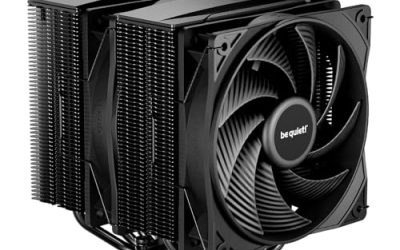
A universal CPU cooler is one that claims to fit almost every mainstream socket, and the appeal is easy to see. Whether you are building a Ryzen 5 machine on AM5 today, repairing an LGA1200 office PC next week or planning to move to a different platform in two years, one cooler with mounting hardware for AM4, AM5 and several Intel generations keeps the parts bin simple. The decision behind the keyword is therefore less about raw cooling than about how much of the socket map a single box covers, and how much of that coverage is real once you read the listing.
This guide is for builders, repair shops and upgraders who want one cooler to follow them across boards. It covers six models in 2026, from a plain single tower to a twin tower with a display, all with socket lists that span both major platforms. An AM4-only stock cooler found in the same search results was left out because it does not meet the universal idea, and a near-identical variant of one listed model was folded into the review of the original.
Our Top Picks




Top 3 picks at a glance
Quick Picks
As an Amazon Associate we earn from qualifying purchases at no extra cost to you.




| Product | Best for | Key spec from the title |
|---|---|---|
| Thermalright Assassin X120 Refined SE | Value single tower | 4 heat pipes, TL-C12C PWM fan, AGHP, AM4/AM5/Intel |
| Thermalright Peerless Assassin 120 SE | Twin-fan, twin-tower capacity | 6 heat pipes, dual 120mm PWM fans, 1550RPM |
| ID-COOLING SE-214-XT V2 Black | Memory clearance and wide sockets | 200W, LGA1851/1700/1200/115X and AM5/AM4 |
| Thermalright Assassin X 120R SE V2 | Single tower with RGB fan | 4x6mm heat pipes, 1550RPM, S-FDB bearing |
| Thermaltake UX150 ARGB | Oldest Intel sockets plus new ones | 130mm PWM fan, 500-2400RPM, LGA1851 down to 1150 |
| Thermalright Peerless Assassin 120 Vision MAX ARGB | Display and twin-tower cooling | Twin tower, 2150RPM, 480×854 screen |
How to Choose
Read the socket list, not just the word “universal”
No cooler is truly universal. Check that your exact sockets appear in the title or specification, such as AM4 and AM5 for AMD, and LGA1700, LGA1200 or LGA115x for Intel. The Thermaltake UX150 title stretches from LGA1851 back to LGA1150, which suits repair work on older Intel systems, while others emphasize the current generation.
If you plan to keep the cooler across several builds, confirm that each bracket or backplate is in the box rather than sold separately. Some coolers ship with kits for the newest sockets only and require an extra purchase for older ones, which turns a flexible cooler into a limited one. Repair shops in particular should keep a note of which socket kits each model includes.
Match capacity to the processors you will actually run
Ratings such as 200W show how much heat the design is meant to handle. A single tower with four heat pipes suits six- to eight-core chips at stock settings. A twin tower with six heat pipes and two fans offers margin for 12- and 16-core parts. A universal cooler that fits every board but runs hot on your chip defeats its own purpose. If your next processor is likely to be hotter than your current one, buy for the next chip, since the cooler is the part that will survive the upgrade.
Height, memory and case clearance
Measure the space inside your case against the cooler height. Single towers with a 120mm fan usually stand around 150mm tall, but twin towers add width and can overlap tall memory. A listing that advertises full memory clearance avoids that issue, which matters most on boards with the first slot close to the socket. If you use the fan on the memory side of a twin tower, you can also raise it slightly on its clips to clear tall modules, at the cost of some extra height in the case.
What to ignore, and where budget models cut corners
Ignore lighting unless you want it, and ignore the top fan speed number; what you hear at idle matters more. Budget coolers can cut corners on fan bearings, mounting hardware quality and fin finish. A cooler with a fluid dynamic bearing, like the S-FDB design mentioned for one Thermalright model, tends to stay quieter as it ages. Check, too, that the fan connector is a four-pin PWM type so that the motherboard can control speed instead of leaving the fan at full tilt.
The 6 Best Options
Thermalright Assassin X120 Refined SE
The Assassin X120 Refined SE is a four-heat-pipe single tower with a TL-C12C PWM fan, an aluminum heatsink cover and AGHP technology. It lists AM4, AM5 and Intel support, making it a flexible first choice for most mainstream builds.
- Strength: four heat pipes and a PWM fan in a straightforward tower.
- Strength: AM4, AM5 and Intel compatibility suit multiple platforms.
- Trade-off: a single tower has less capacity than a twin-tower model for high-core chips.
Skip it if you run a hot 16-core processor or want more than one fan. It is a better match for office builds, home theater machines and mid-range gaming PCs where noise and simplicity count more than headroom.
Thermalright Peerless Assassin 120 SE
This is the twin-tower step up. The title lists six heat pipes with AGHP technology, dual 120mm PWM fans at 1550RPM and support for AM4, AM5 and Intel sockets. It suits builders who want more capacity while staying within a universal socket list.
- Strength: six heat pipes and two fans give strong cooling for the price tier.
- Strength: PWM fans at 1550RPM point to quiet operation at moderate load.
- Trade-off: a twin tower is wide and may conflict with tall memory or narrow cases.
Skip it if you have limited side-panel space or a very small chassis. Since the 1550RPM fans are not extreme, this cooler usually sounds calmer than a faster single-tower under the same load.
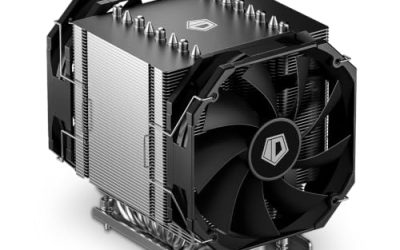
ID-COOLING SE-214-XT V2 Black
The SE-214-XT V2 lists a 200W rating, full memory clearance and a universal mount covering LGA1851, LGA1700, LGA1200, LGA115X, AM5 and AM4. It is the choice for builders who care about RAM fit as much as sockets. A Plus version with a higher rating exists, but the standard model is the representative pick here.
- Strength: full memory clearance avoids conflicts with tall DIMMs.
- Strength: a very broad socket list supports both AMD and Intel.
- Trade-off: a 200W rating leaves less margin than twin-tower alternatives.
Skip it if you need maximum capacity for a heavy workload. It makes the most sense for builds that use four memory sticks, where clearance is the problem other coolers create.
Thermalright Assassin X 120R SE V2
This single tower uses four 6mm heat pipes, a 120mm RGB PWM fan at 1550RPM and an S-FDB bearing, with support for AM4, AM5 and Intel sockets. It suits builders who want a little lighting and a durable fan bearing without moving to a twin tower.
- Strength: an S-FDB bearing aims for longer fan life and quiet operation.
- Strength: RGB lighting included on the fan.
- Trade-off: capacity is limited to a single tower with four heat pipes.
Skip it if you want zero lighting or the largest heatsink in the group. Buyers who like lighting should check that the header on the board matches the fan connector before ordering.
Thermaltake UX150 ARGB
The UX150 ARGB has a copper base, aluminum fins, a 130mm PWM fan running 500 to 2400RPM, and compatibility with LGA1851, 1700, 1200, 1156, 1155, 1151 and 1150. It is the one to pick when the socket list matters most, especially for older Intel machines.
- Strength: the socket list reaches back to LGA1150, covering many older boards.
- Strength: a wide 500 to 2400RPM range gives room to tune noise and cooling.
- Trade-off: the title does not list AMD sockets in the visible portion, so verify AM4 or AM5 coverage.
Skip it if you build only on AMD and want confirmed AM5 support. Its large fan range also demands a sensible fan curve, because 2400RPM at full speed is far louder than the 500RPM floor.
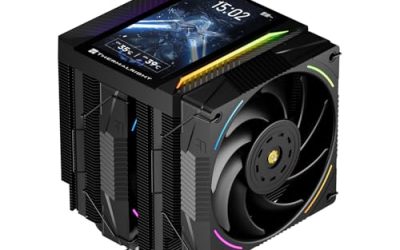
Thermalright Peerless Assassin 120 Vision MAX ARGB
The Vision MAX adds a 5-inch screen at 480×854 resolution to a twin-tower, 2150RPM design. It is the universal cooler with the most visual impact, intended for glass-panel builds.
- Strength: twin-tower cooling combined with a large display.
- Strength: it carries the same twin-tower layout as the Peerless Assassin family.
- Trade-off: the screen adds cost and software requirements to a cooler that is otherwise a standard design.
Skip it if you want the simplest, cheapest universal fit. For a repair shop stocking one cooler for many customers, the plain towers make more sense than a screen model.
Which One Fits Your Situation
A first Ryzen or Core build
The Assassin X120 Refined SE offers broad socket support in a simple tower and does not complicate the build. If the processor is an eight-core or smaller part, it has the capacity to keep fans quiet through everyday use.
A repair shop stocking one cooler
The Thermaltake UX150 ARGB covers the oldest Intel sockets back to LGA1150 as well as newer ones, and the ID-COOLING SE-214-XT V2 Black covers both platforms with full memory clearance.
A high-core workstation or gaming rig
The Peerless Assassin 120 SE brings six heat pipes and two fans for sustained load. Gaming, rendering and compiling all keep the processor busy for long stretches, and the extra capacity lets the fans stay slow while it happens.
A showpiece in a glass case
The Vision MAX ARGB adds the screen to twin-tower cooling. Pair it with a case wide enough for the tower and make sure the software for the display is something you are comfortable running in the background.
Common Mistakes
- Assuming the word “universal” covers your socket without checking the list.
- Buying a twin tower for a case with limited side-panel space.
- Ignoring memory height on boards where the first slot is close to the socket.
- Choosing a low-capacity cooler for a high-core processor because the socket fits.
- Skipping a check for backplates and brackets in the box.
Related guides
- Sustainable Gaming Pc Power Supply Efficiency Guide
- Noctua Nh-D15 Vs Thermalright Peerless Assassin 120
- Thermal Paste Application Method For Lga1851
Frequently Asked Questions
Can one cooler fit both AMD and Intel?
Yes, when the box includes mounting hardware for both. The models listed here name AM4 and AM5 along with several Intel sockets, but check the specifics of your board.
Is a universal cooler worse at cooling?
No. Socket coverage depends on brackets, not on the heatsink. Cooling capacity depends on heat pipes, fin area and fan quality.
Do I need a backplate?
Many Intel mounts use one, while AMD boards often reuse the built-in bracket. Confirm what your cooler ships with before installation.
Should I choose a single or twin tower?
A single tower suits six- to eight-core chips and tighter cases. A twin tower is better for sustained loads and high-core processors if the case has room. When in doubt, base the choice on the hottest processor you expect to install, not the one on the bench today.