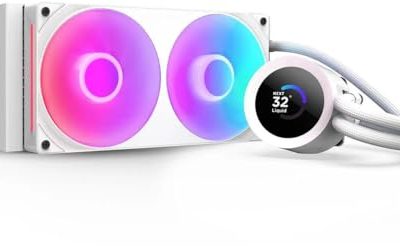
A 240mm all-in-one cooler is the compromise that fits more cases than any other liquid design. It takes two 120mm fans, mounts in the top or front of most mid-towers, and leaves the memory slots completely clear, which is the usual complaint about big air towers. If your case has a 280mm or 360mm mount but you would rather keep the build simpler, or your case only offers a 240mm mount in the first place, this is the radiator size you shop in.
This guide is for builders pairing a 240mm radiator with mid-range and upper-midrange processors on AM5, AM4, LGA1700 or LGA1851. The picks below are judged on the listed specs only: pump design, fan type, display options, socket support and how each cooler handles cabling. Some are plain and quiet, others add an LCD screen, and the right choice depends mostly on whether you want a screen at all and how much case wiring you are willing to manage in 2026.
Our Top Picks
 Thermalright Aqua Elite 240 V3 Water Cooling CPUAE240 BLACK V34.72 x 0.98 x 4.72 Inches0.2 PoundsCheck on Amazon
 Cooler Master Elite Liquid 240 AIO Liquid CPU240mm Radiator4.7 x 4.7 x 1 inches2.87 PoundsCheck on Amazon


Top 3 picks at a glance
Quick Picks
As an Amazon Associate we earn from qualifying purchases at no extra cost to you.


| Product | Best for | Key spec from the title |
|---|---|---|
| Thermalright Aqua Elite 240 V3 | Value-minded builders | Double PWM ARGB fans with S-FDB bearings, PWM-controlled pump |
| Corsair Nautilus 240 RS | Quiet, tidy builds | Low-noise design, direct motherboard connection, daisy-chain |
| NZXT Kraken Plus 240 RGB | Showpiece white builds | Customizable LCD, F240 RGB Core fan, Turbine pump |
| Cooler Master Elite Liquid 240 | Straightforward upgrades | Dual-chamber pump, ARGB, two low-noise fans |
| NZXT Kraken Plus 240 | LCD without extra RGB | Customizable LCD, Turbine pump, F120P fans |
| MSI MAG Coreliquid A13 240 | Matching MSI builds | Dual 120mm ARGB PWM fans, LGA 1700/1851 and AM5/AM4 |
How to Choose
Confirm the 240mm mount before anything else
A 240mm radiator needs two 120mm fan positions side by side, and it is longer than most people picture. Check the case specification for a 240mm or 280mm radiator allowance at the top or front, and measure the gap between the radiator and the top of the motherboard. Thick radiators plus fans can collide with tall memory modules or VRM heatsinks. If the case lists only 120mm or 140mm rear support, a 240mm cooler will not fit, and no amount of cable management changes that.
Socket support and mounting hardware
Match the cooler to your socket and read the listing for your exact platform. The products here cite AM5 and AM4 for AMD and LGA1700 or LGA1851 for Intel, but not every listing names every socket. Older LGA1200 or 115x boards need a separate confirmation from the manufacturer, since backplates and brackets differ. Also confirm the cooler includes thermal paste, because a few budget kits leave it out and a bare cold plate should never be run on a processor.
Pump, fans and noise
For a 240mm radiator, fan quality matters as much as pump design. Look for PWM fans so the motherboard can slow them at idle, and fluid dynamic or similar long-life bearings. A PWM-controlled pump lets you lower pump speed when the system is quiet instead of leaving it fixed. Ignore claims of enormous maximum RPM, since the speed you will actually run day to day is the low-to-middle range. Budget models usually save money on fans and tubing quality rather than on the cold plate.
Screens, lighting and cabling
An LCD or ARGB ring adds cost without lowering temperatures. If you want a display, check whether the cooler needs vendor software running in the background and how many headers and USB connections it needs. Daisy-chained fans and direct motherboard connections reduce cable clutter inside the case. If you skip lighting entirely, a plain black unit with fewer cables will often look cleaner and install faster than a lit one.
The 6 Best Options
Thermalright Aqua Elite 240 V3
This is the pick for builders who want a liquid cooler without paying a premium for a screen or a famous software suite. The listing highlights double PWM ARGB fans with S-FDB bearings and a PWM-controlled pump, which together give you the header-based speed control that matters most for a quiet desktop.
- PWM-controlled pump allows noise tuning from the motherboard
- S-FDB bearings on the fans are aimed at long service life
- Trade-off: the title is short on details such as radiator thickness or bracket specifics, so confirm those before buying
Skip it if you want a built-in display or a manufacturer with a long software history behind it. Anyone who needs documented, brand-specific control software for fans and lighting should look at the Corsair or NZXT options instead, since this listing leaves that side vague.
Corsair Nautilus 240 RS
The Nautilus 240 RS is aimed at people who want a clean, quiet-leaning build. The listing stresses low-noise operation, a direct motherboard connection and daisy-chaining, which points to fewer cables running around the case. Socket support is clearly stated for LGA 1851 and 1700 plus AM5 and AM4, so there is little guesswork on compatibility.
- Daisy-chained fans keep the cable run short and tidy
- Clear Intel and AMD socket list reduces compatibility worries
- Trade-off: the title mentions no screen or flashy features, so it is a plain performer by design
Skip it if you want a display on the pump block or a heavily lit showpiece. It also makes less sense for anyone who enjoys tweaking visual effects, because the listing offers nothing in that direction beyond the basics.
NZXT Kraken Plus 240 RGB
This one is for the builder putting together a white-themed system where the cooler is a visible centerpiece. The listing describes a customizable LCD, an F240 RGB Core fan and a Turbine pump, and this version is shown in a white finish alongside a black option that is the same cooler.
- Customizable LCD turns the pump cap into a status display
- F240 RGB Core fan ties lighting into the cooler’s controls
- Trade-off: display and lighting features mean software and extra connections to manage
Skip it if you want a minimal build with the fewest cables and no companion app running in the background. It is also overkill for a plain office or study machine where nobody will ever look at the pump cap.
Cooler Master Elite Liquid 240
A sensible choice for someone upgrading from a stock or budget air cooler who wants no fuss. The listing names a dual-chamber pump, ARGB lighting and two low-noise fans, along with support for AM5, AM4, LGA1851 and LGA1700, which covers nearly every current desktop platform.
- Dual-chamber pump design is a stated feature of the pump block, aimed at steadier flow
- Socket coverage spans current Intel and AMD platforms
- Trade-off: no LCD or elaborate software features are listed in the title
Skip it if you want display customization or vendor-specific fan control hardware. Builders who plan to reuse the cooler across several platform upgrades should also verify the bracket list for any future socket.
NZXT Kraken Plus 240
This model sits in the same family as the RGB version but is built around F120P fans and described as simple to install. It suits builders who want the LCD pump cap and Turbine pump without a full RGB fan setup, and who would rather keep the lighting in the case restrained.
- Customizable LCD is part of the listed features
- Turbine pump is listed as the improvement for thermals over older designs in the family
- Trade-off: the F120P fans do not carry the RGB integration of the sibling model
Skip it if you want matching RGB fans that sync with the pump display. If a fully lit, coordinated look is the goal, the RGB sibling is the more natural choice, and the plain model leaves that gap open.
MSI MAG Coreliquid A13 240
The A13 240 is a good fit for an MSI motherboard or case build where matching branding matters. The listing names a 240mm radiator, dual 120mm ARGB PWM fans and compatibility with LGA 1700 and 1851 plus AM5 and AM4, so it covers the platforms most buyers are shopping for today.
- PWM ARGB fans give both speed control and lighting
- Black finish suits most dark builds
- Trade-off: no display is listed, so it is a lighting-only design
Skip it if you want an LCD or a white color scheme. The black-only listing also means it will stand out in a pale case, so check your color plan before ordering it.
Which One Fits Your Situation
You want a quiet everyday PC with minimal cables
The Corsair Nautilus 240 RS fits best because the listing emphasizes low noise, a direct motherboard connection and daisy-chaining. Fewer cables also make the build easier to service when you clean dust or swap memory later.
You want a display and a white build
The NZXT Kraken Plus 240 RGB is the clear match, since the listing offers a white version with an LCD and RGB fan. Choose the Kraken Plus 240 instead if you want the screen but less lighting, since its fans are the plainer F120P type rather than the RGB Core design.
You need to keep the budget under control
The Thermalright Aqua Elite 240 V3 and the Cooler Master Elite Liquid 240 are the plainer value options. Pick the Thermalright for its PWM-controlled pump, or the Cooler Master for its dual-chamber pump and wide socket list.
You are building around an MSI board
The MSI MAG Coreliquid A13 240 makes sense for matching looks and ARGB sync across the system, with a black finish that blends into most cases. It also suits buyers who want lighting but not the extra expense and software of a display.
Common Mistakes
- Buying a 240mm radiator without checking whether the case actually has a 240mm mount at the top or front.
- Ignoring memory and VRM clearance under the radiator and fans.
- Assuming every cooler supports every socket; confirm LGA1851, LGA1700 or AM5 on the listing.
- Paying for an LCD and then never installing the companion software that powers it.
- Mounting the radiator with the pump at the highest point of the loop, which can trap air bubbles and raise noise over time.
Related guides
- Noctua Nh-D15 Vs Thermalright Peerless Assassin 120
- Sustainable Gaming Pc Power Supply Efficiency Guide
- Thermal Paste Application Method For Lga1851
Frequently Asked Questions
Is a 240mm AIO enough for a high-end processor?
It depends on the chip and the case airflow. A 240mm radiator suits mid-range and many upper-midrange chips, but very hot processors benefit from a 280mm or 360mm model. Check the processor’s power draw before deciding.
Where should a 240mm radiator be mounted?
The front or top of the case is common. Top mounting with the radiator above the pump helps keep air away from the pump, while front mounting often gives the radiator cooler intake air. Follow your case manual for the supported positions.
Do I need a screen on the cooler?
No. A screen is cosmetic and monitoring-related, not a cooling feature. Skip it if you prefer a simpler setup with fewer cables and less software.
How long do AIO coolers last?
Many are built for several years of regular use, but pumps and fans are mechanical parts, so lifespans vary. Check the warranty length on the listing and keep your case free of dust to protect the fans. Cleaning the radiator fins every few months with compressed air keeps airflow steady and noise down.