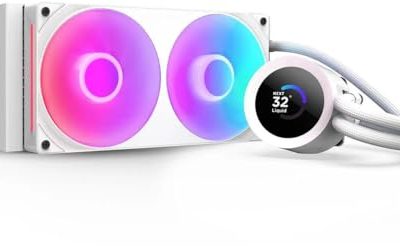
Choosing an AIO cooler is mostly a question of radiator size, socket support, and how much you care about extras like a pump-head screen or lighting. A 360mm radiator with three fans moves more heat at lower fan speeds than a 240mm unit, but it also demands a case with a top or front mount that can actually hold it. Buyers who skip that check end up with a cooler that fits the CPU socket and nothing else in the build.
This guide is written for people building or upgrading a gaming or workstation PC around a current Intel or AMD socket and want liquid cooling that is easy to live with. The seven listings below range from a no-frills 240mm model to a 360mm unit with an LCD on the pump head. Everything here is judged from the specs printed in each listing, so use the sections that follow to match radiator size, socket compatibility, and fan features to your own case and processor.
Our Top Picks
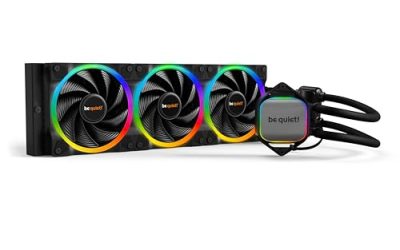
 ARCTIC Liquid Freezer III Pro 360 A-RGBLiquid Freezer III Pro 360 A-RGB15.7 x 4.7 x 2.9 Inches4.5 PoundsCheck on Amazon
 Thermalright Frozen Notte 360 Black ARGB V2 Water360MM0.98 x 4.72 x 4.72 Inches0.2 poundsCheck on Amazon



Top 3 picks at a glance
Quick Picks
As an Amazon Associate we earn from qualifying purchases at no extra cost to you.




| Product | Best for | Key spec from the title |
|---|---|---|
| ARCTIC Liquid Freezer III Pro 360 A-RGB | Broad socket support with lighting | LGA1851, LGA1700, AM4, AM5 cooler |
| ARCTIC Liquid Freezer III Pro 360 | Buyers who skip RGB | 3 x 120 mm water cooling |
| ARCTIC Liquid Freezer III Pro 360 A-RGB (alternate listing) | Same cooler, different seller page | LGA1851, LGA1700, AM4, AM5 cooler |
| Thermalright Frozen Notte 360 Black ARGB V2 | Value-minded 360mm builds | 3x120mm PWM fans, S-FDB bearings |
| NZXT Kraken Plus 360 | Showpiece builds | LCD pump head, Turbine pump, F120P fans |
| Minorsonic 360mm AIO | Spec-driven shoppers | Ceramic bearing pump, 3-phase motor |
| Thermalright Aqua Elite 240 V3 | Mid-size cases | Double PWM ARGB fans, PWM controlled pump |
How to Choose
Match the radiator to your case first
A 360mm radiator is roughly 396mm long, while a 240mm one is close to 275mm, so confirm your case lists support for the size you want at the front or top. Cases with a 360mm front mount are common now, but small mid-towers often stop at 280mm. Also check clearance between the radiator and tall RAM or a motherboard heatsink if you plan a top mount. If your case only supports 240mm, buying a 360mm unit saves nothing. Orientation matters as well: a front-mounted radiator keeps the tubes at the bottom of the loop in most layouts, while a top mount usually puts the tube ports toward the back, and many builders prefer to keep the pump lower than the radiator so trapped air collects in the radiator instead of the pump housing.
Confirm socket coverage and mounting hardware
Look for the exact socket in the title or spec list: LGA1851 and LGA1700 for recent Intel boards, AM4 and AM5 for Ryzen. Intel LGA1700 and AMD AM5 use different bracket styles, and some AIOs ship a bracket for one family only. A listing that mentions several sockets is a good sign, but it is worth scanning the manual or the product page for the contact frame or backplate before you order.
Judge fans, pump, and noise features
PWM fans let the motherboard control speed by temperature, which matters if you want quiet idle behavior. Bearing types such as S-FDB or ceramic are listed to suggest longevity, though the spec sheet alone cannot prove it. Pump-head extras like an LCD or a controlled pump speed are nice, but they are about convenience, not cooling. A three-fan 360mm layout generally has more surface area to work with than two fans on a 240mm.
What to ignore and where budget models cut corners
Ignore marketing phrases like “extreme performance” with no numbers behind them. Budget units often trim thermal paste quality, pump software support, and warranty length. If a model skips a pump-head screen or lighting software, that is usually a fair trade rather than a defect. Pay more attention to whether the AIO includes a mounting plate for your socket and whether the tubing length reaches your case layout. Warranty terms are another useful tiebreaker, because a pump is the one moving part that can fail without warning, and a longer coverage period tells you something about how the maker views its own design. Finally, count the fan headers on your motherboard, since a three-fan radiator plus a pump can need a splitter or a hub if the board only has a handful of connectors.
The 7 Best Options
ARCTIC Liquid Freezer III Pro 360 A-RGB
This listing names LGA1851, LGA1700, AM4, and AM5, which makes it one of the broader socket-coverage options here. It suits buyers moving between Intel and AMD platforms or planning a later CPU swap who want the same cooler to carry over.
- Strength: Explicit support for four sockets, including the newest Intel LGA1851.
- Strength: A-RGB lighting for builds that want addressable color.
- Trade-off: The title does not spell out fan or pump specifications.
Skip it if your case cannot take a 360mm radiator, or if you want a plain black build with no lighting at all.
ARCTIC Liquid Freezer III Pro 360
The non-RGB version is described as a 3 x 120 mm water cooler for the same four sockets. It is the cleaner pick for a stealth build where lighting colors would clash with everything else inside the case.
- Strength: A three-fan 360mm layout with LGA1851, LGA1700, AM4, and AM5 coverage.
- Strength: No lighting to configure, which simplifies cable management and motherboard headers.
- Trade-off: Less visual flair than the A-RGB version or the LCD-equipped NZXT.
Skip it if you want a lit pump head or fans that match an RGB-heavy motherboard.
ARCTIC Liquid Freezer III Pro 360 A-RGB (alternate listing)
This second entry carries the same title as the first A-RGB listing, so it points to the same cooler family and the same four-socket support. It is worth including because shoppers sometimes find one page in stock and the other not, or see a different seller.
- Strength: Same LGA1851, LGA1700, AM4, and AM5 coverage as the first listing.
- Strength: A fallback option if the other A-RGB page is unavailable.
- Trade-off: Nothing in the title separates it from the other A-RGB entry, so confirm the variant details yourself.
Skip it if you already settled on one of the other ARCTIC pages and just need to pick one.
Thermalright Frozen Notte 360 Black ARGB V2
The title lists three 120mm PWM fans and S-FDB bearings in a black 360 design, which is a sensible spec set for a quiet, temperature-controlled build. It speaks to buyers who want three-fan cooling without moving into premium pricing.
- Strength: 3x120mm PWM fans allow temperature-based speed control.
- Strength: S-FDB bearings are listed for the fans.
- Trade-off: The visible title is cut off, so socket coverage needs checking on the product page.
Skip it if you need a confirmed LGA1851 mount without doing extra research first.
NZXT Kraken Plus 360
This one adds an LCD to the pump head and describes a Turbine pump with F120P fans. It is the listing for builders who treat the case window as a display and want animated visuals or system stats on the cooler itself.
- Strength: A customizable LCD gives the build a focal point.
- Strength: Turbine pump and F120P fans come together in one 360mm package.
- Trade-off: The screen is a convenience feature, so some of the cost goes to looks rather than extra cooling.
Skip it if you prefer a plain pump head or you build in a case with no side window.
Minorsonic 360mm AIO
The listing highlights a high-speed ceramic bearing pump, three PWM ARGB fans, and a 3-phase motor. It appeals to shoppers who read the spec sheet closely and want those details at a lower-profile brand name.
- Strength: Ceramic bearing pump and 3-phase motor are named in the title.
- Strength: Three PWM ARGB fans on a 360mm radiator.
- Trade-off: The brand is less established, so long-term support and warranty handling deserve a closer look.
Skip it if brand reputation and software support matter more to you than the spec list.
Thermalright Aqua Elite 240 V3
This is the smallest radiator on the list, a 240mm unit with two PWM ARGB fans, S-FDB bearings, and a PWM-controlled pump for AMD AM4 and AM5 plus Intel sockets. It fits cases that cannot take a 360mm radiator.
- Strength: A 240mm size fits far more mid-tower cases than a 360mm.
- Strength: PWM-controlled pump and fans allow quiet idle tuning.
- Trade-off: Two fans give less radiator surface area than a three-fan 360mm, which matters on hot-running CPUs.
Skip it if your processor runs hot under sustained loads and your case has a 360mm mount available.
Which One Fits Your Situation
You are building on a brand-new Intel platform
The ARCTIC Liquid Freezer III Pro 360 line states LGA1851 support in its title, so the plain version or the A-RGB version is the straightforward choice. Pick the A-RGB one if the rest of your parts are lit. Because the same title also names AM5, it keeps your options open if you switch to Ryzen at your next upgrade and want to reuse the cooler without buying a new one.
You want the build to look like a showcase
The NZXT Kraken Plus 360 is the pick when a pump-head display matters. It fits tempered glass cases where the cooler sits in plain view.
Your case tops out at 240mm
The Thermalright Aqua Elite 240 V3 is the one that matches a smaller radiator mount. It is also a reasonable choice for a mid-range CPU that does not generate extreme heat.
You are balancing three fans against a tight budget
The Thermalright Frozen Notte 360 Black ARGB V2 keeps a 360mm three-fan layout with PWM fans and S-FDB bearings, making it the value-oriented 360 on this list.
Common Mistakes
- Buying a 360mm radiator without confirming the case has a 360mm mount at the top or front.
- Assuming every AIO ships with brackets for both Intel LGA1700 and AMD AM5 sockets.
- Paying extra for an LCD pump head when a plain cooler would have cooled the same processor.
- Ignoring tubing length and mounting the radiator where the hoses cannot reach the CPU block.
- Plugging all AIO fans and the pump into the same low-power header instead of the pump or AIO header on the motherboard.
Related guides
- Sustainable Gaming Pc Power Supply Efficiency Guide
- Noctua Nh-D15 Vs Thermalright Peerless Assassin 120
- Thermal Paste Application Method For Lga1851
Frequently Asked Questions
Is a 360mm AIO always better than a 240mm one?
A 360mm radiator has more surface area and three fans, so it can run quieter at the same heat load. It only helps if your case supports it and your CPU produces enough heat to benefit.
Do I need RGB on an AIO cooler?
No, lighting has no effect on cooling. Choose a non-RGB version if you want fewer cables and a simpler setup, or the A-RGB version if you want colors to match your other components in 2026 builds.
Which sockets should I look for in the listing?
Look for LGA1851 or LGA1700 for recent Intel processors and AM4 or AM5 for Ryzen. If the title is cut off, check the product page for the full compatibility list before ordering.
How often should an AIO be replaced?
The spec sheets here do not state a lifespan, so rely on the manufacturer warranty and watch for rising temperatures or pump noise as a sign something is wrong. Many buyers plan to replace a unit once the warranty period ends.