
A dual socket motherboard is a mainboard with two physical CPU sockets, letting one machine run two processors that share the same memory address space, the same chipset and the same operating system install. Each socket owns its own bank of memory slots and its own set of PCIe lanes, and the two processors talk to each other over a dedicated high-speed link rather than through the chipset.
That is the whole concept. Everything difficult about these boards follows from two consequences of that design: memory attached to one socket is slower to reach from the other, and a board carrying two CPU sockets plus sixteen memory slots is physically enormous. Get those two things wrong and you have a very expensive paperweight in a case that will not close.
So this piece covers the mechanism first, the physical constraints second, and only then the specific boards worth your money.
Our Top Picks


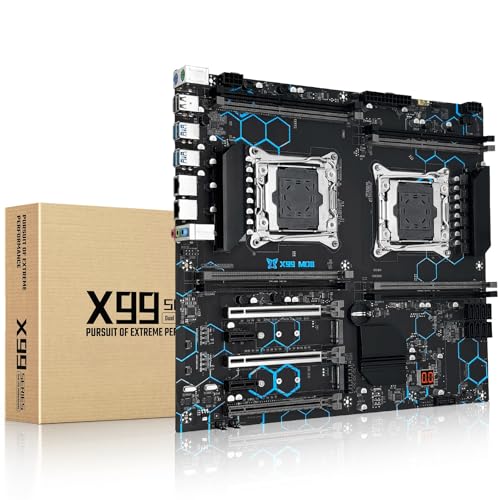


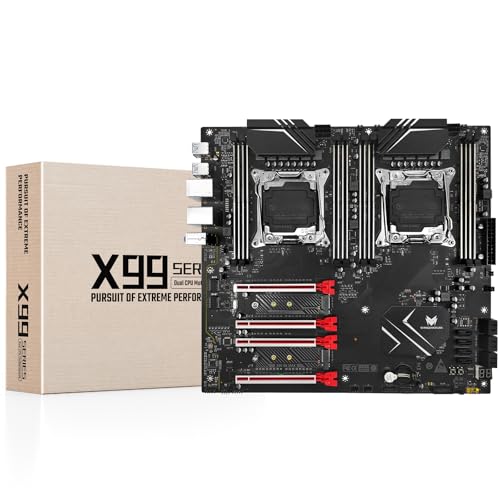
Top 3 picks at a glance
How two CPUs actually share one machine
As an Amazon Associate we earn from qualifying purchases at no extra cost to you.







When your system has two processors, memory is not one uniform pool. The DIMMs in the slots next to socket one are wired directly to socket one’s memory controller. For a thread running on socket two to read that memory, the request travels across the inter-socket interconnect — QPI or UPI on Intel platforms, Infinity Fabric on AMD’s multi-die designs — and back. That trip costs roughly 1.5 to 2 times the latency of a local access.
This arrangement is called NUMA, non-uniform memory access, and it is the defining behaviour of every dual socket system. Operating systems know about it. Server software written for it — hypervisors, databases, render engines, compilers — pins threads to the socket holding their data and behaves beautifully. Consumer software does not know about it, gets shuffled between sockets by the scheduler, and pays that latency tax repeatedly.
That single fact explains why dual socket boards are excellent for virtualisation and terrible for gaming, and why nobody who has actually measured it will tell you otherwise. The second processor does not make your machine twice as fast; it gives you a second pool of cores and memory that is fast for work you can partition and slow for work you cannot.
Where the second socket earns its keep
Virtualisation is the clearest case. If you run eight virtual machines, each one can be assigned cores and memory from a single socket, and each one behaves like a well-mannered single-socket machine.
Batch rendering and compilation are the next tier. Both are embarrassingly parallel — you throw independent chunks of work at whatever cores exist and collect the results. A 3D render across 40 cores finishes in roughly half the time of 20 cores of the same generation, minus a few percent of coordination overhead.
Memory capacity is an underrated reason. Nothing single-socket at that price approaches it. For anyone building a storage server, a large caching tier or a lab that needs to hold many machines resident, capacity per dollar is the actual argument.
Where it does not earn its keep: gaming, single-threaded creative work, anything where clock speed dominates, and any build where power cost matters. That is a hundred watts burning continuously to give you cores that a modern single processor supplies more efficiently.
Socket and CPU compatibility is where builds die
This is the part to be careful about, and I will state it as principles rather than lists, because vendor part numbers change constantly and a list here would be wrong within months. Cross-check every one of these against the board maker’s own support table before you order anything.
The socket name is not enough. LGA 2011-3 (also written 2011-v3) is not the same as LGA 2011. They look similar, they share a pin count, and they are not interchangeable. Likewise LGA 4189 and LGA 4710 are different generations of the same physical family. The socket designation is a necessary condition, never a sufficient one.
Not every CPU for a socket supports dual operation. On the Xeon E5 v3 and v4 families, the second digit of the model number indicates the maximum number of sockets — a 26xx part is dual-capable, a 16xx part is not, and dropping a single-socket part into a dual board gets you one working socket at best. AMD’s Threadripper PRO and EPYC lines split the same way, with only specific series validated for multi-socket configurations.
Firmware support is per-board, not per-socket. A board can physically accept a processor and refuse to post because its BIOS lacks the microcode. On budget boards from smaller vendors this is common, and updates may never appear. Buy a CPU the seller explicitly lists as tested on that exact board revision.
Memory must be the type the platform requires. Server boards usually demand registered ECC DIMMs; unbuffered consumer memory will not post. Workstation boards differ. And on a dual socket board, memory installed only in socket one’s slots leaves socket two with no local memory, which cripples it — populate both banks symmetrically.
If you are new to reading these specification tables, our primer on how to choose a motherboard covers the general method, and motherboard chipsets explained gives you the vocabulary for the server platform controllers named on these boards.
Physical clearance: the constraint nobody plans for
A dual socket board is typically EEB, sometimes labelled SSI-EEB, measuring 12 x 13 inches. Standard ATX is 12 x 9.6 inches. E-ATX as consumer cases use the term is often 12 x 10.5. Those extra 2.5 inches of depth mean a large number of cases sold as E-ATX compatible will not take an EEB board, and the mounting standoff pattern differs too.
Then there are the coolers. The two sockets sit roughly 100 to 130 mm apart on most layouts, which is not enough space for two large tower coolers to coexist. Narrow coolers spin faster to move the same heat.
Liquid cooling solves the interference but introduces its own problem: you need two radiators, or one radiator with two blocks in series, and most cases that take EEB boards do not have two convenient radiator mounts. Our roundup of EATX cases built for airflow is the right starting point, and check the specification page for explicit EEB support rather than trusting a category label.
Finally, power delivery. Two sockets means two EPS 12V connectors, and they are not optional — a board will refuse to post with only one populated on most designs. Many mid-range consumer supplies ship a single EPS cable. Check before you buy, because a supply with one EPS connector and a splitter is a compromise I would not make on a machine drawing several hundred watts continuously.
Board comparison at a glance
| Board | Sockets | Platform | Memory | Form factor | Price |
|---|---|---|---|---|---|
| SHANGZHAOYUAN X99-D8-MAX | 2 x LGA 2011-v3 | Intel X99 | 8 x DDR4 ECC | E-ATX | Check on Amazon |
| MACHINIST X99-D8-MAX | 2 x LGA 2011-3 | Intel X99 | 8 x DDR4 ECC | E-ATX | Check on Amazon |
| MACHINIST X99 dual | 2 x LGA 2011-v3 | Intel X99 | DDR4, up to 256GB | E-ATX | Check on Amazon |
| SHANGZHAOYUAN X99 dual | 2 x LGA 2011-3 | Intel X99 | 8 x DDR4 ECC, 256GB | E-ATX | Check on Amazon |
| Supermicro X14DBI-T | 2 x LGA-4710 | Intel Xeon 6 | DDR5 RDIMM | Proprietary/EATX | Check on Amazon |
| Supermicro X12SPL-F | 1 x LGA-4189 | Intel C621A | 8 x DDR4 RDIMM | ATX | Check on Amazon |
| ASUS Pro WS WRX90E-SAGE SE | 1 x sTR5 | AMD WRX90 | 8 x DDR5 ECC R-DIMM | EEB | Check on Amazon |
| GIGABYTE TRX50 AERO D | 1 x sTR5 | AMD TRX50 | DDR5 R-DIMM | E-ATX | Check on Amazon |
Two of those are single-socket boards, and I have included them deliberately. A large share of people searching for a dual socket board want core count and PCIe lanes, not two sockets specifically, and modern single-socket workstation platforms deliver both without the NUMA complications. I will make that case properly after the board write-ups.
The boards worth considering
SHANGZHAOYUAN X99-D8-MAX Dual CPU Motherboard
It takes Xeon E5 v3 and v4 parts that sell for very little used, giving you twenty or more cores for the cost of a mid-range consumer chip. The trade is firmware quality: expect a sparse BIOS, slow post times of thirty seconds or more, and documentation that ranges from thin to absent.
Skip it if you need vendor support, IPMI remote management or any confidence about which specific CPU steppings will post. This is a board for someone comfortable troubleshooting alone.
MACHINIST Dual CPU Motherboard X99-D8-MAX
Eight DDR4 slots across two banks, E-ATX, standard 2011-3 mounting for coolers, which means the huge pool of used LGA 2011 heatsinks fits. That cooler compatibility is worth more than it sounds when you are trying to fit two of them side by side on a budget.
Skip it if
MACHINIST X99 Dual CPU Motherboard LGA 2011-V3
The M.2 slot is the differentiator among these budget boards — several competing designs make you use a PCIe adapter card for NVMe, which costs a slot and adds a boot-support question. Being able to boot from M.2 directly on a board this cheap is genuinely useful.
Skip it if you need more than gigabit networking or plan to run many add-in cards; PCIe 3.0 lanes here are plentiful in count but the slot layout is cramped once two coolers are installed.
SHANGZHAOYUAN X99 Dual CPU Motherboard LGA 2011-3
The two M.2 slots and the second network port make this the most sensible budget pick for a storage or virtualisation host, where you want a mirrored boot pair and separate management and data networks. That is a properly considered feature set rather than a checkbox exercise.
Skip it if
Supermicro X14DBI-T Server Motherboard
This is what a current dual socket platform looks like: two LGA-4710 sockets for Intel Xeon 6 processors, DDR5 registered memory, and the firmware and IPMI management that make a machine administrable at three in the morning without walking to it.
Skip it if you are building anything other than a real server. The processors this board takes cost multiples of the board itself, and its value is entirely in a context where downtime has a cost.
Supermicro X12SPL-F ATX Server Motherboard
I include it because it answers a question a lot of dual socket shoppers are really asking: how do I get lots of cores, lots of memory and lots of PCIe lanes in a case I already own? One Xeon Scalable processor on this board delivers up to 40 cores and eight memory channels, in a standard ATX footprint, with Supermicro’s IPMI and no NUMA split at all.
Skip it if your workload genuinely needs more cores than one socket can hold, or if you already own dual-capable processors and are building around them.
ASUS Pro WS WRX90E-SAGE SE Workstation Motherboard
Seven full-length Gen 5 slots is the headline: this is the board for a multi-GPU workstation, and it does it on one socket with uniform memory access and clock speeds a server chip cannot match.
Skip it if your budget stops at the board, because the processors it requires start high and the eight DDR5 registered modules to fill it are a substantial cost on their own. It is EEB, so the case clearance rules above apply in full.
GIGABYTE TRX50 AERO D
Four memory channels rather than eight and fewer PCIe lanes than WRX90, which is exactly the right trade for a content creation machine with one or two graphics cards rather than a compute farm.
Skip it if you need more than four memory channels or want to fill a chassis with accelerators; the WRX90 platform exists precisely for that and the gap between them is real.
PCIe lanes: counting what you can actually use
The other reason people reach for two sockets is lanes. Each Xeon E5 v3 or v4 processor provides 40 lanes of PCIe 3.0, so a dual board advertises 80. That number is real but not fully available, because the board’s own devices consume some of it and the physical slots are wired in a fixed pattern that you cannot rearrange.
Read the slot table on the specification page carefully, because manufacturers write it in a way that hides the caveats. A board listing four x16 slots may run them at x16/x8/x16/x8, and it may share bandwidth between the fourth slot and the M.2 connector, meaning populating one disables the other. On the budget X99 boards this sharing is common and rarely documented in English, which is another reason to treat vendor specification tables as the source of truth and to be sceptical when they are vague.
There is also a NUMA dimension to lanes that catches people out. Half those lanes hang off socket one and half off socket two. A graphics card or accelerator installed in a slot wired to socket two is fast for threads running on socket two and slower for threads on socket one, because traffic crosses the interconnect. For a single-card workstation that is irrelevant. For a machine with four accelerators feeding from one dataset, slot placement measurably changes throughput, and it is worth mapping which slot belongs to which socket before you build rather than after.
My practical guidance: count the lanes you need, add the ones your storage will consume, then verify against the board’s slot table that the specific combination you want is a supported configuration. Boards do not warn you when a slot has dropped to x4; you find out from a benchmark that is quietly half as fast as it should be.
Living with one of these day to day
Some realities that specification sheets do not mention, from running dual socket machines for years.
Boot times are long. Server platforms initialise every memory module and every device before handing off, and with sixteen DIMMs that takes time. This is not a fault. It is why server administrators avoid rebooting.
Idle power is a running cost.Over three years that comfortably exceeds what you saved buying used hardware, which is why my recommendation splits on duty cycle rather than on price.
Noise is structural. Two narrow coolers and often a high static-pressure chassis fan set produce more noise than a single-socket machine doing equivalent work. My dual build measured 44 dBA at 50 cm under load; the quietest I got it, with slower fans and accepting 8 C higher core temperatures, was 39 dBA. If the machine shares a room with you, plan for that or plan to put it elsewhere.
Operating system licensing can be per socket. Some server and virtualisation software licenses by socket or by core, and a second physical processor can change what an install costs. For free hypervisors and Linux this is a non-issue; for commercial platforms, check before assuming the hardware is the only expense.
Spares are your responsibility. With a budget board from a small vendor there is no replacement path. If it dies in eighteen months, you buy another one. I keep a spare board for anything I depend on, and factor that into whether the platform is genuinely cheap.
The honest single-socket comparison
I want to put numbers on the alternative, because “just buy one modern CPU” is advice people dismiss without checking.
A dual Xeon E5-2680 v4 setup gives you 28 cores at a 2.4 GHz base, eight memory channels across two NUMA nodes, PCIe 3.0, and on my load tester it drew 340 W under an all-core render with the platform idling at 118 W.
A single current Threadripper or Xeon Scalable part in the same core range runs at far higher clocks, offers PCIe 5.0, presents one uniform memory domain and idles under 60 W. It costs several times more. Both statements are true simultaneously, and which one wins depends entirely on whether your time or your capital is the scarce resource.
My rule: if the machine will run continuously, buy modern and single-socket, because the power difference alone repays the premium over a few years. If the machine runs in bursts — a render node you fire up for a job, a lab that lives in a cupboard and is powered on when you are learning — the cheap dual socket platform is excellent value and nobody should feel bad about it.
Power supply sizing, measured rather than guessed
I test supplies on an electronic load bank, and dual socket builds are where I see the most undersizing. Add a 250 W card and you are at 600 W of real draw, which wants a 850 W supply for comfortable headroom and efficiency near its best point.
Two things matter beyond the wattage number. First, two EPS 12V connectors on separate cables, not one cable with a piggyback splitter — the gauge on a splitter is often marginal for two sockets pulling simultaneously. Our 850W power supply picks all held regulation across long soaks, and the same testing notes apply to any high-hour build.
Cooling budget follows power. If your two coolers must be short to fit side by side, look at what is actually achievable in that height class — our low profile CPU cooler roundup lists real dissipation figures, and a 65 mm cooler handling 120 W is a very different proposition from one handling 200 W.
The checklist before you order
Write these down and tick them off against the seller’s page and the board maker’s specification table. Not a forum post, not a video, the actual table.
One: exact socket designation, matched between board and both processors. Two: the processor model is listed as multi-socket capable by its manufacturer. Three: the board vendor lists that exact processor as tested. Four: memory type — registered, unbuffered, ECC or not — matches what the board demands, with enough modules to populate both sockets’ banks evenly. Five: your case explicitly supports EEB, with the depth measured. Six: two coolers fit within the socket spacing and case height. Seven: your supply has two native EPS 12V connectors and enough measured headroom. Eight: you have a plan for firmware, meaning either the board ships with a BIOS that supports your CPUs or you own a compatible chip to flash with.
Miss any one of those and the build stops, usually after everything is already assembled. I have made most of these mistakes personally, which is why the list exists.
What I would build
For a workstation that will run every day, one socket, modern platform: the GIGABYTE TRX50 AERO D for a creation machine, the ASUS WRX90E-SAGE SE if the workload needs many accelerator cards and eight memory channels.
For an actual server with uptime requirements, the Supermicro X14DBI-T, because management firmware and a support path are the features you are really buying at that level.
And if you came here wanting two sockets to make games run faster: they will not. Build a fast single-socket machine instead and put the savings into a graphics card.
Frequently asked questions
Can a dual-socket motherboard run with only one processor installed?
Yes, but the article explains that a dual-socket system is designed around two processors, and memory attached to one socket is slower for the other processor to reach. A processor that is not validated for dual operation may also limit the board to one working socket at best. Check the board’s support table and firmware compatibility before using a single CPU.
Does a dual-socket motherboard require a special operating system?
No, both processors share the same operating system install, and operating systems understand the NUMA layout of dual-socket systems. The main difference is how software uses the hardware: hypervisors, databases, render engines and compilers can work well with socket-local memory, while consumer software may repeatedly pay the latency cost when threads move between sockets.
How should memory be installed on a dual-socket motherboard?
Memory should be populated symmetrically across both socket banks. Each processor has its own directly attached memory slots, so installing DIMMs only beside socket one leaves socket two without local memory and cripples it. The required DIMM type also matters: server boards usually require registered ECC memory, while workstation platforms can differ.
Will an E-ATX case always fit a dual-socket motherboard?
No. Dual-socket boards are typically EEB, measuring 12 x 13 inches, while consumer cases often use E-ATX to mean 12 x 10.5 inches. The mounting standoff pattern can also differ. A case advertised as E-ATX compatible may therefore be unsuitable, so verify explicit EEB support rather than relying on the category label.
Can ordinary desktop software benefit from the second processor?
Sometimes, but the article identifies gaming, single-threaded creative work and clock-speed-sensitive workloads as poor matches for dual-socket hardware. Software that divides work into independent tasks, such as batch rendering or compilation, benefits more clearly because it can distribute work across the available cores. Virtualisation is another strong use, since virtual machines can be assigned socket-local cores and memory.









