
Our Top Picks

The Short Answer
It depends, but for most people the answer is no. Liquid metal thermal paste is only worth the risk if you are chasing every last degree for extreme overclocking, delidding a desktop CPU, or cooling a high-wattage gaming console or laptop that you are comfortable disassembling and maintaining yourself. If you want a simple, set-and-forget upgrade for a typical desktop build, a premium traditional paste will get you 80 to 90 percent of the benefit with none of the electrical risk.
What You Actually Get
Liquid metal thermal paste is not really a paste at all. It is a eutectic alloy, usually gallium, indium, and tin, that stays liquid at room temperature. The two most referenced products in this category tell you a lot about what you are buying.
As an Amazon Associate we earn from qualifying purchases at no extra cost to you.


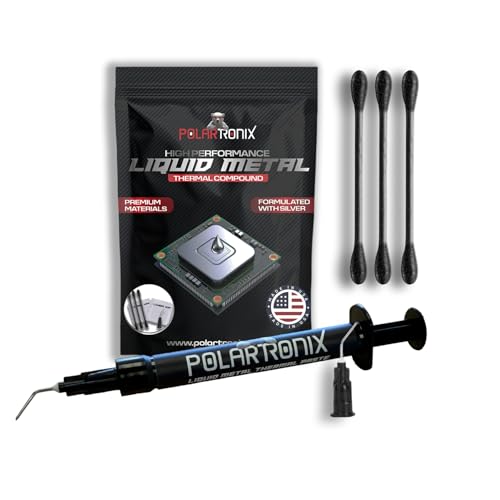
A 1-gram syringe of Thermal Grizzly Conductonaut or PolarTronix Liquid Metal is tiny, about 1.5 inches long and weighing just over 0.03 ounces of actual compound, but that is enough for 2 to 4 applications depending on die size. A standard desktop CPU integrated heat spreader, roughly 45mm x 37.5mm for modern AMD AM5 or 45mm x 45mm for Intel LGA1700/1851, needs only a paper-thin layer about the size of a grain of rice, stretched to cover the surface. A direct-die application, such as a delidded CPU or a bare GPU die that measures 20mm x 25mm to 30mm x 30mm, needs even less.
What you get in the box matters.
Performance-wise, liquid metal has a thermal conductivity rating in the range of 70 to 80 W/mK, compared to 5 to 15 W/mK for high-end conventional pastes. That does not automatically translate to a 5x temperature drop, because the cooler, mounting pressure, and silicon power density matter more. On high-wattage hardware, think CPUs running 125 to 250 watts under load and GPUs in the 200 to 450 watt range, users and system builders generally report improvements of 5 to 12 degrees Celsius over quality traditional paste when the application is done correctly. On lower-wattage 35 to 65 watt CPUs, the difference is often smaller and harder to justify.
As of early 2026, liquid metal remains a niche enthusiast product rather than a mainstream recommendation, and it requires special handling that conventional paste does not.
Pros
- Highest thermal conductivity available in a consumer thermal interface. In the right system, especially delidded desktops, compact gaming laptops, and consoles with sustained 150 to 220 watt loads, it can shave enough degrees to reduce thermal throttling and allow higher sustained boost clocks.
- Extremely thin bond line. Because it is a true liquid metal, it fills microscopic gaps between the die or heat spreader and the cooler with a layer measured in microns, which improves heat transfer more efficiently than thicker ceramic or carbon-based pastes.
- Long-term stability if left undisturbed. Unlike some traditional pastes that can pump out or dry out after 2 to 4 years of thermal cycling, a properly sealed liquid metal application does not cure or harden and can remain effective for years without reapplication.
- Ideal for direct-die cooling. For delidding, where the nickel-plated copper integrated heat spreader is removed to expose the bare silicon die, liquid metal is the standard choice because it makes direct contact without the insulating gap that conventional paste was designed to fill.
Cons
- Electrically conductive. This is the biggest risk. One stray droplet that bridges a surface-mounted capacitor, resistor, or pin near the CPU socket or GPU voltage regulation module can cause an immediate short circuit. Repair is often impossible without board-level work.
- Corrodes aluminum. Gallium aggressively alloys with aluminum, pitting and weakening it within hours to days. You can only use liquid metal with coolers that have a copper or nickel-plated copper cold plate. Most aluminum heatsinks, including many low-cost laptop and console heatsinks with aluminum contact plates, are incompatible unless the contact surface is fully nickel-plated.
- Difficult and unforgiving application. It beads up due to high surface tension and does not spread like regular paste. You must paint it on with a cotton swab or brush, mask the surrounding area with conformal coating, liquid electrical tape, or high-temperature Kapton tape, and work on a completely level surface. It also stains and is hard to clean up.
- Not recommended for vertical mount or frequent transport without sealing. While surface tension holds it in place, vibration or improper sealing around the die can allow migration over time. Systems that are moved often or mounted vertically need a foam dam or silicone barrier to contain it.
- Voids warranty and complicates resale. Delidding a CPU or opening a PS5 or laptop to replace factory liquid metal will void the manufacturer warranty on most consumer hardware. Residue is also difficult to remove completely, which can reduce resale value.
- Reactive with some materials. It can stain nickel plating over time, leave a permanent amalgamated layer on copper, and requires specific cleaning before you can switch back to traditional paste.
Who Should Buy It
You should consider liquid metal if you fall into one of these groups and you are comfortable accepting the trade-offs.
First, competitive overclockers and enthusiasts delidding Intel or AMD desktop CPUs. If you are already removing the integrated heat spreader to close a 15 to 25 degree gap caused by factory sealant and thermal interface, liquid metal is the expected replacement. The risk is still there, but it is part of a controlled process that includes masking the die and sealing the substrate.
Second, owners of high-performance gaming laptops and consoles that shipped with liquid metal from the factory. Many PS5 units and some 2023 and later gaming laptops with Intel HX or AMD HX processors in the 55 to 75 watt CPU plus 115 to 175 watt GPU range use liquid metal on the main SoC. If you are repasting after 3 or more years or after a cooler replacement, replacing like-for-like with a product like PolarTronix or Conductonaut maintains factory-level performance.
Third, small-form-factor builders squeezing 200-plus watt GPUs or 150-plus watt CPUs into cases under 15 liters. When every degree affects fan speed and noise, and radiator space is limited to a 240mm or 280mm all-in-one, the extra headroom can mean the difference between throttling at 95 to 100 degrees Celsius and holding a stable 85 to 90 degrees.
In all of these cases, you should already have isopropyl alcohol 90 percent or higher, lint-free swabs, Kapton tape, and good lighting, and you should be willing to spend 45 to 90 minutes on careful preparation rather than a 10-minute paste swap.
Who Should Skip It
Skip liquid metal if you are building or maintaining a standard desktop gaming PC with a tower air cooler or a 240mm to 360mm all-in-one liquid cooler.
Also skip it if you use an aluminum-based cooler, you are uncomfortable working around exposed surface-mount components, you need a system that will be shipped or moved frequently, or your hardware is still under warranty and you cannot afford to replace it if something goes wrong. For first-time builders, students, or anyone maintaining a family PC or work computer, the learning curve and the cost of a mistake far outweigh the potential 5 to 10 degree improvement.
If you have pets, carpet, or a workspace where a dropped syringe could mean lost material on a porous surface, the handling risk increases further. Liquid metal is best applied on a hard, clean, well-lit workbench with the motherboard fully removed from the case and laid flat.
Cheaper Alternatives
| Option | Cost | Trade-off |
|---|---|---|
| Premium traditional paste (e.g., carbon or ceramic-based, 3-5 gram syringe) | Check on Amazon | Non-conductive and non-corrosive, easy to apply and clean. Typically 3 to 8 degrees warmer than liquid metal under heavy 150+ watt loads, but requires no masking or special cooler compatibility. |
| Premium performance paste (e.g., high-end 12-14 W/mK formulas, 2-4 gram syringe) | Check on Amazon | Closer thermal performance to liquid metal without electrical risk. Still needs replacement every 3 to 5 years, and gains diminish on hardware under 100 watts. |
| Graphite thermal pad (reusable, sized for CPU/GPU, approx. 30mm x 30mm to 40mm x 40mm) | Check on Amazon | Zero mess, electrically non-conductive in most designs, and reusable for multiple installations. Slightly higher thermal resistance than best pastes, and requires precise sizing and even mounting pressure to avoid hot spots. |
| Factory pre-applied paste or included cooler paste | Varies | Good enough for stock operation at 65 to 125 watts. Often 5 to 10 degrees warmer than aftermarket options under sustained load, but no extra cost or effort and no warranty concerns. |
FAQ
Can liquid metal damage my CPU or GPU if it spills?
Yes. Because the alloy is electrically conductive, any excess that touches capacitors, resistors, or exposed contacts around the CPU socket or GPU die can short the board. The damage is often instant when power is applied. That is why experienced users mask the area around the die with Kapton tape or conformal coating and apply a small foam dam to keep the material contained. If you do spill, do not power on the system. Absorb the bead with a dry cotton swab, then clean with isopropyl alcohol and inspect under magnification.
How much temperature improvement should I realistically expect?
Expect a modest but meaningful improvement, not a dramatic transformation. On a desktop CPU or GPU running sustained loads above 150 watts with a good copper or nickel-plated cooler, many builders see 5 to 12 degrees lower peak temperatures compared to a fresh application of quality traditional paste. The exact number depends on cooler quality, case airflow, ambient temperature, and whether you are applying to an integrated heat spreader or directly to the die. On low-power systems or with an undersized cooler, the gains are smaller because the cooler itself is the limit.
Do I need a special cooler for liquid metal?
You need a cooler with a copper or nickel-plated copper cold plate. Pure aluminum cold plates are incompatible because gallium will corrode aluminum on contact, causing pitting and permanent damage that ruins the cooler and the thermal interface. Most modern tower coolers, all-in-one liquid coolers, and GPU heatsinks use copper with nickel plating and are compatible, but you should confirm the material in the product specifications. If the specification lists aluminum contact surface, do not use liquid metal.
How often do you need to replace liquid metal?
Unlike traditional paste that is often recommended for replacement every 2 to 4 years, liquid metal does not dry out and can last 4 to 7 years if the application was clean and sealed. In consoles and laptops where the factory application is contained by a foam barrier, it is common to leave it untouched unless temperatures have risen noticeably or the heatsink has been removed. If you remove the cooler for any reason, you should clean and reapply, because the thin liquid layer breaks and will not reflow evenly without fresh application. Always inspect for migration or staining on the surrounding substrate during any disassembly.









