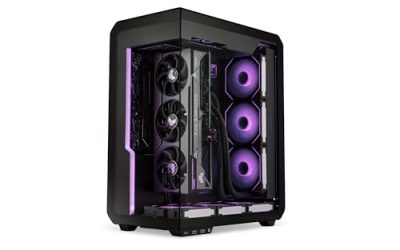
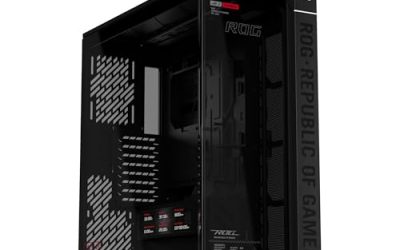
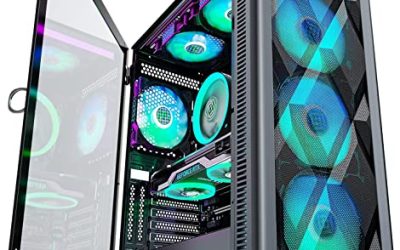
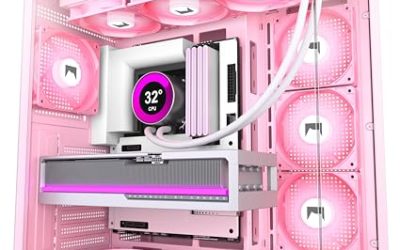
Most modern PC cases have dropped the front 5.25-inch bay entirely, chasing a clean glass-and-mesh look. That leaves a small but loyal group of buyers searching for something specific: a case that still lets them install a DVD or Blu-ray burner, a hot-swap drive dock, a fan controller, or a card reader at the front of the machine. The decision behind “best PC cases with optical drive bay” is how many bays you need, what motherboard size you are building around, and whether you want a basic steel box or something with RGB and liquid-cooling room.
This guide is for people ripping and archiving discs, running legacy software that ships on physical media, or simply keeping a tidy way to add a drive for 2026-era backups. The six cases below range from compact micro-ATX towers to a full-tower that lists twelve 5.25-inch bays. Two cases from the original shortlist were set aside because their listings do not mention a 5.25-inch bay at all, so every entry here names the bay in its title. Judgments come from those listings only, which means a few details, such as maximum graphics card length and dust filter placement, are left for you to confirm on the maker’s page before you buy.
Updated November 2026 – the shortlist below now covers ten cases, from budget ATX towers to a full tower with a dozen front bays.
The best PC cases with optical drive bay in 2026 are the Zalman T6 for a basic ATX build, the Zalman T8 for an RGB gaming build with a 240mm radiator, and the Antec VSK3000E-U3 for a compact micro-ATX office machine. Each lists at least one 5.25-inch front bay, so a DVD or Blu-ray burner mounts at the front without an adapter. Cases from Fractal Design, be quiet!, Rosewill and Cooler Master are added below for readers who want more airflow, quieter operation or extra storage bays.
How this list was built: we compared manufacturer specifications, product listings, published documentation and recurring buyer feedback. We make no performance claims of our own, so confirm graphics card length and radiator clearance on the maker’s page before buying.
Our Top Picks


Top 3 picks at a glance
Quick Picks
As an Amazon Associate we earn from qualifying purchases at no extra cost to you.


| Product | Best for | Key spec from the title |
|---|---|---|
| Zalman T6 | Budget ATX build with a disc drive | 5.25 ODD support, preinstalled 120mm fan |
| Antec VSK3000E-U3 | Compact micro-ATX with spare bays | 2 x 5.25″ bays, 2 x USB 3.0 |
| Zalman T8 | Gaming build with RGB and a drive | 5.25 ODD bay, 240mm radiator, RGB strip |
| Silverstone PS13B | Plain ATX tower, two bays | 2 x 5.25 bays |
| In Win EN708 | Small desktop with one bay | 1 x 5.25″ bay, 2 x USB 3.0, HD audio |
| anidees AI Raider XL | Big builds with many bays | 12 x 5.25″ bays, 480/360 radiator |
How to Choose
Decide how many 5.25-inch bays you really need
One bay is enough for a single DVD or Blu-ray drive. Two bays let you add a drive plus a fan controller, a front card reader, or a 3.5-inch-to-5.25-inch bracket for a hard drive. Cases that list more than two are rare today. The anidees AI Raider XL lists twelve, which suits people who want to stack hot-swap docks or run a tower of optical burners. Count the devices you want at the front before you shop. Also think about whether you will actually keep the optical drive in the machine long term. Many people install a burner for a one-time ripping project and then leave the bay empty for years. A case with two bays gives you the flexibility to repurpose the second slot later for a fan controller or a drive dock without buying a new chassis.
Match the case size to your motherboard
The listings cover micro-ATX mini towers, ATX mid towers, and a full tower that accepts XL-ATX and E-ATX boards. Micro-ATX cases such as the Antec and In Win models save desk space but limit expansion slots. ATX mid towers like the Zalman T6 and T8 fit standard motherboards and long graphics cards. The full tower suits oversized boards. Choose the smallest size that accommodates your motherboard and graphics card. The case titles here rarely state a maximum graphics card length, so measure your card and compare it with the maker’s specification page. A mini tower that looks charming on paper becomes a headache when a long card hits the drive cage. The same goes for tall air coolers, which can touch the side panel on narrow cases.
Cooling: fans and radiator room
Some of these cases ship with a single 120mm fan, which is the minimum for a modest build. If you run a powerful graphics card, plan on adding fans or a better cooling layout. For liquid cooling, the Zalman T8 lists 240mm radiator support and the anidees case lists 480 and 360mm radiator support. Check where a radiator would mount, since a front 5.25-inch bay can conflict with a front radiator in some designs, and a listing may not say so.
Front ports and what to ignore
USB 3.0 front ports are listed on most of these cases, and two ports is a reasonable baseline. HD audio is standard on the In Win. Ignore tempered-glass and RGB marketing if you value airflow, since solid-front steel cases and mesh designs usually breathe better than closed glass panels. Where budget cases cut corners is thin steel, short cables, and a lack of dust filters. Note that the In Win and anidees listings say “case only,” which means no power supply or extras are included. Budget a separate power supply and check its length against the case, because compact towers can be tight around the bottom or rear of the chassis. Cable management is the other trade-off in older-style cases: with drive bays at the front, cables for the optical drive run across the chassis, so plan for clean routing and a few zip ties.
Core Picks in Detail
Zalman T6
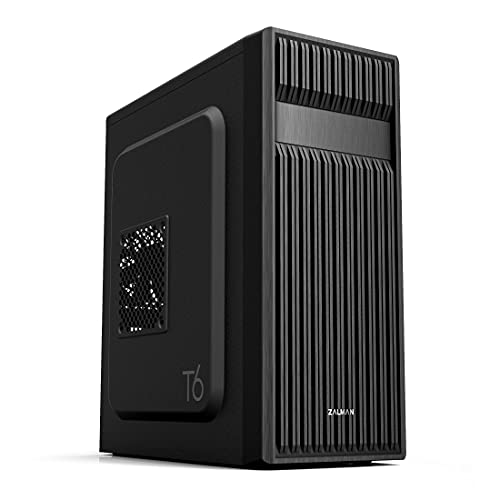
An ATX mid-tower aimed at budget builders who still want a disc drive. The title lists a preinstalled 120mm fan, 5.25-inch ODD support, USB 3.0, and a patterned mesh design.
- Strength: A mesh front and a preinstalled 120mm fan give the build a basic airflow start.
- Strength: Full ATX support leaves room for a regular motherboard and graphics card.
- Trade-off: The title lists only one fan, so heavy workloads may need extra cooling.
It suits someone who wants a conventional layout, a familiar disc drive position, and no lighting to configure. Because the front is patterned mesh, intake air reaches the preinstalled fan without much obstruction. Skip it if you want RGB lighting or liquid-cooling radiator support, since neither appears in the listing.
Antec VSK3000E-U3
A Micro ATX mini tower built from SGCC steel. The title lists two USB 3.0 ports, two 5.25-inch bays, and two 3.5-inch bays (the remaining text is cut off).
- Strength: Two 5.25-inch bays allow a disc drive plus another front-mounted accessory.
- Strength: A compact micro-ATX footprint fits tight desks and office setups.
- Trade-off: Micro-ATX limits the motherboard size and the number of expansion slots.
It fits readers who want a tidy tower for a home office or a shared family computer, where the second bay might hold a card reader. Skip it if you plan an ATX board or a large graphics card, because the micro-ATX layout and mini tower height leave little margin.
Zalman T8
A mid-tower gaming case that pairs a 5.25-inch bay with RGB styling. The title lists a 5.25 ODD bay, an RGB lighting strip with a control button, one 120mm fan, USB 3.0, and 240mm radiator support.
- Strength: It combines an optical bay with 240mm radiator support, which is uncommon in the group.
- Strength: The RGB strip adds a gaming look without extra purchases.
- Trade-off: One included fan is thin for a gaming system.
Skip it if you prefer a plain, lighting-free design.
Silverstone PS13B
A plain ATX tower from a known case maker. The title lists two 5.25-inch bays and little else, which suggests a simple, utilitarian design.
- Strength: ATX support with two 5.25-inch bays covers common drive plans.
- Strength: The brand has a track record in cases, which can ease compatibility concerns.
- Trade-off: The title provides few details about fans, ports, or cooling support.
It suits builders who already know what they want to put inside and only need a sturdy shell with two bays. Skip it if you need listed specs for front ports or radiator mounts, since the title leaves those questions open.
In Win EN708
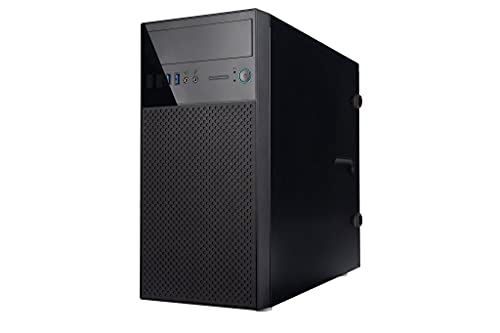
A small Micro ATX mini tower sold as the case only. The title lists one 5.25-inch drive bay, two front USB 3.0 ports, and HD audio.
- Strength: The compact size suits small desks and secondary PCs.
- Strength: Two front USB 3.0 ports cover everyday peripherals.
- Trade-off: A single 5.25-inch bay leaves no room for a second front device.
It works for a media-room PC or a second machine used for disc playback and light tasks. Skip it if you want two bays or room for a large graphics card, since a micro-ATX mini tower is built for modest components.
anidees AI Raider XL
A full tower with tempered glass that accepts XL-ATX, E-ATX, and ATX motherboards. The title lists support for twelve 5.25-inch drive bays and 480 or 360mm radiators, and it is sold as the case only.
- Strength: Twelve 5.25-inch bays are far more than any other case in this group.
- Strength: Oversized motherboard and large radiator support suit high-end builds.
- Trade-off: A full tower takes up a lot of room and is overkill for a basic system.
It speaks to collectors, archivists, and builders planning a showpiece machine with several drives. Skip it if you have limited desk space or a modest build, because the case size and the bays you will not fill add little for an ordinary system.
More PC Cases With a 5.25-Inch Optical Bay
The cases above cover the cheapest ways to keep a front bay. The picks below add better airflow, quieter designs and more drive capacity, which is why they sit a price tier higher.
Cooler Master MasterBox MB600L V2 with ODD – Best for Airflow With a Drive
This is the version of the MasterBox MB600L V2 sold with an optical drive bay, as its listing name states. It uses brushed-steel styling and side mesh intakes, which gives an optical-bay build more fresh air than a closed front.
- Brushed-steel finish with side mesh intakes
- Optical drive (ODD) support named in the listing
- ATX-class mid-tower layout
- Roughly mid-priced for a branded case
Pros: a recognized brand, an airflow-minded layout and a front bay for a disc drive. Plain styling suits an office or media build.
Cons: the listing gives few details on fan count and radiator mounts, and a non-ODD sibling exists under almost the same name.
Skip it if you need a confirmed count of two or more 5.25-inch bays or a long list of cooling options; check the maker’s specifications first.
Fractal Design Focus G – Best for a Clean, Airflow-Focused ATX Build

Fractal Design’s own specification page lists two 5.25-inch drive bays for the Focus G, which makes it one of the few mainstream brands that kept the layout. It is an ATX mid-tower with a window side panel and a high-airflow front.
- ATX, micro-ATX and mini-ITX motherboard support
- Two 5.25-inch drive bays
- Two front fans included (the maker lists 120mm units)
- Up to 380mm graphics card length
- Radiator support up to 280mm at the front and 240mm at the top
Pros: generous cooling support, clean cable-friendly layout, a respected brand and room for a long graphics card.
Cons: the front ports are limited to one USB 2.0 and one USB 5Gbps Type-A, and there is no front USB-C.
Skip it if you want front USB-C or a case that fits more than two optical devices.
be quiet! Pure Base 600 – Best for a Quiet Build With a Drive

The Pure Base 600 is an ATX midi tower built around low noise. Competing roundups list two 5.25-inch bays on it, so treat that as the figure to confirm on the maker’s product page before ordering.
- ATX midi tower format
- Two preinstalled fans
- Repositionable drive and cage options in the listing
- Sound-damping design aimed at office and home use
Pros: quiet-oriented design, two fans included and a roomy interior.
Cons: a higher price than the Zalman cases, and a closed design runs warmer with a strong graphics card.
Skip it if you are on a tight budget or want a mesh front for maximum airflow.
Rosewill Retro NAS ATX Mid Tower – Best for Disc Drives Plus Many Hard Drives

Rosewill built this case for storage-heavy builds with a retro look. Its listing names dual 5.25-inch bays, six 3.5-inch hard drive bays and three preinstalled 140mm fans.
- ATX mid tower with retro styling
- Dual 5.25-inch bays
- Six 3.5-inch HDD bays
- Three 140mm fans preinstalled
Pros: strong drive capacity for a home server or media archive, with a disc drive still welcome at the front. Three large fans give the drive cage airflow.
Cons: pricier than the basic ATX cases here, and the retro front is not for everyone.
Skip it if you only need one disc drive and a gaming card; a cheaper tower does the same job.
anidees AI Crystal XL PRO LITE – Best Premium Full Tower

A full-tower tempered-glass case that, like the AI Raider XL above, targets builders who still want optical drive bays at the front. The listing names XL-ATX, E-ATX and ATX support and 480/360mm radiator room.
- Full tower with tempered glass
- XL-ATX, E-ATX and ATX motherboard support
- 480/360mm radiator support
- Optical drive support named in the listing
- Premium price tier
Pros: huge interior, custom-loop friendly and a showpiece look.
Cons: very large and priced well above every other case here.
Skip it if you build a normal ATX system; a mid tower saves money and desk space.
Which One Fits Your Situation
You need one DVD or Blu-ray drive and little else
The Zalman T6 is the straightforward choice, with ATX support, a mesh front, and a preinstalled 120mm fan. It leaves room in the budget for the drive itself.
You want a gaming look and a drive at the front
The Zalman T8 adds an RGB strip and 240mm radiator support to the 5.25-inch bay. It suits a mid-range gaming build with a classic drive.
You are building a compact office or media PC
The Antec VSK3000E-U3 gives two 5.25-inch bays in a micro-ATX tower. The In Win EN708 is the leaner alternative with a single bay.
You collect drives or run a large storage stack
The anidees AI Raider XL lists twelve 5.25-inch bays, which makes it the case for hot-swap docks, multiple burners, and large radiators.
Best PC Case With Optical Drive Bay by Budget and Use
| Need | Best match | Key spec line |
|---|---|---|
| Cheapest ATX with a bay | Zalman T8 | ATX · 5.25 ODD bay · RGB strip · 240mm radiator |
| Basic ATX with a mesh front | Zalman T6 | ATX · 5.25 ODD · 120mm fan preinstalled |
| Small micro-ATX build | Antec VSK3000E-U3 | Micro-ATX · 2 x 5.25 bays · 2 x USB 3.0 |
| Best airflow brand pick | Fractal Design Focus G | ATX · 2 x 5.25 bays · 380mm GPU |
| Quiet office tower | be quiet! Pure Base 600 | ATX · 2 fans · noise-damped design |
| Disc drive plus storage | Rosewill Retro NAS | 2 x 5.25 bays · 6 x 3.5 HDD bays |
| Twelve front bays | anidees AI Raider XL | 12 x 5.25 bays · XL-ATX/E-ATX |
Table caption: the best PC cases with optical drive bay, grouped by the build they suit.
What If Your Case Has No 5.25-Inch Bay?
If you already own a modern case without a front bay, an external USB optical drive or an internal drive in a 5.25-inch USB enclosure is the cheaper fix. Buying a case only makes sense when you want the drive built into the front and flush with the panel.
Competing guides raise the same point: very few current cases include the bay, so check the product title for a 5.25-inch bay or ODD mention before you buy. A mesh front with a dust filter helps when the bay cover is vented.
How We Chose These Cases
The ranking is based on published specifications, listing details, maker documentation and recurring buyer feedback, not on our own use of the products. A case needed a named 5.25-inch bay in its listing or on the maker’s specification page. Cases without one, such as the Cooler Master N200, were removed from the shortlist.
Buying thresholds worth remembering
- One 5.25-inch bay is enough for a single DVD or Blu-ray burner; choose two or more only if you plan a fan controller, card reader or hot-swap dock.
- For a long graphics card, look for a stated limit of about 350mm or more; the Fractal Focus G lists 380mm.
- If you plan a radiator, check that the bay cage does not sit in front of it.
- Budget at least one extra SATA data and power connection for the drive.
Common Mistakes
- Assuming a modern glass case still includes a 5.25-inch bay when the listing never mentions one.
- Forgetting that a case sold as “case only” does not include a power supply or fans beyond what is stated.
- Choosing a micro-ATX tower and then trying to fit an ATX motherboard.
- Mounting a front radiator without checking whether the 5.25-inch bay cage blocks it.
- Buying more bays than needed and paying for a full tower you will never fill.
Clearance Numbers to Check Before You Order
Most returns in this category start with a measurement, not a defect. Before choosing any case above, write down four numbers from your own parts and compare them with the maker specification page for the exact case variant.
| What to measure | Why it decides the build | Practical rule |
|---|---|---|
| Graphics card length | The front bay cage shortens the space ahead of the card on many older layouts | Leave a small margin beyond the card length instead of buying to the exact millimetre |
| Tower cooler height | Narrow mid towers and mini towers cap cooler height well below flagship air coolers | Measure from the processor socket area to the side panel, not from the desk |
| Drive depth plus cable bend | A burner needs room behind it for a SATA data cable and a power plug to bend safely | A deep drive in a shallow case can push cables into a front fan |
| Radiator position | A front radiator and a bay cage often want the same space | Decide which one matters more before ordering either part |
| Power supply SATA plugs | Each internal drive needs its own SATA power connector on a reachable lead | Count plugs on the lead that actually reaches the front of the case |
Bay-Device Compatibility Checklist
A 5.25-inch opening accepts more than a disc drive, but each device brings its own requirement. Run through this list for every device planned for the front of the machine.
- Standard DVD and Blu-ray drives are half-height devices and need one SATA data connection to the motherboard and one SATA power connection from the supply.
- Slim laptop-style drives do not fit a desktop bay directly; they need a slim-to-5.25-inch adapter bracket and usually a slimline power adapter.
- Hot-swap docks for 3.5-inch and 2.5-inch drives need a free SATA port per drive bay inside the dock, and some models also need a spare power lead with enough connectors.
- Fan controllers need reachable fan cables from every fan they will govern, plus a power connection, so bay position relative to the front fans matters.
- Front card readers and USB panels need an unused internal USB header on the motherboard; a board with one header cannot serve two such panels at once.
- Any device with a door, tray or display sits proud of the panel on some cases, so check clearance where the PC lives under a desk or inside a cabinet.
Installing an Optical Drive, Step by Step
Power the system down and unplug it. Remove both side panels so cables can be guided rather than forced. Pop out the bay cover for the slot you intend to use, keeping the cover in case the drive is removed later. Slide the drive in from the front until its face sits flush with the panel, then secure it with the tool-free latch where fitted and add screws on the opposite side for a burner, because spinning discs vibrate. Connect the SATA data cable to the motherboard first, then the SATA power lead, leaving a gentle curve in both. Route the cables clear of the front intake fan. On first start, open the system firmware setup screen and confirm the drive is listed, then load the operating system and confirm the tray opens and a known disc reads. If the drive is missing, reseat the data cable at both ends before suspecting the drive itself.
Care is simple: keep the front intake filter clean so the drive does not ingest dust, leave the tray closed when idle, and avoid stacking heavy items against the bay door on a tower that stands on the floor.
Who Should Skip an Internal Bay Case Entirely
Skip this whole category if the disc drive will be used once for a single ripping project and never again; a borrowed external drive finishes that job without shaping the next case purchase. Skip it if the build plan centres on a large front radiator and a long graphics card, because the bay cage competes for exactly that front volume. Skip it if the machine will travel to events or between rooms, where a lighter modern case and a small external drive are easier to carry. Everyone else, especially archivists, media collectors and offices that still receive software or records on disc, gains a tidier desk and a faster, more reliable internal connection from a proper bay.
More Picks Worth Considering
Thermaltake Versa H21
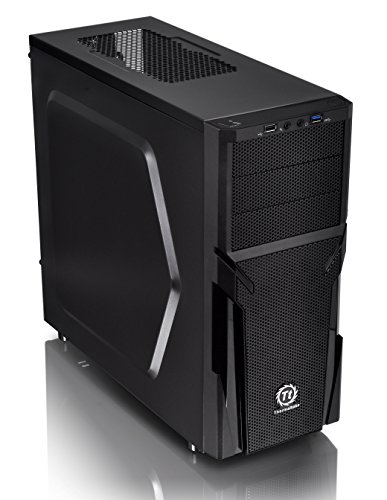
Choose the Versa H21 when the build needs several front devices and a standard ATX board. This SPCC steel mid tower offers three external 5.25-inch bays, so a DVD or Blu-ray drive can sit alongside a fan controller or card reader, plus three bays that each accept a 3.5-inch or 2.5-inch drive and three more 2.5-inch mounts. The perforated mesh front and top panels suit air-cooled builds, a 120mm rear fan comes preinstalled, and tool-free mounting speeds up assembly. Front ports are one USB 3.0, one USB 2.0 and HD audio. It fits budget builders who value bay count over finish. Skip it if front USB-C, a windowed showcase look or serious liquid cooling is planned, because none of those appear in its specification.
SilverStone Grandia GD09B HTPC Case
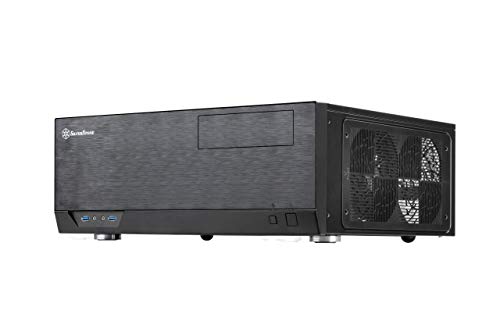
Consider the Grandia GD09B when the disc drive belongs in the living room rather than under a desk. This aluminum HTPC case is shaped like a home theater component yet accepts a full ATX or SSI-CEB motherboard and a standard ATX power supply, and its single 5.25-inch bay takes an optical drive or, with the tray arrangement, one 3.5-inch drive or two 2.5-inch drives instead. Expansion cards up to 12.2 inches fit, so a capable graphics card can join the burner for a combined media and gaming machine. It fits media-PC builders who want a proper internal drive in a cabinet-friendly box. Skip it if more than one front device is planned, because there is only one bay, or if a tall tower cooler is part of the build, since the low-profile shape limits cooler height.
Related guides
- Noctua Nh-D15 Vs Thermalright Peerless Assassin 120
- Sustainable Gaming Pc Power Supply Efficiency Guide
- Thermal Paste Application Method For Lga1851
Frequently Asked Questions
Are optical drives still worth installing?
For disc ripping, legacy software, or backups on physical media, yes. For everyday use, an external USB drive is often easier and takes no bay.
Can I use a 5.25-inch bay for something other than a disc drive?
Yes. Fan controllers, card readers, hot-swap drive docks, and brackets for 3.5-inch drives all fit these bays.
Does an optical bay hurt airflow?
It can if the front panel is solid. Mesh-front designs such as the Zalman T6 help, but check the case layout before assuming good cooling.
What size motherboard do I need?
That depends on the case. The Antec and In Win listings are for Micro ATX boards, the Zalman and Silverstone cases take ATX, and the anidees case accepts XL-ATX, E-ATX, and ATX.
More Questions About PC Cases With an Optical Drive Bay
Which PC case with optical drive bay is best for a budget build?
The Zalman T6 and Zalman T8 are the usual budget answers, since both list a 5.25-inch ODD bay on an ATX tower. The T8 adds RGB and 240mm radiator support, while the T6 keeps a plain mesh front.
Do any current gaming cases still have a 5.25-inch bay?
Yes, but few. The Fractal Design Focus G and Zalman T8 are examples, and Rosewill and anidees offer larger towers. Most glass-front cases from major brands dropped the bay years ago.
Can I install a Blu-ray drive in a case with a 5.25-inch bay?
Yes. Standard internal Blu-ray and DVD drives use the 5.25-inch half-height size and connect with a SATA data and SATA power cable, so any case with a free bay can hold one.
Is a 5.25-inch bay useful for anything other than discs?
Yes. Hot-swap drive docks, fan controllers, card readers and 3.5-inch bracket adapters all use the same bay.
Related guides
- Best Micro ATX Case Picks: Eight Compact Towers by GPU Clearance and Airflow: 8 Compared (2026)
- Best Mini ITX Case: 8 Small Form Factor Cases Compared by Fit and Cooling: 8 Compared (2026)
- RTX 5080 vs RTX 5090: Specs, Power Draw and Who Needs the Bigger Card
- Modular vs Non-Modular Power Supply: Which One Does Your Build Need
More from Amazon
Programs that pair well with the guide above. Offers and eligibility are set by Amazon and may change.
Free shipping on eligible items, Prime Video and more. Eligible new members can start with a free trial.
Start a Prime free trialAd-free music streaming. Eligible new subscribers can start with a free trial.
Try Music Unlimited freeA Prime membership for ages 18-24 with a trial period. Eligibility is set by Amazon.
See Prime for Young AdultsAudiobooks and podcasts to listen to on the go. Eligible new members can start with a free trial.
Try Audible freeAs an Amazon Associate we earn from qualifying purchases.