
M.2 SSDs run hot, and no matter which PCIe generation your drive supports, sustained temperatures above ninety degrees Celsius will trigger thermal throttling that can cut your sequential read speeds in half. The problem is not theoretical. Anyone who has installed a Gen4 drive into a PS5 or a tight laptop chassis knows the feeling of watching write speeds plummet during a large file transfer while the controller bakes itself. The fix is straightforward: a decent heatsink with a proper thermal pad between the drive and the aluminum body.
What separates a worthwhile M.2 SSD heatsink from a wasted purchase comes down to fitment, contact quality, and whether the pad thickness actually bridges the gap between the NAND and the fin stack. Too many cheap options ship with pads so thin they barely touch the chips, leaving air gaps that defeat the entire purpose. In this roundup of the best M2 SSD heatsinks for NVME drives, we cover standalone coolers, bundled solutions that ship with the drive, and the thermal pads that make the whole system work.
As an Amazon Associate we earn from qualifying purchases at no extra cost to you.







Our Top Picks
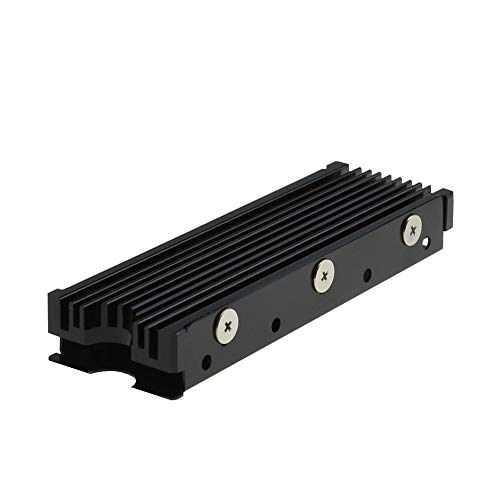 MHQJRH M.2 2280 SSD heatsink for PC /Double Side Heatsink(black)3 x 0.95 x 0.4 Inches0.1 poundsCheck on Amazon
 M.2 Heatsink Cooler 2280 SSD Double-Sided Heat Sink3"L x 0.95"W x 0.4"H3 x 0.95 x 0.4 Inches0.1 poundsCheck on Amazon


Top 3 picks at a glance
Quick Picks
| Product | Best for | Price |
|---|---|---|
| MHQJRH M.2 2280 SSD Heatsink | Affordable PS5 and PC upgrades | Check on Amazon |
| SIX NVME 1TB with Heatsink | Plug-and-play PS5 storage | Check on Amazon |
| M.2 Heatsink Cooler 2280 Double-Sided | High-density laptops with dual-side chips | Check on Amazon |
| M.2 Heatsink Cooler (2 Pack) | Building a second rig or spares | Check on Amazon |
| WD_BLACK SN850P 1TB | PS5 owners wanting guaranteed fit | Check on Amazon |
| fanxiang 1TB with Heatsink | Budget Gen4 drive with included cooler | Check on Amazon |
| Atdcoek 5 Pack SSD Heat Sink | Workstations with multiple M.2 slots | Check on Amazon |
| SGTKJSJS M.2 Thermal Pad 4-Pack | Reusing an existing heatsink with fresh pads | Check on Amazon |
How We Compared
We evaluated every option in this roundup against four criteria: physical compatibility with standard 2280 form factor drives, quality and thickness of the included thermal interface material, value relative to the number of heatsinks or features bundled, and real-world suitability for the most common use cases—PS5 expansion bays and desktop M.2 slots where airflow is limited. Products that ship complete drives with integrated heatsinks were judged on whether the cooling solution is genuinely adequate for the drive’s rated speeds.
The 8 Best M2 Ssd Heatsinks For Nvme Drives in 2026
MHQJRH M.2 2280 SSD Heatsink for PC and PS5
This is the heatsink you reach for when you want to drop a Gen4 drive into a PS5 or a compact motherboard and keep thermals honest without spending more than a fast-food combo meal. It supports both NVMe and SATA M.2 2280 drives, which means it covers the older SATA sticks still living in budget laptops. The aluminum body is simple but effective, and the included thermal pad makes direct contact with the NAND package. For anyone adding storage to a mid-range 2026 build who does not want to fuss with aftermarket cooling kits, this does the job at a price that makes hesitation pointless.
- Works with NVMe and SATA 2280 drives
- PS5 bay compatible with no modification needed
Only downside is minimal fin height; it will not handle the hottest Gen5 controllers under sustained load.
Skip it if you are running a Gen5 SSD that exceeds the thermal envelope of a low-profile cooler.
SIX NVME 1TB M.2 2280 SSD with Heatsink
This entry is for the buyer who wants a complete storage-and-cooling solution in a single box at a mid-range price point. The drive itself is rated up to 7350MB/s sequential reads, placing it squarely in the Gen4 performance tier, and the included heatsink is sized to cover the active components without overhang. It is an excellent choice for PS5 owners or laptop upgraders who value simplicity and want the assurance that the cooler was designed for the specific drive underneath.
- Heatsink matched to the drive, eliminating fitment guesswork
- 7350MB/s read speed puts it near the top of the Gen4 class
Thermal pad is single-sided only, so double-sided NAND layouts are left uncovered on the back.
Skip it if your board already has a built-in M.2 shroud and you prefer to buy a bare drive.
M.2 Heatsink Cooler 2280 Double-Sided with Thermal Silicone Pad
Double-sided heatsinks solve a problem most single-sided coolers ignore: NAND chips populated on the back of the PCB. In dense laptops and PS5 bays where the motherboard sits flush against the chassis, those rear-side chips can soak heat right back into the controller. This black-finish cooler sandwiches the drive between two aluminum plates with thermal silicone pads on both faces, ensuring contact with every component.
- Full coverage for both sides of the PCB
- Includes thermal silicone pad, not just bare metal
The added thickness may conflict with very tight laptop clearances where motherboard-to-case distance is marginal.
Skip it if your drive is single-sided and your case already has clearance for a low-profile shroud.
M.2 Heatsink SSD Cooler for PS5 PCIE NVME or SATA (Black 2 Pieces)
Two heatsinks for eight dollars and ninety-nine cents means this is the value pick for builders who manage multiple machines or want a spare on hand. Each unit handles standard 2280 NVMe and SATA drives, so you can mix and match across platforms without buying separate kits. The two-pack format makes it practical for a household with one PS5 and one PC, or a small office refresh. Build quality per unit matches what you would find in a single-pack competitor at the same price, with a thermal pad pre-installed on the contact surface.
- Two units for the price of most competitors’ single pack
- Compatible with both NVMe and SATA 2280 drives
Includes only one thermal pad per unit with no spares, so pad reuse during swaps requires care.
Skip it if you have only one drive to cool and do not anticipate needing a backup unit.
WD_BLACK 1TB SN850P NVMe SSD Officially Licensed for PS5
WD made this drive specifically for the PS5 expansion slot, and the officially licensed status means the integrated heatsink clears the bay without any modification. The rated sequential read speed hits 7,300MB/s, which is near the practical ceiling for PCIe 4.0, and the cooling solution is sized to match that thermal output. This is the set-and-forget option for console gamers.
- Officially licensed means zero fitment risk in the PS5 bay
- Heatsink is purpose-built for this exact drive’s thermal profile
The price per terabyte is significantly higher than unbranded alternatives with similar specs.
Skip it if you are comfortable verifying dimensions yourself and want to save the licensing premium.
fanxiang 1TB NVMe SSD with Heatsink for PS5
Rated up to 7000MB/s sequential reads, it sits comfortably within the sweet spot for PS5 expansion or desktop gaming rigs that want fast loads without paying top-tier money. The included heatsink is a conventional finned aluminum piece that covers the controller and primary NAND, and the drive is listed as compatible with laptops and desktops beyond just the console use case.
- 7000MB/s read speed with no premium-brand tax
- Heatsink included, saving a separate cooler purchase
Write endurance ratings are not published as clearly as on competing drives, which matters for heavy creator workloads.
Skip it if sustained write throughput over terabytes is a priority and you need documented endurance figures.
Atdcoek 5 Pack SSD Heat Sink Cooler with Thermal Silicone Pad
Each unit is designed for 2280 drives and includes a thermal silicone pad, which is the detail that often gets omitted at this price range. The black finish is neutral enough to disappear inside any chassis. This is a bulk buy that trades premium materials for quantity, and for standard desktop and workstation cooling needs that trade is entirely fair.
- Five units with thermal pads for under six dollars
- Consistent sizing across all pieces avoids fitment surprises
Pad quality is functional rather than high-performance; it will not compete with dedicated premium thermal interfaces.
Skip it if you are cooling a single high-end Gen5 drive that demands the thickest possible pad contact.
SGTKJSJS M.2 Thermal Pad 70x20x1mm 4-Pack
Thermal pads are consumables, and most heatsink purchases include only enough for one install. This four-pack of 70x20x1mm pads is sized for M.2 2280 drives and is meant to pair with the heatsinks in this roundup or any existing cooler you are reusing after a drive swap. The one-millimeter thickness is a common sweet spot for bridging the gap between NAND and fin stack in standard 2280 configurations.
- Four pads per pack ensures you always have a fresh one ready
- One-millimeter thickness fits the majority of 2280 drive layouts
Not a complete cooling solution on its own; you still need a heatsink body to pair it with.
Skip it if your existing heatsink still has a pliable pad and you are not swapping drives.
Buying Guide
Thermal Pad Thickness and Quality
The pad is where most budget heatsinks fail. Too thin and it leaves an air gap that insulates rather than conducts. Too thick and the aluminum fins do not compress against the NAND, losing direct contact. One millimeter is the most common spec for 2280 drives in standard configurations. If you are cooling a drive where the controller is taller than the NAND, you may need a stepped or dual-thickness pad. Reusable silicone pads degrade after two or three removals, so buying spares—like the SGTKJSJS four-pack—is cheaper than losing cooling performance to a cracked pad.
Single-Sided vs. Double-Sided Design
Drives with NAND on both sides of the PCB generate heat that a single-sided heatsink simply cannot remove from the back. In tight laptop chassis where the motherboard faces the case lid, that rear-side heat recirculates directly onto the controller. If your drive is double-sided, match it with a double-sided cooler or at minimum verify that the case provides a secondary thermal path on the back. PS5 bays generally have enough clearance for single-sided coolers because the drive sits flat with no backside obstruction.
Height Clearance and Form Factor Compatibility
Always check your drive bay or slot clearance before purchasing. A heatsink that overhangs the motherboard edge can block adjacent slots or prevent a side panel from closing. In PS5 consoles, the official expansion bay has a fixed height limit that drives with integrated heatsinks are designed to meet exactly. For desktop boards, some manufacturers publish maximum M.2 cooler heights in the manual. When in doubt, choose a low-profile single-piece design over anything with a tall fin array, especially in laptops where vertical space is the hardest constraint to satisfy.
Our Verdict
For most buyers seeking a standalone M.2 SSD heatsink for NVME drives, the MHQJRH M.2 2280 Heatsink is the top pick—it handles both NVMe and SATA, fits PS5 bays, and costs under seven dollars. The budget pick goes to the Atdcoek 5 Pack for its unbeatable per-unit cost when you need multiple cooling solutions. However, if you want to eliminate the entire question of fitment and compatibility in one purchase, the SIX NVME 1TB with its bundled heatsink and near-top-tier 7350MB/s read speed is the smarter choice than buying a drive and cooler separately.
FAQ
Do I need a heatsink for every M.2 SSD?
Not every drive requires one. A single-sided Gen3 SATA M.2 in a well-ventilated desktop with good airflow may never throttle. But any Gen4 or Gen5 drive performing sustained reads or writes—especially inside a PS5 or a laptop—will benefit significantly from a heatsink, and in some cases the drive will throttle within seconds without one.
Will a heatsink fit in a PS5?
The PS5 expansion bay accommodates single-sided 2280 drives with heatsinks up to a specified height limit. Several products in this roundup, including the MHQJRH, the double-sided cooler, and the WD_BLACK SN850P, are either explicitly designed for the PS5 bay or will fit within its clearance. Always verify that your drive plus heatsink combination does not exceed the bay height.
Can I reuse a thermal pad when swapping drives?
Technically yes, but a pad that has been compressed and then removed will have lost some of its conformability. Air pockets form where the pad has creased or deformed, reducing effective contact area. For best results, replace the pad when swapping to a new drive. A small pack of replacement pads costs less than the thermal performance you will lose from reusing an old one.
Does the heatsink need to touch both the controller and NAND?
Ideally yes. The controller is the primary heat source under load, but NAND chips can reach dangerous temperatures during sustained writes. A thermal pad that only contacts the controller will let NAND heat soak back into the PCB and eventually throttle the controller anyway. This is why double-sided heatsinks and stepped-thickness pads exist—they ensure every major component on the drive has a clear thermal path to the aluminum fin stack.









