Buying a Time Machine drive sounds simple until you read the listings closely. No drive in this roundup is sold with a Time Machine certification claim; not one of these listings uses those words. What actually separates the five drives below is more practical: whether the drive is a Mac-designated model that arrives ready for a Mac, or a cross-platform drive whose own listing warns that reformatting may be required before Time Machine will use it. Get that choice wrong and setup stalls on day one; get the capacity wrong and your backup history quietly shrinks within months.
This guide is for Mac owners setting up a first Time Machine drive, replacing one that has filled up, or adding a backup drive to a second machine at home or at work. The picks come from WD’s Mac-designated Passport line, LaCie’s Mobile Drive range and Seagate’s One Touch range, chosen from the capacities, connectors and formatting positions the listings actually state, rather than certification claims none of them make.
Top 3 picks at a glance

Quick Picks
As an Amazon Associate we earn from qualifying purchases.
| Product | Best for | Key spec from title |
|---|---|---|
| WD My Passport for Mac 4TB | The straightforward first Time Machine drive | 4TB, USB 3.1/USB 3.0 compatible, Mac-designated model |
| WD My Passport for Mac 6TB | The deepest backup history | 6TB, backup software, password protection |
| WD My Passport Ultra for Mac 5TB | USB-C Macs and backups that travel | 5TB, USB-C and USB 3.1, ransomware-defense backup software |
| LaCie Mobile Drive 4TB | Mac and iPad USB-C use out of the box | 4TB, USB-C 3.2, works with PC, Mac and iPad |
| Seagate One Touch 5TB | Sharing one drive between Mac and Windows | 5TB, USB 3.0, listing flags a reformat for Time Machine |
How to Choose
Mac-designated out of the box, or reformat it yourself
This is the real split in this roundup. Four of the five drives are positioned by their listings for Mac use from the start: WD sells a separate “for Mac” version of the My Passport, and LaCie states its Mobile Drive works with Mac out of the box. The Seagate One Touch takes the other route. Its listing covers Windows and Mac, then states plainly that reformatting may be required for use with Time Machine. Neither route is wrong, but they suit different buyers. If you want to plug in and start the first backup, choose a Mac-designated drive. If you are comfortable erasing and reformatting a new drive during setup, a cross-platform model opens up sharing options later.
Size the drive against the Mac it protects
Time Machine does not just mirror your Mac once. It keeps hourly, daily and weekly snapshots until the drive fills, then deletes the oldest history to make room. A drive barely larger than your internal storage works, but it cycles through that history quickly. As a planning rule, look for a backup drive with clear headroom over the data you actually hold, and more again if your photo or video library grows every month. That is why this roundup starts at 4TB rather than at smaller capacities: the 4TB drives suit a single Mac with a modest library, the 5TB models add breathing room, and the 6TB Passport is here for large internal drives and long retention.
Match the connector to the ports on your Mac
The five listings do not connect the same way, and the difference decides whether you need an adapter in the box or in your bag. The LaCie Mobile Drive and the WD My Passport Ultra for Mac are the USB-C drives here, suiting recent MacBooks and iMacs directly. The standard My Passport for Mac models list USB 3.1 and USB 3.0 compatibility, and the Seagate One Touch is a USB 3.0 drive, so on a USB-C-only laptop those picks depend on the right cable or adapter being included or already owned. Check the listing’s stated connector against your machine before ordering, because a backup drive you cannot plug in without a dongle tends to get left unplugged.
Look at what helps after something goes wrong
A backup drive earns its keep on the worst day, so the bundled extras matter more than they first appear. Every WD pick here includes backup software and password protection, and the Ultra adds backup software with defense against ransomware, which matters if the backup drive stays connected around the clock. LaCie includes its Toolkit backup software and Rescue Data Recovery Services, a recovery service for the drive itself. The Seagate bundle leans toward photo owners, pairing its Rescue Services with trial photo software. None of these extras replaces a second copy of irreplaceable files stored somewhere else, but they decide how painful a failure is when it happens.
The 5 Best Options
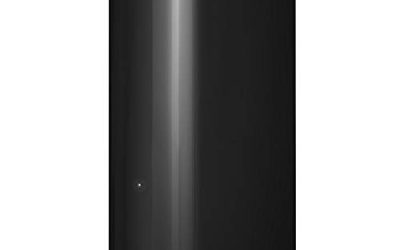
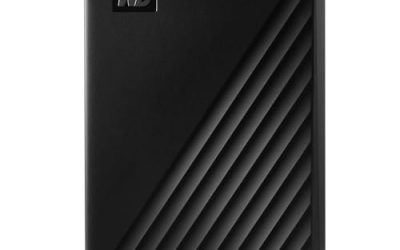
WD My Passport for Mac 4TB

This is the default recommendation for a single Mac because it removes the two decisions buyers most often get wrong. It is WD’s Mac-designated version of the My Passport line, so it is positioned for a Mac from the start rather than adapted from a Windows drive, and 4TB gives a typical home Mac headroom for Time Machine history. The listing adds backup software and password protection, which covers the basics if the drive ever leaves the house. One caution from the listing itself: its title never mentions Time Machine, so treat this as a Mac-ready drive you point Time Machine at during setup, not a certified appliance.
Specs
- Capacity: 4TB
- Model: WDBA2F0040BBL-WESN, Navy
- Portable external hard drive
- Mac-designated “for Mac” model in the My Passport line
- USB 3.1/USB 3.0 compatible
- Backup software included
- Password protection
Best for: A first Time Machine drive for one Mac, set up once and left alone.
Watch out for: The listing title does not mention Time Machine, and box contents for this model line are worth confirming on the live listing before you rely on a USB-C adapter being included.
ASIN: B07VTNW4ZQ
WD My Passport for Mac 6TB
Choose this one when the problem is history, not setup. It is the same Mac-designated Passport formula as the 4TB model, with backup software and password protection, but its 6TB capacity, the largest in this roundup, changes how long Time Machine can hold onto older snapshots before deleting them. That suits Macs with big internal drives, creative libraries that churn through versions, or anyone who has watched a smaller drive fill up and prune the past. If your Mac holds far less data than this, the extra capacity simply sits unused, so size it against the machine it protects rather than buying the biggest number on the page.
Specs
- Capacity: 6TB
- Model: WDBK6C0060BBL-WESN, Navy
- Portable external hard drive
- Mac-designated “for Mac” model in the My Passport line
- USB 3.1/USB 3.0 compatible
- Backup software included
- Password protection
Best for: Large Macs and long backup histories that outgrew a smaller drive.
Watch out for: The listing copy does not mention Time Machine by name, and 6TB is wasted money if your Mac’s data would leave most of it empty for years.
ASIN: B0D26K655K
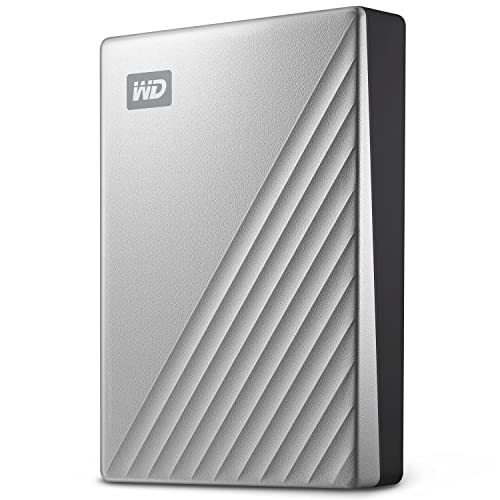
WD My Passport Ultra for Mac 5TB
The Ultra is the pick for Macs that move. Its listing leads with USB-C and USB 3.1, which fits current MacBooks without the adapter question the standard Passport raises, and its backup software adds defense against ransomware alongside the usual password protection. That combination suits a backup drive that travels in a laptop bag or stays plugged into a Mac that is also your daily work machine, where an always-connected backup is itself exposed. The 5TB capacity sits between the two standard Passports, enough for a well-filled Mac plus history. As with its siblings, the listing positions it as a Mac drive without ever claiming a Time Machine certification.
Specs
- Capacity: 5TB
- Model: WDBPMV0050BSL-WESN, Silver
- Portable external hard drive
- Mac-designated Ultra model
- USB-C and USB 3.1
- Backup software with defense against ransomware
- Password protection
Best for: USB-C MacBooks and backups that travel or stay connected all day.
Watch out for: The 4TB Ultra for Mac is a separate listing with a different code, so check the capacity in the title matches this 5TB model before ordering.
ASIN: B07WZYM7RQ
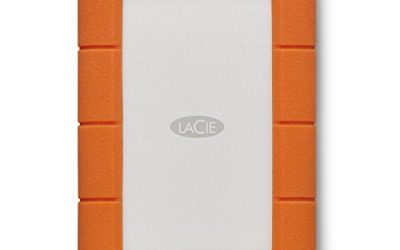
LaCie Mobile Drive 4TB

LaCie makes the clearest out-of-the-box promise in this roundup: its listing states the Mobile Drive works with PC, Mac and iPad USB-C out of the box, so there is no formatting homework before the first backup. The USB-C 3.2 connection suits current Macs directly, and the drive pairs LaCie’s Toolkit backup software with Rescue Data Recovery Services, which covers recovery of the drive itself if it fails. It is also the natural pick if the same drive occasionally serves an iPad. The honest limit is the same as the WD drives: the listing promises Mac compatibility, not Time Machine certification, so setup still means selecting it in Time Machine yourself.
Specs
- Capacity: 4TB
- Model: STLP4000400, Moon Silver
- Mechanical external hard drive
- USB-C 3.2
- Listing states it works with PC, Mac and iPad USB-C out of the box
- LaCie Toolkit backup software
- Rescue Data Recovery Services
- Post-consumer recycled materials per the listing
Best for: Buyers who want zero formatting steps and one drive for Mac and iPad.
Watch out for: A separate Secure version of this drive exists with password protection under a different listing, so confirm you are looking at the standard Mobile Drive before ordering.
ASIN: B09ZLTFC5B
Seagate One Touch 5TB
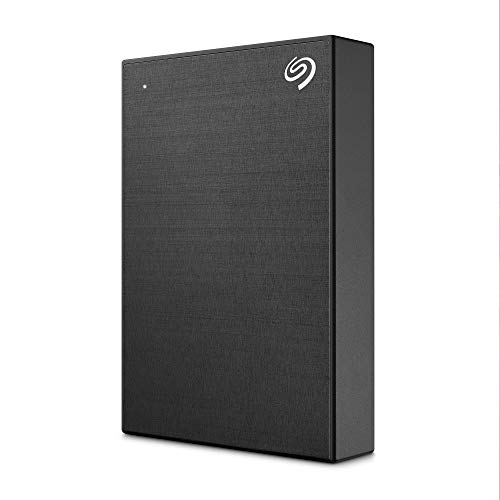
The One Touch earns its place for mixed households, with one condition stated by its own listing: reformatting may be required for use with Time Machine. Read that as the trade at the heart of this pick. In exchange for one erase-and-format step during setup, you get a 5TB drive sold for Windows and Mac alike, bundled in this Amazon Exclusive listing with a year of Mylio Create, a short Adobe CC Photography trial and two years of Rescue Services, which flatters photo-heavy Macs. If the drive will only ever serve one Mac and you never want to think about formatting, a Mac-designated model above is the simpler buy.
Specs
- Capacity: 5TB
- Model: STKB5000410, Black, Amazon Exclusive bundle
- Portable external hard drive
- USB 3.0
- Listing covers Windows and Mac
- Listing states reformatting may be required for use with Time Machine
- Bundle: 1 year Mylio Create, 4 months Adobe CC Photography, 2 years Rescue Services
Best for: Mixed Mac and Windows homes happy to reformat once during setup.
Watch out for: This listing’s code was tied through a product record rather than the live page, and a different 5TB One Touch with hardware encryption exists under another listing, so verify the model number STKB5000410 and the reformat wording on the live listing before buying.
ASIN: B08GR3VBR3
Which One Fits Your Situation
You are setting up Time Machine for the first time
Start with the WD My Passport for Mac 4TB or the LaCie Mobile Drive 4TB. Both are positioned for Mac use out of the box, so setup is selecting the drive in Time Machine and letting the first backup run. The WD adds password protection; the LaCie adds a recovery service and iPad compatibility. Either removes the formatting question entirely, which is what most first-time buyers actually want.
Your current backup drive keeps filling up
Move to the WD My Passport for Mac 6TB. A full Time Machine drive is not broken; it is deleting your oldest snapshots to survive, and the only real fix is capacity headroom. The 6TB Passport is the largest drive in this roundup, and it keeps the same Mac-designated setup as the 4TB model, so the swap changes your retention, not your routine.
Your backup travels with a USB-C MacBook
Take the WD My Passport Ultra for Mac 5TB. Its USB-C connection matches current MacBooks without an adapter hunt, and its backup software’s ransomware defense suits a drive that stays plugged into a working machine. The LaCie Mobile Drive is the alternative if the drive also needs to serve an iPad, since its listing promises both out of the box.
Your home runs both Macs and Windows PCs
The Seagate One Touch 5TB is built for your shelf, as long as you accept its listing’s condition: reformatting may be required for use with Time Machine. Do that once and it serves as the Mac’s backup drive, with photo software trials in the bundle that suit a shared family library. If the reformat step sounds like a chore you will postpone, buy a Mac-designated drive instead.
Common Mistakes
- Assuming “for Mac” on a box means Time Machine certified. No listing in this roundup claims that certification; Mac-designated means formatted and positioned for a Mac, and you still select the drive in Time Machine yourself.
- Buying a backup drive the same size as your internal storage. Time Machine history expands until the drive is full, so a barely-bigger drive starts deleting old snapshots almost immediately.
- Plugging in a cross-platform drive and skipping the reformat. The Seagate listing itself warns reformatting may be required for Time Machine, and ignoring that step is the most common reason setup appears to fail.
- Mixing up variants inside one model line. The 4TB and 5TB Ultra for Mac are different listings, and two different 5TB One Touch drives exist, so match the model number, not just the product name.
- Treating the Time Machine drive as your only copy of everything. A backup that lives permanently connected to the Mac it protects shares some of that Mac’s risks; irreplaceable files deserve a second copy elsewhere.
Frequently Asked Questions
Does a drive need to be Time Machine certified to work?
No listing in this roundup claims Time Machine certification, and that phrase is not what decides whether a drive works. What matters is the formatting position the listing states: Mac-designated drives arrive ready for a Mac, while the Seagate listing says reformatting may be required. Choose based on which setup you are willing to do.
How large should a Time Machine drive be?
Larger than the data on your Mac, with room to spare. Time Machine keeps older snapshots until the drive fills, so headroom is what buys you a longer history. A 4TB drive suits a single modest Mac, 5TB adds breathing room for growing libraries, and 6TB is for large internal drives or anyone who wants to look back years, not months.
Can the Seagate One Touch really back up a Mac?
Yes, with the step its own listing names: reformatting may be required for use with Time Machine. Erase and reformat it during setup and it works as a 5TB Time Machine drive. If you would rather skip that step entirely, the Mac-designated WD and LaCie drives above are the straighter path to the same result.
Can I also store ordinary files on a Time Machine drive?
You can, but think carefully before you do. Files parked on the backup drive sit outside the backup itself, so they exist in exactly one place, and a crowded drive also shortens the history Time Machine can keep. A cleaner pattern is to let the backup drive do one job and keep shared or archive files on a separate drive.
Related guides
More from Amazon
Programs that pair well with the guide above. Offers and eligibility are set by Amazon and may change.
Free shipping on eligible items, Prime Video and more. Eligible new members can start with a free trial.
Start a Prime free trialAd-free music streaming. Eligible new subscribers can start with a free trial.
Try Music Unlimited freeA Prime membership for ages 18-24 with a trial period. Eligibility is set by Amazon.
See Prime for Young AdultsAudiobooks and podcasts to listen to on the go. Eligible new members can start with a free trial.
Try Audible freeAs an Amazon Associate we earn from qualifying purchases.